
ആമുഖം
Thank you for choosing the ATTACK SHARK K87 Wireless Mechanical Keyboard. This manual provides detailed instructions for setting up, operating, and maintaining your keyboard to ensure optimal performance. The K87 offers versatile connectivity options including 2.4G wireless, Bluetooth 5.0, and wired USB-C, making it compatible with various operating systems and devices.
പാക്കേജ് ഉള്ളടക്കം
നിങ്ങളുടെ പാക്കേജിൽ എല്ലാ ഇനങ്ങളും ഉണ്ടെന്ന് ദയവായി പരിശോധിക്കുക:
- ATTACK SHARK K87 Wireless Mechanical Keyboard
- USB-C to USB-A Coiled Cable
- 2.4G വയർലെസ് റിസീവർ (USB ഡോംഗിൾ)
- കീക്യാപ് പുള്ളർ
- ഉപയോക്തൃ മാനുവൽ (ഈ പ്രമാണം)
ഉൽപ്പന്നം കഴിഞ്ഞുview
The ATTACK SHARK K87 is a Tenkeyless (TKL) mechanical keyboard designed for both gaming and productivity. It features a compact layout, hot-swappable switches, customizable RGB backlighting, and a durable construction.
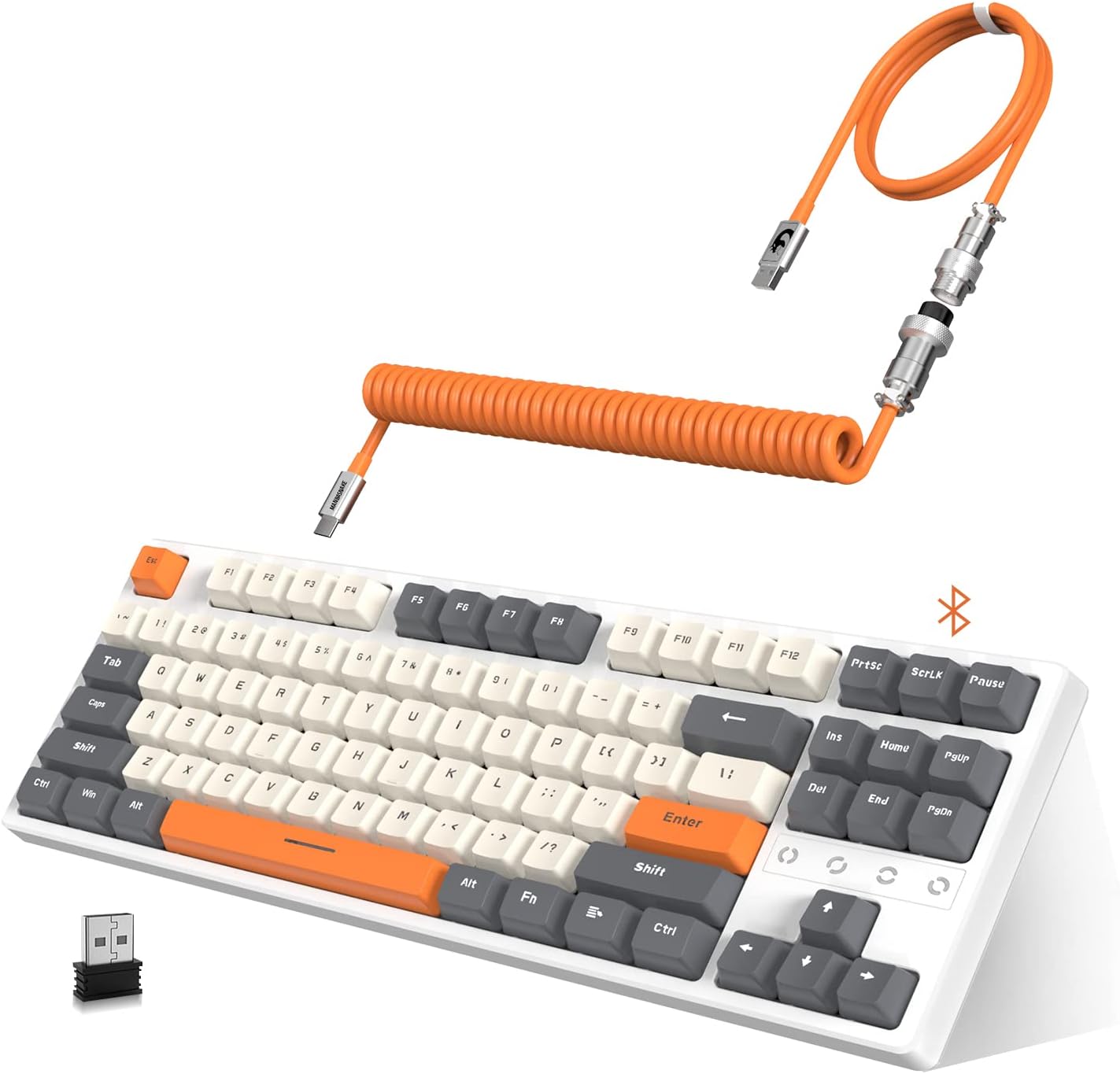
Image: The ATTACK SHARK K87 keyboard in white and gray, shown with its orange coiled USB-C cable and 2.4G wireless dongle.
പ്രധാന സവിശേഷതകൾ:
- ട്രിപ്പിൾ മോഡ് കണക്റ്റിവിറ്റി: Seamlessly switch between 2.4G wireless, Bluetooth 5.0, and wired USB-C connections.
- ഹോട്ട്-സ്വാപ്പബിൾ സ്വിച്ചുകൾ: Compatible with most 3-pin or 5-pin mechanical switches, allowing for easy customization and maintenance. The keyboard comes equipped with tactile blue switches.
- Chroma RGB Backlight: Features 28 RGB backlight modes, 8 monochrome modes, and 20 full-color backlight options. Backlight customization and macro settings are available.
- 3000mAh റീചാർജ് ചെയ്യാവുന്ന ബാറ്ററി: Provides extended wireless usage and includes an intelligent power-saving mode.
- Dual Layer Sound Absorbing Silicone Pads: Enhances typing and gaming experience by reducing noise and improving acoustics.
- 80% TKL Compact Design: Space-saving layout without a numeric keypad, ideal for gaming and minimalist setups.
- Custom Coiled Cable: Durable double-sleeved USB Type-C to USB-A cable with an aviation connector for reliable wired connection and charging.

Image: An exploded diagram illustrating the K87's unique gasket structure, showing layers like the top case, ABS keycaps, 3/5 pin switches, aluminum plate with silicone gasket, Poron plate foam, PCB, Poron switch pad, and bottom case, designed for sound absorption.
സജ്ജമാക്കുക
1. കീബോർഡ് ചാർജ് ചെയ്യുന്നു
Before initial use, it is recommended to fully charge the keyboard. Connect the provided USB-C coiled cable to the keyboard's USB-C port and the USB-A end to a power source (e.g., computer USB port, USB wall adapter). The 3000mAh battery provides long-lasting power.

Image: The K87 keyboard connected via its coiled cable, indicating charging status and compatibility with Windows XP, 7, 10, macOS, and Linux OS.
2. കീബോർഡ് ബന്ധിപ്പിക്കുന്നു
The K87 supports three connection modes: Wired, 2.4G Wireless, and Bluetooth 5.0.

Image: The K87 keyboard connected to a laptop via 2.4G wireless, a tablet via Bluetooth, and a phone via Bluetooth, illustrating its triple mode connectivity.
വയർഡ് കണക്ഷൻ:
- Ensure the keyboard's mode switch (usually on the back or side) is set to 'Wired' or 'USB'.
- Connect the USB-C end of the coiled cable to the keyboard and the USB-A end to your computer's USB port.
- നിങ്ങളുടെ ഓപ്പറേറ്റിംഗ് സിസ്റ്റം കീബോർഡ് യാന്ത്രികമായി തിരിച്ചറിയും.
2.4G വയർലെസ് കണക്ഷൻ:
- Locate the 2.4G wireless receiver (USB dongle) in the package.
- നിങ്ങളുടെ കമ്പ്യൂട്ടറിൽ ലഭ്യമായ ഒരു USB പോർട്ടിലേക്ക് 2.4G റിസീവർ പ്ലഗ് ചെയ്യുക.
- Set the keyboard's mode switch to '2.4G' or the corresponding wireless icon.
- The keyboard should connect automatically. If not, press the designated pairing key combination (refer to keyboard legends or a quick start guide if provided separately) to initiate pairing.
ബ്ലൂടൂത്ത് 5.0 കണക്ഷൻ:
- Set the keyboard's mode switch to 'BT' or the Bluetooth icon.
- നിങ്ങളുടെ ഉപകരണത്തിൽ (കമ്പ്യൂട്ടർ, ടാബ്ലെറ്റ്, ഫോൺ), ബ്ലൂടൂത്ത് പ്രവർത്തനക്ഷമമാക്കി പുതിയ ഉപകരണങ്ങൾക്കായി തിരയുക.
- The keyboard should appear as 'ATTACK SHARK K87' or similar. Select it to pair.
- The K87 can connect to up to 5 devices simultaneously. Use specific key combinations (e.g., Fn + 1, Fn + 2, Fn + 3) to switch between paired Bluetooth devices.
പ്രവർത്തന നിർദ്ദേശങ്ങൾ
1. RGB ബാക്ക്ലൈറ്റ് നിയന്ത്രണം
The K87 offers extensive RGB customization. Use the function keys (Fn) in combination with other keys to change backlight modes, colors, and brightness.
- മാറ്റുന്ന മോഡുകൾ: Refer to the keyboard's key legends for specific Fn key combinations to cycle through 28 RGB modes and 8 monochrome modes.
- Adjusting Brightness/Speed: Typically, Fn + Arrow keys or other designated keys control brightness and animation speed.
- ഇഷ്ടാനുസൃതമാക്കൽ: The keyboard supports macro settings for personalized lighting effects. Consult the official ATTACK SHARK software (if available) for advanced customization.

Image: The K87 keyboard displaying various RGB backlight patterns, highlighting its ergonomic design, hot-swappable keys, and triple mode connection capabilities.
2. ഹോട്ട്-സ്വാപ്പബിൾ സ്വിച്ചുകൾ
The K87's hot-swappable design allows you to change mechanical switches without soldering. This feature is compatible with most 3-pin or 5-pin switches available on the market.
- കീക്യാപ്പുകൾ നീക്കംചെയ്യുന്നു: ആവശ്യമുള്ള കീക്യാപ്പ് സൌമ്യമായി നീക്കം ചെയ്യാൻ നൽകിയിരിക്കുന്ന കീക്യാപ്പ് പുള്ളർ ഉപയോഗിക്കുക.
- സ്വിച്ചുകൾ നീക്കംചെയ്യുന്നു: Use a switch puller (not always included, but often with replacement switches) to carefully extract the switch from the PCB.
- പുതിയ സ്വിച്ചുകൾ ഇൻസ്റ്റാൾ ചെയ്യുന്നു: Align the pins of the new switch with the holes on the PCB and press down gently until it clicks into place. Ensure pins are not bent.
- Re-installing Keycaps: Place the keycap onto the new switch and press down firmly.
3. പവർ സേവിംഗ് മോഡ്
To conserve battery life, the K87 features an intelligent power-saving mode:
- If not used for 2 minutes, the backlight will turn off, entering the first power-saving mode.
- If not used for 30 minutes, the keyboard will enter sleep mode. Press any key to wake it up.
മെയിൻ്റനൻസ്
1. വൃത്തിയാക്കൽ
- കീബോർഡ് വൃത്തിയാക്കുന്നതിന് മുമ്പ് എല്ലാ വൈദ്യുതി സ്രോതസ്സുകളിൽ നിന്നും വിച്ഛേദിക്കുക.
- മൃദുവായ, ലിൻ്റ് രഹിത തുണി ഉപയോഗിക്കുകampകീക്യാപ്പുകളും ഷാസികളും തുടയ്ക്കാൻ വെള്ളമോ നേരിയ ക്ലീനിംഗ് ലായനിയോ ഉപയോഗിച്ച് നനയ്ക്കുക.
- കൂടുതൽ ആഴത്തിലുള്ള വൃത്തിയാക്കലിനായി, നൽകിയിരിക്കുന്ന പുള്ളർ ഉപയോഗിച്ച് കീക്യാപ്പുകൾ നീക്കം ചെയ്യുക, സ്വിച്ചുകൾക്കിടയിലുള്ള അവശിഷ്ടങ്ങൾ നീക്കം ചെയ്യാൻ കംപ്രസ് ചെയ്ത വായു ഉപയോഗിക്കുക.
- കഠിനമായ രാസവസ്തുക്കളോ ഉരച്ചിലുകളോ ഉപയോഗിക്കുന്നത് ഒഴിവാക്കുക.
2. ബാറ്ററി പരിചരണം
- ബാറ്ററി ഇടയ്ക്കിടെ പൂർണ്ണമായും ഡിസ്ചാർജ് ചെയ്യുന്നത് ഒഴിവാക്കുക.
- ദീർഘനേരം ഉപയോഗിക്കാത്തപ്പോൾ കീബോർഡ് തണുത്തതും വരണ്ടതുമായ സ്ഥലത്ത് സൂക്ഷിക്കുക.
- ചാർജ് ചെയ്യുന്നതിന് നൽകിയിരിക്കുന്ന USB-C കേബിളോ സാക്ഷ്യപ്പെടുത്തിയ തത്തുല്യമായതോ മാത്രം ഉപയോഗിക്കുക.
ട്രബിൾഷൂട്ടിംഗ്
| പ്രശ്നം | സാധ്യമായ കാരണം | പരിഹാരം |
|---|---|---|
| Keyboard not responding in 2.4G wireless mode | Keyboard switch is off or in another mode; dongle not properly connected; low battery. | Ensure the keyboard's mode switch is set to '2.4G'. Verify the 2.4G dongle is securely plugged into a USB port. Charge the keyboard. |
| ബ്ലൂടൂത്ത് കണക്ഷൻ പ്രശ്നങ്ങൾ | Keyboard not in pairing mode; device Bluetooth off; interference; low battery. | Set keyboard to 'BT' mode. Ensure Bluetooth is enabled on your device. Try re-pairing. Move closer to the device. Charge the keyboard. |
| Keys not registering or double-clicking | Faulty switch; debris under keycap; software issue. | Remove keycap and clean around the switch. If hot-swappable, try replacing the switch. Test on another computer. |
| ബാക്ക്ലൈറ്റ് പ്രവർത്തിക്കുന്നില്ല അല്ലെങ്കിൽ മിന്നിമറയുന്നു | Backlight turned off; low battery; software glitch. | Adjust backlight brightness/mode using Fn key combinations. Charge the keyboard. Restart the keyboard/computer. |
| വയർ കണക്ഷൻ പ്രവർത്തിക്കുന്നില്ല | Cable issue; USB port issue; keyboard mode switch. | Ensure the keyboard's mode switch is set to 'Wired'. Try a different USB port or a different USB-C cable. |
സ്പെസിഫിക്കേഷനുകൾ
| ഫീച്ചർ | വിശദാംശങ്ങൾ |
|---|---|
| മോഡൽ നമ്പർ | K87 |
| കണക്റ്റിവിറ്റി ടെക്നോളജി | ബ്ലൂടൂത്ത് 5.0, 2.4G വയർലെസ്, യുഎസ്ബി-സി വയർഡ് |
| കീബോർഡ് വിവരണം | Mechanical (Tactile Blue Switches) |
| പ്രത്യേക ഫീച്ചർ | Hot-Swappable, RGB Backlight, Water Resistant |
| അനുയോജ്യമായ ഉപകരണങ്ങൾ | PC (Windows, macOS, Android) |
| ബാറ്ററി ശേഷി | 3000 mAh |
| ഉൽപ്പന്ന അളവുകൾ | 14.3"L x 5.4"W x 1.5"H (ഏകദേശം 36.3cm L x 13.7cm W x 3.8cm H) |
| ഇനത്തിൻ്റെ ഭാരം | 2.59 പൗണ്ട് (ഏകദേശം 1.17 കിലോഗ്രാം) |
| മെറ്റീരിയൽ | Acrylonitrile Butadiene Styrene, Aluminum, Silicone |
| നിറം | വെള്ള ചാരനിറം |
വാറൻ്റിയും പിന്തുണയും
വാറന്റി വിവരങ്ങൾക്കും സാങ്കേതിക പിന്തുണയ്ക്കും, ദയവായി ഔദ്യോഗിക ATTACK SHARK കാണുക. webസൈറ്റിൽ ബന്ധപ്പെടുക അല്ലെങ്കിൽ നിങ്ങളുടെ റീട്ടെയിലറെ ബന്ധപ്പെടുക. വാറന്റി ക്ലെയിമുകൾക്കായി നിങ്ങളുടെ വാങ്ങൽ രസീത് സൂക്ഷിക്കുക.
നിങ്ങൾക്ക് സന്ദർശിക്കാനും കഴിയും ആമസോണിലെ അറ്റാക്ക് ഷാർക്ക് സ്റ്റോർ കൂടുതൽ ഉൽപ്പന്ന വിവരങ്ങൾക്കും പിന്തുണാ ഉറവിടങ്ങൾക്കും.