
PGST PG103-2G-T53A
PGST Wireless Home Alarm System User Manual
Model: PG103-2G-T53A
ബ്രാൻഡ്: പിജിഎസ്ടി
1. ആമുഖവും അവസാനവുംview
The PGST Wireless Home Alarm System is a comprehensive security solution designed to protect your home, apartment, garage, or office. This advanced system integrates GSM, SMS, and WiFi connectivity, allowing for flexible monitoring and control from anywhere. It features a central control panel, various sensors, and remote access capabilities to provide peace of mind.
This manual provides detailed instructions for setting up, operating, and maintaining your PGST Wireless Home Alarm System to ensure optimal performance and security.
2. പാക്കേജ് ഉള്ളടക്കം
അൺപാക്ക് ചെയ്യുമ്പോൾ, താഴെ പട്ടികപ്പെടുത്തിയിരിക്കുന്ന എല്ലാ ഘടകങ്ങളും നിലവിലുണ്ടെന്നും നല്ല നിലയിലാണെന്നും ദയവായി പരിശോധിക്കുക:
- 1 x Alarm Host (Control Panel)
- 1 x Siren
- 10 x ഡോർ/വിൻഡോ സെൻസറുകൾ
- 2 x Motion Sensors (PIR)
- 2 x റിമോട്ട് കൺട്രോളുകൾ
- 2 x RFID Tags
- 1 x SOS Button
- Necessary mounting hardware and power adapter

This image displays the complete PGST Wireless Home Alarm System kit, featuring the central control panel with a touchscreen interface, a loud siren, two passive infrared (PIR) motion sensors, ten door/window contact sensors, two RFID key fobs, and two remote controls for convenient arming and disarming.
3. ഉൽപ്പന്ന സവിശേഷതകൾ
The PGST Wireless Home Alarm System is equipped with a range of features to enhance your security:
- വയർലെസ് കണക്റ്റിവിറ്റി: Supports GSM, SMS, and WiFi for flexible communication and remote control.
- മൊബൈൽ ആപ്പ് നിയന്ത്രണം: Manage your system from anywhere using the dedicated Android and iOS application (Tuya Smart app).
- വികസിപ്പിക്കാവുന്ന സിസ്റ്റം: Supports up to 100 sensors and 10 remote controls, allowing for customization and expansion of your security coverage.
- വോയ്സ് കൺട്രോൾ ഇന്റഗ്രേഷൻ: Compatible with popular voice assistants such as Amazon Alexa, Google Home, and Siri shortcuts for convenient arming and disarming.
- തത്സമയ അലേർട്ടുകൾ: Receive instant notifications via app push, SMS, and voice calls in case of an alarm event.
- SOS പ്രവർത്തനം: A dedicated SOS button on remote controls for emergency situations.
- ഷെഡ്യൂൾ ചെയ്ത ആയുധം/നിരായുധീകരണം: Program the system to automatically arm or disarm at specific times.
- ബഹുഭാഷാ പിന്തുണ: The control panel supports multilingual menus, voice operation, and SMS alerts.
- കുറഞ്ഞ വോളിയംtagഇ അലാറം: Notifies you when the system's battery is low.
- Anti-Disassembly Alarm: Triggers an alarm if the main unit is tampകൂടെ ered.

This diagram highlights the versatile communication capabilities of the PGST alarm system, including instant alarm notifications via mobile application push, SMS text messages, and voice calls to pre-set numbers. It also shows examples of scenarios like motion detection, door/window breaches, and fire/smoke detection.
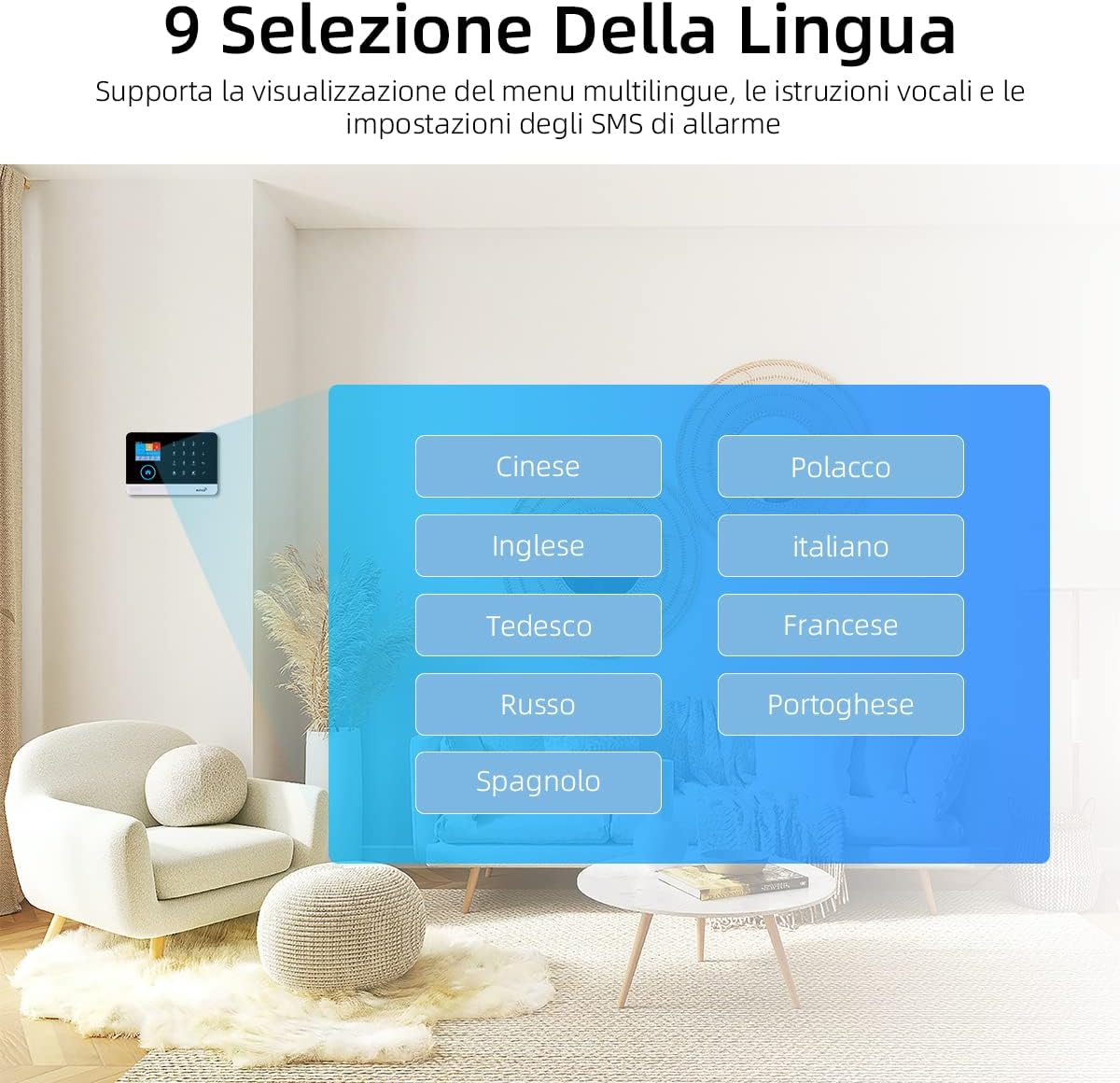
The control panel supports multiple languages for its menu, voice operation, and SMS alerts, making it accessible to a wide range of users. Available languages include Chinese, English, German, Russian, Spanish, Polish, Italian, French, and Portuguese.

The system features a low voltage alarm reminder, indicating when the battery needs attention, and an anti-disassembly alarm function to alert users if the main unit is tampകൂടെ ered.

Users can set scheduled times for automatic arming and disarming of the system via the mobile application, optimizing security routines for daily activities such as going to work, being at home, sleeping, and waking up.

The alarm system features a user-friendly 2.3-inch TFT colorful LCD screen that displays real-time status, date, time, and various menu options for easy navigation and control.
4. സജ്ജീകരണം
4.1 പ്രാരംഭ പവർ-അപ്പ്
- Connect the power adapter to the alarm host and plug it into a standard electrical outlet.
- The system will power on automatically. Follow the on-screen prompts on the 2.4-inch color IPS screen.
4.2 Network Configuration (WiFi/GSM)
- വൈഫൈ കണക്ഷൻ: Navigate to the network settings on the control panel. Select your WiFi network and enter the password. Ensure a stable 2.4GHz WiFi connection.
- GSM Connection: Insert a valid SIM card (2G supported) into the designated slot on the alarm host. The system will automatically detect the network.
4.3 ആപ്പ് ഡൗൺലോഡും ജോടിയാക്കലും
- Download the "Tuya Smart" or "Smart Life" app from your mobile device's app store (Android/iOS).
- ഒരു അക്കൗണ്ട് രജിസ്റ്റർ ചെയ്ത് ലോഗിൻ ചെയ്യുക.
- In the app, add a new device. Select "Security & Video Surveillance" > "Alarm (Wi-Fi)" or similar.
- Follow the app's instructions to pair your alarm host with your mobile device. This typically involves putting the alarm host into pairing mode.
4.4 Sensor and Accessory Pairing
- On the alarm host, enter the pairing mode for sensors (refer to the on-screen menu for "Add Sensor" or "Zone Settings").
- Activate each sensor (e.g., open a door/window for contact sensors, wave hand in front of PIR sensor) to send a signal to the host.
- Once paired, assign each sensor to a specific zone and name it for easy identification (e.g., "Front Door," "Living Room PIR").
- Pair remote controls and RFID tags by following similar steps in the system's menu.
5. പ്രവർത്തന നിർദ്ദേശങ്ങൾ
5.1 ആയുധമാക്കലും നിരായുധീകരണവും
- Via Control Panel: Use the touchscreen interface to select "Arm" or "Disarm" modes.
- റിമോട്ട് കൺട്രോൾ വഴി: Press the arm or disarm button on the remote control.
- മൊബൈൽ ആപ്പ് വഴി: സിസ്റ്റം വിദൂരമായി ആയുധമാക്കാനോ നിരായുധമാക്കാനോ Tuya Smart/Smart Life ആപ്പ് ഉപയോഗിക്കുക.
- വോയ്സ് കമാൻഡ് വഴി: Use integrated voice assistants (Alexa, Google Home, Siri) to arm or disarm the system (e.g., "Alexa, arm my alarm system").
5.2 എസ്ഒഎസ് പ്രവർത്തനം
In case of an emergency, press the SOS button on the remote control. The system will immediately trigger the alarm and send alerts to pre-programmed emergency contacts.
5.3 സോൺ മാനേജ്മെന്റ്
Each sensor is assigned to a specific zone. You can customize zone settings, such as arming delays, alarm types (e.g., instant, delay, 24-hour), and whether a zone is active in specific arming modes (e.g., home arm, away arm).
5.4 ആശയവിനിമയ ക്രമീകരണങ്ങൾ
Configure up to several groups of preset alarm calls and SMS numbers. You can enable or disable SMS alerts and dialing for each contact. The system can record up to 20 seconds of alarm and voice messages for playback during calls.
6. പരിപാലനം
- വൃത്തിയാക്കൽ: Regularly wipe the control panel and sensors with a soft, dry cloth. Avoid using abrasive cleaners or solvents.
- ബാറ്ററി പരിശോധന: Pay attention to low voltage alarm reminders. Replace batteries in wireless sensors as needed to ensure continuous operation.
- ഫേംവെയർ അപ്ഡേറ്റുകൾ: Check the Tuya Smart/Smart Life app periodically for any available firmware updates for the alarm host to ensure optimal performance and security features.
- സിഗ്നൽ ശക്തി: Ensure sensors are within effective range of the alarm host. Relocate if signal strength is consistently low.
7. പ്രശ്നപരിഹാരം
- സിസ്റ്റം ഓണാക്കുന്നില്ല: പവർ അഡാപ്റ്റർ സുരക്ഷിതമായി ബന്ധിപ്പിച്ചിട്ടുണ്ടെന്നും ഔട്ട്ലെറ്റ് പ്രവർത്തനക്ഷമമാണെന്നും ഉറപ്പാക്കുക.
- Sensors Not Pairing: Ensure sensors are in pairing mode and within range of the alarm host. Check sensor batteries.
- ആപ്പ് അറിയിപ്പുകൾ ഇല്ല: Verify WiFi connection on the alarm host and your mobile device. Check app notification settings and ensure the app has necessary permissions.
- GSM/SMS Issues: Ensure the SIM card is correctly inserted, has credit, and is active. Check network signal strength.
- തെറ്റായ അലാറങ്ങൾ: Check sensor placement (e.g., PIR sensors away from heat sources or direct sunlight). Adjust sensitivity settings if available.
- റിമോട്ട് കൺട്രോൾ പ്രവർത്തിക്കുന്നില്ല: Check remote control battery. Re-pair the remote control with the alarm host if necessary.
For more detailed troubleshooting steps, please refer to the comprehensive guide available through the manufacturer's support channels or the app's help section.
8 സ്പെസിഫിക്കേഷനുകൾ
| സ്പെസിഫിക്കേഷൻ | മൂല്യം |
|---|---|
| നിർമ്മാതാവ് | പി.ജി.എസ്.ടി |
| ഭാഗം നമ്പർ | PG103-2G-T53A |
| ഇനം മോഡൽ നമ്പർ | PG103-2G-T53A |
| ഇനത്തിൻ്റെ ഭാരം | 1.12 കിലോഗ്രാം |
| ഉൽപ്പന്ന അളവുകൾ (L x W x H) | 60 x 45 x 20 സെ.മീ |
| നിറം | Pg103-2g/T53a |
| പവർ സോഴ്സ് തരം | വയർലെസ് |
| ഇൻസ്റ്റലേഷൻ രീതി | വയർലെസ് DIY |
| ഉൾപ്പെടുത്തിയ ഘടകങ്ങൾ | Host, Siren, 10 Door Sensors, 2 Motion Sensors, 2 Remote Controls, 2 RFID, SOS Button |
| അനുയോജ്യമായ ഉപകരണങ്ങൾ | ടാബ്ലെറ്റ്, സ്മാർട്ട്ഫോൺ |

This image shows the technical parameter label found on the product packaging, detailing input voltage, wireless frequency, wireless coding, WiFi standard, and the product identifier X001NYR34V.
9. വാറൻ്റിയും പിന്തുണയും
For warranty information and technical support, please refer to the documentation provided with your purchase or contact PGST customer service directly. You can typically find contact details on the manufacturer's official webസൈറ്റ് അല്ലെങ്കിൽ ഉൽപ്പന്നം വാങ്ങിയ റീട്ടെയിലർ വഴി.
Extended warranty options may be available from third-party providers, as indicated during the purchase process. These extended warranties are separate from the manufacturer's standard warranty.
Ask a question about this manual
Ask about setup, troubleshooting, compatibility, parts, safety, or missing instructions. Manuals+ will review the question and use this page’s manual context to help answer it.