
ആമുഖം
Thank you for choosing LoopTone MF-YY03 Powered Bookshelf Speakers. These 2.0 stereo active monitors are designed to deliver high-quality audio for various applications, including home entertainment, computers, and record players. This manual provides essential information for safe and optimal use of your speakers.
പ്രധാനപ്പെട്ട സുരക്ഷാ നിർദ്ദേശങ്ങൾ
- ഉൽപ്പന്നം പ്രവർത്തിപ്പിക്കുന്നതിന് മുമ്പ് ഈ നിർദ്ദേശങ്ങൾ നന്നായി വായിക്കുക.
- ഭാവി റഫറൻസിനായി ഈ നിർദ്ദേശങ്ങൾ സൂക്ഷിക്കുക.
- ഉൽപ്പന്നത്തിലെയും പ്രവർത്തന നിർദ്ദേശങ്ങളിലെയും എല്ലാ മുന്നറിയിപ്പുകളും ശ്രദ്ധിക്കുക.
- എല്ലാ നിർദ്ദേശങ്ങളും പാലിക്കുക.
- വെള്ളത്തിനടുത്ത് ഈ ഉപകരണം ഉപയോഗിക്കരുത്.
- ഉണങ്ങിയ തുണി ഉപയോഗിച്ച് മാത്രം വൃത്തിയാക്കുക.
- വെന്റിലേഷൻ തുറസ്സുകളൊന്നും തടയരുത്. നിർമ്മാതാവിന്റെ നിർദ്ദേശങ്ങൾക്കനുസൃതമായി ഇൻസ്റ്റാൾ ചെയ്യുക.
- റേഡിയറുകൾ, ഹീറ്റ് രജിസ്റ്ററുകൾ, സ്റ്റൗകൾ, അല്ലെങ്കിൽ മറ്റ് ഉപകരണങ്ങൾ (ഉൾപ്പെടെ) പോലെയുള്ള താപ സ്രോതസ്സുകൾക്ക് സമീപം ഇൻസ്റ്റാൾ ചെയ്യരുത്. ampലൈഫയറുകൾ) ചൂട് ഉത്പാദിപ്പിക്കുന്നത്.
- പ്രത്യേകിച്ച് പ്ലഗുകൾ, കൺവീനിയൻസ് റെസെപ്റ്റക്കിളുകൾ, ഉപകരണത്തിൽ നിന്ന് പുറത്തുകടക്കുന്ന ഇടം എന്നിവയിൽ നടക്കുകയോ നുള്ളുകയോ ചെയ്യുന്നതിൽ നിന്ന് പവർ കോർഡ് സംരക്ഷിക്കുക.
- നിർമ്മാതാവ് വ്യക്തമാക്കിയ അറ്റാച്ച്മെൻ്റുകൾ/ആക്സസറികൾ മാത്രം ഉപയോഗിക്കുക.
- മിന്നൽ കൊടുങ്കാറ്റുകളുടെ സമയത്തോ ദീർഘനേരം ഉപയോഗിക്കാത്ത സമയത്തോ ഈ ഉപകരണം അൺപ്ലഗ് ചെയ്യുക.
- എല്ലാ സേവനങ്ങളും യോഗ്യതയുള്ള സേവന ഉദ്യോഗസ്ഥർക്ക് റഫർ ചെയ്യുക. പവർ സപ്ലൈ കോർഡ് അല്ലെങ്കിൽ പ്ലഗ് കേടാകുക, ദ്രാവകം ഒഴുകുകയോ ഉപകരണങ്ങൾ ഉപകരണത്തിലേക്ക് വീഴുകയോ ചെയ്യുക, ഉപകരണം മഴയോ ഈർപ്പമോ സമ്പർക്കം പുലർത്തുക, സാധാരണയായി പ്രവർത്തിക്കാത്തത് എന്നിങ്ങനെയുള്ള ഏതെങ്കിലും വിധത്തിൽ ഉപകരണത്തിന് കേടുപാടുകൾ സംഭവിക്കുമ്പോൾ സേവനം ആവശ്യമാണ്. , അല്ലെങ്കിൽ ഉപേക്ഷിച്ചു.
പാക്കേജ് ഉള്ളടക്കം
താഴെ പറയുന്ന ഇനങ്ങൾക്കായി ബോക്സ് ചെക്ക് ചെയ്യുക:
- 1 Pair of LoopTone MF-YY03 Multimedia Professional Studio Monitors
- 1 ഇൻസ്ട്രക്ഷൻ മാനുവൽ
- 1 വിദൂര നിയന്ത്രണം
- 1 പവർ കോർഡ്
- 1 L&R Speaker Connection Cable
- 1 3.5mm to 2RCA Audio Cable
- 1 2RCA to 2RCA Audio Cable

Image: All components included in the LoopTone MF-YY03 package.
ഉൽപ്പന്നം കഴിഞ്ഞുview
The LoopTone MF-YY03 speakers feature a 4-inch woofer and a 2-inch silk dome tweeter for balanced audio reproduction. The active speaker includes control knobs for volume, treble, and bass, along with input selection and playback controls. The rear panel offers multiple connectivity options.

ചിത്രം: മുൻവശവും വശവും view of the active speaker with controls.

ചിത്രം: വിശദമായത് view of the 4-inch woofer and 2-inch silk dome tweeter.
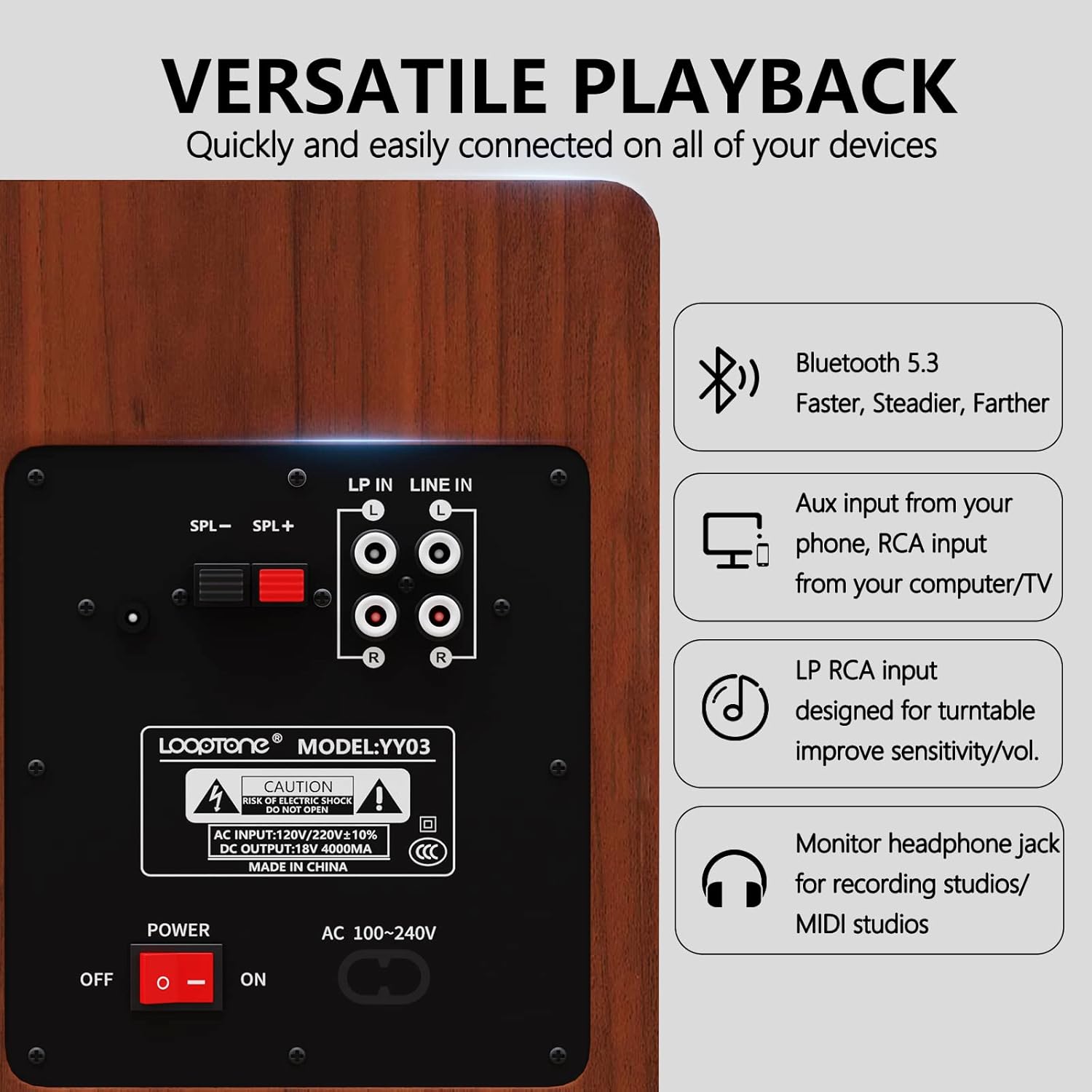
Image: Rear panel with LP In, Line In, speaker output, and power switch.

Image: Side control panel with USB, SD/MMC ports, and EQ knobs.
സജ്ജമാക്കുക
Follow these steps to set up your LoopTone MF-YY03 speakers:
- പ്ലേസ്മെൻ്റ്: Position the speakers on a stable surface, ensuring adequate ventilation.
- Connect Passive Speaker: Use the provided L&R speaker cable to connect the passive speaker to the active speaker's "SPL-" and "SPL+" terminals. Ensure correct polarity (red to red, black to black).
- പവർ കണക്ഷൻ: Connect the power cord to the active speaker's AC input and then to a power outlet.
- ഓൺ ചെയ്യുക: Flip the power switch on the rear panel to the "ON" position. The volume indicator light on the side panel will illuminate.
- ഇൻപുട്ട് ഉറവിടം തിരഞ്ഞെടുക്കുക: Press the "INPUT" button on the side panel or the remote control to cycle through available input sources (Bluetooth, Line In, LP In, USB, SD/MMC).
Video: Demonstrates turning on the speakers, selecting input, and Bluetooth pairing. This video shows the physical controls and connection process for the LoopTone MF-YY03 speakers.
പ്രവർത്തന നിർദ്ദേശങ്ങൾ
ബ്ലൂടൂത്ത് കണക്ഷൻ
- സ്പീക്കറുകൾ ഓണാക്കിയിട്ടുണ്ടെന്ന് ഉറപ്പാക്കുക.
- Press the "INPUT" button until the Bluetooth indicator light (usually the VOL light flashing purple) is active.
- On your device (smartphone, tablet, etc.), enable Bluetooth and search for "LoopTone-YY03".
- Select "LoopTone-YY03" to pair. Once connected, the indicator light will stop flashing.
Wired Connections (Line In / LP In)
- വരിയിൽ: Use the 3.5mm to 2RCA cable or 2RCA to 2RCA cable to connect your audio source (e.g., computer, TV, CD/DVD player) to the "LINE IN" RCA ports on the rear panel. Select "LINE IN" using the INPUT button.
- LP In (Record Player): Connect your vinyl record player to the "LP IN" RCA ports on the rear panel using a 2RCA to 2RCA cable. This input is specifically designed to boost the low volume output of record players. Select "LP IN" using the INPUT button.
USB / SD/MMC Playback
- Insert a USB drive or SD/MMC card into the corresponding slot on the side panel.
- Press the "INPUT" button to select USB or SD/MMC mode.
- Use the "PREV", "PLAY/PAUSE", and "NEXT" buttons on the side panel or remote to control playback.
Sound Adjustment (EQ)
- വോളിയം: Rotate the "VOL" knob on the side panel or use the volume buttons on the remote control.
- ട്രെബിൾ / ബാസ്: Rotate the "TREBLE" and "BASS" knobs on the side panel to adjust the high and low frequencies to your preference.
- പ്രീസെറ്റ് ഇക്യു മോഡുകൾ: Use the remote control to select from 6 preset sound effects: Normal, Classic, Pop, Rock, Jazz, Vocal, Monitor.

Image: Remote control for selecting EQ modes and adjusting sound.
മെയിൻ്റനൻസ്
- വൃത്തിയാക്കൽ: Wipe the speaker surfaces with a soft, dry cloth. Do not use liquid cleaners or aerosols.
- വെൻ്റിലേഷൻ: Ensure the speakers have adequate airflow and do not block ventilation openings.
- സംഭരണം: If storing for an extended period, unplug the speakers and keep them in a cool, dry place.
ട്രബിൾഷൂട്ടിംഗ്
| പ്രശ്നം | സാധ്യമായ കാരണം | പരിഹാരം |
|---|---|---|
| ശക്തിയില്ല | Power cord not connected; Power switch off | Ensure power cord is securely plugged in; Turn power switch to ON. |
| ശബ്ദമില്ല | Incorrect input source selected; Volume too low; Cables not connected properly | Press INPUT to select correct source; Increase volume; Check all audio cables. |
| ബ്ലൂടൂത്ത് ജോടിയാക്കുന്നില്ല | Speakers not in pairing mode; Device Bluetooth off; Too far from speakers | Ensure Bluetooth input is selected (flashing light); Turn on device Bluetooth; Move device closer to speakers. |
| വികലമായ ശബ്ദം | Volume too high; Source audio quality poor; Incorrect EQ settings | Lower volume; Check source audio; Adjust Treble/Bass knobs or EQ presets. |
സ്പെസിഫിക്കേഷനുകൾ
| ഫീച്ചർ | വിശദാംശങ്ങൾ |
|---|---|
| മോഡലിൻ്റെ പേര് | MF-YY03 |
| സ്പീക്കർ തരം | Monitor, Bookshelf |
| സ്പീക്കർ പരമാവധി ഔട്ട്പുട്ട് പവർ | 70 വാട്ട്സ് ആർഎംഎസ് |
| സറൗണ്ട് സൗണ്ട് ചാനൽ കോൺഫിഗറേഷൻ | 2.0 |
| വൂഫർ വ്യാസം | 4 ഇഞ്ച് |
| ട്വീറ്റർ വ്യാസം | 2 Inches (52 Millimeters) Silk Dome |
| ഫ്രീക്വൻസി പ്രതികരണം | 20 KHz വരെ |
| സിഗ്നൽ-ടു-നോയിസ് അനുപാതം | 78 ഡി.ബി |
| കണക്റ്റിവിറ്റി ടെക്നോളജി | Bluetooth, USB, SD/MMC, Auxiliary (3.5mm, 2RCA), LP Input |
| വയർലെസ് കമ്മ്യൂണിക്കേഷൻ ടെക്നോളജി | ബ്ലൂടൂത്ത് |
| ബ്ലൂടൂത്ത് ശ്രേണി | 10 മീറ്റർ |
| നിയന്ത്രണ രീതി | Remote, On-speaker knobs/buttons |
| മെറ്റീരിയൽ | Wood (MDF), Metal, Plastic, Silk |
| ഉൽപ്പന്ന അളവുകൾ | 6.9"D x 6.3"W x 9.8"H |
| ഇനത്തിൻ്റെ ഭാരം | 11.08 പൗണ്ട് |
| ഇൻപുട്ട് വോളിയംtage | 120 വോൾട്ട് |
വാറൻ്റി & പിന്തുണ
LoopTone provides a limited warranty for this product. For detailed warranty information, please refer to the warranty card included in your package or contact LoopTone customer support. For technical assistance or service inquiries, please visit the official LoopTone webസൈറ്റ് അല്ലെങ്കിൽ അവരുടെ ഉപഭോക്തൃ സേവന ടീമിനെ ബന്ധപ്പെടുക.