
1. പ്രധാന സുരക്ഷാ നിർദ്ദേശങ്ങൾ
Please read this manual carefully before using the XIEBro HR101 Robot Vacuum and Mop Combo and retain it for future reference. Adhere to all safety warnings and instructions to prevent injury or damage.
- 8 വയസ്സും അതിനുമുകളിലും പ്രായമുള്ള കുട്ടികൾക്കും ശാരീരികമോ ഇന്ദ്രിയപരമോ മാനസികമോ ആയ കഴിവുകൾ കുറഞ്ഞവർക്കും അനുഭവപരിചയവും അറിവും ഇല്ലാത്തവർക്കും സുരക്ഷിതമായ രീതിയിൽ ഉപകരണം ഉപയോഗിക്കുന്നതുമായി ബന്ധപ്പെട്ട മേൽനോട്ടമോ നിർദ്ദേശമോ നൽകുകയും അപകടസാധ്യതകൾ മനസ്സിലാക്കുകയും ചെയ്തിട്ടുണ്ടെങ്കിൽ ഈ ഉപകരണം ഉപയോഗിക്കാൻ കഴിയും. .
- കുട്ടികൾ ഉപകരണം ഉപയോഗിച്ച് കളിക്കുന്നില്ലെന്ന് ഉറപ്പാക്കാൻ മേൽനോട്ടം വഹിക്കണം.
- മേൽനോട്ടമില്ലാതെ കുട്ടികൾ വൃത്തിയാക്കലും ഉപയോക്തൃ പരിപാലനവും നടത്തരുത്.
- നിർമ്മാതാവ് നൽകുന്ന യഥാർത്ഥ പവർ അഡാപ്റ്റർ മാത്രം ഉപയോഗിക്കുക.
- Do not operate the robot in environments with open flames or explosive materials.
- ചാർജിംഗ് ഡോക്ക് ഒരു ഭിത്തിയോട് ചേർന്ന് നിരപ്പായ പ്രതലത്തിൽ സ്ഥാപിച്ചിട്ടുണ്ടെന്നും അതിനു ചുറ്റും വ്യക്തമായ ഇടമുണ്ടെന്നും ഉറപ്പാക്കുക.
- കുരുക്കുകളോ കേടുപാടുകളോ തടയുന്നതിന്, പ്രവർത്തനത്തിന് മുമ്പ് തറയിൽ നിന്ന് അയഞ്ഞ കേബിളുകൾ, ചെറിയ വസ്തുക്കൾ അല്ലെങ്കിൽ ദുർബലമായ വസ്തുക്കൾ എന്നിവ നീക്കം ചെയ്യുക.
- Do not immerse the robot or its electronic components in water.
- Regularly clean the brushes and filters to maintain optimal performance.
2. ഉൽപ്പന്നം കഴിഞ്ഞുview
The XIEBro HR101 is a versatile 3-in-1 robotic cleaning device designed for vacuuming, sweeping, and mopping. It features powerful suction, intelligent navigation, and convenient control options.

ചിത്രം 2.1: The XIEBro HR101 Robot Vacuum and Mop Combo, showcasing its sleek design, remote control, and smartphone app interface. The dustbin and water tank are also visible, highlighting its multi-functionality.
2.1 പാക്കേജ് ഉള്ളടക്കം
- XIEBro HR101 Robot Vacuum
- ചാർജിംഗ് ഡോക്ക്
- പവർ അഡാപ്റ്റർ
- റിമോട്ട് കൺട്രോൾ
- സൈഡ് ബ്രഷുകൾ (2 ജോഡി)
- ഉയർന്ന കാര്യക്ഷമതയുള്ള ഫിൽട്ടർ (മുൻകൂട്ടി ഇൻസ്റ്റാൾ ചെയ്തത്)
- മോപ്പ് പാഡ് (മുൻകൂട്ടി ഇൻസ്റ്റാൾ ചെയ്തത്)
- ക്ലീനിംഗ് ടൂൾ
- ഉപയോക്തൃ മാനുവൽ
2.2 ഉൽപ്പന്ന സവിശേഷതകൾ
- 3-ഇൻ-1 ക്ലീനിംഗ്: Integrates vacuuming, sweeping, and mopping functions.
- ശക്തമായ സക്ഷൻ: Up to 1600Pa max suction for effective debris and pet hair removal.
- സ്ലിം ഡിസൈൻ: At 2.89 inches height, it easily cleans under furniture.
- സ്മാർട്ട് നിയന്ത്രണം: Compatible with App, Bluetooth, and voice assistants like Amazon Alexa and Google Home.
- സ്വയം ചാർജിംഗ്: Automatically returns to the charging dock when battery is low.
- Electronic Water Tank: 200ml capacity with 2-speed water outlet modes for controlled mopping.
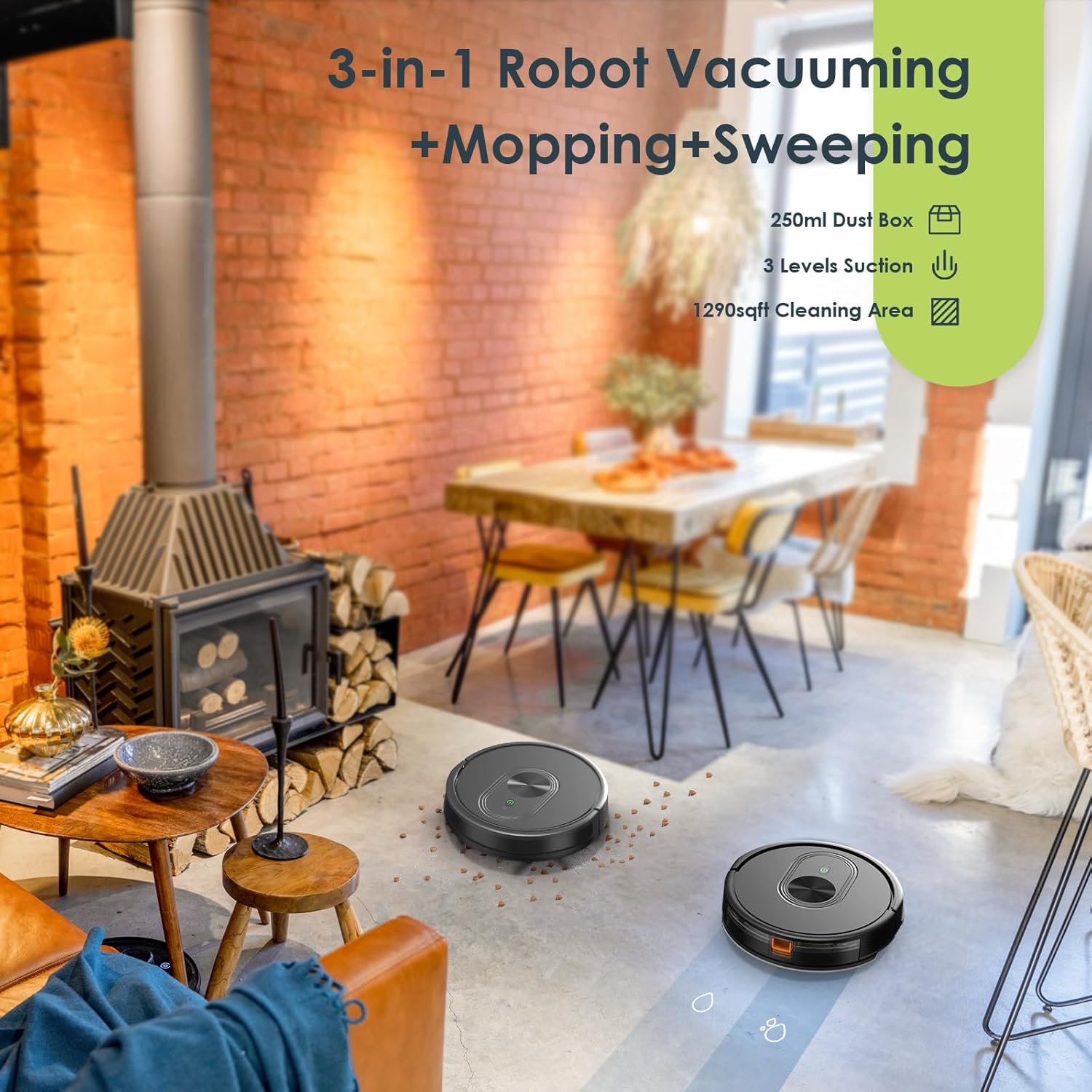
ചിത്രം 2.2: The XIEBro HR101 demonstrating its 3-in-1 capability, showing the robot cleaning a living space with both vacuuming and mopping actions. It highlights the 250ml dust box, 3 levels of suction, and a 1290 sq ft cleaning area.
3. സജ്ജീകരണ ഗൈഡ്
3.1 ചാർജിംഗ് ഡോക്ക് പ്ലേസ്മെന്റ്
- ചാർജിംഗ് ഡോക്ക് ഒരു ഭിത്തിയോട് ചേർത്ത് കട്ടിയുള്ളതും നിരപ്പായതുമായ പ്രതലത്തിൽ വയ്ക്കുക.
- Ensure there is at least 1 meter (3 feet) of clear space on both sides of the dock and 2 meters (6.5 feet) in front of it. This allows the robot to easily locate and return to the dock.
- Connect the power adapter to the charging dock and plug it into a wall outlet. Ensure the power indicator on the dock illuminates.
3.2 പ്രാരംഭ ചാർജിംഗ്
- Place the robot onto the charging dock, ensuring the charging contacts on the robot align with those on the dock.
- The robot's indicator light will show charging status. For first use, charge the robot for at least 6 hours or until fully charged.

ചിത്രം 3.1: The XIEBro HR101 robot vacuum automatically returning to its charging dock. This image highlights the 2600mAh battery and approximately 100 minutes of runtime.
3.3 ആപ്പ് കണക്ഷൻ (ഓപ്ഷണൽ)
For enhanced control and scheduling features, download the XIEBro app from your smartphone's app store.
- നിങ്ങളുടെ സ്മാർട്ട്ഫോൺ 2.4GHz വൈഫൈ നെറ്റ്വർക്കിലേക്ക് കണക്റ്റ് ചെയ്തിട്ടുണ്ടെന്ന് ഉറപ്പാക്കുക.
- Open the app and follow the on-screen instructions to add your HR101 robot.
- നിങ്ങളുടെ വീട്ടിലെ വൈ-ഫൈ നെറ്റ്വർക്കിലേക്ക് റോബോട്ടിനെ ബന്ധിപ്പിക്കുന്നതിലൂടെ ആപ്പ് നിങ്ങളെ നയിക്കും.

ചിത്രം 3.2: A user interacting with the XIEBro HR101 robot vacuum via a smartphone app, remote control, and voice commands through Amazon Alexa. This illustrates the multiple control options available for the device.
4. പ്രവർത്തന നിർദ്ദേശങ്ങൾ
4.1 വൃത്തിയാക്കൽ ആരംഭിക്കുകയും താൽക്കാലികമായി നിർത്തുകയും ചെയ്യുന്നു
- മാനുവൽ ആരംഭം: Press the power button on the robot or the 'Start' button on the remote control/app.
- താൽക്കാലികമായി നിർത്തുക: Press the power button again or the 'Pause' button on the remote control/app.
4.2 ക്ലീനിംഗ് മോഡുകൾ
The HR101 offers various cleaning modes to suit different needs:
- ഓട്ടോ ക്ലീനിംഗ്: റോബോട്ട് ബുദ്ധിപരമായി നാവിഗേറ്റ് ചെയ്യുകയും ആക്സസ് ചെയ്യാവുന്ന മുഴുവൻ സ്ഥലവും വൃത്തിയാക്കുകയും ചെയ്യുന്നു.
- സ്പോട്ട് ക്ലീനിംഗ്: The robot cleans a specific area more intensely, ideal for concentrated dirt.
- എഡ്ജ് ക്ലീനിംഗ്: റോബോട്ട് ചുവരുകളിലും ഫർണിച്ചറിന്റെ അരികുകളിലും വൃത്തിയാക്കുന്നു.
- ഷെഡ്യൂൾ ചെയ്ത ക്ലീനിംഗ്: Set specific times for cleaning via the app.

ചിത്രം 4.1: The XIEBro HR101 robot vacuum demonstrating its 1600Pa super suction power, effectively picking up hair and debris from a hard floor. Icons indicate its intelligent 2-in-1 function, app control, and schedule settings.
4.3 മോപ്പിംഗ് ഫംഗ്ഷൻ
- Remove the dustbin and fill the water tank with clean water. Do not use cleaning solutions that may clog the water outlet.
- മോപ്പ് പാഡ് വാട്ടർ ടാങ്കിൽ സുരക്ഷിതമായി ഘടിപ്പിക്കുക.
- Reinsert the combined water tank and mop pad into the robot.
- Select the mopping mode or a combined vacuum/mop mode via the app or remote control. You can adjust the water flow level (2 speeds) through the app.
- The robot will now vacuum and mop simultaneously or sequentially, depending on the selected mode.

ചിത്രം 4.2: ഒരു പൊട്ടിത്തെറിച്ചു view of the XIEBro HR101's integrated mopping system, showing the electric water tank, 200ml capacity, and two levels of water flow. The main brush and side brushes are also visible, indicating the combined cleaning action.
4.4 ശബ്ദ നിയന്ത്രണം
The HR101 is compatible with Amazon Alexa and Google Home. Follow the instructions in the XIEBro app to link your robot to your preferred voice assistant. Once linked, you can use commands like "Alexa, turn on the robot!" or "Hey Google, start cleaning."
5. പരിപാലനം
Regular maintenance ensures optimal performance and extends the lifespan of your XIEBro HR101.
5.1 ഡസ്റ്റ്ബിൻ ശൂന്യമാക്കൽ
- ഡസ്റ്റ്ബിൻ റിലീസ് ബട്ടൺ അമർത്തി ഡസ്റ്റ്ബിൻ പുറത്തെടുക്കുക.
- ഡസ്റ്റ്ബിൻ കവർ തുറന്ന് അതിലെ സാധനങ്ങൾ ഒരു ചവറ്റുകുട്ടയിലേക്ക് ഒഴിക്കുക.
5.2 ക്ലീനിംഗ് ഫിൽട്ടറുകൾ
- Remove the high-efficiency filter and filter cotton from the dustbin.
- Tap the filter against a trash bin to remove dust. Do not wash the high-efficiency filter with water.
- Rinse the filter cotton with water if necessary and allow it to air dry completely before reinserting.
- Replace filters every 3-6 months, depending on usage.
5.3 ക്ലീനിംഗ് ബ്രഷുകൾ
- പ്രധാന ബ്രഷ്: Remove the main brush cover and lift out the main brush. Use the provided cleaning tool to cut and remove any tangled hair or debris.
- സൈഡ് ബ്രഷുകൾ: Gently pull off the side brushes. Remove any hair or debris. If brushes are damaged, replace them with new ones.
5.4 സെൻസറുകളും ചാർജിംഗ് കോൺടാക്റ്റുകളും വൃത്തിയാക്കൽ
Wipe all sensors (cliff sensors, anti-collision sensors) and charging contacts on both the robot and the charging dock with a clean, dry cloth. This ensures proper navigation and charging.
5.5 വാട്ടർ ടാങ്കും മോപ്പ് പാഡും വൃത്തിയാക്കൽ
- വൃത്തിയാക്കിയ ശേഷം, ടാങ്കിൽ നിന്ന് ശേഷിക്കുന്ന വെള്ളം ഒഴിക്കുക.
- ശുദ്ധജലം ഉപയോഗിച്ച് വാട്ടർ ടാങ്ക് നന്നായി കഴുകുക.
- Remove the mop pad and wash it by hand or machine. Allow it to air dry completely before reattaching or storing.
6. പ്രശ്നപരിഹാരം
If you encounter issues with your XIEBro HR101, refer to the following common problems and solutions:
| പ്രശ്നം | സാധ്യമായ കാരണം | പരിഹാരം |
|---|---|---|
| റോബോട്ട് ഓണാക്കുന്നില്ല. | Low battery; Power button not pressed. | Charge the robot fully; Press and hold the power button for 3 seconds. |
| Robot cannot charge. | Charging contacts are dirty; Charging dock not powered. | Clean charging contacts on both robot and dock; Ensure power adapter is connected and dock is powered. |
| മോശം ക്ലീനിംഗ് പ്രകടനം. | Dustbin full; Filters clogged; Brushes tangled. | Empty dustbin; Clean/replace filters; Clean main and side brushes. |
| റോബോട്ട് ഇടയ്ക്കിടെ കുടുങ്ങിപ്പോകാറുണ്ട്. | Obstacles on floor; Cliff sensors dirty. | Clear floor of loose cables and small objects; Clean cliff sensors. |
| റോബോട്ടിന് വൈഫൈ/ആപ്പുമായി കണക്റ്റ് ചെയ്യാൻ കഴിയുന്നില്ല. | Incorrect Wi-Fi band (only 2.4GHz supported); Incorrect password; Router too far. | Ensure 2.4GHz Wi-Fi; Re-enter password; Move robot closer to router. |
| മോപ്പിംഗ് പ്രവർത്തനം പ്രവർത്തിക്കുന്നില്ല. | Water tank empty; Mop pad not attached; Water outlet clogged. | Fill water tank; Attach mop pad correctly; Clean water tank and mop pad. |
7 സ്പെസിഫിക്കേഷനുകൾ
| ഫീച്ചർ | വിശദാംശങ്ങൾ |
|---|---|
| ബ്രാൻഡ് | XIEBro |
| മോഡൽ | HR101 |
| ഉൽപ്പന്ന അളവുകൾ | 12.04"L x 12.04"W x 2.89"H |
| പരമാവധി സക്ഷൻ പവർ | 1600പ |
| ഡസ്റ്റ്ബിൻ കപ്പാസിറ്റി | 250 മില്ലി |
| വാട്ടർ ടാങ്ക് കപ്പാസിറ്റി | 200 മില്ലി |
| ബാറ്ററി ലൈഫ് | 120 മിനിറ്റ് വരെ |
| ബാറ്ററി തരം | 2600mAh |
| വാല്യംtage | 14 വോൾട്ട് |
| ഫിൽട്ടർ തരം | High-efficiency filtration + Filter cotton |
| കണക്റ്റിവിറ്റി | App (2.4GHz Wi-Fi), Bluetooth, Remote Control |
| വോയ്സ് അസിസ്റ്റന്റ് അനുയോജ്യത | ആമസോൺ എക്കോ, ഗൂഗിൾ ഹോം |
| ഇനത്തിൻ്റെ ഭാരം | 7.32 പൗണ്ട് |
| യു.പി.സി | 643708797256 |
8. വാറൻ്റിയും പിന്തുണയും
The XIEBro HR101 Robot Vacuum and Mop Combo comes with a standard manufacturer's warranty. Please refer to the warranty card included in your package for specific terms and conditions.
8.1 ഉപഭോക്തൃ പിന്തുണ
For technical assistance, warranty claims, or general inquiries, please contact XIEBro customer support. Contact information can typically be found on the official XIEBro webസൈറ്റ് അല്ലെങ്കിൽ ഉൽപ്പന്ന പാക്കേജിംഗിൽ.
When contacting support, please have your product model (HR101) and purchase information readily available.