
1. ആമുഖം
എൽന എക്സെലൻസ് 710 എന്നത് കൃത്യതയ്ക്കും ഉപയോഗ എളുപ്പത്തിനും വേണ്ടി രൂപകൽപ്പന ചെയ്ത ഒരു കമ്പ്യൂട്ടറൈസ്ഡ് തയ്യൽ, ക്വിൽറ്റിംഗ് മെഷീനാണ്. ഇതിൽ ഒരു വലിയ തയ്യൽ ഏരിയ, ഒരു അഡ്വാൻസ്ഡ് ഡ്യുവൽ ഫീഡ് സിസ്റ്റം, വൈവിധ്യമാർന്ന തയ്യൽ പ്രോജക്റ്റുകളെ പിന്തുണയ്ക്കുന്നതിനായി വിവിധതരം ബിൽറ്റ്-ഇൻ തുന്നലുകൾ, ഫംഗ്ഷനുകൾ എന്നിവ ഉൾപ്പെടുന്നു. നിങ്ങളുടെ മെഷീൻ സജ്ജീകരിക്കുന്നതിനും പ്രവർത്തിപ്പിക്കുന്നതിനും പരിപാലിക്കുന്നതിനും ട്രബിൾഷൂട്ട് ചെയ്യുന്നതിനും ആവശ്യമായ വിവരങ്ങൾ ഈ മാനുവലിൽ നൽകുന്നു.

ചിത്രം 1: മുൻഭാഗം view എൽന എക്സലൻസ് 710 തയ്യൽ, ക്വിൽറ്റിംഗ് മെഷീനിന്റെ.
2 പ്രധാന സവിശേഷതകൾ
- 170 തുന്നലുകൾ: 9 മില്ലീമീറ്റർ തുന്നൽ വീതിയുള്ള ആൽഫബെറ്റും 10 ഓട്ടോമാറ്റിക് ബട്ടൺഹോളുകളും ഉൾപ്പെടുന്നു.
- സൗകര്യപ്രദമായ പ്രവർത്തനങ്ങൾ: ബട്ടൺ-ഓപ്പറേറ്റഡ് ഓട്ടോമാറ്റിക് ത്രെഡ് കട്ടർ, വൺ-സ്റ്റെപ്പ് നീഡിൽ പ്ലേറ്റ് കൺവേർഷൻ, ലോക്ക് സ്റ്റിച്ച്.
- ടച്ച് കൺട്രോൾ പാനൽ: തുന്നലുകളും സജ്ജീകരണങ്ങളും എളുപ്പത്തിൽ തിരഞ്ഞെടുക്കുന്നതിന്.
- ഉയർന്ന തയ്യൽ വേഗത: മിനിറ്റിൽ 1000 തുന്നലുകൾ വരെ ഇടാം.
- വിപുലമായ ഡ്യുവൽ ഫീഡ് സിസ്റ്റം: കൃത്യതയ്ക്കായി തുണി മുകളിൽ നിന്നും താഴെ നിന്നും തുല്യമായി നീക്കുന്നു, ഒന്നിലധികം ലെയറുകൾക്കും പാറ്റേൺ പൊരുത്തപ്പെടുത്തലിനും അനുയോജ്യം. നീക്കം ചെയ്യാവുന്ന ഡ്യുവൽ ഫീഡ് ഫൂട്ട് വീതിയും ഉൾപ്പെടുന്നു.
- 15 പ്രഷർ ഫീറ്റ്: ഡ്യുവൽ ഫീഡ് വൈഡ്, കൺവേർട്ടിബിൾ ഫ്രീ-മോഷൻ ക്വിൽറ്റിംഗ് കിറ്റ് ഉൾപ്പെടെയുള്ള വിവിധ തയ്യൽ പ്രവർത്തനങ്ങൾക്കായി.
- സംയോജിത സംഭരണം: പ്രഷർ കാലുകൾക്കുള്ള മുകളിലെ കമ്പാർട്ടുമെന്റും ഫ്രീ ആമിൽ രണ്ട് കമ്പാർട്ടുമെന്റുകളും.
- മുട്ട് ലിഫ്റ്റർ: നിങ്ങളുടെ പ്രോജക്റ്റിൽ കൈകൾ വച്ചുകൊണ്ട്, നിങ്ങളുടെ കാലുകൊണ്ട് പ്രഷർ ഫൂട്ട് ഉയർത്താൻ അനുവദിക്കുന്നു.
- LED ലൈറ്റിംഗ്: മെച്ചപ്പെട്ട ദൃശ്യപരതയ്ക്കായി 3 ഇടങ്ങളിലായി 5 ബിൽറ്റ്-ഇൻ വെളുത്ത LED ലൈറ്റുകൾ.
3. സജ്ജീകരണം
3.1 അൺപാക്കിംഗും പ്ലേസ്മെന്റും
മെഷീൻ അതിന്റെ പാക്കേജിംഗിൽ നിന്ന് ശ്രദ്ധാപൂർവ്വം നീക്കം ചെയ്യുക. മെഷീൻ സ്ഥിരതയുള്ളതും പരന്നതുമായ ഒരു പ്രതലത്തിൽ വയ്ക്കുക. സുഖകരമായ പ്രവർത്തനത്തിനായി മെഷീനിന് ചുറ്റും മതിയായ ഇടം ഉറപ്പാക്കുക.

ചിത്രം 2: വശം view എൽന എക്സെലൻസ് 710 ന്റെ ഒതുക്കമുള്ള ഡിസൈൻ കാണിക്കുന്നു.
3.2 പവർ കണക്ഷൻ
പവർ കോർഡ് മെഷീനുമായി ബന്ധിപ്പിക്കുക, തുടർന്ന് അനുയോജ്യമായ ഒരു ഇലക്ട്രിക്കൽ ഔട്ട്ലെറ്റുമായി ബന്ധിപ്പിക്കുക. ബന്ധിപ്പിക്കുന്നതിന് മുമ്പ് മെഷീനിന്റെ പവർ സ്വിച്ച് 'ഓഫ്' സ്ഥാനത്താണെന്ന് ഉറപ്പാക്കുക.
3.3 എക്സ്റ്റൻഷൻ ടേബിൾ അറ്റാച്ചുചെയ്യൽ
ക്വിൽറ്റിംഗിനും വലിയ പ്രോജക്ടുകൾക്കും പ്രത്യേകിച്ചും ഉപയോഗപ്രദമായ വിപുലീകൃത വർക്ക്സ്പെയ്സ് എക്സ്റ്റൻഷൻ ടേബിൾ നൽകുന്നു. എക്സ്റ്റൻഷൻ ടേബിൾ സുരക്ഷിതമായി സ്ഥലത്ത് ക്ലിക്കുചെയ്യുന്നതുവരെ ഫ്രീ ആമിലേക്ക് സ്ലൈഡ് ചെയ്യുക.

ചിത്രം 3: വികസിപ്പിച്ച വർക്ക് ഉപരിതലം നൽകുന്ന എക്സ്റ്റൻഷൻ ടേബിളുള്ള എൽന എക്സെലൻസ് 710.
3.4 ബോബിൻ വൈൻഡിംഗ്
സ്പൂൾ പിന്നിൽ ഒരു സ്പൂൾ ത്രെഡ് വയ്ക്കുക. ബോബിൻ വൈൻഡിംഗ് ടെൻഷൻ ഡിസ്കിലൂടെ ത്രെഡ് നയിക്കുക, തുടർന്ന് ഒഴിഞ്ഞ ബോബിന് ചുറ്റും വയ്ക്കുക. ബോബിൻ വൈൻഡർ ഷാഫ്റ്റിൽ ബോബിൻ സ്ഥാപിച്ച് വലതുവശത്തേക്ക് തള്ളുക. വൈൻഡിംഗ് ആരംഭിക്കാൻ സ്റ്റാർട്ട്/സ്റ്റോപ്പ് ബട്ടൺ അമർത്തുക. ബോബിൻ നിറയുമ്പോൾ മെഷീൻ യാന്ത്രികമായി നിർത്തും.
3.5 അപ്പർ ത്രെഡിംഗ്
പ്രഷർ ഫൂട്ടും സൂചിയും അതിന്റെ ഏറ്റവും ഉയർന്ന സ്ഥാനത്തേക്ക് ഉയർത്തുക. മെഷീനിൽ സൂചിപ്പിച്ചിരിക്കുന്ന നമ്പർ നൽകിയ ത്രെഡിംഗ് പാത്ത് പിന്തുടരുക, ത്രെഡ് എല്ലാ ഗൈഡുകളിലും ടെൻഷൻ ഡിസ്കുകളിലും സുരക്ഷിതമായി സ്ഥാപിച്ചിട്ടുണ്ടെന്ന് ഉറപ്പാക്കുക. സൂചി കണ്ണിന്റെ എളുപ്പത്തിൽ ത്രെഡിംഗ് ചെയ്യുന്നതിന് ബിൽറ്റ്-ഇൻ സൂചി ത്രെഡർ ഉപയോഗിക്കുക.

ചിത്രം 4: മുകളിൽ view ത്രെഡിംഗ് പാത്തും സ്റ്റിച്ച് സെലക്ഷൻ ചാർട്ടും ചിത്രീകരിക്കുന്നു.
3.6 ബോബിൻ ചേർക്കൽ
ബോബിൻ കവർ തുറക്കുക. ത്രെഡ് ശരിയായ ദിശയിൽ (സാധാരണയായി എതിർ ഘടികാരദിശയിൽ) അഴിക്കുന്നുണ്ടെന്ന് ഉറപ്പാക്കിക്കൊണ്ട്, മുറിവ് ബോബിൻ ബോബിൻ കേസിൽ തിരുകുക. ടെൻഷൻ സ്പ്രിംഗിലൂടെയും കട്ടറിലൂടെയും ത്രെഡ് നയിക്കുക. ബോബിൻ കവർ അടയ്ക്കുക.
4. പ്രവർത്തന നിർദ്ദേശങ്ങൾ
4.1 തുന്നൽ തിരഞ്ഞെടുക്കൽ
നിങ്ങൾക്ക് ആവശ്യമുള്ള തുന്നൽ തിരഞ്ഞെടുക്കാൻ ടച്ച് കൺട്രോൾ പാനൽ ഉപയോഗിക്കുക. യൂട്ടിലിറ്റി, ഡെക്കറേറ്റീവ്, ബട്ടൺഹോൾ തുന്നലുകൾ എന്നിവയുൾപ്പെടെ 170 ബിൽറ്റ്-ഇൻ തുന്നലുകൾ മെഷീൻ വാഗ്ദാനം ചെയ്യുന്നു. വിഷ്വൽ റഫറൻസിനായി മെഷീനിന്റെ മുകളിലെ കവറിൽ സ്ഥിതിചെയ്യുന്ന തുന്നൽ ചാർട്ട് കാണുക.

ചിത്രം 5: മുൻഭാഗം view തുറന്ന സ്റ്റോറേജ് കമ്പാർട്ടുമെന്റുകൾ, ആക്സസറികൾ, സ്റ്റിച്ച് ചാർട്ട് എന്നിവ വെളിപ്പെടുത്തുന്ന തരത്തിൽ.
4.2 തുന്നൽ ക്രമീകരണങ്ങൾ ക്രമീകരിക്കൽ
ഒരു തുന്നൽ തിരഞ്ഞെടുത്ത ശേഷം, ടച്ച് കൺട്രോൾ പാനൽ ശുപാർശ ചെയ്യുന്ന തുന്നൽ നീളവും വീതിയും പ്രദർശിപ്പിക്കും. നിങ്ങളുടെ തുണിയുടെയും പ്രോജക്റ്റ് ആവശ്യകതകളുടെയും അടിസ്ഥാനത്തിൽ പാനലിലെ സമർപ്പിത ബട്ടണുകൾ ഉപയോഗിച്ച് ഇവ ക്രമീകരിക്കാവുന്നതാണ്.

ചിത്രം 6: തുന്നലിനും സജ്ജീകരണ ക്രമീകരണങ്ങൾക്കുമായി ടച്ച് കൺട്രോൾ പാനലിന്റെ ക്ലോസ്-അപ്പ്.
4.3 തയ്യൽ ആരംഭിക്കൽ
നിങ്ങളുടെ തുണി പ്രഷർ ഫൂട്ടിനടിയിൽ വയ്ക്കുക. പ്രഷർ ഫൂട്ട് താഴ്ത്തുക. തയ്യൽ ആരംഭിക്കാൻ സ്റ്റാർട്ട്/സ്റ്റോപ്പ് ബട്ടൺ അല്ലെങ്കിൽ ഫൂട്ട് കൺട്രോളർ ഉപയോഗിക്കുക. സ്പീഡ് കൺട്രോൾ സ്ലൈഡർ ഉപയോഗിച്ച് തയ്യൽ വേഗത ക്രമീകരിക്കുക.
5. പരിപാലനം
5.1 മെഷീൻ വൃത്തിയാക്കൽ
ബോബിൻ ഏരിയ പതിവായി വൃത്തിയാക്കുക, ലിന്റും പൊടിയും നീക്കം ചെയ്യാൻ നായ്ക്കൾക്ക് ഭക്ഷണം കൊടുക്കുക. നൽകിയിരിക്കുന്ന ലിന്റ് ബ്രഷ് ഉപയോഗിക്കുക. വൃത്തിയാക്കുന്നതിന് മുമ്പ് മെഷീൻ വൈദ്യുതിയിൽ നിന്ന് വിച്ഛേദിക്കുക. ലിക്വിഡ് ക്ലീനറുകളോ ലായകങ്ങളോ ഉപയോഗിക്കരുത്.
5.2 സൂചി മാറ്റിസ്ഥാപിക്കൽ
സൂചി ഇടയ്ക്കിടെ മാറ്റുക, പ്രത്യേകിച്ച് വ്യത്യസ്ത തരം തുണിത്തരങ്ങൾ തുന്നുമ്പോൾ അല്ലെങ്കിൽ സൂചി മങ്ങിയതോ വളഞ്ഞതോ ആണെങ്കിൽ. നിങ്ങളുടെ തുണിക്ക് എല്ലായ്പ്പോഴും ശരിയായ സൂചി തരവും വലുപ്പവും ഉപയോഗിക്കുക.
6. പ്രശ്നപരിഹാരം
6.1 പൊതുവായ പ്രശ്നങ്ങൾ
- ഒഴിവാക്കിയ തുന്നലുകൾ: സൂചി ശരിയായി ചേർത്തിട്ടുണ്ടോ, വളഞ്ഞതാണോ മങ്ങിയതാണോ, അല്ലെങ്കിൽ തുണിയിൽ ശരിയായ സൂചി തരം ഉപയോഗിക്കുന്നുണ്ടോ എന്ന് പരിശോധിക്കുക.
- ത്രെഡ് പൊട്ടൽ: മെഷീൻ ശരിയായി ത്രെഡ് ചെയ്തിട്ടുണ്ടെന്നും, ടെൻഷൻ ഉചിതമാണെന്നും, ത്രെഡ് പഴയതോ കേടായതോ അല്ലെന്നും ഉറപ്പാക്കുക.
- തുണി ജാമിംഗ്: തയ്യലിന് മുമ്പ് പ്രഷർ ഫൂട്ട് താഴ്ത്തിയിട്ടുണ്ടെന്നും ശരിയായ പ്രഷർ ഫൂട്ട് ആണ് ജോലിക്ക് ഉപയോഗിക്കുന്നതെന്നും ഉറപ്പാക്കുക.
- അസമമായ തുന്നലുകൾ: മുകളിലെ ത്രെഡും ബോബിൻ ത്രെഡും പരിശോധിക്കുക. മെഷീൻ വൃത്തിയുള്ളതും ലിന്റ് ഇല്ലാത്തതുമാണെന്ന് ഉറപ്പാക്കുക.
7 സ്പെസിഫിക്കേഷനുകൾ
| ഫീച്ചർ | വിശദാംശങ്ങൾ |
|---|---|
| ഉൽപ്പന്ന അളവുകൾ | 9 x 20.4 x 12.4 ഇഞ്ച് (9"D x 20.4"W x 12.4"H) |
| ഇനത്തിൻ്റെ ഭാരം | 26.9 പൗണ്ട് |
| നിർമ്മാതാവ് | എൽന |
| ഇനം മോഡൽ നമ്പർ | EL710 |
| പവർ ഉറവിടം | കോർഡഡ് ഇലക്ട്രിക് |
| മെറ്റീരിയൽ | മെറ്റൽ, പ്ലാസ്റ്റിക് |
| നിറം | വെള്ള/ചുവപ്പ് |
| അസംബ്ലി ആവശ്യമാണ് | ഇല്ല |
| ബാറ്ററികൾ ആവശ്യമാണ് | ഇല്ല |

ചിത്രം 7: എൽന എക്സലൻസ് 710 തയ്യൽ മെഷീനിന്റെ അളവുകൾ.
8. ഉൾപ്പെടുത്തിയ ആക്സസറികൾ
നിങ്ങൾക്ക് ഉടൻ തന്നെ ആരംഭിക്കാൻ സഹായിക്കുന്ന സമഗ്രമായ ആക്സസറികളുടെ ഒരു സെറ്റ് എൽന എക്സെലൻസ് 710-ൽ ഉണ്ട്:
- സ്റ്റാൻഡേർഡ് കാൽ A
- ഉരുട്ടിയ ഹെം കാൽ ഡി
- സിപ്പർ കാൽ ഇ
- സാറ്റിൻ സ്റ്റിച്ച് കാൽ എഫ്
- ഓപ്പൺ-ടോ സാറ്റിൻ സ്റ്റിച്ച് ഫൂട്ട് F2
- ബ്ലൈൻഡ് ഹെം ഫൂട്ട് ജി
- ഓവർലോക്ക് ഫൂട്ട് എം
- ¼” സീം കാൽ O
- ഡാർനിംഗ് ഫൂട്ട് PD-H
- കൺവെർട്ടിബിൾ ഫ്രീ-മോഷൻ ക്വിൽറ്റിംഗ് കിറ്റ് QB-S (ഉൾപ്പെടെ: അടഞ്ഞ കാൽവിരൽ, തുറന്ന കാൽവിരൽ, ക്ലിയർ-view കാൽ)
- സ്റ്റെബിലൈസർ പ്ലേറ്റുള്ള ഓട്ടോമാറ്റിക് ബട്ടൺഹോൾ ഫൂട്ട് R
- ബട്ടൺ തയ്യൽ കാൽ ടി
- ഡ്യുവൽ ഫീഡ് ഫൂട്ട് എഡി വൈഡ് സിസ്റ്റം
- നേരായ തുന്നൽ സൂചി പ്ലേറ്റ്
- കാൽമുട്ട് ഉയർത്തുന്നയാൾ
- ക്വിൽറ്റിംഗ് ഗൈഡ് ബാർ
- ബോബിൻസ്
- സീം റിപ്പർ
- സൂചി സെറ്റ്
- ലിൻ്റ് ബ്രഷ്
- സ്പൂൾ ഹോൾഡർ ചെറിയ x2
- വലിയ സ്പൂൾ ഹോൾഡർ x2
- സ്പൂൾ ഹോൾഡർ സ്പെഷ്യൽ x2
- സ്പൂൾ വിശ്രമം
- ഫെൽറ്റ് കുഷ്യൻ
- അധിക സ്പൂൾ പിൻ
- സ്ക്രൂഡ്രൈവർ
- ടച്ച് പാനൽ സ്റ്റൈലസ്
- കാൽ കൺട്രോളർ
- സെമി-ഹാർഡ് കവർ
- എക്സലൻസ് 710 തയ്യൽ മെഷീൻ
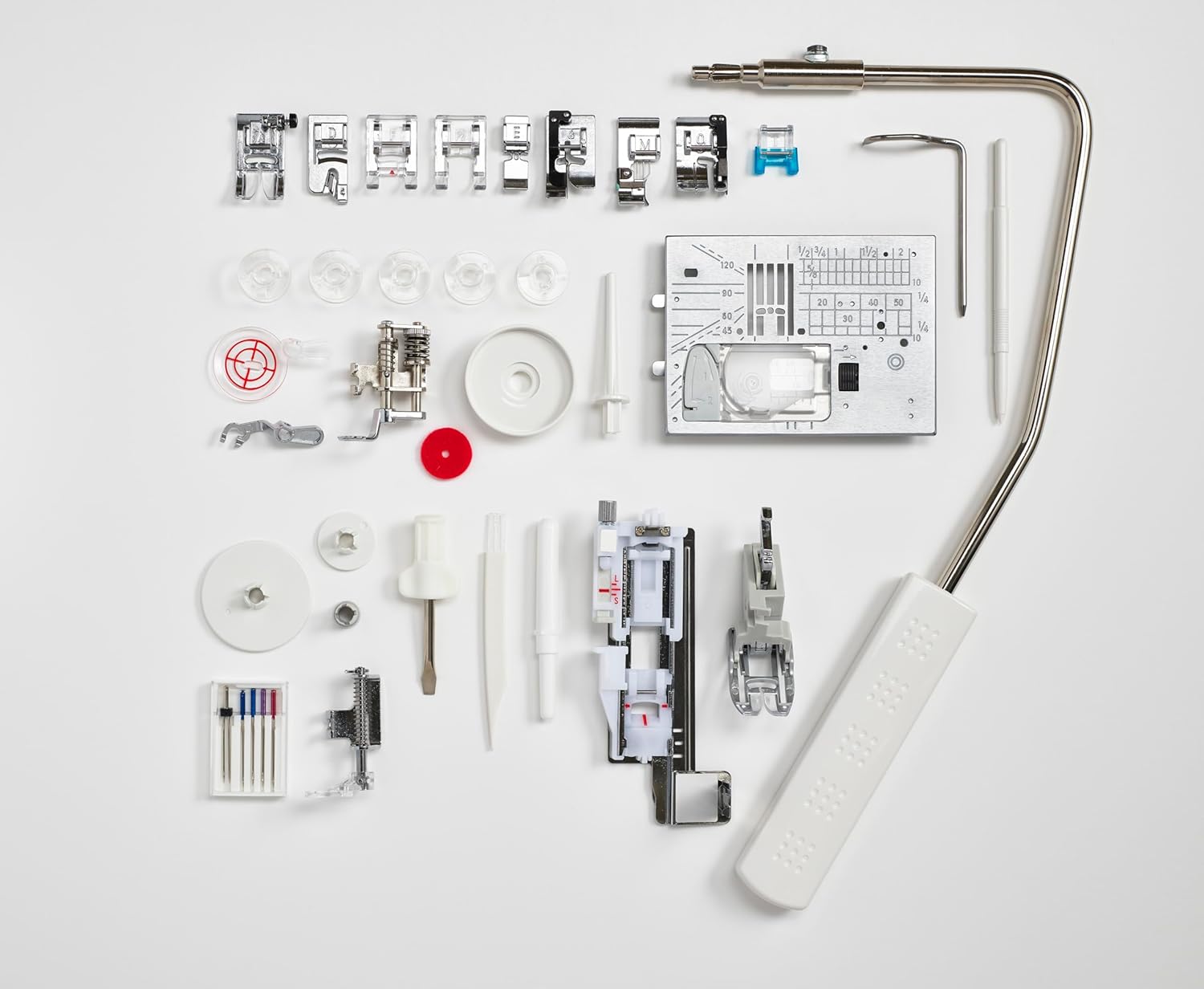
ചിത്രം 8: വിവിധ പ്രഷർ പാദങ്ങളും ഉപകരണങ്ങളും ഉൾപ്പെടെ എല്ലാ ഉൾപ്പെടുത്തിയ ആക്സസറികളും.
9. വാറൻ്റിയും പിന്തുണയും
വാറന്റി വിവരങ്ങൾക്കും ഉപഭോക്തൃ പിന്തുണയ്ക്കും, ദയവായി നിങ്ങളുടെ ഉൽപ്പന്നത്തിനൊപ്പം ഉൾപ്പെടുത്തിയിരിക്കുന്ന ഡോക്യുമെന്റേഷൻ പരിശോധിക്കുക അല്ലെങ്കിൽ ഔദ്യോഗിക എൽന സന്ദർശിക്കുക. webസൈറ്റ്. വാറന്റി ക്ലെയിമുകൾക്കായി നിങ്ങളുടെ വാങ്ങലിന്റെ തെളിവ് സൂക്ഷിക്കുക.
10. ഉൽപ്പന്ന വീഡിയോകൾ
നൽകിയിരിക്കുന്ന ഡാറ്റയിൽ ഈ നിർദ്ദിഷ്ട മോഡലിനായി വിൽപ്പനക്കാരനിൽ നിന്നുള്ള ഔദ്യോഗിക ഉൽപ്പന്ന വീഡിയോകളൊന്നും കണ്ടെത്തിയില്ല. ദയവായി എഴുതിയ നിർദ്ദേശങ്ങളോ നിർമ്മാതാവിന്റെയോ കാണുക. webവിഷ്വൽ ഗൈഡുകൾക്കായുള്ള സൈറ്റ്.