
1. ആമുഖം
SHANLING UA2 Plus ഒരു ഒതുക്കമുള്ളതും ശക്തവുമായ പോർട്ടബിൾ USB DAC/AMP designed to enhance your audio experience across various devices. Featuring an ES9038Q2M DAC chip and dual RT6863 amplifier chips, it supports high-resolution audio up to 32bit/768kHz and DSD512. With both 3.5mm single-ended and 4.4mm balanced outputs, it offers versatile connectivity for a wide range of headphones. Its small size and robust build make it an ideal companion for on-the-go high-fidelity sound.
2. പാക്കേജ് ഉള്ളടക്കം
താഴെ പറയുന്ന ഇനങ്ങൾക്കായി ബോക്സ് ചെക്ക് ചെയ്യുക:
- 1x SHANLING UA2 Plus Portable DAC/AMP
- 1x USB Type-C to C Data Cable
- 1x USB A to Type-C Adapter
- 1x ദ്രുത ആരംഭ ഗൈഡ്
- 1x വാറൻ്റി കാർഡ്

Image: Contents of the SHANLING UA2 Plus retail box, showing the device, cables, and manuals.
Video: An unboxing video of the SHANLING UA2 Plus USB DAC/AMP, demonstrating the contents of the package.
3. ഉൽപ്പന്നം കഴിഞ്ഞുview
പ്രധാന സവിശേഷതകൾ:
- DAC ചിപ്പ്: ES9038Q2M for high-fidelity audio conversion.
- Ampജീവപര്യന്തം: Dual RT6863 Amp chips for powerful and clean output.
- ഉയർന്ന മിഴിവുള്ള ഓഡിയോ: Supports up to 32bit/768kHz and DSD512.
- ഔട്ട്പുട്ടുകൾ: 3.5mm Single-Ended and 4.4mm Balanced headphone jacks.
- ഔട്ട്പുട്ട് പവർ: Up to 195mW@32Ω (Balanced) and 125mW@32Ω (Single-Ended).
- അനുയോജ്യത: Android, iOS, Windows, Mac, Nintendo Switch.
- പോർട്ടബിലിറ്റി: Compact size (1.97x0.7x0.25 inches) and lightweight (10.6g).
- ആപ്പ് നിയന്ത്രണം: Customizable settings via the Eddict Player app.
- പവർ എഫിഷ്യൻസി: Optimized power consumption for extended battery life on connected devices.
- LED സൂചകം: Displays current sampling rate and MQA status.
ഘടകങ്ങളും നിയന്ത്രണങ്ങളും:
The UA2 Plus features a minimalist design with essential controls and indicators.
- യുഎസ്ബി-സി പോർട്ട്: For data connection and power.
- മോഡ് ബട്ടൺ: Used for various settings and UAC1.0 mode for Nintendo Switch.
- 3.5mm സിംഗിൾ-എൻഡഡ് ഔട്ട്പുട്ട്: സ്റ്റാൻഡേർഡ് ഹെഡ്ഫോൺ ജാക്ക്.
- 4.4 എംഎം ബാലൻസ്ഡ് ഔട്ട്പുട്ട്: For balanced headphones, offering higher power and improved sound quality.
- LED സൂചകം: Located near the USB-C port, changes color to indicate sampling rate and MQA status.
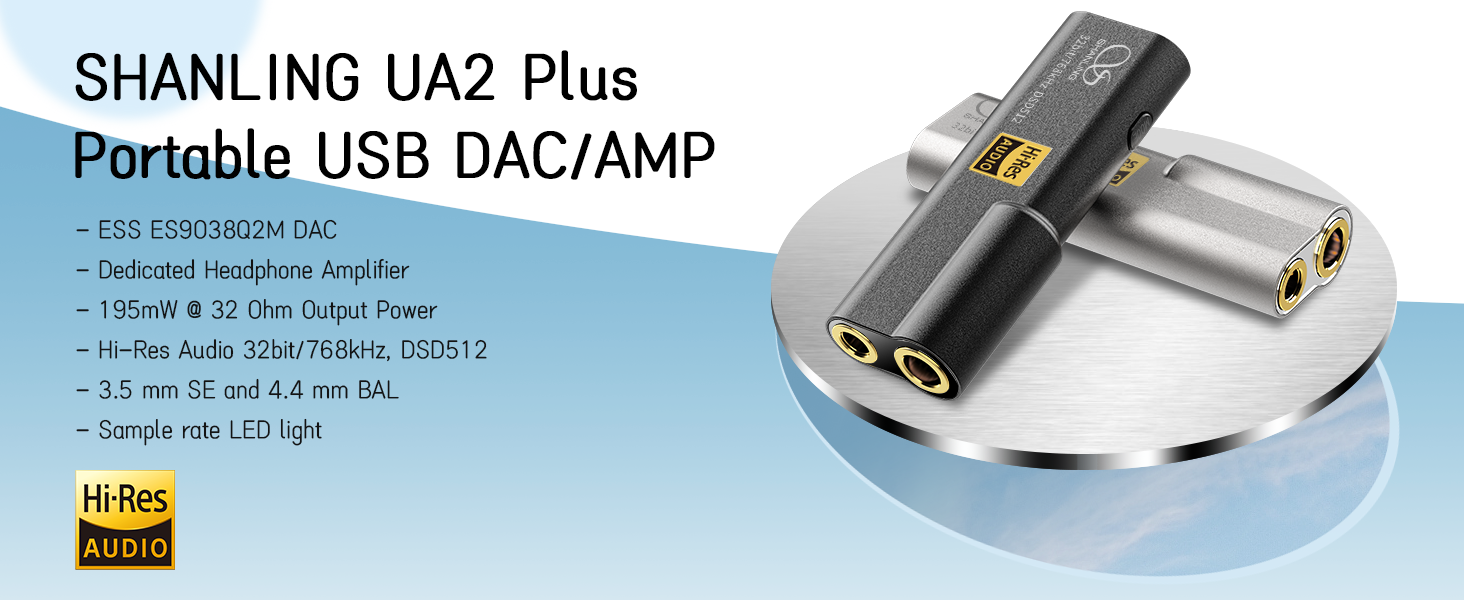
ചിത്രം: ഒരു ഓവർview of the SHANLING UA2 Plus highlighting its internal components and output capabilities.

Image: The LED indicator on the UA2 Plus, explaining the color codes for various sampling rates (Blue: 44.1/48 kHz, Green: 88.2/96 kHz, Yellow: 176.4/192 kHz, Purple: 352/384/705/768 kHz, White: DSD, Red: UAC1.0 mode).
4. സജ്ജീകരണം
4.1 ഉപകരണങ്ങളിലേക്ക് ബന്ധിപ്പിക്കുന്നു
The UA2 Plus is designed for plug-and-play operation with most compatible devices.
- Android ഉപകരണങ്ങൾ: Connect the UA2 Plus to your Android phone using the provided USB Type-C to C cable. Ensure your phone supports USB OTG audio output.
- iOS ഉപകരണങ്ങൾ: A special Lightning to USB-C cable (e.g., Shanling L3 cable) is required for iOS compatibility. Standard OTG cables are not compatible.
- Windows/Mac Computers: Use the provided USB Type-C to C cable and the USB A to Type-C adapter (if needed) to connect to your computer. Drivers may be required for Windows for optimal performance (download from SHANLING official webസൈറ്റ്).
- നിൻ്റെൻഡോ സ്വിച്ച്: Connect the UA2 Plus and press down the Mode switch while connecting to enable UAC1.0 mode for compatibility.

Image: The SHANLING UA2 Plus connected to a Nintendo Switch, illustrating its use for gaming.
4.2 App Control (Eddict Player)
The Eddict Player app allows for advanced control and customization of your UA2 Plus settings. Download the app from your device's official app store (Google Play Store for Android, App Store for iOS).
- ബന്ധിപ്പിക്കുക: Ensure your UA2 Plus is connected to your device.
- ആപ്പ് തുറക്കുക: Launch the Eddict Player app.
- Access USB Control: Navigate to the USB Control section within the app.
- Select UA2 Plus: Choose your UA2 Plus from the list of connected devices.
- ഇഷ്ടാനുസൃതമാക്കുക: Adjust settings such as digital filters, gain, volume, and more.
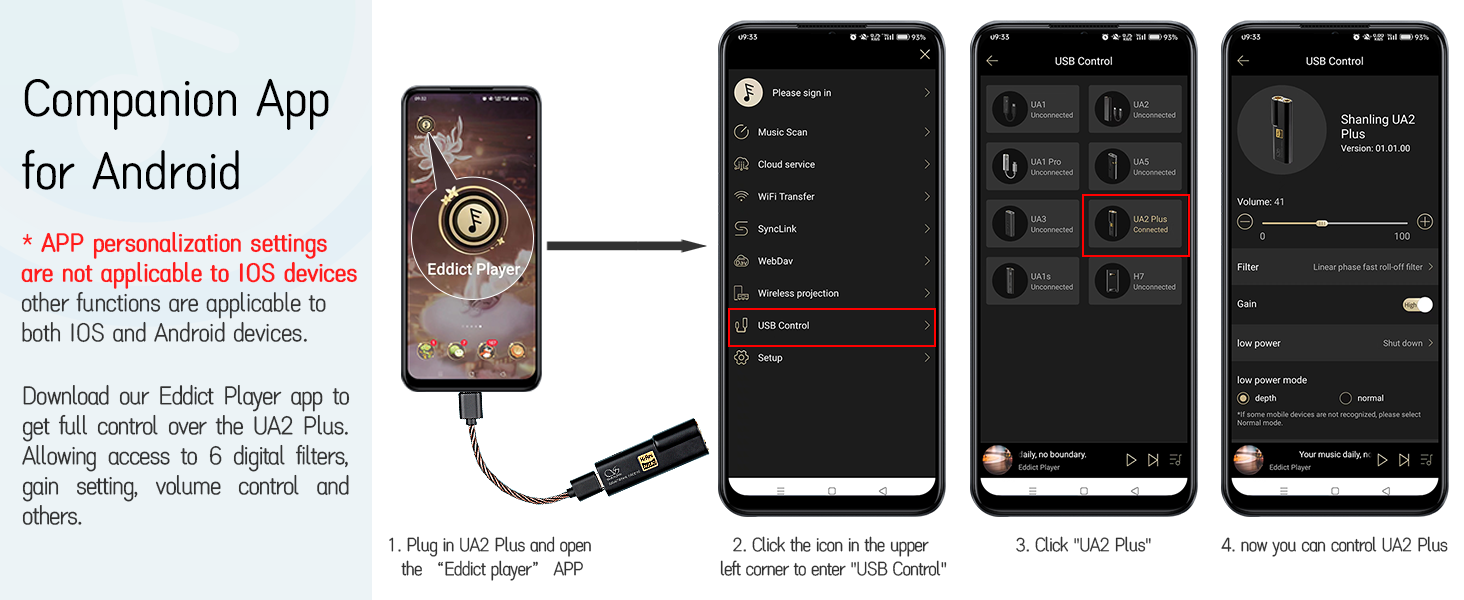
Image: A visual guide to using the Eddict Player app for controlling the UA2 Plus, showing the connection and settings interface.
Video: A tutorial demonstrating the SyncLink connection method for Android and iOS devices using the Eddict Player app, which is applicable to the UA2 Plus for app control.
5. പ്രവർത്തന നിർദ്ദേശങ്ങൾ
5.1 അടിസ്ഥാന പ്രവർത്തനം
The UA2 Plus is designed for simple operation. Once connected to a compatible device, it will typically power on automatically.
- വോളിയം നിയന്ത്രണം: Volume is primarily controlled via the connected source device (phone, computer). The UA2 Plus acts as a high-quality audio output.
- മോഡ് ബട്ടൺ: A short press of the 'MODE' button cycles through available digital filters. A long press (while connecting to Nintendo Switch) activates UAC1.0 mode.
5.2 LED സൂചകങ്ങൾ
The LED indicator on the UA2 Plus provides visual feedback on the device's status:
- നീല: 44.1 / 48 kHz sampലിംഗ് നിരക്ക്.
- പച്ച: 88.2 / 96 kHz sampലിംഗ് നിരക്ക്.
- മഞ്ഞ: 176.4 / 192 kHz sampലിംഗ് നിരക്ക്.
- പർപ്പിൾ: 352 / 384 / 705 / 768 kHz sampലിംഗ് നിരക്ക്.
- വെള്ള: DSD 64 / 128 / 256 / 512 playback.
- ചുവപ്പ്: 44.1 / 48 kHz (Switch Mode / UAC1.0).

Image: The LED indicator on the UA2 Plus, detailing the color codes for various audio formats and modes.
6. പരിപാലനം
To ensure the longevity and optimal performance of your SHANLING UA2 Plus, please follow these maintenance guidelines:
- വൃത്തിയാക്കൽ: ഉപകരണം വൃത്തിയാക്കാൻ മൃദുവായതും ഉണങ്ങിയതുമായ തുണി ഉപയോഗിക്കുക. കഠിനമായ രാസവസ്തുക്കളോ ഉരച്ചിലുകളോ ഉള്ള വസ്തുക്കൾ ഉപയോഗിക്കുന്നത് ഒഴിവാക്കുക.
- സംഭരണം: നേരിട്ടുള്ള സൂര്യപ്രകാശത്തിൽ നിന്നും കടുത്ത താപനിലയിൽ നിന്നും മാറി തണുത്തതും വരണ്ടതുമായ സ്ഥലത്ത് ഉപകരണം സൂക്ഷിക്കുക.
- സംരക്ഷണം: Avoid dropping the device or exposing it to excessive force, which could damage internal components or the glass panels.
- ഈർപ്പം: വെള്ളം, ഉയർന്ന ആർദ്രത എന്നിവയിൽ നിന്ന് ഉപകരണം അകറ്റി നിർത്തുക.
7. പ്രശ്നപരിഹാരം
If you encounter any issues with your UA2 Plus, please refer to the following common troubleshooting steps:
- ശബ്ദമില്ല:
- Ensure the UA2 Plus is securely connected to both the source device and headphones.
- Check the volume level on both the source device and within the Eddict Player app.
- Verify that the correct audio output is selected on your source device (e.g., 'SHANLING UA2 Plus' in sound settings).
- For iOS devices, confirm you are using a compatible Lightning to USB-C cable.
- ഉപകരണം തിരിച്ചറിഞ്ഞിട്ടില്ല:
- ഉപകരണം വീണ്ടും കണക്റ്റ് ചെയ്യാൻ ശ്രമിക്കുക.
- നിങ്ങളുടെ ഉറവിട ഉപകരണം പുനരാരംഭിക്കുക.
- For Windows computers, ensure the necessary drivers are installed.
- For Nintendo Switch, ensure UAC1.0 mode is activated by pressing the Mode button during connection.
- ഇടവിട്ടുള്ള കണക്ഷൻ:
- Check the USB cable for damage and ensure it is firmly seated.
- മറ്റൊരു USB പോർട്ട് അല്ലെങ്കിൽ കേബിൾ പരീക്ഷിക്കുക.
- മോശം ശബ്ദ നിലവാരം:
- ഉയർന്ന നിലവാരമുള്ള ഓഡിയോയാണ് ഉപയോഗിക്കുന്നതെന്ന് ഉറപ്പാക്കുക. files.
- Check headphone connections and ensure they are fully inserted.
- Adjust digital filter and gain settings in the Eddict Player app.
8 സ്പെസിഫിക്കേഷനുകൾ
| ഫീച്ചർ | വിവരണം |
|---|---|
| മോഡലിൻ്റെ പേര് | UA2 പ്ലസ് |
| DAC ചിപ്പ് | ES9038Q2M |
| Amp ചിപ്പ് | Dual RT6863 |
| ഹൈ-റെസ് പിന്തുണ | 32bit/768kHz, DSD512 |
| Output Power (4.4mm BAL) | 195mW@32Ω |
| Output Power (3.5mm SE) | 125mW@32Ω |
| സിഗ്നൽ-ടു-നോയിസ് അനുപാതം | 121dB വരെ |
| ഹെഡ്ഫോണുകൾ ജാക്ക് | 3.5 mm Jack, 4.4 mm Balanced Jack |
| കണക്റ്റിവിറ്റി ടെക്നോളജി | വയേർഡ് (USB-C) |
| അനുയോജ്യമായ ഉപകരണങ്ങൾ | Android, iOS, Windows, Mac, Nintendo Switch |
| ഇനത്തിൻ്റെ ഭാരം | 10.6 ഗ്രാം (0.37 ഔൺസ്) |
| മെറ്റീരിയൽ | ലോഹം |
9. വാറൻ്റിയും പിന്തുണയും
Your SHANLING UA2 Plus comes with a warranty card included in the package. Please refer to the warranty card for specific terms and conditions.
For further support, product updates, or to explore other SHANLING products, please visit the official SHANLING webസൈറ്റ് അല്ലെങ്കിൽ അവരുടെ ആമസോൺ സ്റ്റോർ: