
1. ഉൽപ്പന്നം കഴിഞ്ഞുview
The ENEGON C9015 is a versatile universal battery charger designed for various rechargeable battery types. It features independent charging slots, a discharge function, and an LCD display for monitoring charging status.
പ്രധാന സവിശേഷതകൾ:
- Individual Slot Charging: Supports 1-4 AA/AAA/C/D and 1-2 9V Ni-MH/Ni-CD rechargeable batteries simultaneously. Each slot operates independently.
- One-Button Discharge: Press the blue button to initiate discharge for Ni-MH/Ni-CD batteries. The charger automatically switches to charge mode after discharge.
- ഫാസ്റ്റ് ചാർജിംഗ്: Charges 1-4 AA/AAA/C/D batteries with a total current of 2A, completing in under 3 hours. 9V batteries charge in under 10 hours.
- LCD ഡിസ്പ്ലേ: Provides real-time charging status (Charging, Discharging, Full, Error) for AA/AAA/C/D batteries. LED indicators are used for 9V batteries.
- സുരക്ഷാ പരിരക്ഷകൾ: Includes safeguards against short-circuit, overheating, overcharge, overcurrent, overvoltage, over-discharge, and non-rechargeable battery detection.

Image: The ENEGON C9015 universal battery charger with different battery types (AA, AAA, C, D, 9V) inserted, showcasing its multi-slot design and LCD screen.
2. സുരക്ഷാ നിർദ്ദേശങ്ങൾ
Please read and understand these safety instructions before using the charger to prevent injury or damage.
- Use only with specified Ni-MH/Ni-CD rechargeable batteries (AA, AAA, C, D, 9V). Do not attempt to charge non-rechargeable batteries or other battery types (e.g., Lithium-ion), as this may cause explosion, rupture, or leakage.
- Do not disassemble, modify, or short-circuit the charger.
- Avoid exposing the charger to rain, moisture, or extreme temperatures.
- കുട്ടികൾക്കും വളർത്തുമൃഗങ്ങൾക്കും ലഭ്യമാകാതെ സൂക്ഷിക്കുക.
- ഉപയോഗത്തിലില്ലാത്തപ്പോഴോ വൃത്തിയാക്കുന്നതിന് മുമ്പോ ചാർജർ പവർ സ്രോതസ്സിൽ നിന്ന് അൺപ്ലഗ് ചെയ്യുക.
- Ensure proper polarity (+/-) when inserting batteries.
- ചാർജർ കേടായാൽ ഉപയോഗിക്കരുത്.
3. സജ്ജീകരണം
Follow these steps to set up your ENEGON C9015 battery charger:
- ചാർജർ അൺപാക്ക് ചെയ്യുക: Remove the charger and any included accessories from the packaging.
- പവറിലേക്ക് ബന്ധിപ്പിക്കുക: Connect the charger to a power source using a compatible USB cable (Micro-USB or USB-C) and a 5V/2A power adapter (not included). The charger can be powered via a laptop, power bank, car charger, or wall adapter.
- പ്രാരംഭ പരിശോധന: The LCD screen should illuminate, indicating the charger is ready for use.
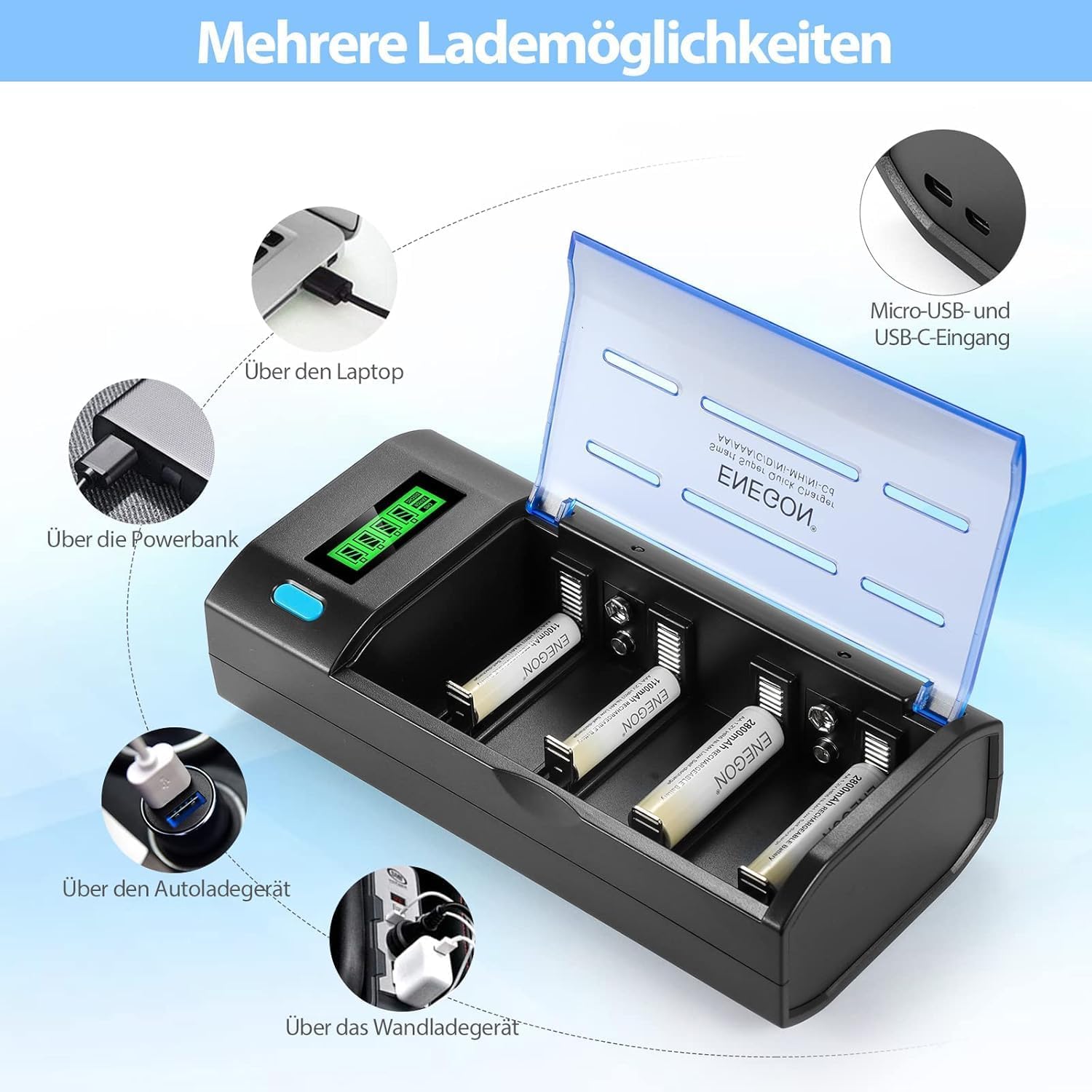
Image: The ENEGON C9015 charger illustrating multiple power input options, including laptop, power bank, car charger, and wall adapter, via Micro-USB and USB-C ports.
4. പ്രവർത്തന നിർദ്ദേശങ്ങൾ
4.1 Charging AA/AAA/C/D Batteries
- ബാറ്ററികൾ ചേർക്കുക: Place 1 to 4 AA, AAA, C, or D Ni-MH/Ni-CD rechargeable batteries into the corresponding slots, ensuring correct polarity (+ and -).
- മോണിറ്റർ എൽസിഡി: The LCD display will show the charging progress for each battery. The status will cycle through "Charging", "Discharging" (if initiated), and "Full".
- ചാർജിംഗ് പൂർത്തിയാക്കൽ: Charging stops automatically when batteries are fully charged. The LCD will indicate "Full".

ചിത്രം: ഒരു ക്ലോസ്-അപ്പ് view of the ENEGON C9015 charger with various battery types (AAA, 9V, AA, C, D) correctly inserted into their respective slots, demonstrating the independent charging capability.
4.2 Charging 9V Batteries
- ബാറ്ററികൾ ചേർക്കുക: Place 1 or 2 9V Ni-MH/Ni-CD rechargeable batteries into the dedicated 9V slots, observing correct polarity.
- LED നിരീക്ഷിക്കുക: For 9V batteries, an LED indicator will show charging status. Note that the LED remains continuously lit; charging time should be estimated based on battery capacity.
- ചാർജിംഗ് പൂർത്തിയാക്കൽ: Disconnect 9V batteries after the estimated charging time (up to 10 hours for full charge).
4.3 Discharge Function (for Ni-MH/Ni-CD AA/AAA/C/D Batteries)
- ബാറ്ററികൾ ചേർക്കുക: Insert 1 to 4 AA, AAA, C, or D Ni-MH/Ni-CD batteries into their slots.
- Initiate Discharge: Press the blue button on the charger. The LCD will display "Discharging".
- യാന്ത്രിക ചാർജിംഗ്: Once the discharge cycle is complete, the charger will automatically switch to charging mode.

Image: The ENEGON C9015 charger highlighting its LCD display for AA/AAA/C/D batteries and the blue one-button discharge feature. It also shows the LED indicator for 9V batteries.
5. പരിപാലനം
- വൃത്തിയാക്കൽ: Disconnect the charger from power before cleaning. Use a soft, dry cloth to wipe the surface. Do not use abrasive cleaners or solvents.
- സംഭരണം: നേരിട്ടുള്ള സൂര്യപ്രകാശത്തിൽ നിന്നും തീവ്രമായ താപനിലയിൽ നിന്നും മാറി തണുത്തതും വരണ്ടതുമായ സ്ഥലത്ത് ചാർജർ സൂക്ഷിക്കുക.
- പരിശോധന: Periodically inspect the charger and cables for any signs of damage.
6. പ്രശ്നപരിഹാരം
| പ്രശ്നം | സാധ്യമായ കാരണം | പരിഹാരം |
|---|---|---|
| ചാർജർ ഓണാകുന്നില്ല. | വൈദ്യുതി കണക്ഷനില്ല അല്ലെങ്കിൽ കേബിൾ/അഡാപ്റ്റർ തകരാറിലല്ല. | Ensure the USB cable is securely connected to both the charger and a working power source. Try a different USB cable or power adapter. |
| ബാറ്ററികൾ ചാർജ് ചെയ്യുന്നില്ല. | Incorrect battery type, incorrect polarity, or faulty battery. | Verify batteries are Ni-MH/Ni-CD rechargeable. Check battery polarity. Remove and reinsert batteries. If problem persists, the battery may be faulty. |
| LCD shows "Error". | Non-rechargeable battery detected, short-circuit, or severely damaged battery. | Remove the problematic battery. Ensure only compatible rechargeable batteries are used. If the error persists with known good batteries, contact support. |
| സ്ലോ ചാർജിംഗ്. | Low power input (adapter less than 5V/2A). | Use a 5V/2A power adapter for optimal charging speed. |
7 സ്പെസിഫിക്കേഷനുകൾ
| ഫീച്ചർ | വിശദാംശങ്ങൾ |
|---|---|
| മോഡൽ | C9015 |
| അനുയോജ്യമായ ബാറ്ററി തരങ്ങൾ | AA, AAA, C, D, 9V Ni-MH/Ni-CD rechargeable batteries |
| ഇൻപുട്ട് കണക്റ്റർ | Micro-USB, USB-C |
| ഇൻപുട്ട് വോളിയംtagഇ/കറന്റ് | 5V/2A (recommended) |
| Output Current (AA/AAA/C/D) | 2A total (distributed across slots) |
| Approx. Charging Time (AA/AAA/C/D) | 3 മണിക്കൂറിൽ താഴെ |
| Approx. Charging Time (9V) | 10 മണിക്കൂറിൽ താഴെ |
| പ്രദർശിപ്പിക്കുക | LCD for AA/AAA/C/D, LED for 9V |
| സുരക്ഷാ സവിശേഷതകൾ | Short-circuit, overheating, overcharge, overcurrent, overvoltage, over-discharge protection, non-rechargeable battery detection. |
| അളവുകൾ | 12P x 16lx 5H സെന്റീമീറ്റർ |
8. വാറൻ്റിയും പിന്തുണയും
ENEGON products are designed for reliability and performance. For warranty information or technical support, please refer to the contact details provided with your purchase or visit the official ENEGON webവാറന്റി ക്ലെയിമുകൾക്കുള്ള വാങ്ങലിന്റെ തെളിവായി നിങ്ങളുടെ വാങ്ങൽ രസീത് സൂക്ഷിക്കുക.
For further assistance, please contact ENEGON customer service.