
1. ആമുഖം
The Meliconi Gumbody Personal 5+ is a dedicated universal remote control designed to replace your original Panasonic TV remote. It comes pre-programmed for immediate use with most Panasonic digital TVs, eliminating the need for complex setup codes. Its durable anti-shock rubber body provides enhanced protection against impacts and drops. This remote also includes a convenient learning function and direct access buttons for essential Smart TV features.

Image 1.1: Meliconi Gumbody Personal 5+ Remote Control.
2. ഉൽപ്പന്ന സവിശേഷതകൾ
- Pre-programmed for Panasonic TVs: Ready to use out of the box with no programming required for most Panasonic models.
- Anti-shock Gumbody: Features a protective rubber casing to absorb impacts and prevent damage from accidental drops.
- Learn Function: Capable of acquiring signals from other remote controls, allowing you to control additional devices like soundbars or home audio systems.
- Direct Smart TV Access: Dedicated buttons for popular streaming platforms (e.g., Netflix, Prime Video) for quick access.
- സമഗ്രമായ Web പിന്തുണ: Access to key correspondence tables, full user manuals, video guides, and FAQs on the official webസൈറ്റ്.
- Specialized Telephone Assistance: Dedicated technical support available.
3. സജ്ജീകരണം
3.1. ബാറ്ററികൾ ചേർക്കുന്നു
The remote control requires two (2) AAA 1.5V alkaline batteries (not included). To insert them:
- വിദൂര നിയന്ത്രണത്തിന്റെ പിൻഭാഗത്ത് ബാറ്ററി കമ്പാർട്ട്മെന്റ് കവർ തുറക്കുക.
- കമ്പാർട്ടുമെന്റിനുള്ളിൽ സൂചിപ്പിച്ചിരിക്കുന്നതുപോലെ ശരിയായ പോളാരിറ്റി (+ ഉം - ഉം) ഉറപ്പാക്കിക്കൊണ്ട് രണ്ട് AAA ബാറ്ററികൾ ഇടുക.
- ബാറ്ററി കമ്പാർട്ട്മെൻ്റ് കവർ സുരക്ഷിതമായി അടയ്ക്കുക.
3.2. Initial Use (Pre-programmed)
The Meliconi Gumbody Personal 5+ is pre-programmed for Panasonic TVs and should work immediately upon battery insertion. No additional programming or code entry is typically required. Point the remote at your Panasonic TV and test the basic functions (Power, Volume, Channel). If all functions operate correctly, no further setup is needed.
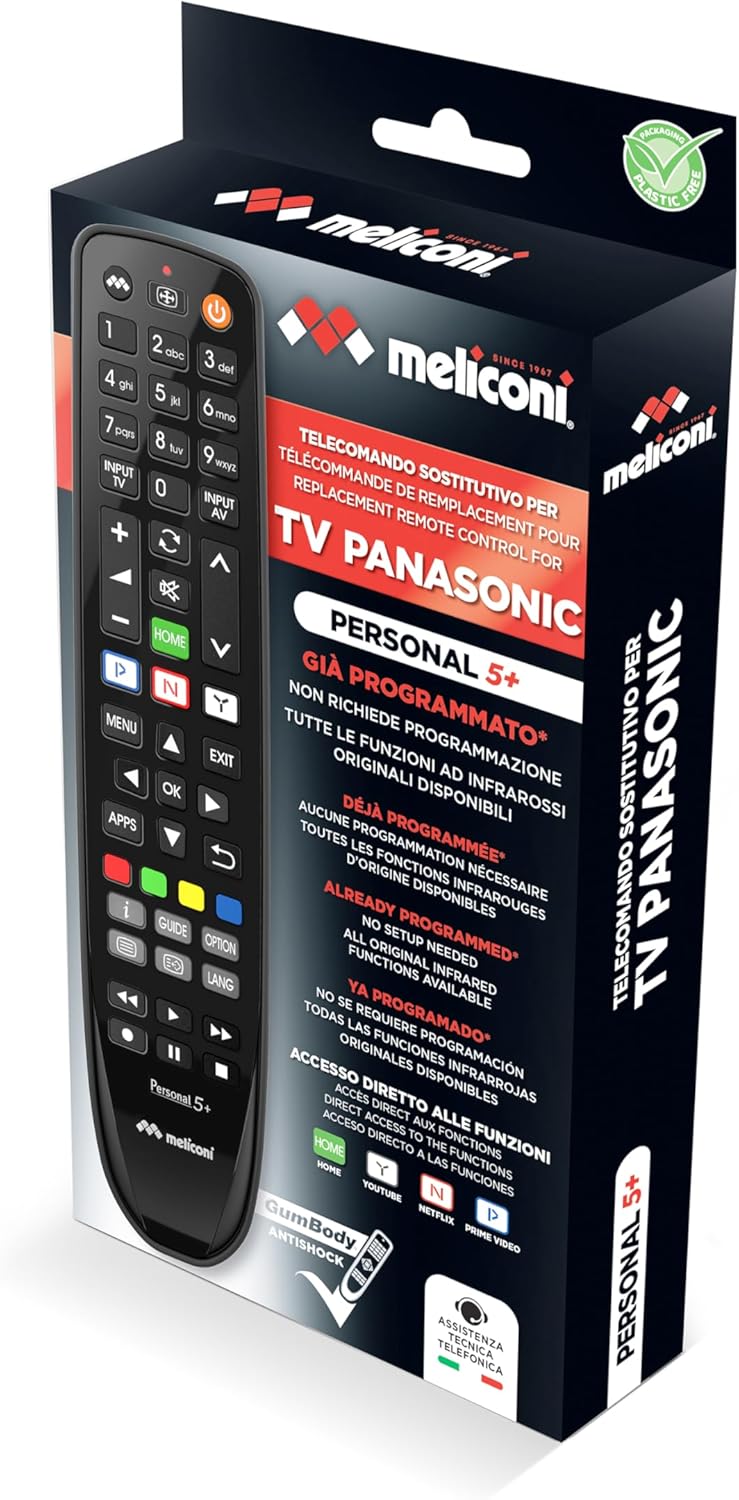
Image 3.1: Product packaging showing the remote control.
4. പ്രവർത്തന നിർദ്ദേശങ്ങൾ
4.1. അടിസ്ഥാന ടിവി നിയന്ത്രണം
The remote control features standard buttons for common TV functions:
- പവർ ബട്ടൺ (⏻): ടിവി ഓണാക്കുകയോ ഓഫാക്കുകയോ ചെയ്യുന്നു.
- വോളിയം കൂട്ടുക/താഴ്ത്തുക (VOL +/-): ടിവി വോളിയം ക്രമീകരിക്കുന്നു.
- ചാനൽ മുകളിലേക്കും/താഴേക്കും (CH +/-): ടിവി ചാനലുകൾ മാറ്റുന്നു.
- നമ്പർ ബട്ടണുകൾ (0-9): നേരിട്ടുള്ള ചാനൽ തിരഞ്ഞെടുപ്പിനായി.
- നിശബ്ദ ബട്ടൺ (🔇): ടിവി ശബ്ദം മ്യൂട്ട് ചെയ്യുകയോ അൺമ്യൂട്ട് ചെയ്യുകയോ ചെയ്യുന്നു.
- Input/Source (INPUT TV / INPUT AV): ഇൻപുട്ട് ഉറവിടം (HDMI, AV, മുതലായവ) തിരഞ്ഞെടുക്കുന്നു.
4.2. Smart TV Functions
The remote provides direct access to popular Smart TV applications:
- ഹോം ബട്ടണ്: Accesses the TV's main Smart TV menu.
- Netflix ബട്ടൺ: നെറ്റ്ഫ്ലിക്സ് ആപ്ലിക്കേഷൻ നേരിട്ട് സമാരംഭിക്കുന്നു.
- പ്രധാന വീഡിയോ ബട്ടൺ: Launches the Amazon Prime Video application directly.
- YouTube ബട്ടൺ: Launches the YouTube application directly.
4.3. Learn Function
The Learn function allows you to copy specific commands from another remote control (e.g., a soundbar remote) to your Meliconi Gumbody Personal 5+. This enables control of multiple devices with a single remote.
- Place the Meliconi remote and the original remote on a flat surface, facing each other, about 2-5 cm apart.
- അമർത്തിപ്പിടിക്കുക പഠിക്കുക button on the Meliconi remote until the LED indicator lights up steadily.
- Press the button on the Meliconi remote that you wish to program (e.g., a volume button). The LED will flash.
- Press and hold the corresponding button on the original remote (e.g., the original volume button). The Meliconi remote's LED will flash rapidly to confirm successful learning.
- നിങ്ങൾ പ്രോഗ്രാം ചെയ്യാൻ ആഗ്രഹിക്കുന്ന മറ്റ് ബട്ടണുകൾക്കായി 3 ഉം 4 ഉം ഘട്ടങ്ങൾ ആവർത്തിക്കുക.
- To exit Learn mode, press the പഠിക്കുക ബട്ടൺ വീണ്ടും. എൽഇഡി ഓഫ് ചെയ്യും.
For detailed instructions and troubleshooting for the Learn function, refer to the full manual available on the Meliconi webസൈറ്റ്.

Image 4.1: Meliconi Gumbody Personal 5+ button layout and key features.
5. പരിപാലനം
5.1. ബാറ്ററി മാറ്റിസ്ഥാപിക്കൽ
When the remote control's range decreases or buttons become unresponsive, it is time to replace the batteries. Follow the steps in Section 3.1 to replace the two AAA batteries. Always use new alkaline batteries for optimal performance.
5.2. വൃത്തിയാക്കൽ
റിമോട്ട് കൺട്രോൾ വൃത്തിയാക്കാൻ, മൃദുവായതും ഉണങ്ങിയതുമായ ഒരു തുണി ഉപയോഗിക്കുക. കഠിനമായ അഴുക്കിന്, ചെറുതായി dampതുണിയിൽ വെള്ളം അല്ലെങ്കിൽ നേരിയതും ഉരച്ചിലുകൾ ഇല്ലാത്തതുമായ ഒരു ക്ലീനർ ഉപയോഗിക്കുക. കഠിനമായ രാസവസ്തുക്കൾ ഉപയോഗിക്കരുത് അല്ലെങ്കിൽ റിമോട്ട് വെള്ളത്തിൽ മുക്കരുത്.
5.3. Anti-shock Body
The remote control is equipped with an anti-shock rubber body (Gumbody) designed to protect it from minor drops and impacts. While this feature enhances durability, it does not guarantee immunity from all damage. Handle the remote with care.
6. പ്രശ്നപരിഹാരം
- റിമോട്ട് പ്രതികരിക്കുന്നില്ല: Ensure batteries are correctly inserted and not depleted. Replace batteries if necessary. Check for any obstructions between the remote and the TV's infrared receiver.
- പ്രവർത്തിക്കാത്ത പ്രത്യേക ബട്ടണുകൾ: If the remote is pre-programmed, some advanced functions might not be directly mapped. Refer to the online key correspondence tables on the Meliconi webസൈറ്റ് (cme.it) to verify button assignments for your specific TV model.
- Learn function issues: Ensure the original remote has working batteries and is placed correctly facing the Meliconi remote. Repeat the learning process carefully.
- ഫാക്ടറി ക്രമീകരണങ്ങളിലേക്ക് പുന Res സജ്ജമാക്കുക: If you encounter persistent issues, you can reset the remote to its factory pre-programmed state. Consult the full user manual on the Meliconi website for the specific reset procedure.
7 സ്പെസിഫിക്കേഷനുകൾ
| ബ്രാൻഡ് | മെലിക്കോണി |
| മോഡലിൻ്റെ പേര് | Gumbody Personal 5+ |
| അനുയോജ്യമായ ഉപകരണങ്ങൾ | Panasonic Televisions |
| കണക്റ്റിവിറ്റി ടെക്നോളജി | ഇൻഫ്രാറെഡ് |
| ബട്ടണുകളുടെ എണ്ണം | 20 |
| പരമാവധി പരിധി | 10 മീറ്റർ |
| ബാറ്ററികൾ ആവശ്യമാണ് | 2 x AAA (Alkaline) |
| പ്രത്യേക ഫീച്ചർ | Universal, Anti-shock, Learn Function |
8. വാറൻ്റി വിവരങ്ങൾ
This Meliconi product is covered by a 2 വർഷത്തെ വാറൻ്റി from the date of purchase. Please retain your proof of purchase for any warranty claims. The warranty covers manufacturing defects under normal use conditions. It does not cover damage caused by misuse, accidents, unauthorized modifications, or normal wear and tear.
9 പിന്തുണയും വിഭവങ്ങളും
For further assistance, detailed manuals, key correspondence tables for specific TV models, video tutorials, and frequently asked questions, please visit the official Meliconi webസൈറ്റ്:
Specialized telephone technical assistance is also available for direct support.
9.1. ഉൽപ്പന്ന വീഡിയോ കഴിഞ്ഞുview
വീഡിയോ 9.1: ഒരു ഓവർview of Meliconi dedicated remote controls, highlighting features like ready-to-use functionality, anti-shock design, Smart TV access, learning function, and available support resources.