
ആമുഖം
വാങ്ങിയതിന് നന്ദി.asing the Andoer D2 Handheld RGB LED Video Light Wand. This manual provides detailed instructions for the safe and effective use of your new light wand. Please read this manual thoroughly before operation and retain it for future reference.
സുരക്ഷാ വിവരങ്ങൾ
- ഉപകരണം വെള്ളത്തിലോ ഉയർന്ന ആർദ്രതയിലോ തുറന്നുകാട്ടരുത്.
- പ്രകാശ സ്രോതസ്സിലേക്ക് നേരിട്ട് കണ്ണ് എക്സ്പോഷർ ചെയ്യുന്നത് ഒഴിവാക്കുക.
- Do not disassemble or modify the device. Repairs should only be performed by authorized personnel.
- കുട്ടികൾക്ക് ലഭ്യമാകാതെ സൂക്ഷിക്കുക.
- നൽകിയിരിക്കുന്നതോ സാക്ഷ്യപ്പെടുത്തിയതോ ആയ ചാർജിംഗ് കേബിൾ മാത്രം ഉപയോഗിക്കുക.
- Do not operate in environments with flammable gases or liquids.
പാക്കേജ് ഉള്ളടക്കം
തുറക്കുമ്പോൾ പാക്കേജ് ഉള്ളടക്കം പരിശോധിക്കുക. ഏതെങ്കിലും ഇനങ്ങൾ നഷ്ടപ്പെട്ടാലോ കേടുപാടുകൾ സംഭവിച്ചാലോ, നിങ്ങളുടെ റീട്ടെയിലറെ ബന്ധപ്പെടുക.
- Andoer D2 Handheld RGB LED Video Light Wand
- യുഎസ്ബി ടൈപ്പ്-സി ചാർജിംഗ് കേബിൾ
- ഉപയോക്തൃ മാനുവൽ (ഈ പ്രമാണം)
ഉൽപ്പന്നം കഴിഞ്ഞുview
Familiarize yourself with the components and controls of the Andoer D2 light wand.
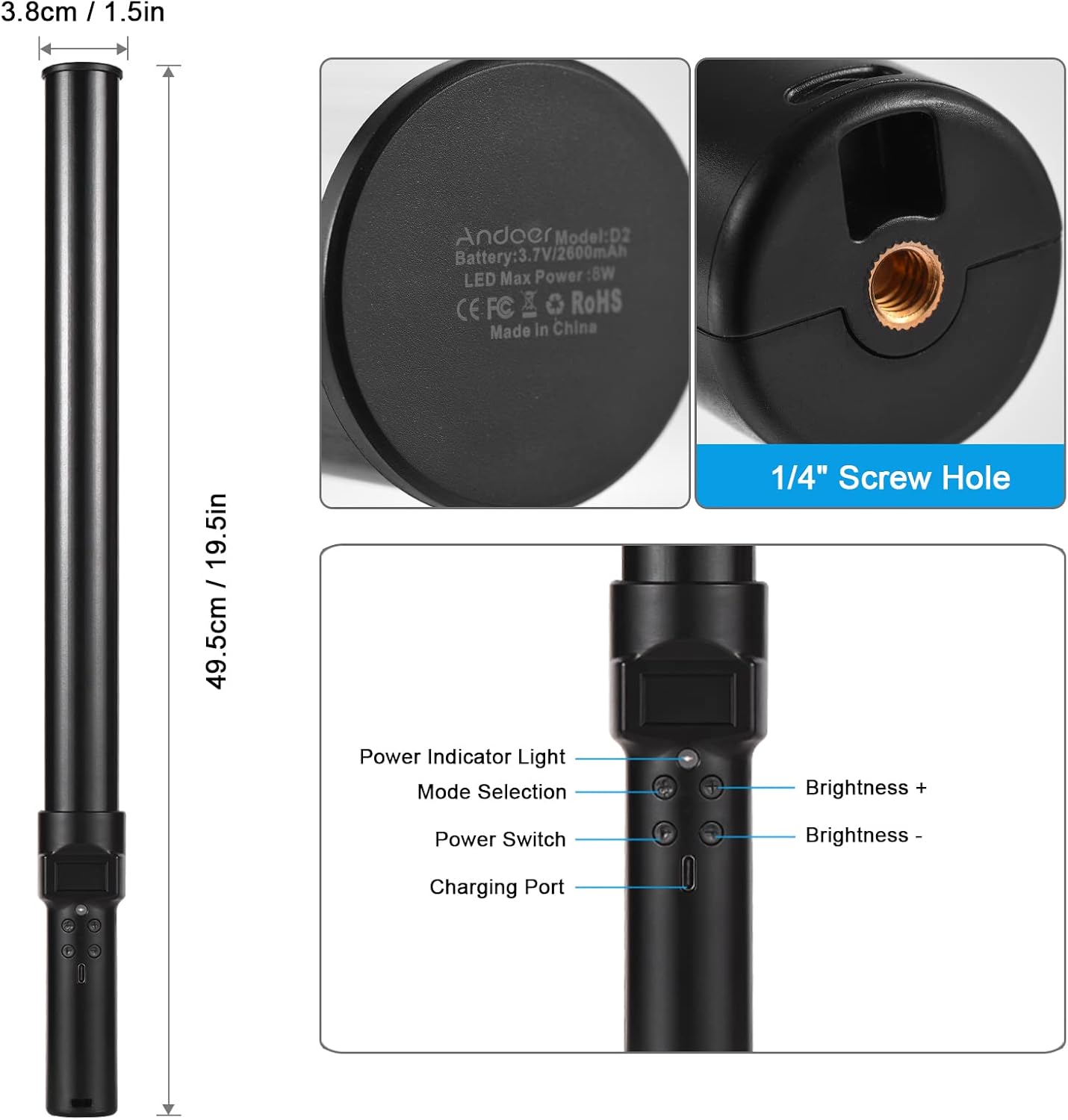
ചിത്രം: കഴിഞ്ഞുview of the Andoer D2 light wand, showing its dimensions (approximately 49.5cm / 19.5in long and 3.8cm / 1.5in diameter) and control panel. The control panel includes a Power Indicator Light, Mode Selection button, Power Switch, Brightness + button, Brightness - button, and a Charging Port.
നിയന്ത്രണ പാനൽ പ്രവർത്തനങ്ങൾ:
- വൈദ്യുതി സ്വിച്ച്: Turns the light wand on or off.
- മോഡ് തിരഞ്ഞെടുക്കൽ: Cycles through different lighting modes (e.g., CCT mode, RGB color effects).
- തെളിച്ചം +: Increases the light brightness.
- തെളിച്ചം -: Decreases the light brightness.
- പവർ ഇൻഡിക്കേറ്റർ ലൈറ്റ്: Shows the power status and charging status.
- ചാർജിംഗ് പോർട്ട് (ടൈപ്പ്-സി): Used for charging the internal battery.
സജ്ജമാക്കുക
പ്രാരംഭ ചാർജ്:
Before first use, fully charge the light wand. Connect the provided USB Type-C cable to the charging port on the device and the other end to a USB power adapter (not included) or a computer USB port. The power indicator light will show charging status.

ചിത്രം: ഒരു ക്ലോസപ്പ് view of the Type-C charging port, indicating where to connect the charging cable.

ചിത്രം: The Andoer D2 light wand shown alongside its USB Type-C charging cable, illustrating the charging setup.
മൗണ്ടിംഗ് ഓപ്ഷനുകൾ:
The Andoer D2 light wand can be used handheld for flexible lighting or mounted for stable positioning. It features a standard 1/4-inch screw hole at the bottom.

ചിത്രം: എ വിശദമായി view of the 1/4-inch screw hole located at the base of the light wand, demonstrating how it can be attached to a light stand or tripod for stable use. Note that the light stand/tripod is sold separately.
- ഹാൻഡ്ഹെൽഡ് ഉപയോഗം: Simply hold the light wand to direct light as needed.
- Tripod/Light Stand Mounting: Screw the 1/4-inch thread at the bottom of the light wand onto a compatible tripod or light stand. Ensure it is securely fastened before use.
പ്രവർത്തന നിർദ്ദേശങ്ങൾ
പവർ ഓൺ/ഓഫ്:
അമർത്തിപ്പിടിക്കുക പവർ സ്വിച്ച് ലൈറ്റ് വാൻഡ് ഓണാക്കാനോ ഓഫാക്കാനോ ഉള്ള ബട്ടൺ.
തെളിച്ചം ക്രമീകരിക്കൽ:
The light wand offers 12 levels of adjustable brightness. Use the തെളിച്ചം + തെളിച്ചം വർദ്ധിപ്പിക്കുന്നതിനുള്ള ബട്ടണും തെളിച്ചം - അത് കുറയ്ക്കാനുള്ള ബട്ടൺ.

ചിത്രം: Illustration of the 12 levels of adjustable brightness, demonstrating the range from dim to bright light output.
വർണ്ണ താപനില ക്രമീകരിക്കൽ (CCT മോഡ്):
In CCT mode, you can adjust the color temperature between 2500K (warm light), 5500K (neutral/daylight), and 8500K (cold light). Press the മോഡ് തിരഞ്ഞെടുക്കൽ button to cycle to CCT mode, then use the തെളിച്ചം + ഒപ്പം തെളിച്ചം - buttons to adjust the color temperature.

ചിത്രം: Visual representation of the adjustable color temperatures, ranging from warm (2500K) to neutral (5500K) to cool (8500K) light.
Activating Colorful Light Effects (RGB Mode):
The light wand features 7 colorful light effects: red, green, blue, orange, purple, light blue, and red & blue flash. Press the മോഡ് തിരഞ്ഞെടുക്കൽ button to cycle through these RGB effects. Brightness can still be adjusted in these modes using the തെളിച്ചം + ഒപ്പം തെളിച്ചം - ബട്ടണുകൾ.
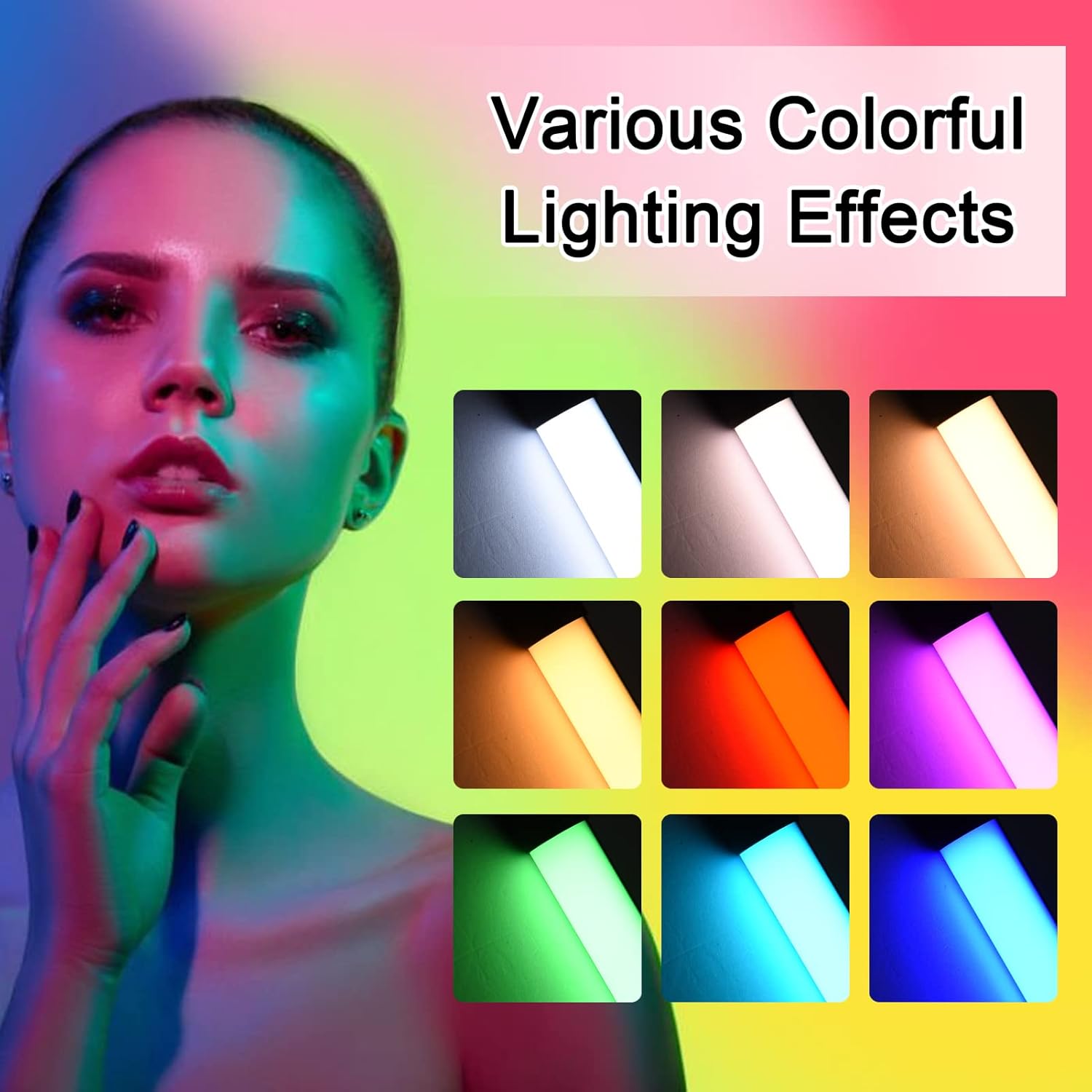
ചിത്രം: A visual guide to the 7 colorful light effects available, showcasing the vibrant range of colors the light wand can produce.
ചാർജിംഗ്
The Andoer D2 light wand has a built-in 2600mAh rechargeable lithium battery. When the battery is low, the power indicator light will signal. To charge:
- Connect the small end of the USB Type-C charging cable to the charging port on the light wand.
- Connect the standard USB end of the cable to a USB power source (e.g., wall adapter, power bank, computer USB port).
- The power indicator light will illuminate or change color to indicate charging. It will change again or turn off when fully charged.
A full charge provides approximately 2.5 hours of continuous use at maximum brightness.
മെയിൻ്റനൻസ്
- Clean the light wand with a soft, dry cloth. Do not use abrasive cleaners or solvents.
- നേരിട്ടുള്ള സൂര്യപ്രകാശത്തിൽ നിന്നും കടുത്ത താപനിലയിൽ നിന്നും മാറി തണുത്തതും വരണ്ടതുമായ സ്ഥലത്ത് ഉപകരണം സൂക്ഷിക്കുക.
- If not used for extended periods, charge the battery every 3 months to maintain battery health.
ട്രബിൾഷൂട്ടിംഗ്
| പ്രശ്നം | സാധ്യമായ കാരണം | പരിഹാരം |
|---|---|---|
| ലൈറ്റ് ഓണാക്കില്ല. | ബാറ്ററി തീർന്നു. | Charge the light wand using the provided USB Type-C cable. |
| വെളിച്ചം മങ്ങുന്നു അല്ലെങ്കിൽ മിന്നിമറയുന്നു. | കുറഞ്ഞ ബാറ്ററി. | ഉപകരണം റീചാർജ് ചെയ്യുക. |
| Cannot change color or mode. | തെറ്റായ ബട്ടൺ അമർത്തൽ അല്ലെങ്കിൽ താൽക്കാലിക സോഫ്റ്റ്വെയർ തകരാർ. | Ensure you are pressing the Mode Selection button. Try turning the device off and on again. |
| ഉപകരണം ചാർജ് ചെയ്യുന്നില്ല. | Faulty cable, power adapter, or charging port. | Try a different USB Type-C cable or power adapter. Ensure the cable is fully inserted. |
സ്പെസിഫിക്കേഷനുകൾ
| ഫീച്ചർ | വിശദാംശങ്ങൾ |
|---|---|
| മോഡൽ | D2 (SJI3033515989406YA) |
| ബ്രാൻഡ് | അൻഡോയർ |
| വർണ്ണ താപനില | 2500K / 5500K / 8500K (ക്രമീകരിക്കാവുന്നത്) |
| തെളിച്ച നിലകൾ | 12 ലെവലുകൾ |
| വർണ്ണാഭമായ ലൈറ്റ് ഇഫക്റ്റുകൾ | 7 effects (Red, Green, Blue, Orange, Purple, Light Blue, Red & Blue Flash) |
| ബാറ്ററി ശേഷി | 2600mAh ലിഥിയം ബാറ്ററി |
| ചാർജിംഗ് പോർട്ട് | യുഎസ്ബി ടൈപ്പ്-സി |
| ബാറ്ററി ലൈഫ് (പരമാവധി തെളിച്ചം) | ഏകദേശം 2.5 മണിക്കൂർ |
| മൗണ്ടിംഗ് | 1/4-inch screw hole |
| അളവുകൾ | Approx. 49.5cm (19.5in) length, 3.8cm (1.5in) diameter |
വാറൻ്റിയും പിന്തുണയും
Andoer products are designed and manufactured to the highest quality standards. For warranty information or technical support, please refer to the warranty card included with your purchase or visit the official Andoer webസൈറ്റ്. വാറന്റി ക്ലെയിമുകൾക്കായി നിങ്ങളുടെ വാങ്ങലിന്റെ തെളിവ് സൂക്ഷിക്കുക.
Andoer Official Webസൈറ്റ്: Andoer Store on Amazon