
1. ആമുഖം
Thank you for choosing the ieGeek 5MP Outdoor Security Camera ZS-GQ4. This manual provides detailed instructions for setting up, operating, and maintaining your camera to ensure optimal performance and security. Please read this manual thoroughly before use and retain it for future reference.
സുരക്ഷാ മുൻകരുതലുകൾ
- വീഴാതിരിക്കാൻ ക്യാമറ ഒരു സ്ഥിരതയുള്ള സ്ഥലത്ത് സ്ഥാപിച്ചിട്ടുണ്ടെന്ന് ഉറപ്പാക്കുക.
- കേടുപാടുകൾ ഒഴിവാക്കാൻ നൽകിയിരിക്കുന്ന പവർ അഡാപ്റ്റർ മാത്രം ഉപയോഗിക്കുക.
- ഉയർന്ന താപനിലയിലോ നാശകരമായ ചുറ്റുപാടുകളിലോ ക്യാമറ തുറന്നുകാട്ടരുത്.
- മികച്ച ഇമേജ് നിലവാരം ലഭിക്കാൻ ക്യാമറ ലെൻസ് വൃത്തിയായി സൂക്ഷിക്കുക.
- Avoid direct exposure to sunlight for prolonged periods.
2. ഉൽപ്പന്നം കഴിഞ്ഞുview
പാക്കേജ് ഉള്ളടക്കം
- ieGeek 5MP Outdoor Security Camera (ZS-GQ4) x1
- പവർ അഡാപ്റ്റർ x1
- സ്ക്രൂകളും ആങ്കറുകളും x3
- Positioning Sheet x1
- ഉപയോക്തൃ മാനുവൽ x1
പ്രധാന സവിശേഷതകൾ
- 5MP അൾട്രാ HD റെസല്യൂഷൻ: Captures clear and detailed images.
- Dual-Band WiFi Support: Compatible with both 2.4GHz and 5GHz WiFi networks for stable connectivity.
- 360° Pan/Tilt/Zoom (PTZ): Offers horizontal 355° and vertical 90° rotation for comprehensive coverage.
- യാന്ത്രിക ട്രാക്കിംഗ്: Detects and tracks human movement, returning to its original position after tracking.
- വിപുലമായ രാത്രി കാഴ്ച: Provides up to 25 meters of clear night vision, with options for black & white or full-color night vision using built-in IR and LED lights.
- ഹ്യൂമൻ മോഷൻ ഡിറ്റക്ഷൻ: Reduces false alarms by focusing on human shapes.
- Automatic Deterrence: Features audible alarms, flashing lights, and sound/light alarms to deter intruders.
- ഫ്ലെക്സിബിൾ സ്റ്റോറേജ് ഓപ്ഷനുകൾ: Supports up to 128GB MicroSD card (sold separately) and cloud storage (free 6-second clips for 1 week with auto-overwrite).
- ടു-വേ ഓഡിയോ: തത്സമയ ആശയവിനിമയത്തിനായി ബിൽറ്റ്-ഇൻ മൈക്രോഫോണും സ്പീക്കറും.
- Alexa അനുയോജ്യത: Control surveillance areas using voice commands.
- IP66 കാലാവസ്ഥാ പ്രതിരോധം: വ്യത്യസ്ത കാലാവസ്ഥകളിൽ ഔട്ട്ഡോർ ഉപയോഗത്തിനായി രൂപകൽപ്പന ചെയ്തിരിക്കുന്നു.

Figure 1: ieGeek 5MP Outdoor Security Camera ZS-GQ4 and power adapter.
വീഡിയോ 1: കഴിഞ്ഞുview of ieGeek 5MP Outdoor Security Camera features, including 5MP resolution, dual-band WiFi, and smart functions.
3. സജ്ജീകരണം
3.1 മൈക്രോ എസ്ഡി കാർഡ് ഇൻസ്റ്റാളേഷൻ
To store recordings locally, install a MicroSD card (up to 128GB, sold separately) into the camera. Ensure the camera is powered off before inserting or removing the card.
Video 2: Demonstration of how to correctly insert a MicroSD card into the camera.
3.2 ക്യാമറ മൗണ്ടിംഗ്
The camera can be wall-mounted. Use the included positioning sheet to mark drill holes, then secure the camera with the provided screws and anchors. Ensure the camera is positioned to cover your desired surveillance area.

Figure 2: The camera mounted on a wall, illustrating its 360-degree pan and tilt capabilities.
3.3 പവർ കണക്ഷൻ
Connect the camera to a power outlet using the supplied power adapter. The camera will power on automatically.
3.4 ആപ്പ് ഇൻസ്റ്റാളേഷനും പ്രാരംഭ സജ്ജീകരണവും
- ഡൗൺലോഡ് ചെയ്യുക ieGeek കാം app from your smartphone's app store (iOS/Android).
- ഒരു അക്കൗണ്ട് രജിസ്റ്റർ ചെയ്ത് ലോഗിൻ ചെയ്യുക.
- ഒരു പുതിയ ഉപകരണം ചേർക്കാൻ '+' ടാപ്പ് ചെയ്യുക.
- Follow the on-screen instructions to connect the camera to your 2.4GHz or 5GHz WiFi network. This typically involves scanning a QR code displayed on your phone with the camera.
- കണക്റ്റ് ചെയ്തുകഴിഞ്ഞാൽ, നിങ്ങളുടെ ക്യാമറയ്ക്ക് പേര് നൽകാനും തത്സമയം ആരംഭിക്കാനും കഴിയും. viewing.
Video 3: A quick guide demonstrating the initial setup process, including app connection and QR code scanning.
4. പ്രവർത്തന നിർദ്ദേശങ്ങൾ
4.1 തത്സമയം View കൂടാതെ PTZ നിയന്ത്രണവും
Open the ieGeek Cam app and select your camera to access the live view. You can use the on-screen controls to pan (horizontal 355°) and tilt (vertical 90°) the camera lens to adjust the viewing ആംഗിൾ.
4.2 റെക്കോർഡിംഗ് മോഡുകൾ
The camera supports three recording modes:
- 24/7 തുടർച്ചയായ റെക്കോർഡിംഗ്: ഏറ്റവും പഴയ ഫൂവിനെ തിരുത്തിയെഴുതിക്കൊണ്ട് തുടർച്ചയായി റെക്കോർഡുചെയ്യുന്നു.tagസംഭരണം നിറയുമ്പോൾ ഇ.
- ഇവൻ്റ് റെക്കോർഡിംഗ്: ചലനം തിരിച്ചറിയുമ്പോൾ മാത്രം രേഖപ്പെടുത്തുന്നു.
- ഷെഡ്യൂൾഡ് റെക്കോർഡിംഗ്: Records during specific times set by the user.
Recordings can be saved to a MicroSD card or to the cloud. Free cloud storage provides 6-second event clips for one week, with automatic overwriting.
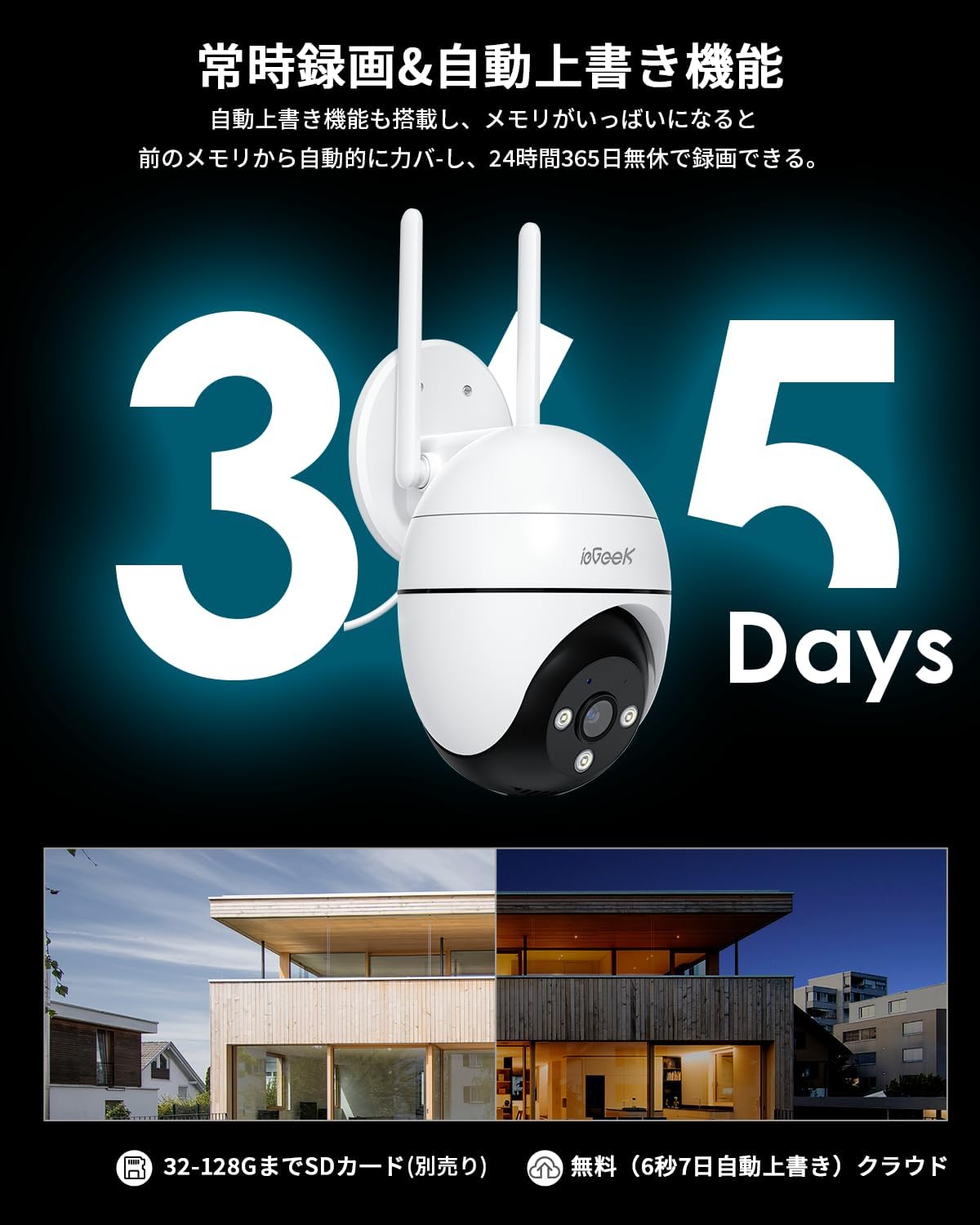
Figure 3: Illustration of 24/7 recording and automatic overwrite functionality.

Figure 4: Customizable recording modes, including motion-activated and continuous recording.
4.3 മോഷൻ ഡിറ്റക്ഷനും അലേർട്ടുകളും
The camera features high-precision human detection, reducing false alarms by 90%. When motion is detected, you will receive push notifications on your smartphone. The camera can also activate audible alarms, flashing lights, or a combination of both to deter potential intruders.
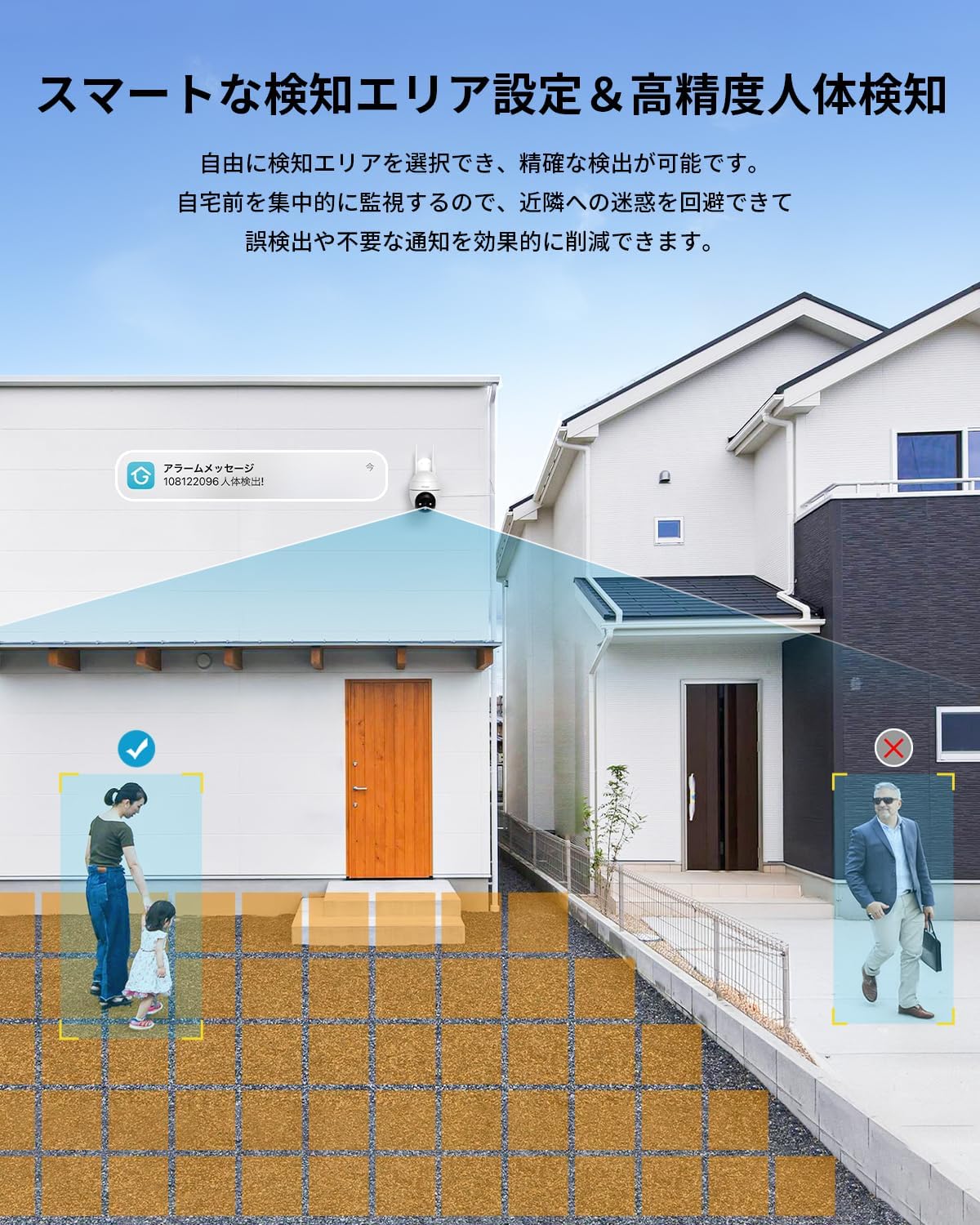
Figure 5: Setting up smart detection areas and the effectiveness of human detection.

Figure 6: The camera's automatic tracking feature following a detected person.

ചിത്രം 7: ഉദാample of a push notification from the ieGeek Cam app.
4.4 നൈറ്റ് വിഷൻ
The camera automatically switches to night vision in low-light conditions. It features both infrared (black & white) and full-color night vision, utilizing 3 IR lights and 3 LED lights to illuminate up to 25 meters.
Video 4: A time-lapse video demonstrating the camera's night vision capabilities, transitioning from day to night.

Figure 8: Comparison of night vision range, highlighting the camera's 20m effective range.
4.5 ടു-വേ ഓഡിയോ
The built-in microphone and speaker allow for two-way communication. You can speak through the app to anyone near the camera and hear their responses.

Figure 9: A user interacting with the two-way audio feature via the smartphone app.

Figure 10: Multiple family members can view the camera feed simultaneously.
4.6 അലക്സാ ഇന്റഗ്രേഷൻ
The camera is compatible with Alexa. You can use voice commands to view the camera feed on compatible Alexa-enabled devices, such as
Ask a question about this manual
Ask about setup, troubleshooting, compatibility, parts, safety, or missing instructions. Manuals+ will review the question and use this page’s manual context to help answer it.