
AOSHIDA DAC-A26
Gustard A26 Full Balanced DAC User Manual
Model: DAC-A26
ആമുഖം
Thank you for choosing the Gustard A26 Full Balanced DAC. This high-performance Digital-Analog Converter is designed to deliver exceptional audio fidelity, featuring dual AK4499EX DAC chips and advanced streaming capabilities. This manual provides detailed instructions for setting up, operating, and maintaining your A26 DAC to ensure optimal performance and longevity.
പ്രധാന സവിശേഷതകൾ
- High-Quality Chipset: Equipped with two AK4499EX DAC chips and one AK4191 modulator for superior audio conversion.
- Advanced USB Interface: XMOS XU216 supports up to PCM768 (with MQA support) and DSD512. MQA decoding up to 384K.
- ബഹുമുഖ ഇൻപുട്ടുകൾ: Supports USB, Optical, Coaxial, AES, LAN, Clock, and IIS inputs.
- സമതുലിതമായ p ട്ട്പുട്ടുകൾ: Features both RCA and XLR analog outputs for flexible connectivity.
- കുറഞ്ഞ ശബ്ദ രൂപകൽപ്പന: Utilizes two specific toroidal transformers for isolated digital and analog power supplies, minimizing interference.
- Independent Regulation: മൾട്ടി-എസ്tage independent regulators with bypass capacitors for clean power delivery.
- Parallel Hybrid I/V Converters: Provides accurate and powerful output.
- Streamer/Renderer Functionality: Easy access to high-quality online streams with Roon, UPnP, and HQPlayer NAA support.
- ഉപയോക്തൃ സൗഹൃദ നിയന്ത്രണം: Includes a remote control and touch panel for convenient operation.
സജ്ജീകരണ ഗൈഡ്
1. അൺബോക്സിംഗും പാക്കേജ് ഉള്ളടക്കങ്ങളും
Carefully unpack your Gustard A26 DAC and verify all components are present. The package should include:
- 1 x Gustard A26 DAC Unit
- 1 x എസി പവർ കേബിൾ
- 1 x USB കേബിൾ
- 1 x റിമോട്ട് കൺട്രോൾ
- 1 x Gustard Card (Warranty/Information)
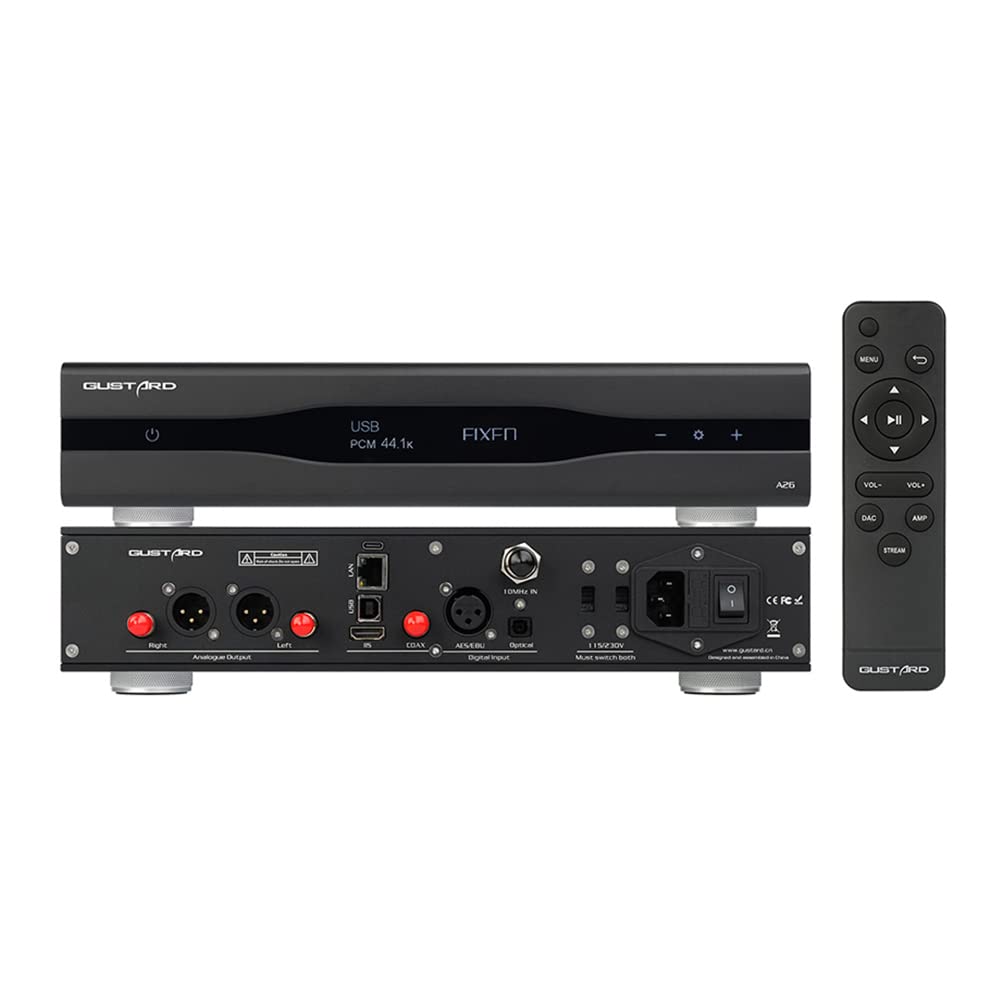
Figure 1: Gustard A26 DAC with included remote control, displaying its front and rear connectivity options.

ചിത്രം 2: കോണാകൃതിയിലുള്ളത് view of the Gustard A26 DAC, highlighting its sleek design and side ventilation.
2. Connecting Your A26 DAC
The A26 offers a wide range of input and output options. Choose the appropriate connections for your audio system.

ചിത്രം 3: വിശദമായി view of the A26's back panel, illustrating all input and output ports including USB, AES, Clock, LAN, IIS, Coaxial, Optical, RCA, and XLR outputs.
ഇൻപുട്ട് കണക്ഷനുകൾ:
- യുഎസ്ബി ഇൻപുട്ട്: Connect to your computer or digital audio source using the provided USB cable. Supports DSD64-DSD512 and PCM 44.1K-768K, MQA 8X.
- IIS Input (via HDMI): For high-fidelity digital audio transmission. Note: This is not a standard HDMI video port. Do not connect to a video port. Supports DSD64-DSD512 and PCM 44.1K-768K, MQA 8X.
- ലാൻ ഇൻപുട്ട്: For network streaming (Roon, UPnP, HQPlayer NAA). Supports DSD64-DSD512 and PCM 44.1K-768K, MQA 8X.
- ഏകോപന ഇൻപുട്ട്: Connect to digital audio sources with a coaxial output. Supports DSD64 (DOP) and PCM 44.1K-192K, MQA 8X.
- AES ഇൻപുട്ട്: Connect to professional audio equipment with an AES/EBU output. Supports DSD64 (DOP) and PCM 44.1K-192K, MQA 8X.
- ഒപ്റ്റിക്കൽ ഇൻപുട്ട്: Connect to digital audio sources with an optical (TOSLINK) output. Supports DSD64 (DOP) and PCM 44.1K-192K, MQA 8X.
- 10M Clock Input: For external clock synchronization (50 Ω BNC, 0dBm-20dBm, square wave 0.2-3.3V, sinewave 0.5-3.3V).

Figure 4: IIS (via HDMI) input diagram, detailing pinout and emphasizing it is not for video connection.
ഔട്ട്പുട്ട് കണക്ഷനുകൾ:
- ആർസിഎ putട്ട്പുട്ട്: Standard unbalanced analog output (2.5vrms, 100Ω).
- XLR putട്ട്പുട്ട്: Balanced analog output (5.0vrms, 100Ω). XLR pinout: 1-Ground, 2-Hot, 3-Cold.
3. പവർ ചെയ്യുന്നു
After connecting all necessary audio cables, connect the supplied AC power cable to the A26 and then to a wall outlet. Use the power switch on the rear panel to turn the unit on. The front display will illuminate.
പ്രവർത്തന നിർദ്ദേശങ്ങൾ
1. ഇൻപുട്ട് തിരഞ്ഞെടുക്കൽ
Use the input selection buttons on the front panel or the remote control to cycle through the available digital inputs (USB, IIS, LAN, Coaxial, AES, Optical). The selected input will be displayed on the front screen.
2. വോളിയം നിയന്ത്രണം
The A26 provides fixed volume outputs for both RCA (2.5vrms) and XLR (5.0vrms). Volume control should be managed by your connected pre-ampലൈഫയർ അല്ലെങ്കിൽ സംയോജിത ampജീവൻ.
3. MQA and DSD Playback
The A26 supports MQA full decoding and native DSD playback up to DSD512 via USB, IIS, and LAN inputs. For Coaxial, AES, and Optical inputs, DSD64 (DoP) and MQA 8X are supported. Ensure your playback software and source files are configured correctly for optimal performance.
4. Streamer/Renderer Functionality
The LAN input allows the A26 to function as a network streamer/renderer. It supports Roon, UPnP, and HQPlayer NAA protocols. Connect the A26 to your home network via an Ethernet cable. Refer to the specific software documentation (Roon, UPnP client, HQPlayer) for detailed setup instructions to stream audio to your A26.

ചിത്രം 5: ആന്തരിക view ഷോasing the dual AK4499EX DACs and AK4191 modulator, highlighting the independent power supply and grounding for each channel.

ചിത്രം 6: View of the independent regulators and various stages of bypass capacitors, designed to eliminate interference.

Figure 7: Detailed image of the LPF (Low Pass Filter) circuit, specifically designed for the AK4499EX using discrete devices.
മെയിൻ്റനൻസ്
To ensure the longevity and optimal performance of your Gustard A26 DAC, follow these maintenance guidelines:
- വൃത്തിയാക്കൽ: Use a soft, dry cloth to clean the exterior of the unit. Avoid using liquid cleaners or abrasive materials, as they may damage the finish.
- വെൻ്റിലേഷൻ: Ensure the unit has adequate ventilation. Do not block the ventilation slots on the sides or top of the unit.
- പ്ലേസ്മെൻ്റ്: Place the DAC on a stable, level surface away from direct sunlight, heat sources, and excessive moisture.
- പവർ സൈക്കിൾ: If the unit will not be used for an extended period, it is recommended to unplug it from the power outlet.
ട്രബിൾഷൂട്ടിംഗ്
| പ്രശ്നം | സാധ്യമായ കാരണം | പരിഹാരം |
|---|---|---|
| ശക്തിയില്ല | പവർ കേബിൾ ബന്ധിപ്പിച്ചിട്ടില്ല; പവർ സ്വിച്ച് ഓഫാണ്; പവർ ഔട്ട്ലെറ്റ് പ്രശ്നം. | Ensure power cable is securely connected. Turn on the rear power switch. Check if the power outlet is functional. |
| ശബ്ദ ഔട്ട്പുട്ട് ഇല്ല | Incorrect input selected; Cables not connected properly; Connected ampലൈഫയർ/പ്രീamp ഇഷ്യൂ. | Verify the correct input is selected on the A26. Check all audio cable connections. Ensure your ampലൈഫയർ/പ്രീamp is powered on and set to the correct input. |
| വികലമായ അല്ലെങ്കിൽ ശബ്ദായമാനമായ ഓഡിയോ | Poor cable connection; Ground loop; Source audio quality. | Check all cable connections for looseness. Try isolating the DAC from other components to check for ground loop issues. Ensure the source audio file is not corrupted or low quality. |
| LAN streaming issues (Roon, UPnP) | Network connectivity problem; Software configuration. | Ensure the A26 is properly connected to your network. Verify network settings on your router. Check Roon, UPnP, or HQPlayer NAA software settings for correct device detection and configuration. |
| റിമോട്ട് കൺട്രോൾ പ്രവർത്തിക്കുന്നില്ല | ഡെഡ് ബാറ്ററികൾ; റിമോട്ടിനും യൂണിറ്റിനും ഇടയിലുള്ള തടസ്സം. | Replace batteries in the remote control. Ensure there are no obstructions blocking the remote's signal to the A26. |
സ്പെസിഫിക്കേഷനുകൾ
| ഫീച്ചർ | വിശദാംശങ്ങൾ |
|---|---|
| DAC ചിപ്സെറ്റ് | 2 x AK4499EX, 1 x AK4191 Modulator |
| USB/IIS/LAN Input Support | DSD64-DSD512, PCM 44.1K-768K (16-32bit), MQA 8X |
| COAX/AES/OPT Input Support | DSD64 (DOP), PCM 44.1K-192K (16-24bit), MQA 8X |
| ലാൻ പ്രോട്ടോക്കോളുകൾ | Roon, UPnP, HQPlayer NAA |
| 10M Clock Input | 50 Ω BNC, 0dBm-20dBm, square wave 0.2-3.3V, sinewave 0.5-3.3V |
| ഫ്രീക്വൻസി പ്രതികരണം | 20-20KHZ / ±0.2db |
| ഡൈനാമിക് റേഞ്ച് | >127db |
| സിഗ്നൽ-ടു-നോയിസ് അനുപാതം | >126db |
| ക്രോസ്സ്റ്റോക്ക് | -139db@1khz |
| THD+N | ≤0.0001% @1kHz |
| MD | ≈0.001%@ -1dbfs |
| RCA ഔട്ട്പുട്ട് ലെവൽ | 2.5vrms (VOLUME FIXED), 100Ω |
| XLR Output Level | 5.0vrms (VOLUME FIXED), 100Ω |
| വൈദ്യുതി വിതരണം | AC115V 50/60Hz (Voltage switching available) |
| വൈദ്യുതി ഉപഭോഗം | <30W |
| അളവുകൾ (WxLxH) | 330x260x65mm (protrusion not included) |
| ഭാരം | 7kg (with package) |
| കേസ് മെറ്റീരിയൽ | Sandblasted aluminum alloy (Black/Silver) |
വാറൻ്റിയും പിന്തുണയും
For warranty information and technical support, please refer to the Gustard card included in your package or visit the official AOSHIDA Audio website. You may also contact the seller, Aoshida Audio-US, directly through your Amazon order details for assistance.
For additional resources, you can refer to the official User Guide PDF provided by the manufacturer: Gustard A26 User Guide (PDF).
Ask a question about this manual
Ask about setup, troubleshooting, compatibility, parts, safety, or missing instructions. Manuals+ will review the question and use this page’s manual context to help answer it.