
1. ആമുഖം
GONEO പോർട്ടബിൾ പവർ സ്റ്റേഷൻ GNV-USY16 എന്നത് ഔട്ട്ഡോർ പ്രവർത്തനങ്ങൾ, അടിയന്തര ബാക്കപ്പ്, സെൻസിറ്റീവ് ഇലക്ട്രോണിക്സുകൾ പവർ ചെയ്യൽ എന്നിവയുൾപ്പെടെ വിവിധ ആപ്ലിക്കേഷനുകൾക്കായി രൂപകൽപ്പന ചെയ്ത വൈവിധ്യമാർന്നതും വിശ്വസനീയവുമായ ഒരു പവർ സ്രോതസ്സാണ്. സുരക്ഷിതമായ പ്രവർത്തനം, ഒപ്റ്റിമൽ പ്രകടനം, നിങ്ങളുടെ ഉപകരണത്തിന്റെ ശരിയായ അറ്റകുറ്റപ്പണി എന്നിവയ്ക്ക് ആവശ്യമായ വിവരങ്ങൾ ഈ മാനുവൽ നൽകുന്നു. പവർ സ്റ്റേഷൻ ഉപയോഗിക്കുന്നതിന് മുമ്പ് ദയവായി ഈ മാനുവൽ നന്നായി വായിക്കുക.
2. പ്രധാന സുരക്ഷാ നിർദ്ദേശങ്ങൾ
- യൂണിറ്റ് വേർപെടുത്തുകയോ നന്നാക്കുകയോ പരിഷ്കരിക്കുകയോ ചെയ്യരുത്. തെറ്റായി വീണ്ടും കൂട്ടിച്ചേർക്കുന്നത് തീപിടുത്തത്തിനോ പരിക്കിനോ കാരണമായേക്കാം.
- യൂണിറ്റ് തീയിലോ ഉയർന്ന താപനിലയിലോ (60°C/140°F ന് മുകളിൽ) തുറന്നുകാട്ടരുത്.
- ഒരു കുളിമുറിയിലോ മഴയോ ഈർപ്പമോ ഉള്ള സ്ഥലങ്ങളിലോ യൂണിറ്റ് ഉപയോഗിക്കുകയോ സൂക്ഷിക്കുകയോ ചെയ്യരുത്.
- ശുപാർശ ചെയ്യുന്ന ആക്സസറികളും ചാർജറുകളും മാത്രം ഉപയോഗിക്കുക.
- കുട്ടികളിൽ നിന്നും വളർത്തുമൃഗങ്ങളിൽ നിന്നും യൂണിറ്റ് അകറ്റി നിർത്തുക.
- വീഴൽ, കനത്ത ആഘാതങ്ങൾ അല്ലെങ്കിൽ ശക്തമായ വൈബ്രേഷനുകൾ എന്നിവ ഒഴിവാക്കുക.
- തുറമുഖങ്ങളിൽ വിദേശ വസ്തുക്കൾ തിരുകരുത്.
- ഉപയോഗിക്കുമ്പോഴും ചാർജ് ചെയ്യുമ്പോഴും ശരിയായ വായുസഞ്ചാരം ഉറപ്പാക്കുക. യൂണിറ്റ് മൂടരുത്.
- തീപിടിത്തമുണ്ടായാൽ, ഉണങ്ങിയ പൊടി അഗ്നിശമന ഉപകരണം ഉപയോഗിക്കുക.
3. ഉൽപ്പന്നം കഴിഞ്ഞുview
3.1 പാക്കേജ് ഉള്ളടക്കം
- GONEO പോർട്ടബിൾ പവർ സ്റ്റേഷൻ GNV-USY16
- എസി പവർ അഡാപ്റ്റർ
- കാർ ചാർജർ കേബിൾ
- ഉപയോക്തൃ മാനുവൽ
3.2 ഘടകം തിരിച്ചറിയൽ

ചിത്രം: മുൻഭാഗം view GONEO പോർട്ടബിൾ പവർ സ്റ്റേഷൻ GNV-USY16 ന്റെ വിവിധ പോർട്ടുകൾ, ഡിസ്പ്ലേ, ചുമക്കുന്ന ഹാൻഡിൽ എന്നിവ എടുത്തുകാണിക്കുന്നു.
3.3 ഇൻപുട്ട്/ഔട്ട്പുട്ട് പോർട്ടുകൾ

ചിത്രം: പവർ സ്റ്റേഷന്റെ ഇൻപുട്ട്, ഔട്ട്പുട്ട് പോർട്ടുകളുടെ ക്ലോസ്-അപ്പ്, അതിൽ DC, PV, കാർ സോക്കറ്റ്, USB-C, USB-A, AC ഔട്ട്ലെറ്റുകൾ എന്നിവ ഉൾപ്പെടുന്നു, മുൻampഅനുയോജ്യമായ ഉപകരണങ്ങളുടെ എണ്ണം.
- ഡിസി ഇൻപുട്ട്/ഔട്ട്പുട്ട് (12V/12A): പവർ സ്റ്റേഷൻ ചാർജ് ചെയ്യുന്നതിനോ 12V DC ഉപകരണങ്ങൾ പവർ ചെയ്യുന്നതിനോ.
- പിവി ഇൻപുട്ട്: പവർ സ്റ്റേഷൻ ചാർജ് ചെയ്യുന്നതിനായി സോളാർ പാനലുകൾ ബന്ധിപ്പിക്കുന്നതിന്.
- കാർ സോക്കറ്റ് (12V/12A): 12V കാർ ഉപകരണങ്ങൾക്ക് പവർ നൽകുന്നതിന്.
- USB-C ഇൻപുട്ട്/ഔട്ട്പുട്ട് (PD 100W): പവർ സ്റ്റേഷൻ അല്ലെങ്കിൽ അനുയോജ്യമായ USB-C ഉപകരണങ്ങൾ വേഗത്തിൽ ചാർജ് ചെയ്യുന്നതിന്.
- USB-A ഔട്ട്പുട്ട് (5V/2.4A): സാധാരണ യുഎസ്ബി ഉപകരണങ്ങൾ ചാർജ് ചെയ്യുന്നതിന്.
- എസി ഔട്ട്പുട്ട് (110V/600W): വീട്ടുപകരണങ്ങൾക്കുള്ള സ്റ്റാൻഡേർഡ് എസി ഔട്ട്ലെറ്റുകൾ.
3.4 എൽഇഡി ഡിസ്പ്ലേ പാനൽ

ചിത്രം: വിശദമായ ഒരു ചിത്രം view 5.5 ഇഞ്ച് LED ഡിസ്പ്ലേയുടെ, ചാർജിംഗ് സ്റ്റാറ്റസ് (DC, CAR, PD), ബാറ്ററി ശതമാനം എന്നിവയ്ക്കുള്ള സൂചകങ്ങൾ കാണിക്കുന്നു.tage, പൂർണ്ണമായി/ശൂന്യമാകാനുള്ള ഏകദേശ സമയം, ഇൻപുട്ട്/ഔട്ട്പുട്ട് പവർ, സജീവ ഔട്ട്പുട്ട് പോർട്ടുകൾ (DC, CIG, USB-A, USB-C, AC, LIGHT).
5.5 ഇഞ്ച് എൽഇഡി ഡിസ്പ്ലേ പവർ സ്റ്റേഷന്റെ അവസ്ഥയെക്കുറിച്ചുള്ള തത്സമയ വിവരങ്ങൾ നൽകുന്നു:
- ബാറ്ററി ശതമാനംtage: നിലവിലെ ചാർജ് ലെവൽ കാണിക്കുന്നു.
- പൂർണ്ണമായും/ശൂന്യമാകാനുള്ള സമയം: ചാർജ് ചെയ്യുന്നതിനോ ഡിസ്ചാർജ് ചെയ്യുന്നതിനോ ശേഷിക്കുന്ന ഏകദേശ സമയം.
- ഇൻപുട്ട് പവർ: നിലവിലെ പവർ ഇൻപുട്ട് (വാട്ടിൽ) പ്രദർശിപ്പിക്കുന്നു.
- ഔട്ട്പുട്ട് പവർ: നിലവിലെ പവർ ഔട്ട്പുട്ട് (വാട്ടിൽ) പ്രദർശിപ്പിക്കുന്നു.
- ചാർജിംഗ് സൂചകങ്ങൾ: സജീവ ചാർജിംഗ് രീതി കാണിക്കുന്നതിന് DC, CAR, PD ഐക്കണുകൾ പ്രകാശിക്കുന്നു.
- ഔട്ട്പുട്ട് സൂചകങ്ങൾ: DC, CIG (കാർ സോക്കറ്റ്), USB-A, USB-C, AC, LIGT എന്നിവയ്ക്കുള്ള ഐക്കണുകൾ അവയുടെ ഔട്ട്പുട്ടുകൾ സജീവമാകുമ്പോൾ പ്രകാശിക്കുന്നു.
4. സജ്ജീകരണവും പ്രാരംഭ ഉപയോഗവും
- അൺപാക്ക് ചെയ്യുന്നു: പാക്കേജിംഗിൽ നിന്ന് പവർ സ്റ്റേഷനും എല്ലാ അനുബന്ധ ഉപകരണങ്ങളും ശ്രദ്ധാപൂർവ്വം നീക്കം ചെയ്യുക.
- പ്രാരംഭ ചാർജ്: ആദ്യമായി ഉപയോഗിക്കുന്നതിന് മുമ്പ്, നൽകിയിരിക്കുന്ന എസി അഡാപ്റ്റർ ഉപയോഗിച്ച് പവർ സ്റ്റേഷൻ പൂർണ്ണമായും ചാർജ് ചെയ്യുക. എസി അഡാപ്റ്റർ ഡിസി ഇൻപുട്ട് പോർട്ടുമായി ബന്ധിപ്പിച്ച് ഒരു വാൾ ഔട്ട്ലെറ്റിൽ പ്ലഗ് ചെയ്യുക. എൽഇഡി ഡിസ്പ്ലേ ചാർജിംഗ് പുരോഗതി കാണിക്കും.
- പവർ ഓൺ/ഓഫ്: യൂണിറ്റ് ഓണാക്കാനോ ഓഫാക്കാനോ പ്രധാന പവർ ബട്ടൺ കുറച്ച് സെക്കൻഡ് അമർത്തിപ്പിടിക്കുക.
5. ഓപ്പറേഷൻ
5.1 പവർ സ്റ്റേഷൻ ചാർജ് ചെയ്യുന്നു
മൂന്ന് രീതികൾ ഉപയോഗിച്ച് പവർ സ്റ്റേഷൻ റീചാർജ് ചെയ്യാൻ കഴിയും:
- എ സി അഡാപ്റ്റർ: നൽകിയിരിക്കുന്ന എസി അഡാപ്റ്റർ ഡിസി ഇൻപുട്ട് പോർട്ടുമായി ബന്ധിപ്പിക്കുക.
- സോളാർ പാനൽ: പിവി ഇൻപുട്ട് പോർട്ടിലേക്ക് അനുയോജ്യമായ 100W സോളാർ പാനൽ ബന്ധിപ്പിക്കുക.
- യുഎസ്ബി-സി പിഡി 100W: അനുയോജ്യമായ ഒരു USB-C PD ചാർജറും കേബിളും ഉപയോഗിക്കുക.
വേഗത്തിൽ ചാർജ് ചെയ്യുന്നതിന്, USB-C PD പോർട്ടും DC ഇൻപുട്ട് പോർട്ടും ഒരേസമയം ഉപയോഗിക്കുക. ഇത് ഏകദേശം 2 മണിക്കൂറിനുള്ളിൽ ബാറ്ററി പൂർണ്ണമായും ചാർജ് ചെയ്യും.
5.2 പവർ ഉപകരണങ്ങൾ
ഒരു ഉപകരണം പവർ ചെയ്യുന്നതിന്, പവർ സ്റ്റേഷൻ ഓണാക്കിയിട്ടുണ്ടെന്ന് ഉറപ്പാക്കുക. ആവശ്യമുള്ള പോർട്ട് സജീവമാക്കുന്നതിന് അതത് ഔട്ട്പുട്ട് ബട്ടൺ (ഉദാ: AC, DC, USB) അമർത്തുക. LED ഡിസ്പ്ലേയിലെ അനുബന്ധ ഐക്കൺ പ്രകാശിക്കും.
- എസി putട്ട്പുട്ട്: 110V AC പവർ (600W വരെ) ആവശ്യമുള്ള ഉപകരണങ്ങൾ ബന്ധിപ്പിക്കുക.
- ഡിസി ഔട്ട്പുട്ട്/കാർ സോക്കറ്റ്: 12V DC ഉപകരണങ്ങൾ ബന്ധിപ്പിക്കുക.
- USB-A/USB-C ഔട്ട്പുട്ട്: ചാർജ് ചെയ്യുന്നതിനായി USB-യിൽ പ്രവർത്തിക്കുന്ന ഉപകരണങ്ങൾ ബന്ധിപ്പിക്കുക.
5.3 എൽഇഡി ഫ്ലാഷ്ലൈറ്റ് പ്രവർത്തനം
ചിത്രം: ഗൊനിയോ പവർ സ്റ്റേഷന്റെ 6.5 ഇഞ്ച് എൽഇഡി ഫ്ലാഷ്ലൈറ്റ് പാനൽ എസി പ്രകാശിപ്പിക്കുന്നു.ampരാത്രിയിൽ കൂടാരം കെട്ടി, നോർമൽ, ബ്രൈറ്റ്, എസ്ഒഎസ്, ഫ്ലാഷിംഗ് എന്നീ നാല് ലൈറ്റിംഗ് മോഡുകൾ പ്രദർശിപ്പിച്ചു.
പവർ സ്റ്റേഷനിൽ നാല് ലൈറ്റിംഗ് മോഡുകളുള്ള 6.5 ഇഞ്ച് എൽഇഡി ഫ്ലാഷ്ലൈറ്റ് പാനൽ ഉണ്ട്:
- സാധാരണ: സ്റ്റാൻഡേർഡ് പ്രകാശം.
- തിളക്കം: മെച്ചപ്പെട്ട ദൃശ്യപരതയ്ക്കായി വർദ്ധിച്ച തെളിച്ചം.
- SOS: അന്താരാഷ്ട്ര ദുരിത സിഗ്നൽ മിന്നുന്നു.
- മിന്നുന്നു: തുടർച്ചയായ മിന്നുന്ന പാറ്റേൺ.
മോഡുകൾ സജീവമാക്കാനോ അതിലൂടെ സൈക്കിൾ ചെയ്യാനോ, സമർപ്പിത ഫ്ലാഷ്ലൈറ്റ് ബട്ടൺ അമർത്തുക.
5.4 താഴ്ന്ന താപനില പ്രവർത്തനം

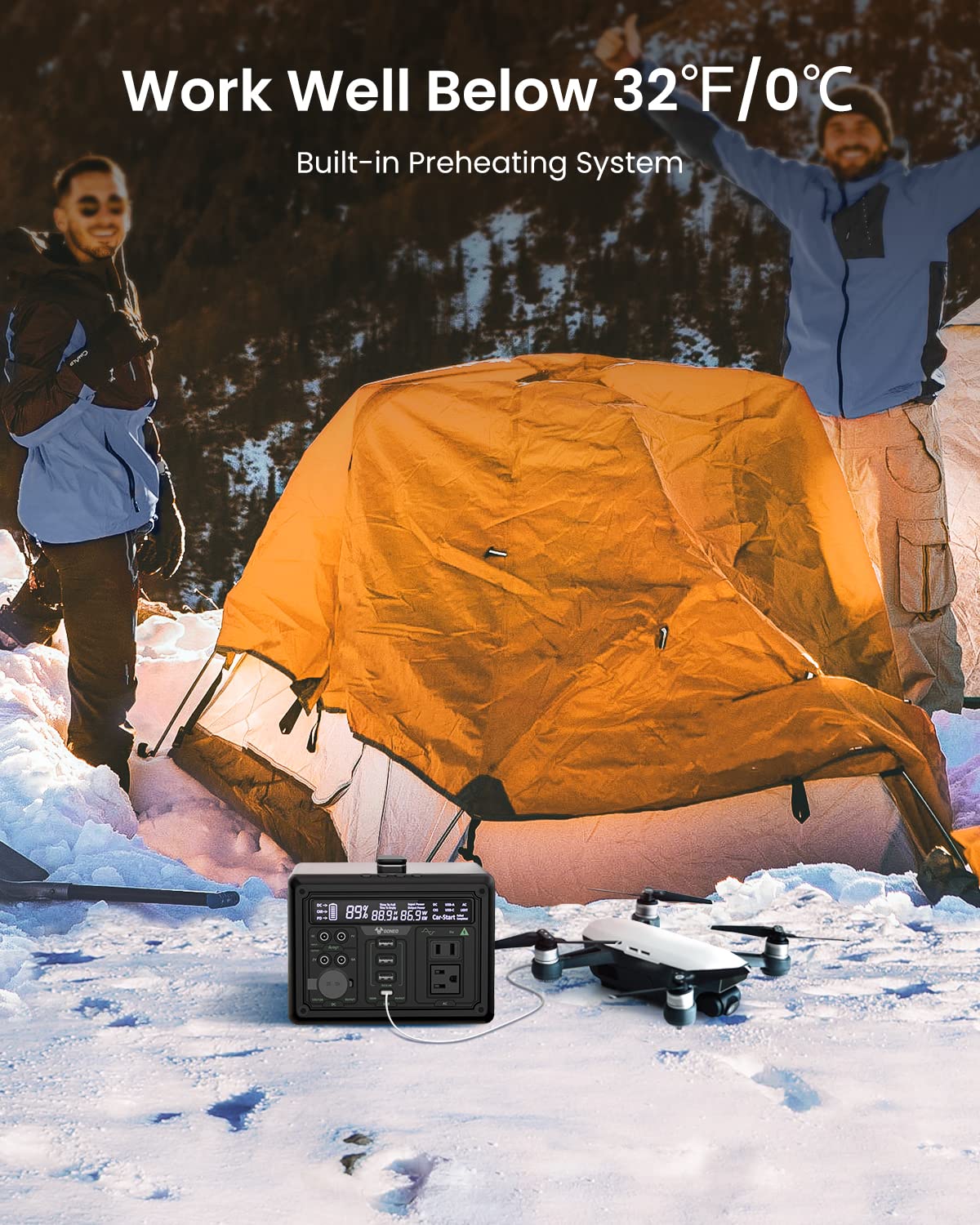
ചിത്രം: മഞ്ഞുവീഴ്ചയുള്ള ഔട്ട്ഡോർ ക്രമീകരണത്തിലെ GONEO പവർ സ്റ്റേഷൻ, ബിൽറ്റ്-ഇൻ പ്രീഹീറ്റിംഗ് സിസ്റ്റം കാരണം തണുത്ത സാഹചര്യങ്ങളിൽ (32°F/0°C-ൽ താഴെ) ഫലപ്രദമായി പ്രവർത്തിക്കാനുള്ള കഴിവ് പ്രകടമാക്കുന്നു, ഒരു ഡ്രോൺ ചാർജ് ചെയ്യുന്നതായി കാണിച്ചിരിക്കുന്നു.
പവർ സ്റ്റേഷനിൽ ഒരു ബിൽറ്റ്-ഇൻ പ്രീഹീറ്റിംഗ് സിസ്റ്റം ഉൾപ്പെടുന്നു, ഇത് താഴ്ന്ന താപനിലകൾ (-20°C/-4°F വരെ) യാന്ത്രികമായി കണ്ടെത്തുകയും തണുത്ത അന്തരീക്ഷത്തിൽ ഒപ്റ്റിമൽ ബാറ്ററി പ്രകടനവും ചാർജിംഗ് ശേഷിയും ഉറപ്പാക്കാൻ ചൂടാക്കൽ ആരംഭിക്കുകയും ചെയ്യുന്നു.
5.5 നിശബ്ദ പ്രവർത്തനം
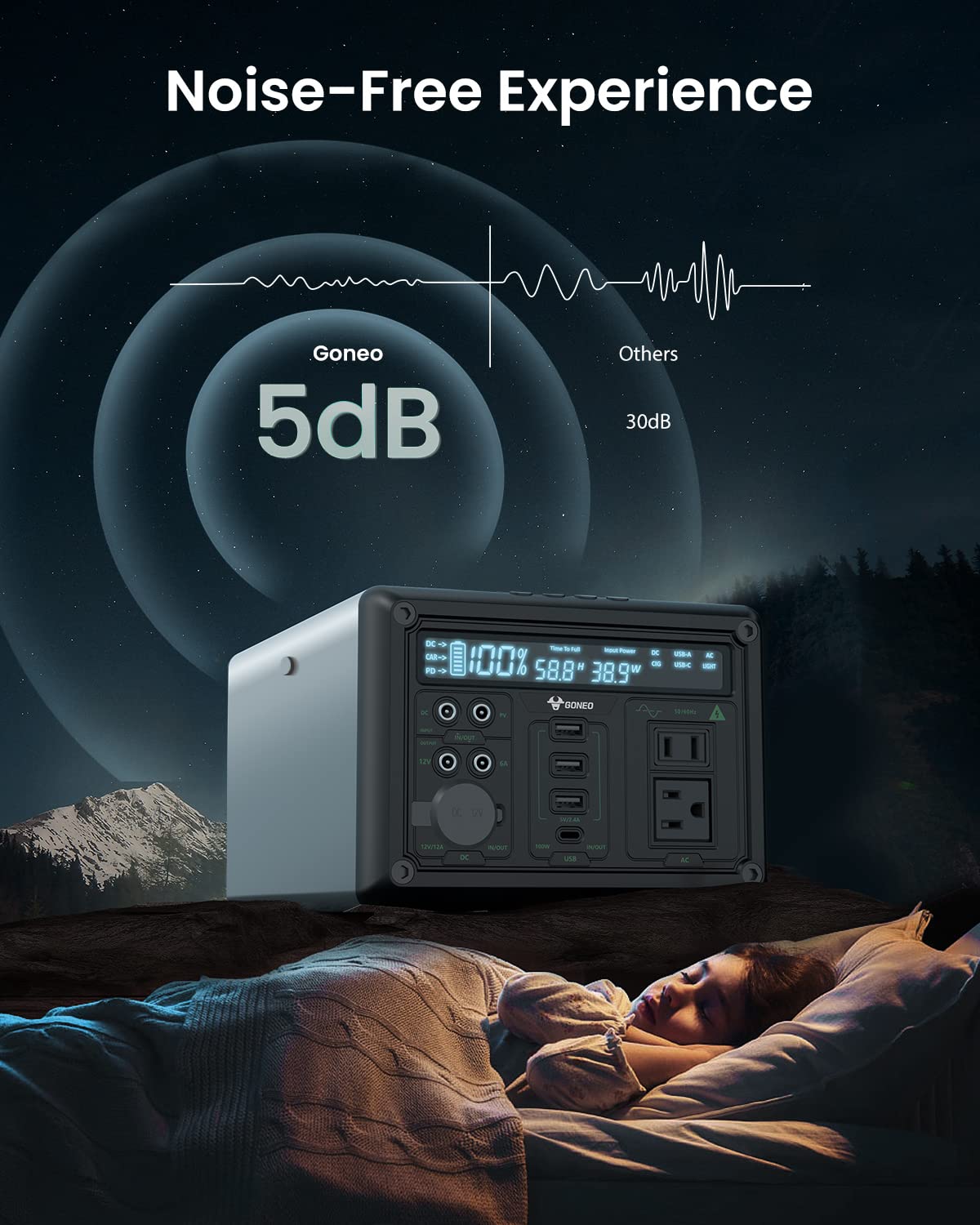
ചിത്രം: 5dB കുറഞ്ഞ ശബ്ദ നിലവാരത്തിൽ പ്രവർത്തിക്കുന്ന GONEO പവർ സ്റ്റേഷൻ, ഒരു ടെന്റിൽ സമാധാനപരമായി ഉറങ്ങുന്ന ഒരാളുടെ അരികിൽ ചിത്രീകരിച്ചിരിക്കുന്നു, ശാന്തമായ അന്തരീക്ഷത്തിനായുള്ള അതിന്റെ ഫാൻ ഇല്ലാത്ത രൂപകൽപ്പന ഇത് ചിത്രീകരിക്കുന്നു.
ഫാൻലെസ് കൂളിംഗ് സിസ്റ്റത്തോടെ രൂപകൽപ്പന ചെയ്തിരിക്കുന്ന ഈ പവർ സ്റ്റേഷൻ ഏകദേശം 5dB യുടെ കുറഞ്ഞ ശബ്ദ നിലവാരത്തിൽ പ്രവർത്തിക്കുന്നു, ഇത് സി-ക്ക് അനുയോജ്യമായ ശാന്തമായ അന്തരീക്ഷം നൽകുന്നു.ampവൈദ്യുതി വിതരണം, ആർവി ട്രിപ്പുകൾ, അല്ലെങ്കിൽ വൈദ്യുതി സമയത്ത്tages.
6. പരിചരണവും പരിപാലനവും
- വൃത്തിയാക്കൽ: യൂണിറ്റിന്റെ പുറംഭാഗം തുടയ്ക്കാൻ ഉണങ്ങിയതും മൃദുവായതുമായ തുണി ഉപയോഗിക്കുക. അബ്രസീവ് ക്ലീനറുകളോ ലായകങ്ങളോ ഉപയോഗിക്കരുത്.
- സംഭരണം: നേരിട്ടുള്ള സൂര്യപ്രകാശത്തിൽ നിന്നും കടുത്ത താപനിലയിൽ നിന്നും അകന്ന്, തണുത്തതും വരണ്ടതുമായ സ്ഥലത്ത് പവർ സ്റ്റേഷൻ സൂക്ഷിക്കുക. ദീർഘകാല സംഭരണത്തിനായി, ബാറ്ററി ലൈഫ് സംരക്ഷിക്കുന്നതിന് ഓരോ 3-6 മാസത്തിലും യൂണിറ്റ് 50-80% വരെ ചാർജ് ചെയ്യുക.
- ബാറ്ററി കെയർ: ബാറ്ററി ഇടയ്ക്കിടെ പൂർണ്ണമായും ഡിസ്ചാർജ് ചെയ്യുന്നത് ഒഴിവാക്കുക. ഉപയോഗത്തിന് ശേഷം ഉടൻ തന്നെ യൂണിറ്റ് റീചാർജ് ചെയ്യുക.
7. പ്രശ്നപരിഹാരം
| പ്രശ്നം | സാധ്യമായ കാരണം | പരിഹാരം |
|---|---|---|
| യൂണിറ്റ് ഓണാക്കുന്നില്ല | ബാറ്ററി പൂർണ്ണമായും ചാർജ്ജ് ചെയ്തു; പവർ ബട്ടൺ വേണ്ടത്ര സമയം അമർത്തിയിട്ടില്ല. | യൂണിറ്റ് ചാർജ് ചെയ്യുക; പവർ ബട്ടൺ 3-5 സെക്കൻഡ് അമർത്തിപ്പിടിക്കുക. |
| പോർട്ടുകളിൽ നിന്ന് ഔട്ട്പുട്ട് ഇല്ല | ഔട്ട്പുട്ട് പോർട്ട് സജീവമാക്കിയിട്ടില്ല; ഉപകരണം വളരെയധികം വൈദ്യുതി ഉപയോഗിക്കുന്നു; ബാറ്ററി കുറവാണ്. | അനുബന്ധ ഔട്ട്പുട്ട് ബട്ടൺ അമർത്തുക; ഉപകരണ വാട്ട് പരിശോധിക്കുകtagഇ; പവർ സ്റ്റേഷൻ റീചാർജ് ചെയ്യുക. |
| സാവധാനം ചാർജ് ചെയ്യുന്നു | കുറഞ്ഞ പവർ ചാർജർ ഉപയോഗിക്കുന്നു; പരിസ്ഥിതി താപനില വളരെ കുറവാണ്. | നൽകിയിരിക്കുന്ന AC അഡാപ്റ്റർ അല്ലെങ്കിൽ 100W PD ചാർജർ ഉപയോഗിക്കുക; യൂണിറ്റ് പ്രവർത്തന താപനില പരിധിക്കുള്ളിലാണെന്ന് ഉറപ്പാക്കുക. |
8 സാങ്കേതിക സവിശേഷതകൾ
| മോഡൽ | ജിഎൻവി-യുഎസ്വൈ16 |
| ബാറ്ററി ശേഷി | 607Wh (ലിഥിയം അയോൺ) |
| എസി ഔട്ട്പുട്ട് | 110V, 600W (പ്യുവർ സൈൻ വേവ്) |
| DC ഇൻപുട്ട് | 12V/12A |
| USB-C ഇൻപുട്ട്/ഔട്ട്പുട്ട് | PD 100W |
| യുഎസ്ബി-എ put ട്ട്പുട്ട് | 5V/2.4A |
| കാർ സോക്കറ്റ് ഔട്ട്പുട്ട് | 12V/12A |
| LED ഫ്ലാഷ്ലൈറ്റ് | 6.5 ഇഞ്ച്, 4 മോഡുകൾ (സാധാരണ, തിളക്കമുള്ള, SOS, മിന്നുന്ന) |
| അളവുകൾ (LxWxH) | 27.94 x 18.8 x 13.72 സെ.മീ (11.0 x 7.4 x 5.4 ഇഞ്ച്) |
| ഭാരം | നൽകിയിരിക്കുന്ന ഡാറ്റയിൽ വ്യക്തമാക്കിയിട്ടില്ല |
| മെറ്റീരിയൽ | അലുമിനിയം |
| പ്രവർത്തന താപനില | -20°C മുതൽ 40°C വരെ (-4°F മുതൽ 104°F വരെ) |
9. വാറണ്ടിയും ഉപഭോക്തൃ പിന്തുണയും
വാറന്റി വിവരങ്ങൾ, സാങ്കേതിക പിന്തുണ, അല്ലെങ്കിൽ നിങ്ങളുടെ GONEO പോർട്ടബിൾ പവർ സ്റ്റേഷൻ GNV-USY16 സംബന്ധിച്ച എന്തെങ്കിലും ചോദ്യങ്ങൾ എന്നിവയ്ക്ക്, ദയവായി നിങ്ങളുടെ ഉൽപ്പന്നത്തിനൊപ്പം ഉൾപ്പെടുത്തിയിരിക്കുന്ന വാറന്റി കാർഡ് പരിശോധിക്കുകയോ GONEO ഉപഭോക്തൃ സേവനവുമായി നേരിട്ട് ബന്ധപ്പെടുകയോ ചെയ്യുക. കോൺടാക്റ്റ് വിശദാംശങ്ങൾ സാധാരണയായി ഔദ്യോഗിക GONEO-യിൽ ലഭ്യമാണ്. webസൈറ്റ് അല്ലെങ്കിൽ നിങ്ങളുടെ വാങ്ങൽ പ്ലാറ്റ്ഫോം വഴി.