
1. ഉൽപ്പന്നം കഴിഞ്ഞുview
The WFLY RG209S is a 9-channel RC receiver designed for use with WFLY X9 series transmitters. It features support for external gyroscope modules and GPS for speed detection, making it suitable for various RC applications including racing cars and rock crawlers.
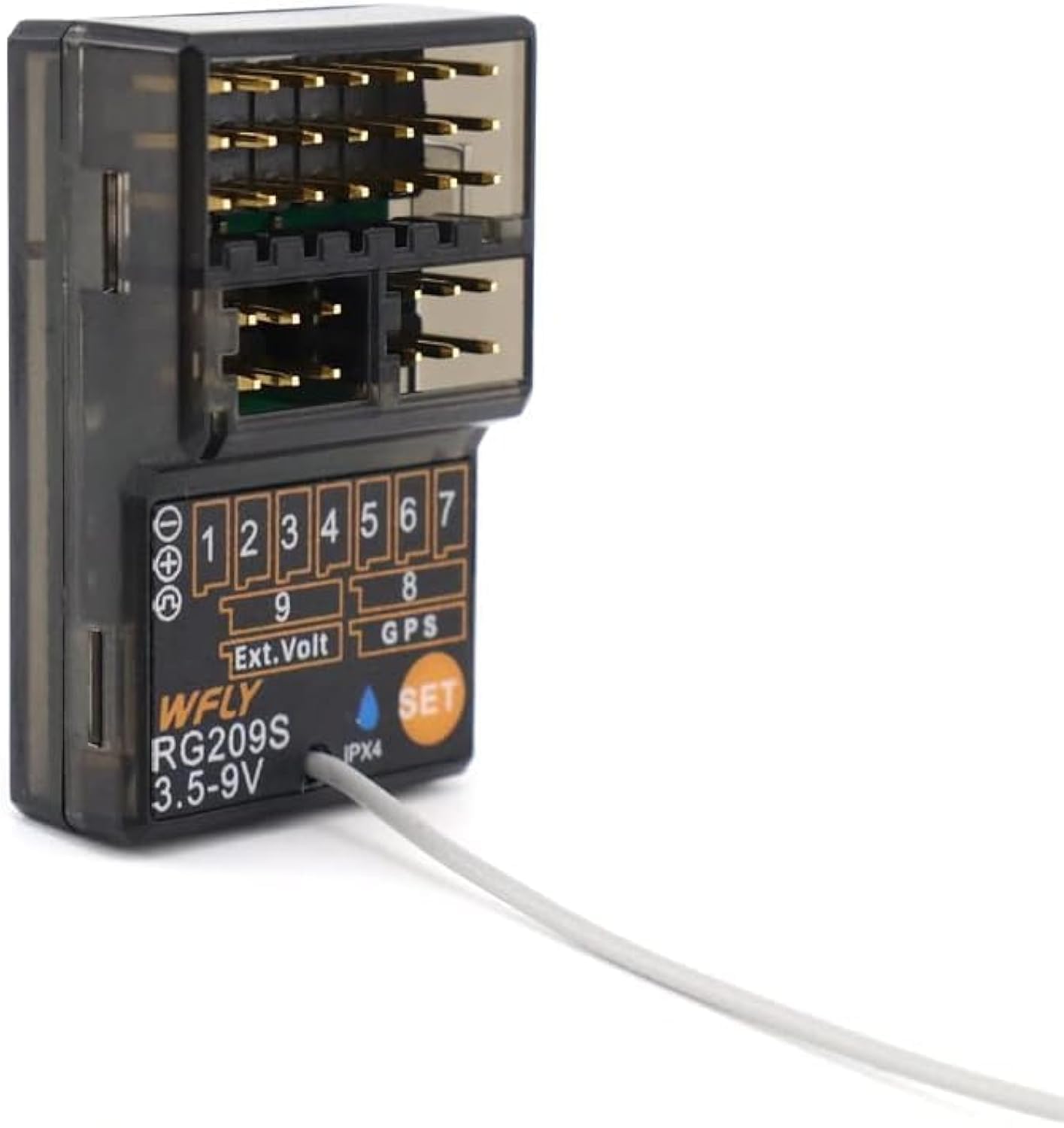
ചിത്രം 1.1: മുൻഭാഗം view of the WFLY RG209S receiver, showing the channel ports and antenna.
പ്രധാന സവിശേഷതകൾ:
- 9 channels for comprehensive control.
- Compatible with WFLY X9 transmitters.
- Supports external gyroscope module for enhanced stability.
- Integrated GPS support for speed detection.
- Compact dimensions suitable for various RC models.
2. ബോക്സിൽ എന്താണുള്ളത്?
അൺബോക്സിംഗ് ചെയ്യുമ്പോൾ എല്ലാ ഘടകങ്ങളും ഉണ്ടെന്ന് ഉറപ്പാക്കുക:
- 1x WFLY RG209S RC Receiver
- 1x വാല്യംtage Inspection Wire
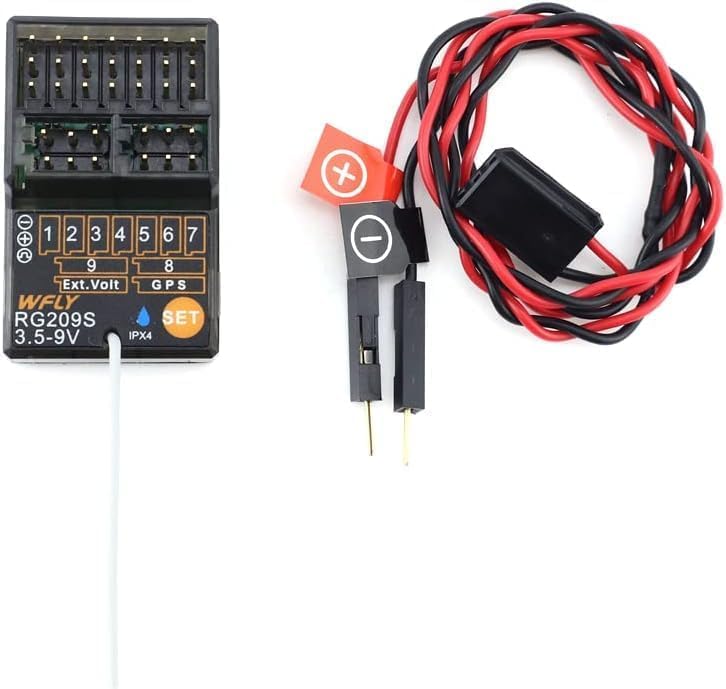
Image 2.1: The WFLY RG209S receiver packaged with its voltage inspection wire.
3. Setup and Binding
Follow these steps to properly set up and bind your RG209S receiver with your WFLY X9 transmitter.
3.1 Receiver Layout
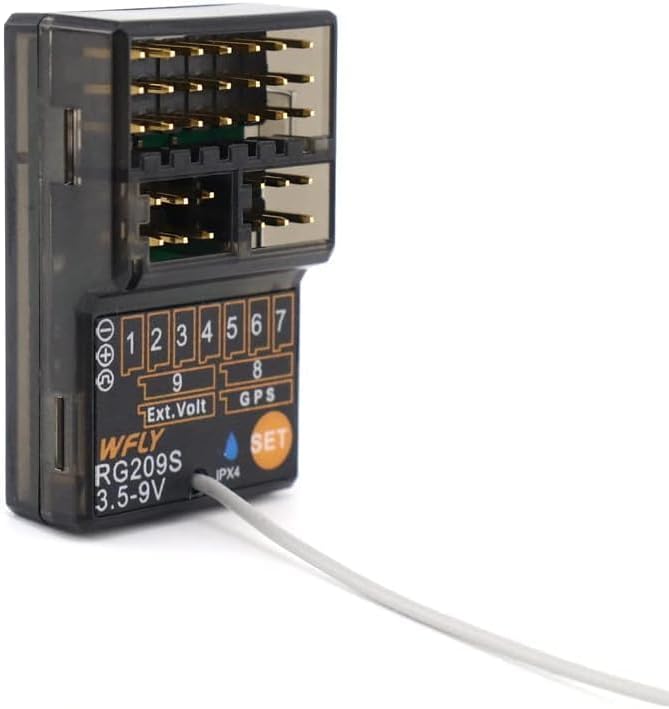
ചിത്രം 3.1: വിശദമായത് view of the RG209S receiver showing channel ports 1-9, external voltage port, GPS port, and SET button.
3.2 ബൈൻഡിംഗ് നടപടിക്രമം
- Ensure your WFLY X9 transmitter is powered off.
- Connect a power source (e.g., ESC or separate battery) to any channel port on the RG209S receiver.
- അമർത്തിപ്പിടിക്കുക സെറ്റ് button on the receiver while powering it on. The receiver's LED indicator will flash rapidly, indicating it is in binding mode.
- Power on your WFLY X9 transmitter. Navigate to the binding menu on your transmitter and initiate the binding process.
- Once binding is successful, the receiver's LED will turn solid. Power cycle both the transmitter and receiver to confirm the binding.
കുറിപ്പ്: Some users have reported compatibility issues with newer X9S transmitters requiring specific firmware updates. Refer to WFLY's official support for the latest firmware and compatibility information if you encounter difficulties.
4. ഓപ്പറേഷൻ
After successful binding, the receiver is ready for operation. Connect your servos, ESC, and other accessories to the appropriate channels.
4.1 ബാഹ്യ വോളിയംtagഇ മോണിറ്ററിംഗ്
നൽകിയിരിക്കുന്ന വോളിയം ബന്ധിപ്പിക്കുകtage inspection wire to the 'Ext. Volt' port on the receiver and to your main battery to monitor its voltage through your WFLY X9 transmitter.
4.2 ജിപിഎസ് പ്രവർത്തനം
The RG209S supports GPS modules for speed detection. Connect a compatible GPS module to the 'GPS' port on the receiver. Refer to your GPS module's instructions for specific setup and calibration.
4.3 External Gyroscope Module
For enhanced stability, an external gyroscope module can be connected. Consult the gyroscope module's manual for connection details and configuration with the RG209S receiver.
Video 4.1: Demonstration of the RG209S receiver in application with the WFLY X9 transmitter, showcasing its use in various RC vehicles.
5. പരിപാലനവും പരിചരണവും
To ensure the longevity and optimal performance of your WFLY RG209S receiver, observe the following maintenance guidelines:
- വൃത്തിയാക്കൽ: Gently clean the receiver with a soft, dry cloth. Avoid using solvents or harsh chemicals.
- സംഭരണം: Store the receiver in a dry, cool environment away from direct sunlight and extreme temperatures.
- ഈർപ്പം സംരക്ഷണം: The receiver has an IPX4 rating, indicating resistance to splashing water from any direction. However, it is not waterproof. Avoid submerging the receiver or exposing it to heavy rain.
- ആൻ്റിന പ്ലേസ്മെൻ്റ്: Ensure the receiver antenna is positioned correctly and not obstructed by carbon fiber or metal parts for optimal signal reception.
6. പ്രശ്നപരിഹാരം
If you encounter issues with your RG209S receiver, refer to the following common troubleshooting steps:
- സിഗ്നൽ ഇല്ല/നിയന്ത്രണം നഷ്ടപ്പെടുന്നു:
- Re-bind the receiver to the transmitter.
- സുരക്ഷയ്ക്കും ശരിയായ പോളാരിറ്റിക്കും വേണ്ടി എല്ലാ വയറിംഗ് കണക്ഷനുകളും പരിശോധിക്കുക.
- Ensure the transmitter batteries are charged.
- Verify the receiver antenna is not damaged or obstructed.
- ഇടവിട്ടുള്ള സിഗ്നൽ:
- Check for sources of interference (e.g., other 2.4GHz devices, high-power electronics).
- Ensure the receiver is not mounted directly against large metal surfaces.
- Receiver Not Powering On:
- Confirm the power source is connected correctly and providing adequate voltagഇ (3.5-9V).
- Inspect the power wires for any damage.
For further assistance, contact WFLY customer support.
7 സ്പെസിഫിക്കേഷനുകൾ
| ഫീച്ചർ | സ്പെസിഫിക്കേഷൻ |
|---|---|
| ചാനലുകൾ | 9 |
| ഓപ്പറേറ്റിംഗ് വോളിയംtage | 3.5വി - 9വി |
| അളവുകൾ | ഏകദേശം 36mm x 22.8mm x 12.6mm |
| ഭാരം | 0.32 ഔൺസ് (ഏകദേശം 9 ഗ്രാം) |
| അനുയോജ്യത | WFLY X9 Transmitters |
| പ്രത്യേക സവിശേഷതകൾ | External Gyroscope Support, GPS Speed Detection |
| IP റേറ്റിംഗ് | IPX4 |

Image 7.1: The RG209S receiver with dimensions indicated, showing its compact size.
8. വാറൻ്റിയും പിന്തുണയും
WFLY products are manufactured to high standards. For warranty information, technical support, or service inquiries, please refer to the official WFLY webസൈറ്റിൽ ബന്ധപ്പെടുക അല്ലെങ്കിൽ നിങ്ങളുടെ അംഗീകൃത ഡീലറെ ബന്ധപ്പെടുക. വാറന്റി ക്ലെയിമുകൾക്കായി നിങ്ങളുടെ വാങ്ങലിന്റെ തെളിവ് സൂക്ഷിക്കുക.
നിർമ്മാതാവ്: Shenzhen WFLY Technology Development Co.,Ltd