
AUNA Oxford SE
Auna Oxford Stereo System User Manual
Model: Oxford SE
1. പ്രധാന സുരക്ഷാ നിർദ്ദേശങ്ങൾ
Please read these instructions carefully before operating the unit and retain them for future reference. Follow all warnings and instructions marked on the product.
- വെന്റിലേഷൻ തുറസ്സുകളൊന്നും തടയരുത്. നിർമ്മാതാവിന്റെ നിർദ്ദേശങ്ങൾക്കനുസൃതമായി ഇൻസ്റ്റാൾ ചെയ്യുക.
- റേഡിയറുകൾ, ഹീറ്റ് രജിസ്റ്ററുകൾ, സ്റ്റൗകൾ, അല്ലെങ്കിൽ മറ്റ് ഉപകരണങ്ങൾ (ഉൾപ്പെടെ) പോലെയുള്ള താപ സ്രോതസ്സുകൾക്ക് സമീപം ഇൻസ്റ്റാൾ ചെയ്യരുത്. ampലൈഫയറുകൾ) ചൂട് ഉത്പാദിപ്പിക്കുന്നത്.
- പ്രത്യേകിച്ച് പ്ലഗുകൾ, കൺവീനിയൻസ് റെസെപ്റ്റക്കിളുകൾ, ഉപകരണത്തിൽ നിന്ന് പുറത്തുകടക്കുന്ന ഇടം എന്നിവയിൽ നടക്കുകയോ നുള്ളുകയോ ചെയ്യുന്നതിൽ നിന്ന് പവർ കോർഡ് സംരക്ഷിക്കുക.
- നിർമ്മാതാവ് വ്യക്തമാക്കിയ അറ്റാച്ച്മെൻ്റുകൾ/ആക്സസറികൾ മാത്രം ഉപയോഗിക്കുക.
- മിന്നൽ കൊടുങ്കാറ്റുകളുടെ സമയത്തോ ദീർഘനേരം ഉപയോഗിക്കാത്ത സമയത്തോ ഈ ഉപകരണം അൺപ്ലഗ് ചെയ്യുക.
- എല്ലാ സേവനങ്ങളും യോഗ്യതയുള്ള സേവന ഉദ്യോഗസ്ഥർക്ക് റഫർ ചെയ്യുക. പവർ സപ്ലൈ കോർഡ് അല്ലെങ്കിൽ പ്ലഗ് കേടാകുക, ദ്രാവകം ഒഴുകുകയോ ഉപകരണങ്ങൾ ഉപകരണത്തിലേക്ക് വീഴുകയോ ചെയ്യുക, ഉപകരണം മഴയോ ഈർപ്പമോ സമ്പർക്കം പുലർത്തുക, സാധാരണയായി പ്രവർത്തിക്കാത്തത് എന്നിങ്ങനെയുള്ള ഏതെങ്കിലും വിധത്തിൽ ഉപകരണത്തിന് കേടുപാടുകൾ സംഭവിക്കുമ്പോൾ സേവനം ആവശ്യമാണ്. , അല്ലെങ്കിൽ ഉപേക്ഷിച്ചു.
2. ഉൽപ്പന്നം കഴിഞ്ഞുview
The Auna Oxford Stereo System is a versatile audio device designed for playing vinyl records, CDs, and digital audio via Bluetooth, USB, DAB, and FM radio. It features a retro design with modern connectivity options.
2.1 Main Unit and Components
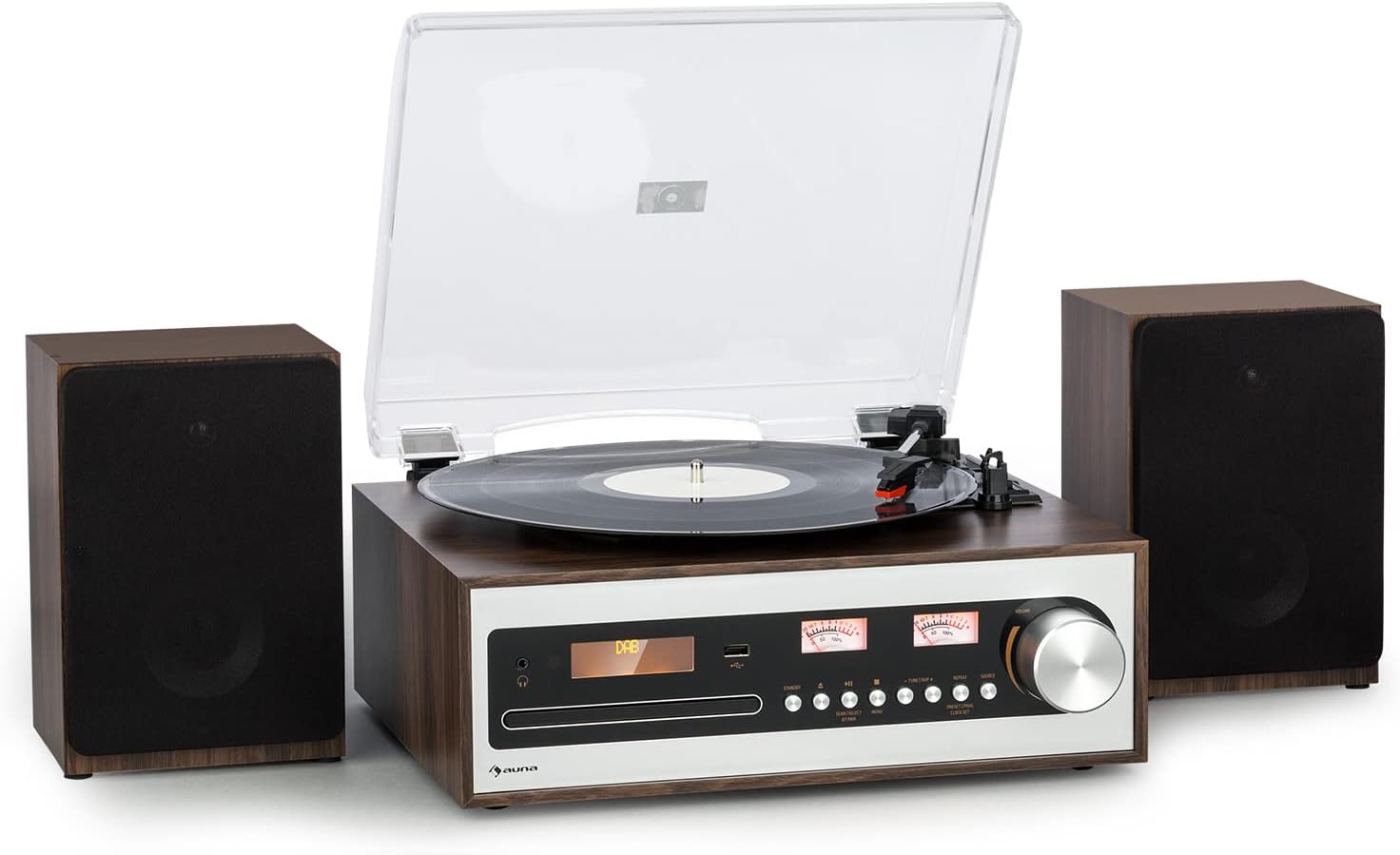
This image shows the Auna Oxford Stereo System, featuring the main unit with a turntable on top and two separate, detachable speakers positioned on either side. The main unit has a control panel with a display, buttons, and a large rotary knob. The overall design is a stylish walnut-silver finish.
2.2 പ്രധാന സവിശേഷതകൾ
- Multi-Speed Turntable: Supports 33 1/3, 45, and 78 RPM records. Includes a 45-RPM adapter.
- Detachable Stereo Speakers: Two powerful speakers providing 2 x 10 watts max power for clear audio.
- ഓട്ടോ-സ്റ്റോപ്പ് ഫംഗ്ഷൻ: Protects vinyl records by automatically stopping the turntable when a record finishes.
- ഒന്നിലധികം പ്ലേബാക്ക് ഓപ്ഷനുകൾ: Integrated CD player, Bluetooth connectivity for wireless streaming, AM/FM & DAB radio, and AUX input.
- USB റെക്കോർഡിംഗ്: Digitally record your vinyl collection to a USB drive.
- റിമോട്ട് കൺട്രോൾ: ദൂരെ നിന്ന് സൗകര്യപ്രദമായ പ്രവർത്തനത്തിന്.

This infographic highlights the main features of the Auna Oxford Stereo System. It illustrates the 3-speed turntable, powerful 2x10W stereo speakers, and compatibility with 7", 10", and 12" records. It also emphasizes connectivity options like USB, AUX, and headphone jack, the auto-stop function for record protection, and the ceramic pick-up for best sound quality.
3. സജ്ജീകരണ ഗൈഡ്
3.1 സിസ്റ്റം അൺപാക്ക് ചെയ്യുന്നു
പാക്കേജിംഗിൽ നിന്ന് എല്ലാ ഘടകങ്ങളും ശ്രദ്ധാപൂർവ്വം നീക്കം ചെയ്യുക. താഴെ പട്ടികപ്പെടുത്തിയിരിക്കുന്ന എല്ലാ ഇനങ്ങളും ഉണ്ടെന്ന് ഉറപ്പാക്കുക:
- 1 x Turntable with Main Unit
- 2 x Detachable Speakers
- 1 x റിമോട്ട് കൺട്രോൾ
- 1 x പവർ അഡാപ്റ്റർ
- 1 x Multilingual User Manual (this document)
ഭാവിയിലെ ഗതാഗതത്തിനോ സംഭരണത്തിനോ വേണ്ടി യഥാർത്ഥ പാക്കേജിംഗ് സൂക്ഷിക്കുക.
3.2 സ്പീക്കറുകൾ ബന്ധിപ്പിക്കുന്നു
The Auna Oxford Stereo System comes with two detachable speakers. Connect each speaker to the corresponding speaker output terminals on the rear of the main unit. Ensure the polarity is correct (red to red, black to black).

This image displays the main unit of the Auna Oxford Stereo System alongside one of its detachable speakers, emphasizing their separate nature and the long connection cable for flexible placement. The design is both decorative and sonorous, allowing for optimal sound dispersion.
3.3 പവർ കണക്ഷൻ
Connect the provided power adapter to the DC IN port on the rear of the main unit, then plug the adapter into a suitable wall outlet.
3.4 Antenna Connection (for Radio)
For optimal DAB and FM radio reception, connect the included FM antenna to the dedicated port on the rear panel. Extend the antenna fully for better signal quality.

ഈ ചിത്രം വിശദമായ ഒരു വിവരണം നൽകുന്നു view of the rear panel of the Auna Oxford Stereo System, highlighting its various connection ports including DC IN, AUX IN, and speaker outputs (R and L). Dimensions of the main unit and speakers are also indicated, showing the compact design and numerous connectivity options for external devices like USB, Audio-Out, and Headphone.
4. പ്രവർത്തന നിർദ്ദേശങ്ങൾ
4.1 അടിസ്ഥാന പ്രവർത്തനം
- പവർ ഓൺ/ഓഫ്: Press the Power button on the front panel or remote control to turn the unit on or off.
- മോഡ് തിരഞ്ഞെടുക്കൽ: Use the "MODE" button on the front panel or remote to switch between Turntable, CD, Bluetooth, DAB, FM, and AUX modes.
- വോളിയം നിയന്ത്രണം: Adjust the volume using the large rotary knob on the front panel or the VOL +/- buttons on the remote control.

This image demonstrates the ease of operation for the Auna Oxford Stereo System. It shows the main unit on a cabinet with its multifunctional control dial, and a close-up of the remote control, highlighting the convenience of managing settings from a distance.
4.2 ടേൺടേബിൾ പ്രവർത്തനം
- പൊടി കവർ തുറക്കുക.
- ഒരു വിനൈൽ റെക്കോർഡ് പ്ലേറ്ററിൽ വയ്ക്കുക.
- Select the appropriate speed (33 1/3, 45, or 78 RPM) using the speed selector switch. Use the 45-RPM adapter for singles.
- ടോൺ ആം സൌമ്യമായി ഉയർത്തി സ്റ്റൈലസ് റെക്കോർഡിലെ ആവശ്യമുള്ള ട്രാക്കിന് മുകളിൽ വയ്ക്കുക.
- Lower the tone arm slowly onto the record. Playback will begin.
- At the end of the record, the auto-stop function will automatically stop the platter. Lift the tone arm and return it to its rest.

This image showcases two core features of the Auna Oxford Stereo System: the classic built-in CD player with its disc tray open, and a close-up of the turntable's smooth belt drive mechanism, designed for 33 1/3, 45, or 78 rpm playback.
4.3 സിഡി പ്ലെയർ പ്രവർത്തനം
- Press the "MODE" button to select CD mode.
- Press the Eject button to open the CD tray.
- Place a CD (or MP3 CD) into the tray with the label side facing up.
- Press the Eject button again to close the tray. The unit will read the disc.
- Use the Play/Pause, Skip Forward, and Skip Backward buttons to control playback.
4.4 ബ്ലൂടൂത്ത് ജോടിയാക്കൽ
- Press the "MODE" button to select Bluetooth mode. The display will show "BT" and start flashing, indicating it's in pairing mode.
- നിങ്ങളുടെ മൊബൈൽ ഉപകരണത്തിൽ (സ്മാർട്ട്ഫോൺ, ടാബ്ലെറ്റ് മുതലായവ) ബ്ലൂടൂത്ത് പ്രവർത്തനക്ഷമമാക്കുക.
- ഇതിനായി തിരയുക "Auna Oxford" in your device's Bluetooth list and select it to pair.
- Once paired, the display will stop flashing, and you can stream audio wirelessly to the system.
4.5 റേഡിയോ പ്രവർത്തനം (DAB/FM)
- Press the "MODE" button to select DAB or FM radio mode.
- For DAB: The system will automatically scan for available DAB stations. Use the tuning buttons to navigate through the station list.
- എഫ്എമ്മിനായി: Use the tuning buttons to manually tune to a station or press and hold to auto-scan for the next available station.
- To save a favorite station, refer to the detailed instructions in the full user manual for preset functions.
4.6 യുഎസ്ബി പ്ലേബാക്കും റെക്കോർഡിംഗും
- മുൻ പാനലിലെ USB പോർട്ടിലേക്ക് ഒരു USB ഫ്ലാഷ് ഡ്രൈവ് തിരുകുക.
- For Playback: Press the "MODE" button to select USB mode. The system will automatically detect and play compatible audio file(ഉദാ. MP3).
- For Recording (from Vinyl/CD/AUX): While playing audio from the turntable, CD, or AUX input, press the "RECORD" button. The system will begin recording the audio to the connected USB drive. Press "RECORD" again to stop.
5. പരിപാലനം
5.1 യൂണിറ്റ് വൃത്തിയാക്കൽ
- മൃദുവായതും ഉണങ്ങിയതുമായ തുണി ഉപയോഗിച്ച് യൂണിറ്റ് തുടയ്ക്കുക. അബ്രാസീവ് ക്ലീനറുകൾ, മെഴുക് അല്ലെങ്കിൽ ലായകങ്ങൾ ഉപയോഗിക്കരുത്.
- For the dust cover, use a soft cloth and a mild detergent solution if necessary, then wipe dry.
5.2 Turntable Maintenance
- സ്റ്റൈലസ് കെയർ: Gently clean the stylus regularly with a soft brush designed for stylus cleaning, brushing from back to front.
- റെക്കോർഡ് കെയർ: Keep your vinyl records clean and free of dust to ensure optimal sound quality and prolong stylus life.
- പൊടി കവർ: പൊടിയിൽ നിന്നും അവശിഷ്ടങ്ങളിൽ നിന്നും ടർടേബിളിനെ സംരക്ഷിക്കാൻ ഉപയോഗത്തിലില്ലാത്തപ്പോൾ പൊടി കവർ അടച്ചു വയ്ക്കുക.
6. പ്രശ്നപരിഹാരം
| പ്രശ്നം | സാധ്യമായ കാരണം | പരിഹാരം |
|---|---|---|
| ശക്തിയില്ല | പവർ കോർഡ് ബന്ധിപ്പിച്ചിട്ടില്ല; പവർ ഔട്ട്ലെറ്റ് തകരാറിലാണ്. | പവർ കോർഡ് സുരക്ഷിതമായി ബന്ധിപ്പിച്ചിട്ടുണ്ടെന്ന് ഉറപ്പാക്കുക. മറ്റൊരു പവർ ഔട്ട്ലെറ്റ് പരീക്ഷിക്കുക. |
| സ്പീക്കറുകളിൽ നിന്ന് ശബ്ദമില്ല | Speakers not connected; Volume too low; Incorrect mode selected. | Check speaker connections. Increase volume. Select correct input mode. |
| ടേണബിൾ കറങ്ങുന്നില്ല | Unit not powered on; Belt dislodged; Auto-stop engaged prematurely. | Ensure power is on. Check turntable belt. Ensure record is placed correctly. |
| ബ്ലൂടൂത്ത് ജോടിയാക്കുന്നില്ല | Unit not in pairing mode; Device too far; Already paired to another device. | Ensure unit is in Bluetooth pairing mode. Move device closer. Disconnect from other devices. |
| മോശം റേഡിയോ സ്വീകരണം | ആന്റിന നീട്ടിയിട്ടില്ല; ദുർബലമായ സിഗ്നൽ. | എഫ്എം ആന്റിന പൂർണ്ണമായും നീട്ടുക. മികച്ച സ്വീകരണത്തിനായി യൂണിറ്റ് പുനഃസ്ഥാപിക്കുക. |
7 സ്പെസിഫിക്കേഷനുകൾ
| ഫീച്ചർ | വിശദാംശങ്ങൾ |
|---|---|
| മോഡലിൻ്റെ പേര് | Oxford SE |
| ബ്രാൻഡ് | ഔന |
| ഉൽപ്പന്ന അളവുകൾ (പ്രധാന യൂണിറ്റ്) | 36.6 x 29.4 x 11.8 സെ.മീ (വീതി x ആഴം x ഉയരം) |
| Detachable Speaker Dimensions (each) | 15 x 13 x 22.1 സെ.മീ (വീതി x ആഴം x ഉയരം) |
| ഇനത്തിൻ്റെ ഭാരം | 5.8 കി.ഗ്രാം |
| പവർ ഔട്ട്പുട്ട് | 2 x 10 watts max |
| ടേൺ ചെയ്യാവുന്ന വേഗത | 33 1/3, 45, 78 ആർപിഎം |
| കണക്റ്റിവിറ്റി | Bluetooth, CD, USB, AUX, DAB, FM |
| പ്രത്യേക സവിശേഷതകൾ | Digital Recorder (USB), Auto-Stop Function |
| മെറ്റീരിയൽ | പ്ലാസ്റ്റിക് |
| നിറം | Walnut-Silver |
| വൈദ്യുതി ഉപഭോഗം (ഓൺ-മോഡ്) | 10 വാട്ട്സ് |
8. വാറൻ്റിയും പിന്തുണയും
For warranty information and technical support, please refer to the warranty card included with your product or visit the official Auna webസൈറ്റ്. ഏതെങ്കിലും വാറന്റി ക്ലെയിമുകൾക്ക് നിങ്ങളുടെ വാങ്ങലിന്റെ തെളിവ് സൂക്ഷിക്കുക.
You can also visit the AUNA Store on Amazon for more information and support:
Ask a question about this manual
Ask about setup, troubleshooting, compatibility, parts, safety, or missing instructions. Manuals+ will review the question and use this page’s manual context to help answer it.