
iClebo YCR-M07-20
iClebo Omega Robot Vacuum Cleaner & Mop Pad User Manual
Model: YCR-M07-20 | Brand: iClebo
1. ആമുഖം
The iClebo Omega is an intelligent cleaning robot designed to provide efficient and thorough floor cleaning. This device combines vacuuming and mopping functionalities, utilizing a visionary camera mapping system for optimal navigation. It is equipped with advanced sensors and features to ensure a clean living environment.
This manual provides detailed instructions for the setup, operation, maintenance, and troubleshooting of your iClebo Omega robot vacuum cleaner and mop pad. Please read this manual carefully before using the product to ensure safe and effective operation.
2 പ്രധാന സവിശേഷതകൾ
- Camera Gyroscope Mapping: Finds the most efficient cleaning pathway, avoiding major obstacles.
- Turbo Suction Mode: Automatically boosts power when detecting heavy carpeting or concentrated dirt.
- Automatic Recharging and Resume: Returns to the charging base when battery is low and resumes cleaning from where it left off.
- Anti-Tangling Main Brush: Designed with V6 rubber blades to effectively pick up pet hair and prevent tangles.
- സ്ലിം ഡിസൈൻ: At 3.4 inches in height, it can access areas under beds and sofas.
- Deep Corner Cleaning: Side brushes are specifically designed for reaching difficult corners and edges.
- 19 Obstacle Detection Sensors: Comprehensive sensor array to avoid collisions and falls.
- Scheduled Cleanings: Program the robot to automatically power on for daily cleaning tasks.
- Bagless Dust Bin: Easy access for emptying collected dirt and debris.
- Climbing Feature: Capable of moving over thresholds, door seals, and onto thick rugs or carpets.
- Wet Mopping Function: Equipped to mop hard floors, assisting with spills and general floor cleaning.

ചിത്രം 2.1: ഓവർview of iClebo Omega's 5-step cleaning system components.
3. സജ്ജീകരണം
3.1 Unpacking the Robot
Carefully remove all components from the packaging. Ensure all packing materials are removed from the robot and its accessories. Verify that all items listed in the packaging contents are present.

Figure 3.1: iClebo Omega robot vacuum cleaner with remote control.
3.2 ചാർജിംഗ് ബേസ് പ്ലേസ്മെന്റ്
Place the charging base against a wall in an open, uncluttered area. Ensure there is at least 0.5 meters (1.6 feet) of clear space on either side of the base and 1.5 meters (5 feet) in front of it. Plug the power adapter into the charging base and then into a wall outlet. The indicator light on the charging base will illuminate.

ചിത്രം 3.2: വശം view of the iClebo Omega, highlighting the charging port area.
3.3 പ്രാരംഭ ചാർജിംഗ്
Place the iClebo Omega onto the charging base, ensuring the charging contacts on the robot align with those on the base. The robot will begin charging, and the display will show the charging status. For first-time use, allow the robot to charge completely, which may take several hours.
4. പ്രവർത്തന നിർദ്ദേശങ്ങൾ
4.1 ഒരു ക്ലീനിംഗ് സൈക്കിൾ ആരംഭിക്കുന്നു
Press the 'Start' button on the robot or the remote control to begin a cleaning cycle. The iClebo Omega will automatically map your home using its camera and sensors, determining the most efficient cleaning path.

Figure 4.1: The iClebo Omega effectively cleaning up debris on a hard floor.
4.2 ക്ലീനിംഗ് മോഡുകൾ
The iClebo Omega offers various cleaning modes:
- യാന്ത്രിക മോഡ്: The robot intelligently cleans the entire accessible area.
- സ്പോട്ട് മോഡ്: For concentrated cleaning of a specific dirty area.
- ടർബോ മോഡ്: Automatically activated on carpets or when significant dust/hair is detected, increasing suction power.
- Wet Mopping Mode: Attach the mop pad and water tank for wet cleaning of hard floors.

Figure 4.2: Turbo mode automatically engages on carpets for enhanced cleaning.
4.3 ഷെഡ്യൂളിംഗ് ക്ലീനിംഗ്
Use the remote control to set a cleaning schedule. This allows the robot to automatically start cleaning at your preferred times, ensuring your home remains clean even when you are away.
4.4 Obstacle Avoidance and Climbing
The 19 built-in detection sensors enable the iClebo Omega to navigate around furniture and avoid falling down stairs. Its climbing feature allows it to easily transition over small obstacles like door thresholds and onto rugs.
Video 4.1: Demonstration of iClebo Omega's navigation, cleaning capabilities, and obstacle avoidance. This video showcases the robot's ability to clean various surfaces and navigate around common household items.
5. പരിപാലനം
Regular maintenance ensures optimal performance and extends the lifespan of your iClebo Omega.
5.1 ഡസ്റ്റ് ബിൻ ശൂന്യമാക്കൽ
The bagless dust bin should be emptied after each cleaning cycle or when full. To access, open the top cover of the robot, remove the dust bin, and dispose of the contents. Clean the dust bin with a dry cloth.
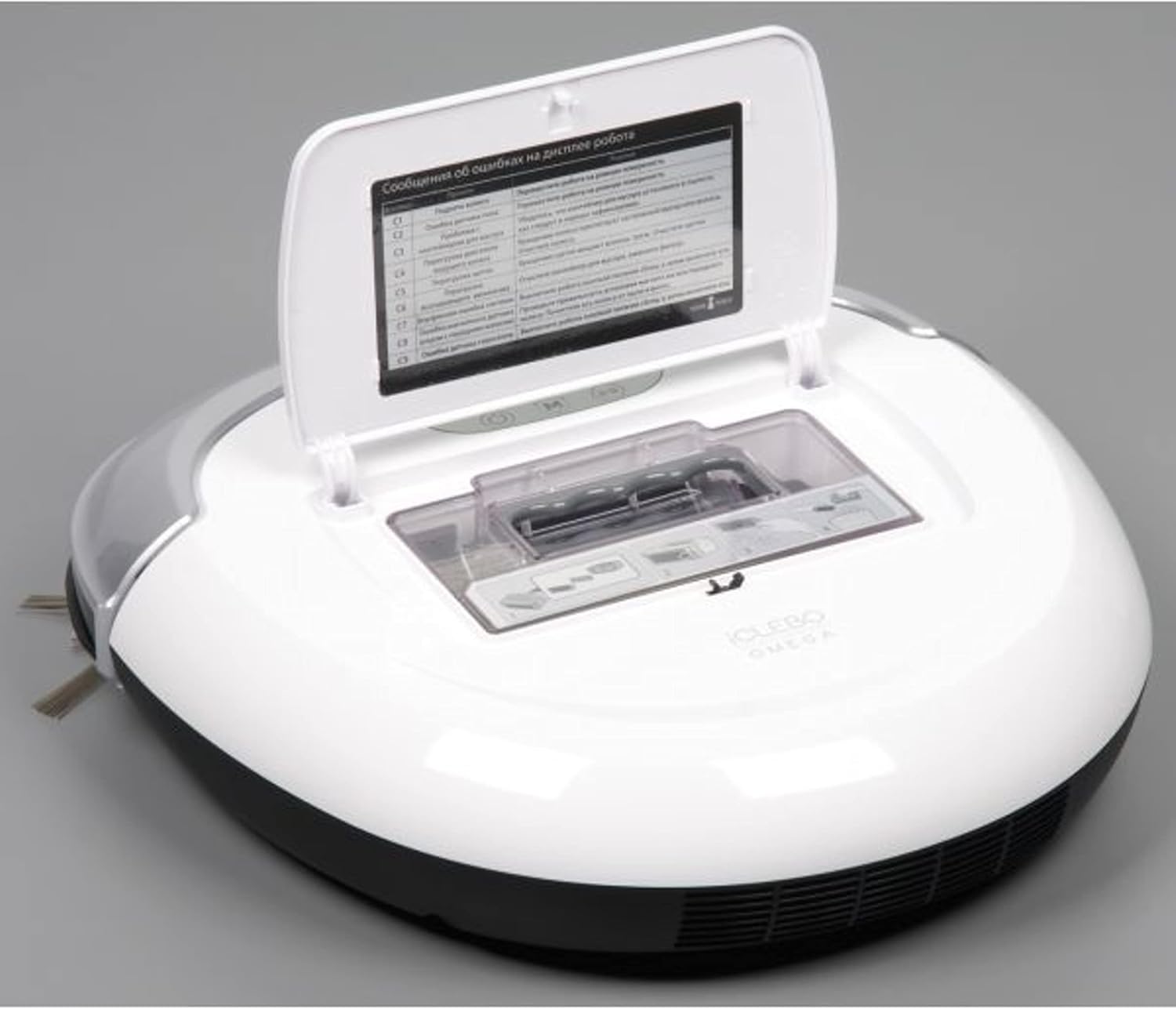
Figure 5.1: Accessing the dust bin for emptying and cleaning.
5.2 ക്ലീനിംഗ് ഫിൽട്ടറുകൾ
The EPA11 filter should be cleaned regularly to maintain suction power. Tap the filter gently to remove dust, or use a small brush. Replace the filter every 3-6 months, depending on usage.
5.3 ബ്രഷുകളും വീലുകളും വൃത്തിയാക്കൽ
Periodically check the main brush and side brushes for tangled hair or debris. Use the cleaning tool provided to cut and remove any hair. Clean the wheels to ensure smooth movement.
5.4 സെൻസറുകളും ചാർജിംഗ് കോൺടാക്റ്റുകളും വൃത്തിയാക്കൽ
Wipe the robot's sensors and charging contacts with a clean, dry cloth to ensure proper functionality and charging.
6. പ്രശ്നപരിഹാരം
| പ്രശ്നം | സാധ്യമായ കാരണം | പരിഹാരം |
|---|---|---|
| റോബോട്ട് സ്റ്റാർട്ട് ആകുന്നില്ല. | ബാറ്ററി തീരെയില്ല; പവർ സ്വിച്ച് ഓഫ്; റോബോട്ട് കുടുങ്ങി. | റോബോട്ട് ചാർജ് ചെയ്യുക; പവർ സ്വിച്ച് ഓണാക്കുക; തടസ്സങ്ങൾ നീക്കുക. |
| മോശം ക്ലീനിംഗ് പ്രകടനം. | Full dust bin; Clogged filter; Tangled brushes. | Empty dust bin; Clean/replace filter; Clean main and side brushes. |
| ചാർജിംഗ് ബേസ് കണ്ടെത്താൻ റോബോട്ടിന് കഴിയുന്നില്ല. | Charging base obstructed; Robot too far from base. | Ensure clear space around base; Manually place robot near base. |
| റോബോട്ട് ഇടയ്ക്കിടെ കുടുങ്ങിപ്പോകാറുണ്ട്. | Too many obstacles; Uneven surfaces. | Clear small objects from cleaning path; Ensure robot can climb over obstacles. |
7 സ്പെസിഫിക്കേഷനുകൾ
- ബ്രാൻഡ്: iClebo
- മോഡലിൻ്റെ പേര്: iCLEBO Omega
- ഇനം മോഡൽ നമ്പർ: YCR-M07-20
- നിറം: വെള്ള
- ഉൽപ്പന്ന അളവുകൾ: 13.9"L x 13.6"W x 3.4"H
- ഫിൽട്ടർ തരം: Disk (EPA11)
- ക്ലീനിംഗ് പാത്ത് വീതി: 14 ഇഞ്ച്
- വാല്യംtage: 120 വോൾട്ട്
- ഊർജ്ജ സ്രോതസ്സ്: ബാറ്ററി പവർ
- ഫോം ഘടകം: റോബോട്ടിക്
- UPC: 880917229226
- നിർമ്മാതാവ്: Yujin Robot
8. വാറൻ്റിയും പിന്തുണയും
For warranty information and technical support, please refer to the warranty card included with your product or visit the official iClebo webവാറന്റി ക്ലെയിമുകൾക്കുള്ള വാങ്ങലിന്റെ തെളിവായി നിങ്ങളുടെ വാങ്ങൽ രസീത് സൂക്ഷിക്കുക.
നിർമ്മാതാവ്: Yujin Robot
For further assistance, you may contact iClebo customer service through their official channels.
Ask a question about this manual
Ask about setup, troubleshooting, compatibility, parts, safety, or missing instructions. Manuals+ will review the question and use this page’s manual context to help answer it.