
1. ഉൽപ്പന്നം കഴിഞ്ഞുview
The Dangbei DBX3 Pro is an infrared remote control designed for seamless interaction with compatible Dangbei devices, primarily televisions. It features an ergonomic design for comfortable handling and intuitive button placement for easy navigation and control.
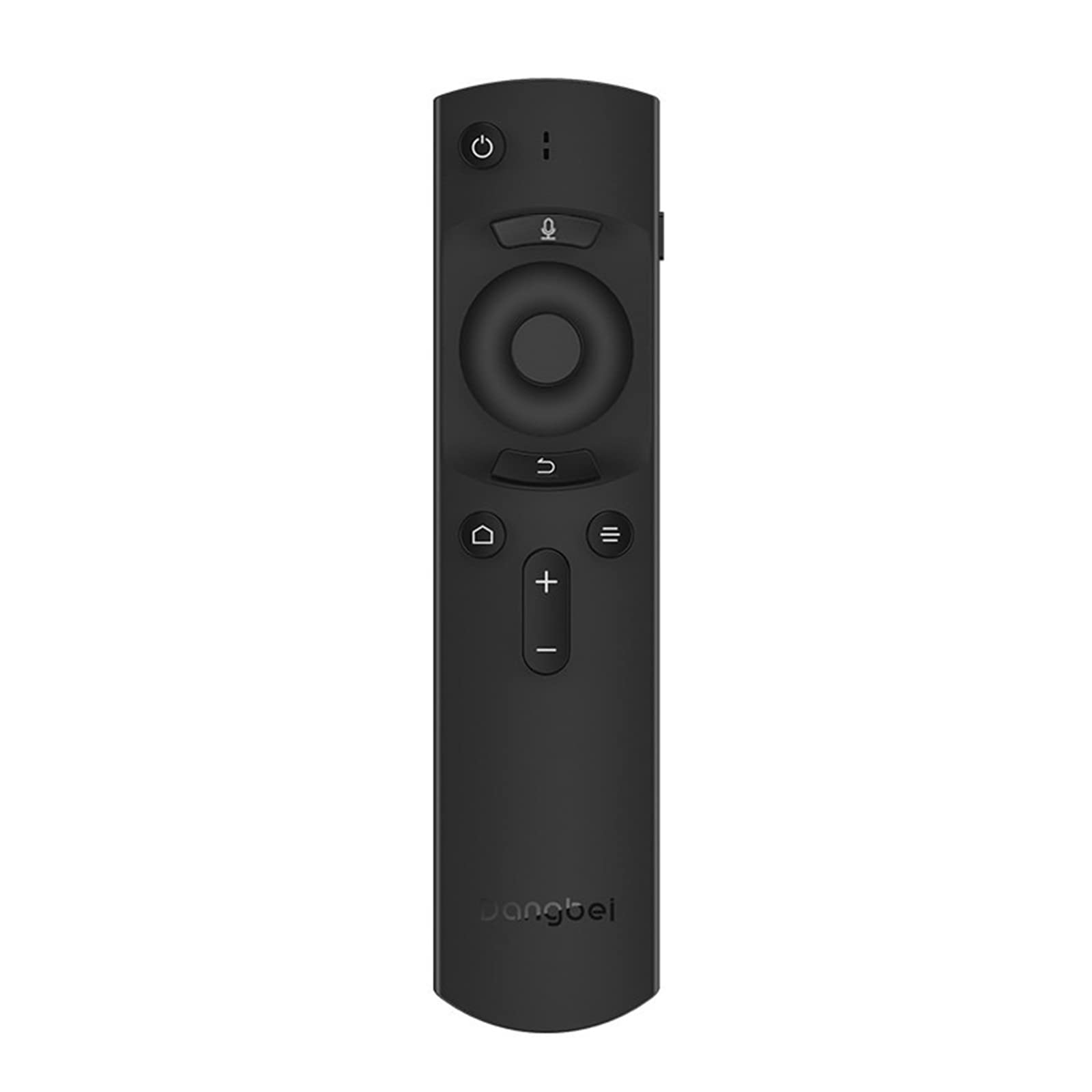
ചിത്രം 1: Dangbei DBX3 Pro Remote Control. This image displays the remote control from an angled perspective, highlighting its ergonomic shape and the layout of its primary control buttons, including power, navigation, volume, and home.
ബട്ടൺ പ്രവർത്തനങ്ങൾ:
- പവർ ബട്ടൺ (⏻): ബന്ധിപ്പിച്ച ഉപകരണം ഓൺ അല്ലെങ്കിൽ ഓഫ് ചെയ്യുന്നു.
- Microphone Button (🎙): Activates voice control or voice search features (if supported by the connected device).
- Navigation Pad (Up, Down, Left, Right): മെനുകൾ നാവിഗേറ്റ് ചെയ്യാനും ഇനങ്ങൾ തിരഞ്ഞെടുക്കാനും ഉപയോഗിക്കുന്നു.
- ശരി ബട്ടൺ: തിരഞ്ഞെടുപ്പുകൾ സ്ഥിരീകരിക്കുന്നു അല്ലെങ്കിൽ മെനുകളിൽ പ്രവേശിക്കുന്നു.
- ബാക്ക് ബട്ടൺ (↩): മുമ്പത്തെ സ്ക്രീനിലേക്കോ മെനുവിലേക്കോ മടങ്ങുന്നു.
- Menu/Options Button (☰): Accesses additional options or context menus.
- ഹോം ബട്ടണ് (🏠): Returns to the main home screen of the connected device.
- Volume Up/Down Buttons (+/-): ഓഡിയോ വോളിയം ക്രമീകരിക്കുന്നു.
2. സജ്ജീകരണം
2.1. ബാറ്ററി ഇൻസ്റ്റാളേഷൻ
- റിമോട്ട് കൺട്രോളിൻ്റെ പിൻഭാഗത്ത് ബാറ്ററി കമ്പാർട്ട്മെൻ്റ് കവർ കണ്ടെത്തുക.
- കവർ താഴേക്ക് സ്ലൈഡ് ചെയ്യുക അല്ലെങ്കിൽ അത് തുറക്കാൻ ലാച്ച് അമർത്തുക.
- കമ്പാർട്ടുമെന്റിനുള്ളിലെ അടയാളപ്പെടുത്തലുകളുമായി പോസിറ്റീവ് (+), നെഗറ്റീവ് (-) ടെർമിനലുകൾ ശരിയായി വിന്യസിക്കുന്നുണ്ടെന്ന് ഉറപ്പാക്കാൻ രണ്ട് AAA ബാറ്ററികൾ (ഉൾപ്പെടുത്തിയിട്ടില്ല) ഇടുക.
- ബാറ്ററി കമ്പാർട്ട്മെന്റ് കവർ സുരക്ഷിതമായി സ്ഥലത്ത് ക്ലിക്ക് ചെയ്യുന്നതുവരെ മാറ്റിസ്ഥാപിക്കുക.
2.2. പ്രാരംഭ ഉപയോഗം
The Dangbei DBX3 Pro remote control operates using infrared (IR) technology. For the remote to function, ensure there is a clear line of sight between the remote's IR emitter (located at the front tip) and the IR receiver on your compatible Dangbei device. Point the remote directly at the device you wish to control.
3. പ്രവർത്തന നിർദ്ദേശങ്ങൾ
3.1. അടിസ്ഥാന നാവിഗേഷൻ
- ഉപയോഗിക്കുക നാവിഗേഷൻ പാഡ് (Up, Down, Left, Right arrows) to move through menus, lists, and content on your screen.
- അമർത്തുക ശരി ബട്ടൺ to select a highlighted item, confirm an an action, or open an application.
- അമർത്തുക ബാക്ക് ബട്ടൺ to return to the previous screen or exit a menu.
- അമർത്തുക ഹോം ബട്ടൺ to quickly access the main interface of your device.
3.2. Power and Volume Control
- അമർത്തുക പവർ ബട്ടൺ once to turn your device on or off.
- ഉപയോഗിക്കുക വോളിയം കൂട്ടുക (+) ഒപ്പം വോളിയം താഴേക്ക് (-) ശബ്ദ നില ക്രമീകരിക്കാനുള്ള ബട്ടണുകൾ.
3.3. Voice Control (If Supported)
If your connected Dangbei device supports voice control, press and hold the മൈക്രോഫോൺ ബട്ടൺ. Speak clearly into the remote control's microphone. Release the button when you have finished speaking. Refer to your device's manual for specific voice command capabilities.
4. പരിപാലനം
4.1. വൃത്തിയാക്കൽ
റിമോട്ട് കൺട്രോൾ വൃത്തിയാക്കാൻ, മൃദുവായതും ഉണങ്ങിയതുമായ ഒരു തുണി ഉപയോഗിച്ച് അതിന്റെ പ്രതലം സൌമ്യമായി തുടയ്ക്കുക. കഠിനമായ അഴുക്കിന്, ചെറുതായി dampen the cloth with water or a mild, non-abrasive cleaner. Avoid using harsh chemicals, solvents, or abrasive materials, as these can damage the remote's finish or internal components.
4.2. ബാറ്ററി മാറ്റിസ്ഥാപിക്കൽ
Replace batteries when the remote's response becomes sluggish or stops working. Always replace both batteries simultaneously with new AAA batteries. Do not mix old and new batteries, or different types of batteries, as this can lead to leakage or malfunction. Dispose of used batteries according to local regulations.
4.3. സംഭരണം
Store the remote control in a cool, dry place away from direct sunlight, extreme temperatures, and high humidity. If the remote will not be used for an extended period, it is recommended to remove the batteries to prevent potential leakage.
5. പ്രശ്നപരിഹാരം
| പ്രശ്നം | സാധ്യമായ കാരണം | പരിഹാരം |
|---|---|---|
| റിമോട്ട് പ്രതികരിക്കുന്നില്ല. |
|
|
| ബട്ടണുകൾ പ്രതികരിക്കുന്നില്ല അല്ലെങ്കിൽ ഒട്ടിപ്പിടിക്കുന്നു. |
|
|
| ഹ്രസ്വമായ പ്രവർത്തന ശ്രേണി. |
|
|
6 സ്പെസിഫിക്കേഷനുകൾ
- മോഡൽ: DBX3 Pro
- ബ്രാൻഡ്: ഡാങ്ബെയ്
- കണക്റ്റിവിറ്റി ടെക്നോളജി: ഇൻഫ്രാറെഡ് (IR)
- അനുയോജ്യമായ ഉപകരണങ്ങൾ: Television (specifically compatible Dangbei devices)
- ഊർജ്ജ സ്രോതസ്സ്: 2 x AAA ബാറ്ററികൾ (ഉൾപ്പെടുത്തിയിട്ടില്ല)
- ഉൽപ്പന്ന അളവുകൾ: 1.5 x 9.06 x 3.94 ഇഞ്ച് (ഏകദേശം 3.8 x 23.0 x 10.0 സെ.മീ)
- ഇനത്തിൻ്റെ ഭാരം: 4.6 ഔൺസ് (ഏകദേശം 130 ഗ്രാം)
- പ്രത്യേക സവിശേഷത: എർഗണോമിക് ഡിസൈൻ
7. വാറണ്ടിയും പിന്തുണയും
7.1. വാറൻ്റി വിവരങ്ങൾ
This Dangbei product is covered by a limited manufacturer's warranty. The specific terms and duration of the warranty may vary by region and purchase date. Please retain your proof of purchase for warranty claims. For detailed warranty information, refer to the documentation provided with your primary Dangbei device or visit the official Dangbei webസൈറ്റ്.
7.2. ഉപഭോക്തൃ പിന്തുണ
For technical assistance, troubleshooting, or inquiries regarding your Dangbei DBX3 Pro remote control, please contact Dangbei customer support. Contact information can typically be found on the official Dangbei website or within the support section of your primary Dangbei device's user interface.
ഉദ്യോഗസ്ഥൻ Webസൈറ്റ്: www.dangbei.com (Please check for regional variations)
