
ആമുഖം
This manual provides detailed instructions for the setup, operation, maintenance, and troubleshooting of your Ugoos AM6B Plus TV Box. Please read this manual thoroughly before using the device to ensure optimal performance and longevity.
ബോക്സിൽ എന്താണുള്ളത്
പാക്കേജ് തുറക്കുമ്പോൾ, ഇനിപ്പറയുന്ന എല്ലാ ഇനങ്ങളും ഉൾപ്പെടുത്തിയിട്ടുണ്ടെന്ന് ഉറപ്പാക്കുക:
- Ugoos AM6B Plus TV Box
- IR റിമോട്ട് കൺട്രോൾ
- 2 Dual-Band Antennas
- 12V 2A Power Adapter (with interchangeable plugs for US/EU/UK/AU)
- HDMI കേബിൾ
- ഉപയോക്തൃ മാനുവൽ (ഇംഗ്ലീഷ്)
ചിത്രം 1: പാക്കേജ് ഉള്ളടക്കങ്ങൾ. This image displays all items included in the Ugoos AM6B Plus TV Box retail package, including the TV box, IR remote, two dual-band antennas, power adapter with various plug types, HDMI cable, and the user manual.
Video 1: Unboxing the Ugoos AM6B Plus TV Box. This video demonstrates the unboxing process and showcases all components included in the package, providing a visual guide to verify contents.
ഉൽപ്പന്നം കഴിഞ്ഞുview
The Ugoos AM6B Plus TV Box features a compact and sleek design, optimized for efficient heat dissipation and easy integration into your home entertainment system.
മുന്നിലും വശത്തും Views

ചിത്രം 2: മുൻഭാഗം view of the Ugoos AM6B Plus TV Box with its remote control. This image highlights the compact design of the TV box and the included IR remote.

ചിത്രം 3: വശം view of the Ugoos AM6B Plus TV Box with dual-band antennas. This perspective shows the device's profile and the two antenna ports on the side.
Rear Ports and Connections
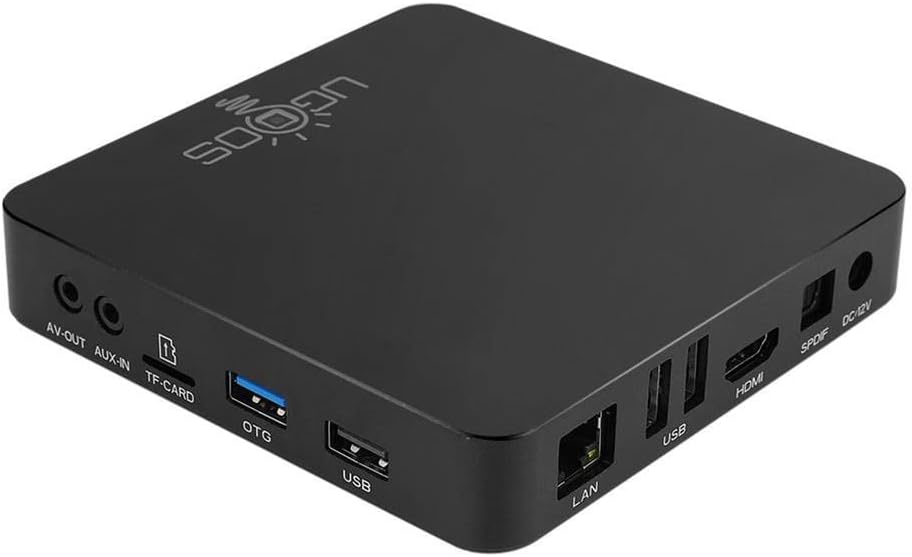
ചിത്രം 4: പിൻഭാഗം view of the Ugoos AM6B Plus TV Box showing various connectivity ports. This image details the available ports for external connections.
The device is equipped with a variety of ports for versatile connectivity:
- ലാൻ: വയർഡ് നെറ്റ്വർക്ക് കണക്ഷനുള്ള ഗിഗാബിറ്റ് ഇതർനെറ്റ് പോർട്ട്.
- USB: Multiple USB 2.0 and USB 3.0 ports for external storage or peripherals.
- എച്ച്ഡിഎംഐ: HDMI 2.1 port for video and audio output to a display.
- SPDIF: Optical audio output for high-quality digital audio.
- ഡിസി 12 വി: പവർ ഇൻപുട്ട് പോർട്ട്.
- എവി-ഔട്ട്: അനലോഗ് ഓഡിയോ/വീഡിയോ ഔട്ട്പുട്ട്.
- ഓക്സ്-ഇൻ: സഹായ ഓഡിയോ ഇൻപുട്ട്.
- TF-CARD: MicroSD card slot for storage extension.
- OTG: On-The-Go USB port.
സജ്ജീകരണ ഗൈഡ്
Connecting the TV Box
- പവർ കണക്ഷൻ: Connect the 12V 2A power adapter to the DC 12V port on the TV box and then plug it into a power outlet.
- HDMI കണക്ഷൻ: Use the provided HDMI cable to connect the HDMI port on the TV box to an HDMI input port on your television or display.
- നെറ്റ്വർക്ക് കണക്ഷൻ (ഓപ്ഷണൽ): For a wired connection, connect an Ethernet cable from your router to the LAN port on the TV box. For Wi-Fi, you will configure it after initial boot-up.
ആൻ്റിനകൾ അറ്റാച്ചുചെയ്യുന്നു
Screw the two dual-band antennas clockwise into the designated antenna ports on the side of the TV box. Ensure they are securely fastened for optimal wireless signal reception.
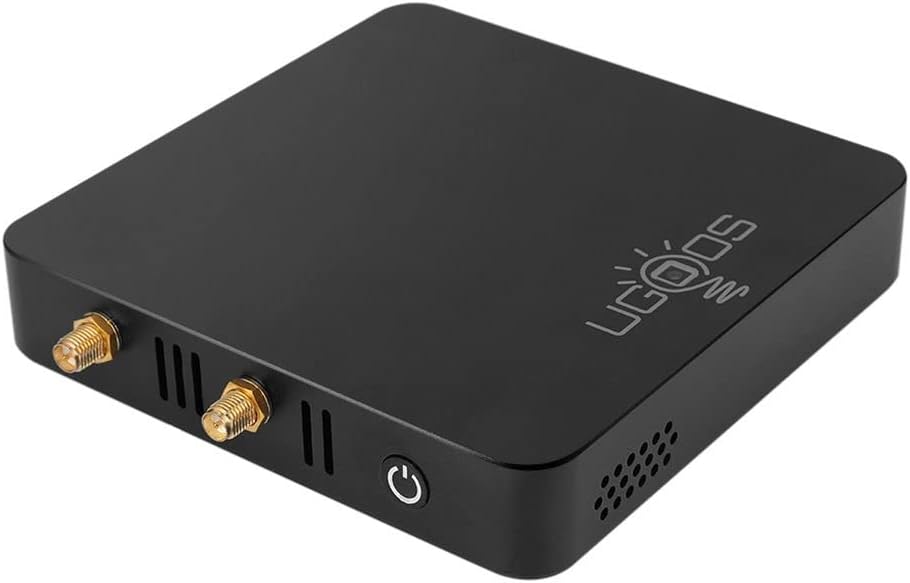
ചിത്രം 5: വശം view highlighting the antenna connection points. This image shows where the dual-band antennas should be attached.
പ്രവർത്തന നിർദ്ദേശങ്ങൾ
പ്രാരംഭ പവർ ഓൺ
After connecting all necessary cables, press the power button on the TV box or the remote control to turn on the device. The device will boot into the Android 9.0 interface.
റിമോട്ട് കൺട്രോൾ ജോടിയാക്കൽ
The included IR remote control may require pairing for full functionality, especially for Bluetooth features. Refer to the "REMOTE CONTROL INSTRUCTION" paper included in the package for detailed pairing steps. Typically, this involves holding down specific buttons on the remote until an indicator light flashes, then searching for the remote in the TV Box's Bluetooth settings.
Video 2: Remote Control Overview and Pairing. This video segment provides a closer look at the IR remote control and briefly mentions the pairing instructions, emphasizing the importance of reading the included guide.
ആൻഡ്രോയിഡ് 9.0 ഇന്റർഫേസ്
The Ugoos AM6B Plus runs on Android 9.0 Pie, offering a user-friendly interface. Navigate through menus and applications using the remote control's directional pad and OK button.

Figure 6: Screenshot of the Android 9.0 Pie operating system interface. This image illustrates the visual layout of the Android 9.0 system running on the device.
Network Configuration (WiFi6 and Ethernet)
To connect to a wireless network, go to ക്രമീകരണം > നെറ്റ്വർക്കും ഇൻ്റർനെറ്റും > വൈഫൈ, select your network, and enter the password. For wired connections, ensure the Ethernet cable is properly connected; the device should automatically establish a connection.

Figure 7: Diagram illustrating WiFi6 MIMO technology. This graphic highlights the advanced wireless capabilities of the TV box for efficient and stable data transfer.
ബ്ലൂടൂത്ത് 5.0 കണക്റ്റിവിറ്റി
To pair Bluetooth devices such as headphones or gamepads, navigate to ക്രമീകരണം > കണക്റ്റുചെയ്ത ഉപകരണങ്ങൾ > പുതിയ ഉപകരണം ജോടിയാക്കുക. Select your device from the list to connect.

Figure 8: Comparison chart of Bluetooth data transfer speeds. This chart demonstrates the improved speed of Bluetooth 5.0 compared to older versions, supported by the Ugoos AM6B Plus.
മെയിൻ്റനൻസ്
System Updates (OTA)
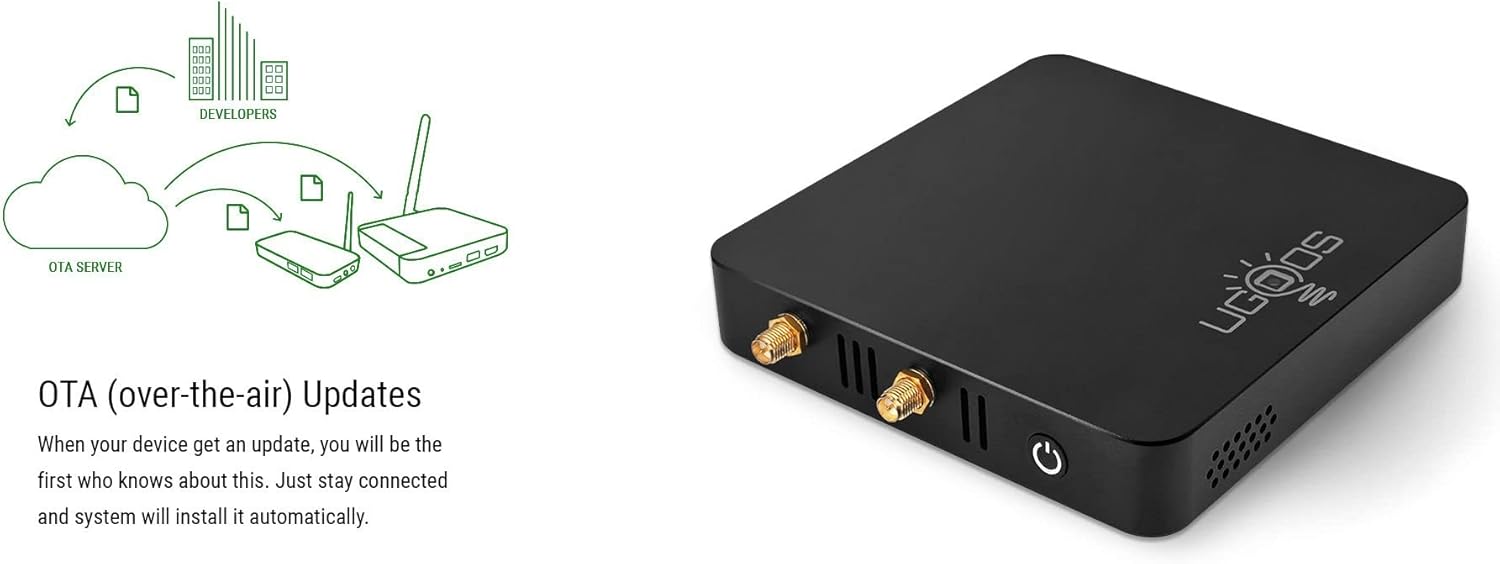
The Ugoos AM6B Plus supports Over-The-Air (OTA) updates. Ensure your device is connected to the internet to receive and install the latest firmware updates automatically. Regular updates provide performance improvements and security enhancements.

Figure 9: Illustration of the OTA update mechanism. This diagram shows how the device receives and installs updates from the server, ensuring the system remains current.
താപ വിസർജ്ജനം
The device is designed with ventilation holes to ensure proper heat dissipation. To maintain optimal performance and prevent overheating, ensure the TV box is placed in a well-ventilated area and that the vents are not obstructed.
ചിത്രം 10: വശം view of the TV box highlighting the ventilation design. The perforated side panels are crucial for maintaining internal temperature.
ട്രബിൾഷൂട്ടിംഗ്
If you encounter any issues with your Ugoos AM6B Plus TV Box, refer to the common problems and solutions below:
- ശക്തിയില്ല: Ensure the power adapter is securely connected to both the device and a working power outlet. Verify the power outlet is active.
- ഡിസ്പ്ലേ ഇല്ല: Check the HDMI cable connection between the TV box and your TV. Ensure your TV is set to the correct HDMI input source. Try a different HDMI cable or port if available.
- റിമോട്ട് കൺട്രോൾ പ്രതികരിക്കുന്നില്ല: Check the batteries in the remote control. If the remote is Bluetooth, ensure it is properly paired with the TV box as per the remote control instruction paper.
- നെറ്റ്വർക്ക് കണക്റ്റിവിറ്റി പ്രശ്നങ്ങൾ: For Wi-Fi, double-check your Wi-Fi password in the device settings. For Ethernet, ensure the cable is securely plugged into both the TV box and your router. Restart your router and the TV box.
- Applications Not Working: Ensure the application is updated to the latest version. Clear the app's cache and data in ക്രമീകരണങ്ങൾ > ആപ്പുകളും അറിയിപ്പുകളും > ആപ്പ് വിവരങ്ങൾ. Reinstall the application if necessary.
വീണ്ടെടുക്കൽ ഓപ്ഷനുകൾ
For advanced troubleshooting or firmware recovery, the device includes 'Maskrom' and 'Recovery' buttons, typically located in small recessed holes on the bottom of the device. These are used for flashing firmware and should only be accessed by experienced users or under specific technical guidance.
സാങ്കേതിക സവിശേഷതകൾ
Below are the detailed specifications for the Ugoos AM6B Plus TV Box:
| ഫീച്ചർ | സ്പെസിഫിക്കേഷൻ |
|---|---|
| പ്രോസസ്സർ | Amlogic S922X-J (Quad core ARM Cortex-A73 and dual-core ARM Cortex-A53 CPU) |
| ജിപിയു | ARM MaliTM-G52 MP6 |
| മെമ്മറി | 4GB LPDDR4 |
| ആന്തരിക സംഭരണം | 32 ജിബി (ഇഎംഎംസി) |
| സംഭരണ വിപുലീകരണം | MicroSD Card, up to 32GB (SD2.X, SD3.X, SD4.X, eMMC vers5.0) |
| ഓപ്പറേറ്റിംഗ് സിസ്റ്റം | ആൻഡ്രോയിഡ് 9.0 |
| വയർലെസ് കണക്റ്റിവിറ്റി | IEEE 802.11 a/b/g/n/ac/ax WiFi 6 2x2 MIMO |
| നെറ്റ്വർക്ക് | IEEE 802.3 10/100/1000M Ethernet |
| ബ്ലൂടൂത്ത് | Bluetooth 5.0 with LE Technology |
| HDMI ഔട്ട്പുട്ട് | HDMI 2.1 Type-A 4Kx2K@60fps max resolution |
| പെരിഫറൽ ഇന്റർഫേസ് | 2xUSB 2.0 and 1xUSB 3.0 High Speed, HDMI 2.1 |
| പിന്തുണയ്ക്കുന്ന വീഡിയോ ഫോർമാറ്റുകൾ | VP9 പ്രോfile-2, H.265 HEVCMP-10@L5.1, H.264 AVC HP@L5.1, H2.64 MVC, MPEG-4 ASP@L5, WMV/VC-1 SP/MP/AP, MPEG-2 MP/HL, MPEG-1 MP/HL |
| പിന്തുണയ്ക്കുന്ന ഓഡിയോ ഫോർമാറ്റുകൾ | MP3, AAC, WMA, RM, FLAC, Ogg and programmable with 7.1/5.1 down-mixing |
| ശക്തി | 12V 2A |
വാറൻ്റിയും പിന്തുണയും
For warranty information and technical support, please refer to the official Ugoos website or contact your retailer. The included English User's Manual also contains important information regarding product care and support.