
MONODEAL DG10 Pro
MONODEAL DG10 Pro Bone Conduction Headphones User Manual
Model: DG10 Pro
ആമുഖം
Thank you for choosing the MONODEAL DG10 Pro Bone Conduction Headphones. This manual provides detailed instructions on how to set up, operate, and maintain your headphones and the included replacement charging cable. Please read this manual thoroughly before use to ensure optimal performance and longevity of your device.
ഉൽപ്പന്നം കഴിഞ്ഞുview ഘടകങ്ങളും
The MONODEAL DG10 Pro headphones offer a unique open-ear listening experience using bone conduction technology, coupled with a noise-canceling microphone for clear communication. This package also includes a dedicated magnetic charging cable.
ബോക്സിൽ എന്താണുള്ളത്:
- MONODEAL DG10 Pro Bone Conduction Headphones
- Replacement Magnetic Charging Cable

Image: The MONODEAL DG10 Pro Bone Conduction Headphones with its adjustable boom microphone, alongside the magnetic charging cable.
സജ്ജമാക്കുക
1. ഹെഡ്ഫോണുകൾ ചാർജ് ചെയ്യുന്നു:
Before first use, fully charge your MONODEAL DG10 Pro headphones. Connect the magnetic charging cable to the charging port on the headphones and the USB-A end to a compatible USB power source (e.g., computer USB port, wall adapter). The LED indicator on the headphones will show charging status.
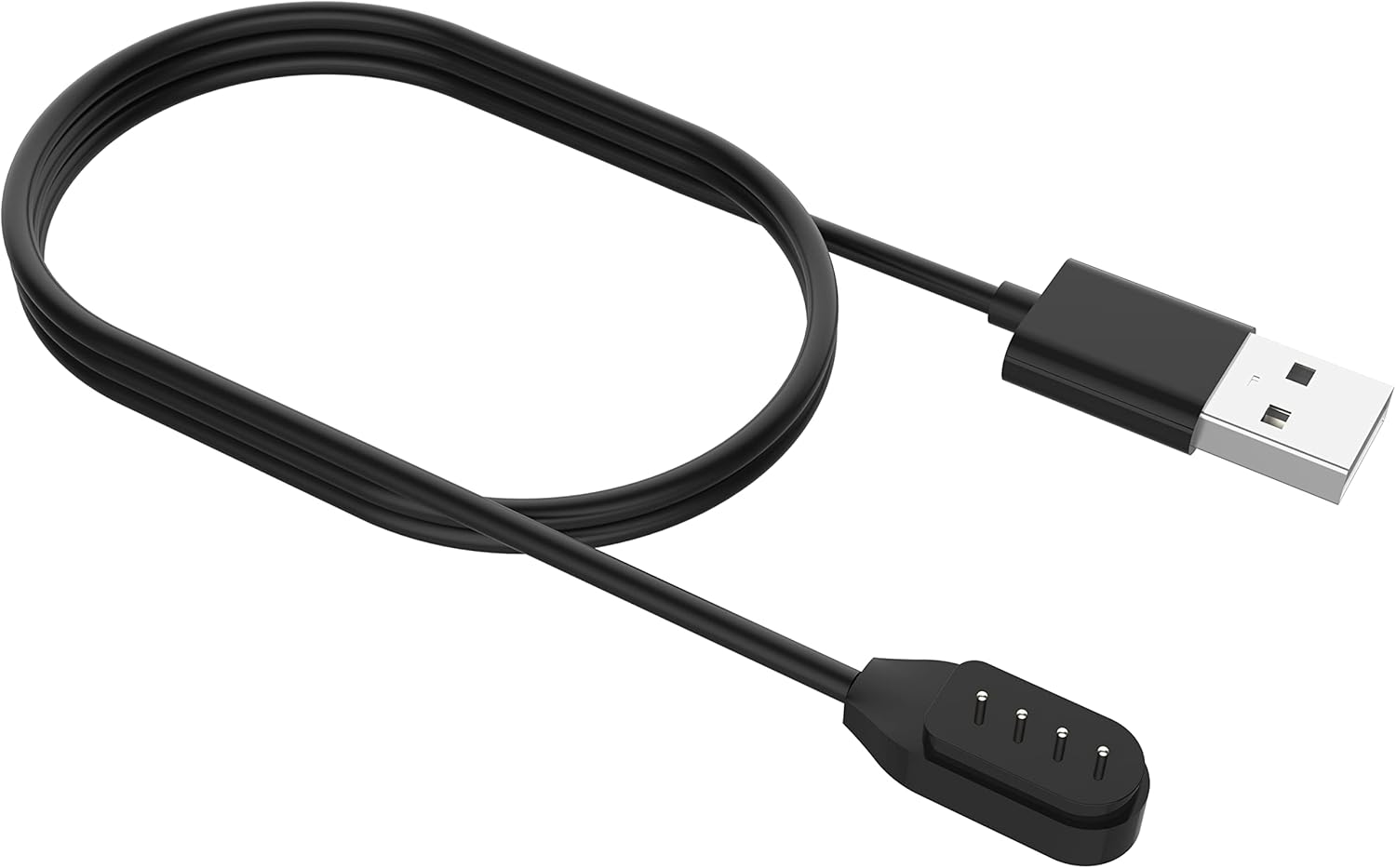
Image: Close-up of the magnetic charging cable, showing the USB-A connector and the magnetic charging pins.
2. ബ്ലൂടൂത്ത് ജോടിയാക്കൽ:
- പവർ ഓൺ: ജോടിയാക്കൽ മോഡ് സൂചിപ്പിക്കുന്ന LED ഇൻഡിക്കേറ്റർ മിന്നുന്നതുവരെ ഹെഡ്ഫോണുകളിലെ പവർ ബട്ടൺ അമർത്തിപ്പിടിക്കുക.
- ബ്ലൂടൂത്ത് സജീവമാക്കുക: നിങ്ങളുടെ ഉപകരണത്തിൽ (സ്മാർട്ട്ഫോൺ, ടാബ്ലെറ്റ്, കമ്പ്യൂട്ടർ), ബ്ലൂടൂത്ത് പ്രവർത്തനക്ഷമമാക്കുക.
- ഉപകരണം തിരഞ്ഞെടുക്കുക: In your device's Bluetooth settings, search for "MONODEAL DG10 Pro" and select it to connect.
- സ്ഥിരീകരണം: Once connected, the LED indicator on the headphones will change, and you may hear an audible confirmation.
The headphones support multipoint pairing, allowing connection to two devices simultaneously. This enables seamless switching between devices for calls or audio playback.

Image: A visual representation of the DG10 Pro headphones connected simultaneously to a smartphone, tablet, and laptop, illustrating multipoint pairing.
പ്രവർത്തന നിർദ്ദേശങ്ങൾ
ഹെഡ്ഫോണുകൾ ധരിക്കുന്നത്:
Position the headphones with the transducers resting on your cheekbones, just in front of your ears. The band should wrap around the back of your head. The lightweight and ergonomic design ensures comfort even during extended wear.

Image: A man wearing the DG10 Pro headphones, demonstrating the open-ear comfort and proper placement on the cheekbones.
അടിസ്ഥാന നിയന്ത്രണങ്ങൾ:
The headphones feature intuitive touch controls for various functions.
- പവർ ഓൺ/ഓഫ്: പവർ ബട്ടൺ അമർത്തിപ്പിടിക്കുക.
- പ്ലേ/താൽക്കാലികമായി നിർത്തുക: മൾട്ടി-ഫംഗ്ഷൻ ബട്ടണിൽ ഒറ്റത്തവണ ടാപ്പ് ചെയ്യുക.
- വോളിയം കൂട്ടുക/താഴ്ത്തുക: പ്രത്യേക വോളിയം ബട്ടണുകൾ ഉപയോഗിക്കുക.
- അടുത്ത ട്രാക്ക്: മൾട്ടി-ഫംഗ്ഷൻ ബട്ടണിൽ രണ്ടുതവണ ടാപ്പ് ചെയ്യുക.
- മുമ്പത്തെ ട്രാക്ക്: മൾട്ടി-ഫംഗ്ഷൻ ബട്ടണിൽ മൂന്ന് തവണ ടാപ്പ് ചെയ്യുക.
- ഉത്തരം/അവസാന കോൾ: Single tap the multi-function button during an incoming call.
- കോൾ നിരസിക്കുക: ഇൻകമിംഗ് കോൾ സമയത്ത് മൾട്ടി-ഫംഗ്ഷൻ ബട്ടൺ അമർത്തിപ്പിടിക്കുക.
- വോയ്സ് അസിസ്റ്റന്റിനെ സജീവമാക്കുക: Press and hold the multi-function button (check specific model for duration).
Using the Dual Mic ENC Noise Canceling Feature:
The adjustable boom microphone, combined with dual-mic ENC (Environmental Noise Cancellation) technology, ensures clear voice pickup and reduces background noise during calls. Position the microphone close to your mouth for optimal clarity.

Image: An infographic detailing the dual-mic ENC noise cancellation, showing omnidirectional pickup and the closed-loop bone-conducting oscillator for clear calls.
സുരക്ഷയും അവബോധവും:
Due to their open-ear design, the DG10 Pro headphones allow you to remain aware of your surroundings while listening to audio or taking calls. This feature is particularly beneficial in environments where situational awareness is crucial, such as during work or driving.

Image: A man in a car wearing the DG10 Pro headphones, highlighting the ability to stay connected while remaining aware of the environment.
മെയിൻ്റനൻസ്
വൃത്തിയാക്കൽ:
- ഒരു സോഫ്റ്റ്, ഡി ഉപയോഗിച്ച് ഹെഡ്ഫോണുകൾ തുടയ്ക്കുകamp തുണി.
- കഠിനമായ രാസവസ്തുക്കളോ ഉരച്ചിലുകൾ ഉപയോഗിക്കരുത്.
- ചാർജ് ചെയ്യുന്നതിനുമുമ്പ് ചാർജിംഗ് പോർട്ട് ഡ്രൈ ആണെന്ന് ഉറപ്പാക്കുക.
സംഭരണം:
Store the headphones in a cool, dry place away from direct sunlight and extreme temperatures. Avoid bending or twisting the band excessively.
ട്രബിൾഷൂട്ടിംഗ്
| പ്രശ്നം | സാധ്യമായ കാരണം | പരിഹാരം |
|---|---|---|
| ഹെഡ്ഫോണുകൾ ഓണാകില്ല. | കുറഞ്ഞ ബാറ്ററി. | Charge the headphones fully using the provided cable. |
| ഉപകരണവുമായി ജോടിയാക്കാൻ കഴിയില്ല. | ഹെഡ്ഫോണുകൾ ജോടിയാക്കൽ മോഡിൽ ഇല്ല; ഉപകരണത്തിൽ ബ്ലൂടൂത്ത് ഓഫാണ്; ഉപകരണം വളരെ അകലെയാണ്. | Ensure headphones are in pairing mode; enable Bluetooth on your device; move device closer (within 10 meters). |
| ശബ്ദമില്ല അല്ലെങ്കിൽ കുറഞ്ഞ ശബ്ദമില്ല. | ശബ്ദം വളരെ കുറവാണ്; കണക്റ്റ് ചെയ്തിട്ടില്ല; ഓഡിയോ ഉറവിട പ്രശ്നം. | Increase volume on headphones and device; ensure proper Bluetooth connection; check audio source. |
| Microphone not clear. | Microphone position; environmental noise. | Adjust the boom microphone closer to your mouth; ensure ENC is active (if applicable); reduce background noise if possible. |
സ്പെസിഫിക്കേഷനുകൾ
- മോഡലിൻ്റെ പേര്: DG10 Pro
- ബ്രാൻഡ്: മോണോഡീൽ
- കണക്റ്റിവിറ്റി ടെക്നോളജി: വയർലെസ്
- വയർലെസ് കമ്മ്യൂണിക്കേഷൻ ടെക്നോളജി: ബ്ലൂടൂത്ത് 5.3
- ബ്ലൂടൂത്ത് ശ്രേണി: 10 മീറ്റർ
- ചെവി സ്ഥാപിക്കൽ: തുറന്ന ചെവി
- ഫോം ഘടകം: ചെവിയിൽ
- ഓഡിയോ ഡ്രൈവർ തരം: ബോൺ കണ്ടക്ഷൻ ഡ്രൈവർ
- നിയന്ത്രണ തരം: മീഡിയ നിയന്ത്രണം, ടച്ച്
- മൈക്രോഫോൺ: Dual Mic ENC Noise Canceling Boom Microphone
- മെറ്റീരിയൽ: അലുമിനിയം, സിലിക്കൺ
- ഭാരം: ഏകദേശം 33 ഗ്രാം
- ജല പ്രതിരോധ നില: വാട്ടർ റെസിസ്റ്റൻ്റ് അല്ല
- ഉൾപ്പെടുത്തിയ ഘടകങ്ങൾ: Headphones, Magnetic Charging Cable
വാറൻ്റിയും പിന്തുണയും
For warranty information and customer support, please refer to the warranty card included with your product or visit the official MONODEAL website. You can also contact MONODEAL customer service through the platform where you purchased the product.
MONODEAL Official Store: Visit MONODEAL Store on Amazon
Ask a question about this manual
Ask about setup, troubleshooting, compatibility, parts, safety, or missing instructions. Manuals+ will review the question and use this page’s manual context to help answer it.