
ആമുഖം
This manual provides essential instructions for the safe and efficient use of your Olympia 2298 foldable 4G mobile phone. Please read it thoroughly before operating the device and keep it for future reference.
1. സജ്ജീകരണം
1.1 പാക്കേജ് ഉള്ളടക്കം
- Olympia 2298 Mobile Phone
- ബാറ്ററി (ലിഥിയം-അയൺ)
- USB-C ചാർജിംഗ് കേബിൾ
- Charging Cradle (if included)
- ഉപയോക്തൃ മാനുവൽ
1.2 Inserting the Battery and SIM Card
- Open the phone: Gently open the phone to access the battery compartment.
- പിൻ കവർ നീക്കം ചെയ്യുക: ഫോണിന്റെ പിൻ കവർ ശ്രദ്ധാപൂർവ്വം നീക്കം ചെയ്യുക.
- സിം കാർഡ് ചേർക്കുക: Locate the SIM card slot(s). Insert your 4G compatible SIM card(s) into the designated slot(s) with the gold contacts facing down, ensuring it clicks into place.
- ബാറ്ററി ചേർക്കുക: Place the Lithium-ion battery into the battery compartment, aligning the contacts.
- Replace back cover: Securely attach the back cover until it clicks.
 ചിത്രം: മുൻഭാഗം view of the Olympia 2298 foldable phone, showing the main display with time and date.
1.3 ബാറ്ററി ചാർജ് ചെയ്യുന്നു
ആദ്യ ഉപയോഗത്തിന് മുമ്പ്, ഫോണിന്റെ ബാറ്ററി പൂർണ്ണമായും ചാർജ് ചെയ്യുക.
- Connect charger: Plug the USB-C cable into the phone's USB-C port or place the phone in the charging cradle. Connect the other end of the cable to a suitable power adapter.
- ചാർജിംഗ് സൂചകം: The phone will display a charging indicator on the screen.
- മുഴുവൻ ചാർജ്ജ്: Allow the phone to charge until the battery indicator shows a full charge. This may take several hours for the initial charge.
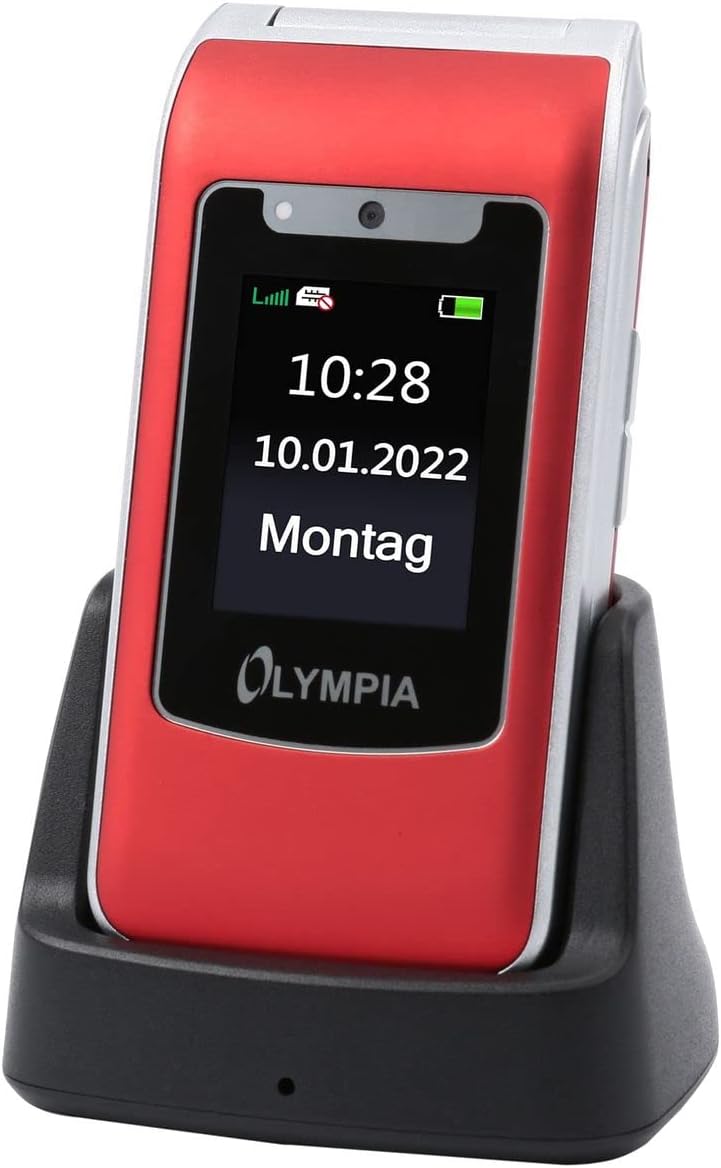 Image: The Olympia 2298 phone placed in its charging cradle, indicating ease of charging.
1.4 പവർ ഓൺ/ഓഫ്
- പവർ ഓണാക്കാൻ: സ്ക്രീൻ പ്രകാശിക്കുന്നത് വരെ പവർ/എൻഡ് കോൾ ബട്ടൺ അമർത്തിപ്പിടിക്കുക.
- പവർ ഓഫ് ചെയ്യാൻ: Press and hold the Power/End Call button, then select "Power Off" from the options on the screen.
2. പ്രവർത്തന നിർദ്ദേശങ്ങൾ
2.1 അടിസ്ഥാന കോൾ പ്രവർത്തനങ്ങൾ
- ഒരു കോൾ ചെയ്യുന്നു: കീപാഡ് ഉപയോഗിച്ച് നമ്പർ ഡയൽ ചെയ്ത് ഗ്രീൻ കോൾ ബട്ടൺ അമർത്തുക.
- ഒരു കോളിന് മറുപടി നൽകുന്നു: ഫോൺ റിംഗ് ചെയ്യുമ്പോൾ, ഗ്രീൻ കോൾ ബട്ടൺ അമർത്തുക.
- ഒരു കോൾ അവസാനിപ്പിക്കുന്നു: റെഡ് എൻഡ് കോൾ ബട്ടൺ അമർത്തുക.
- വോളിയം ക്രമീകരിക്കുന്നു: Use the volume buttons on the side of the phone during a call.
2.2 Emergency Call Button (SOS)
The Olympia 2298 features a dedicated SOS button for emergencies.
 ചിത്രം: പിൻഭാഗം view of the Olympia 2298 phone, highlighting the prominent SOS emergency call button.
- Setup Emergency Contacts: Before using, configure up to 5 emergency contacts in the phone's settings. Refer to the "Settings" section in the menu for details.
- SOS സജീവമാക്കുന്നു: In an emergency, press and hold the SOS button on the back of the phone for several seconds.
- Automatic Dialing: The phone will automatically dial the pre-set emergency contacts one by one until a connection is made. It will also send an emergency SMS message to these contacts.
പ്രധാനപ്പെട്ടത്: Ensure emergency contacts are regularly updated and aware they are listed as such.
2.3 മെനു നാവിഗേഷൻ
Use the navigation keys (up, down, left, right) and the central "OK" button to browse the phone's menu. The "Back" button typically returns to the previous screen.
- ബന്ധങ്ങൾ: Store and manage phone numbers.
- സന്ദേശങ്ങൾ: SMS സന്ദേശങ്ങൾ അയയ്ക്കുകയും സ്വീകരിക്കുകയും ചെയ്യുക.
- കോൾ ലോഗ്: View missed, dialed, and received calls.
- ക്രമീകരണങ്ങൾ: Customize phone preferences, including sound, display, and emergency contacts.
- ക്യാമറ: Access the integrated camera.
- ഉപകരണങ്ങൾ: Includes features like alarm, calendar, and calculator.
2.4 സന്ദേശങ്ങൾ അയയ്ക്കുകയും സ്വീകരിക്കുകയും ചെയ്യുന്നു
- To Send: Go to "Messages" -> "Write Message". Enter the recipient's number or select from contacts, type your message, and send.
- സ്വീകരിക്കാൻ: New messages will appear as a notification. Go to "Messages" -> "Inbox" to read them.
3. പരിപാലനം
3.1 വൃത്തിയാക്കൽ
- Use a soft, dry cloth to clean the phone's exterior.
- Avoid using liquid cleaners, aerosols, or harsh chemicals.
- Keep the USB-C port free from dust and debris.
3.2 ബാറ്ററി കെയർ
- അങ്ങേയറ്റത്തെ താപനിലയിലേക്ക് ബാറ്ററി തുറന്നുകാട്ടരുത്.
- ബാറ്ററിയുടെ ആയുസ്സ് വർദ്ധിപ്പിക്കുന്നതിന് ഇടയ്ക്കിടെ പൂർണ്ണമായും ഡിസ്ചാർജ് ചെയ്യുന്നത് ഒഴിവാക്കുക.
- ഫോൺ കൂടുതൽ നേരം ഉപയോഗിക്കാൻ കഴിയുന്നില്ലെങ്കിൽ, സൂക്ഷിക്കുന്നതിന് മുമ്പ് ഏകദേശം 50% വരെ ചാർജ് ചെയ്യുക.
4. പ്രശ്നപരിഹാരം
| പ്രശ്നം | സാധ്യമായ കാരണം | പരിഹാരം |
|---|---|---|
| ഫോൺ പവർ ഓൺ ആകുന്നില്ല. | ബാറ്ററി ഡിസ്ചാർജ് ചെയ്തു അല്ലെങ്കിൽ ശരിയായി ചേർത്തിട്ടില്ല. | ബാറ്ററി ചാർജ് ചെയ്യുക. ബാറ്ററി ശരിയായി ചേർത്തിട്ടുണ്ടെന്ന് ഉറപ്പാക്കുക. |
| കോളുകൾ വിളിക്കാനോ സ്വീകരിക്കാനോ കഴിയില്ല. | നെറ്റ്വർക്ക് സിഗ്നൽ ഇല്ല, സിം കാർഡ് ഇട്ടിട്ടില്ല, അല്ലെങ്കിൽ സിം കാർഡ് പ്രശ്നം. | നെറ്റ്വർക്ക് സിഗ്നൽ ശക്തി പരിശോധിക്കുക. സിം കാർഡ് വീണ്ടും ചേർക്കുക. നിങ്ങളുടെ സേവന ദാതാവിനെ ബന്ധപ്പെടുക. |
| SOS ബട്ടൺ പ്രവർത്തിക്കുന്നില്ല. | Emergency contacts not set up or incorrect. | Verify and update emergency contacts in settings. |
| മോശം കോൾ നിലവാരം. | ദുർബലമായ നെറ്റ്വർക്ക് സിഗ്നൽ അല്ലെങ്കിൽ ഇടപെടൽ. | മെച്ചപ്പെട്ട സിഗ്നൽ ലഭിക്കുന്ന സ്ഥലത്തേക്ക് നീങ്ങുക. തടസ്സങ്ങൾ ഒഴിവാക്കുക. |
5 സ്പെസിഫിക്കേഷനുകൾ
- മോഡൽ നമ്പർ: 2298
- ബ്രാൻഡ്: ഒളിമ്പിയ
- സ്ക്രീൻ വലിപ്പം: 2.4 ഇഞ്ച്
- സെല്ലുലാർ ടെക്നോളജി: 4G (LTE)
- കണക്റ്റിവിറ്റി ടെക്നോളജി: USB (USB Type C)
- വയർലെസ് കാരിയർ: All carriers
- ബാറ്ററി: 1 ലിഥിയം-അയൺ (ഉൾപ്പെടുത്തിയിരിക്കുന്നു)
- ഇനത്തിൻ്റെ ഭാരം: 105 ഗ്രാം
- സംസാര സമയം: 6 മണിക്കൂർ
- അളവുകൾ: 5.3 x 2.1 x 10.5 സെൻ്റീമീറ്റർ
6. വാറൻ്റിയും പിന്തുണയും
For warranty information and technical support, please refer to the documentation provided with your purchase or visit the official OLYMPIA webസൈറ്റ്. വാറന്റി ക്ലെയിമുകൾക്കായി നിങ്ങളുടെ വാങ്ങലിന്റെ തെളിവ് സൂക്ഷിക്കുക.
കുറിപ്പ്: Spare parts availability and software update guarantees are not specified in the product information provided.