
ആമുഖം
The Numark Mixstream Pro+ is a feature-packed standalone DJ controller designed for seamless music mixing and performance. It integrates Wi-Fi streaming, built-in speakers, and a responsive 7-inch touchscreen, offering a comprehensive solution for DJs on the go or in a home setup. This manual provides essential information for setting up, operating, and maintaining your Mixstream Pro+.
ബോക്സിൽ എന്താണുള്ളത്
- Mixstream Pro+ DJ Controller
- IEC കേബിൾ
- പൊതുമേഖലാ സ്ഥാപനം (വൈദ്യുതി വിതരണ യൂണിറ്റ്)
- QS Guide (Quick Start Guide)
- സുരക്ഷ, വാറന്റി വിവരങ്ങൾ
- സ്റ്റിക്കർ
- ക്ലീനിംഗ് തുണി
- USB കേബിൾ
ഉൽപ്പന്നം കഴിഞ്ഞുview കൂടാതെ പ്രധാന സവിശേഷതകൾ
The Mixstream Pro+ offers a robust set of features for both aspiring and experienced DJs:
- Standalone DJ Controller: Mix and perform without a computer, utilizing the powerful Engine DJ OS.
- ബിൽറ്റ്-ഇൻ സ്പീക്കറുകൾ: Integrated high-quality speakers with dedicated volume control for immediate playback and practice.
- 7" HD Touchscreen: Navigate song lists, use swipe controls, and view zoomable waveforms with ease.
- വൈഫൈയും സ്ട്രീമിംഗും: Access over 100 million tracks from Amazon Music Unlimited, TIDAL, Beatsource, Beatport, SoundCloud Go+, and more.
- Stem Separation: Isolate or remove vocals, melody, bass, and drums from tracks for creative mixing.
- 6" Jog Wheels: Responsive jog wheels for precise track control and scratching.
- DJ Mixer with 3-band EQ: Professional mixer section with full EQ control on each deck.
- FX Section: Apply 4 effects with 2 toggle switches for dynamic transitions.
- പ്രകടന പാഡുകൾ: 4 dual-layer pads per deck for Cue, Saved Loop, Auto Loop, and Roll functions.
- സ്മാർട്ട് ലൈറ്റിംഗ് നിയന്ത്രണം: Wirelessly control Philips Hue, Nanoleaf, and DMX lights directly from the controller.
- ബഹുമുഖ കണക്റ്റിവിറ്റി: Includes 2x USB ports, SD media slot, balanced XLR Main outs, RCA Main outs, 1/4" mic in, and 1/4" and 1/8" headphones outs.

ചിത്രം 1: മുകളിൽ view of the Numark Mixstream Pro+ DJ Controller.
സജ്ജമാക്കുക
1. പവർ കണക്ഷൻ
Connect the provided PSU to the DC IN port on the rear of the Mixstream Pro+ and plug it into a power outlet. Use only the supplied power adapter.
2. ഓഡിയോ കണക്ഷനുകൾ
For external sound systems, connect your speakers or amplifier to the balanced XLR Main Outs or RCA Main Outs on the rear panel. For monitoring, plug your headphones into the 1/4" or 1/8" headphone jacks on the front.

Figure 2: Rear panel connections including XLR and RCA outputs, USB, and SD card slots.
A 1/4" microphone input with dedicated volume control is also available for vocal performances or announcements.
3. വൈഫൈ കണക്ഷൻ
Power on the Mixstream Pro+. On the 7-inch touchscreen, navigate to the settings menu and select Wi-Fi. Choose your desired network and enter the password to connect. This enables access to streaming services.
4. ബാഹ്യ സംഭരണം
Insert a USB drive into one of the USB ports or an SD card into the SD media slot to access your pre-analyzed music library. The Mixstream Pro+ supports various file ഫോർമാറ്റുകൾ.
വീഡിയോ 1: ഒരു ഓവർview of the Numark Mixstream Pro Go-Standalone Controller, demonstrating its features and connectivity options.
കൺട്രോളർ പ്രവർത്തിപ്പിക്കുന്നു
1. അടിസ്ഥാന നിയന്ത്രണങ്ങൾ
- ടച്ച്സ്ക്രീൻ നാവിഗേഷൻ: Use the 7-inch touchscreen to browse your music library, load tracks to decks, and access settings. Swipe gestures and tap controls provide intuitive interaction.
- ജോഗ് വീലുകൾ: The 6-inch jog wheels are touch-capacitive for precise control. Use them for scratching, nudging, and track searching.
- പിച്ച് നിയന്ത്രണം: Adjust the tempo of your tracks using the dedicated Pitch Slider. Pitch Bend buttons allow for momentary tempo adjustments.
- Play/Pause & Cue: Use the large Play/Pause and Cue buttons to control track playback and set cue points.
- സമന്വയം: The Sync button automatically matches the BPM of tracks for seamless transitions.
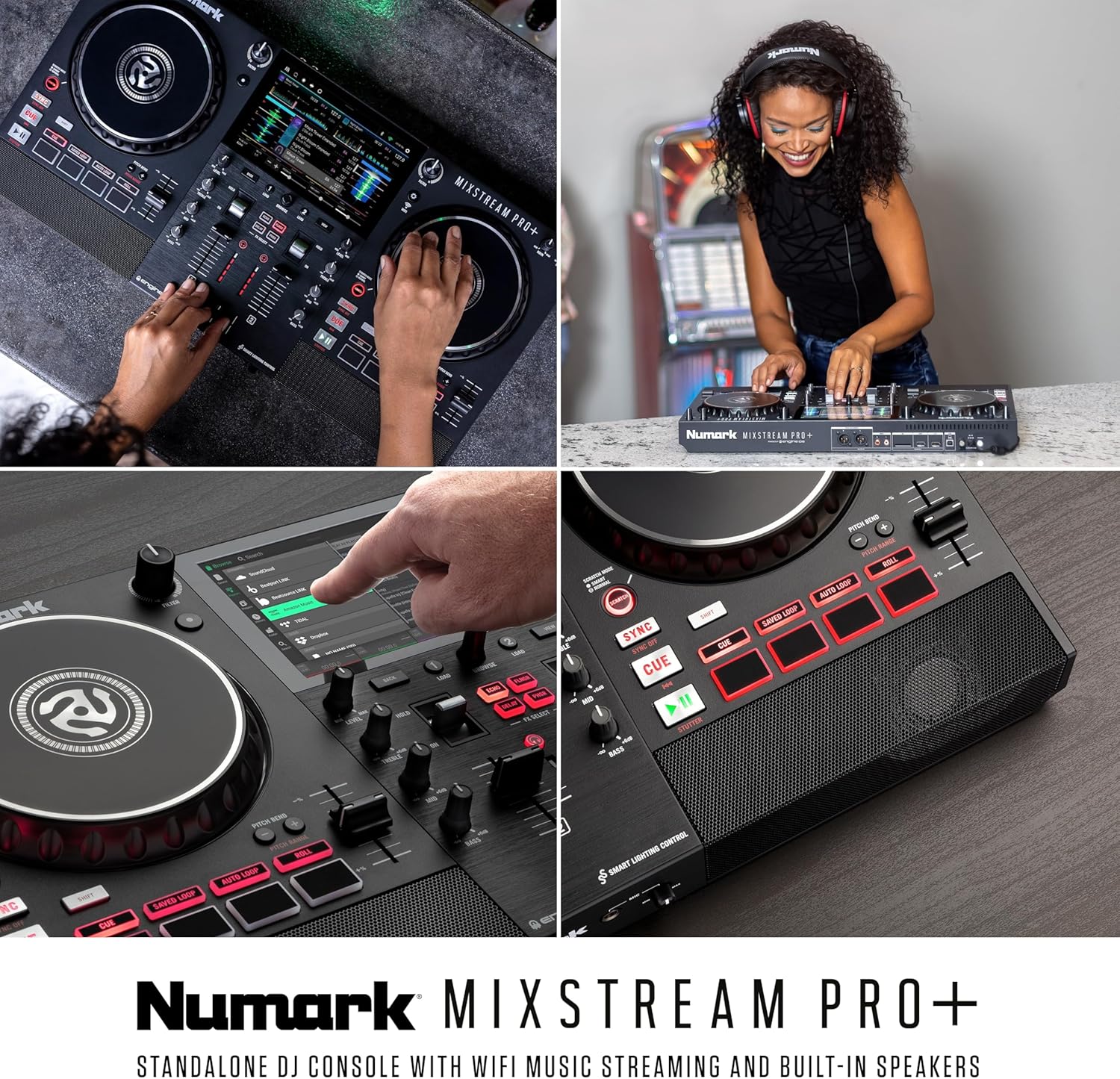
ചിത്രം 3: വിശദമായി view of the Mixstream Pro+ interface, highlighting the touchscreen and physical controls.
2. Mixer Section
- 3-ബാൻഡ് EQ: Each deck features dedicated knobs for Treble, Mid, and Bass to shape your sound.
- Channel Faders & Crossfader: Adjust individual channel volumes and blend between decks using the smooth channel faders and crossfader.
- ഫിൽറ്റർ നോബുകൾ: Large filter knobs on each deck allow for creative frequency manipulation.
- FX Section: Apply 4 built-in effects (Echo, Flanger, Delay, Phaser) with dedicated toggle switches for dynamic mixing.
3. Music Management & Streaming
The Mixstream Pro+ offers multiple ways to access your music:
- സ്ട്രീമിംഗ് സേവനങ്ങൾ: Log in to your preferred streaming platforms directly from the device. Browse charts, playlists, and search for tracks.
- USB/SD കാർഡ്: Play tracks directly from connected USB drives or SD cards.
- Dropbox Integration: Access your personal cloud music library via Dropbox.
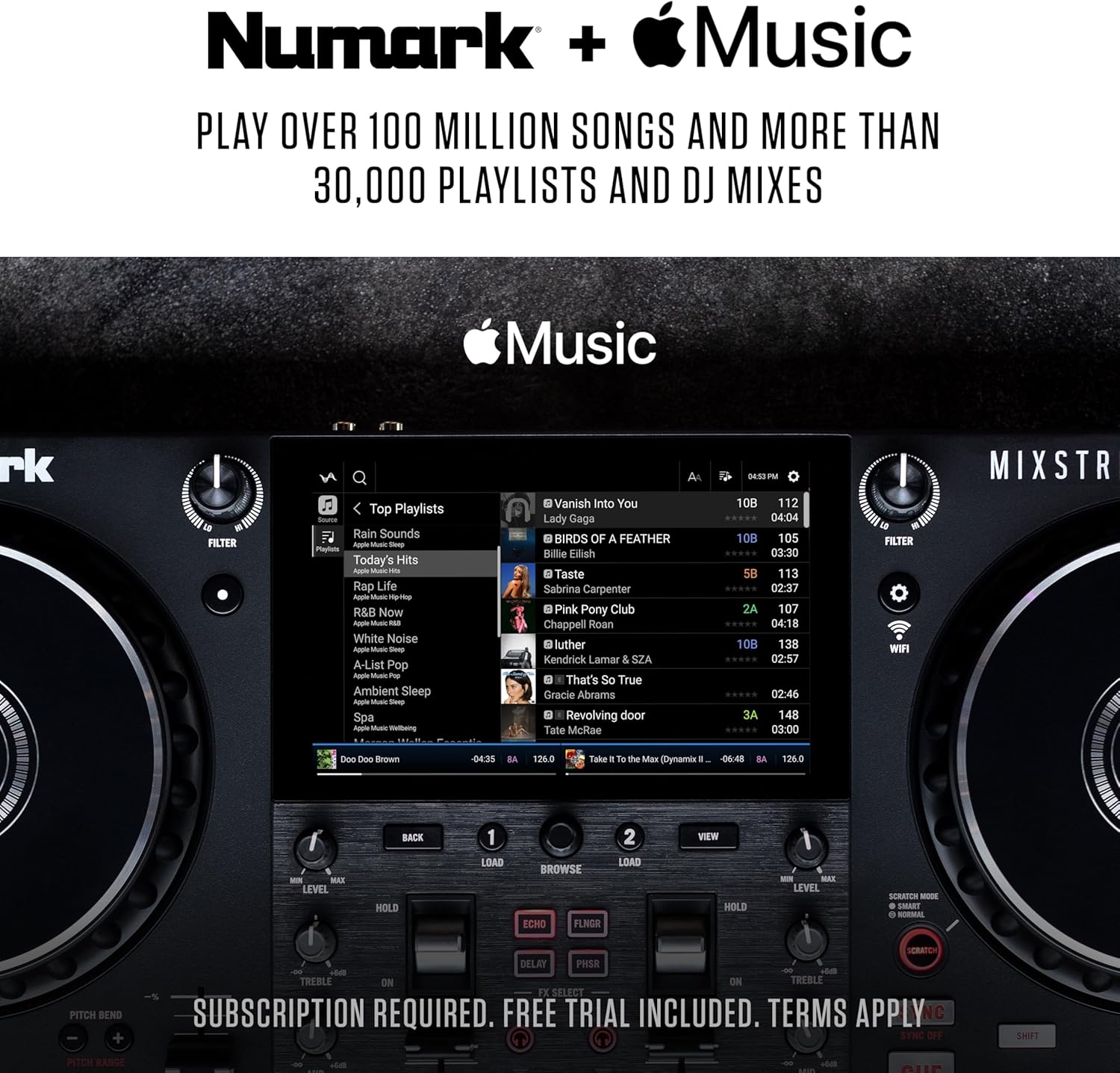
ചിത്രം 4: ഓവർview of the various music sources supported by the Mixstream Pro+.
Video 2: A demonstration of the Numark Mixstream Pro Standalone DJ Controller, highlighting its built-in speakers and standalone capabilities.
4. Engine DJ OS Features
The powerful Engine DJ OS provides advanced features for enhanced performance:
- Standalone Stems: Pre-render tracks with Engine DJ Desktop to access high-quality 4-part Stems (Vocal, Melody, Bass, Drums) directly on the controller.
- Phase Meter: Visualize track timing offset from the lead deck for precise beatmatching.
- പൊരുത്തം: Utilize powerful, customizable filtering to find your next track based on BPM, key, and genre.
- Fader Echo: Automatically apply echo effects by moving the channel faders.

Figure 5: The Mixstream Pro+ supports 4-part standalone stems for advanced mixing.
Video 3: An official promotional video for Engine DJ 3.3, showcasing new features like Fader Echo and improved track analysis.
5. Smart Lighting Control
Enhance your performance with integrated lighting control. Connect to Philips Hue, Nanoleaf, or DMX lighting systems and control them directly from the Mixstream Pro+ touchscreen.

Figure 6: The Mixstream Pro+ offers seamless integration with smart home lighting systems.
മെയിൻ്റനൻസ്
വൃത്തിയാക്കൽ
Regularly clean your Mixstream Pro+ to ensure optimal performance and longevity. Use the provided cleaning cloth or a soft, lint-free cloth. Avoid abrasive cleaners, solvents, or harsh chemicals. For the touchscreen, use a screen-specific cleaner if necessary, applied to the cloth, not directly to the screen.
സോഫ്റ്റ്വെയർ അപ്ഡേറ്റുകൾ
Keep your Engine DJ OS updated to access the latest features and improvements. Connect your Mixstream Pro+ to a Wi-Fi network and check for updates in the settings menu. Follow the on-screen instructions for installation.
ട്രബിൾഷൂട്ടിംഗ്
If you encounter any issues with your Mixstream Pro+, consider the following common solutions:
- ശക്തിയില്ല: പവർ അഡാപ്റ്റർ യൂണിറ്റിലേക്കും പ്രവർത്തിക്കുന്ന ഒരു പവർ ഔട്ട്ലെറ്റിലേക്കും സുരക്ഷിതമായി ബന്ധിപ്പിച്ചിട്ടുണ്ടെന്ന് ഉറപ്പാക്കുക.
- ശബ്ദമില്ല: Check all audio cable connections. Verify volume levels on the Mixstream Pro+, connected speakers, and headphones. Ensure the correct input source is selected if using external audio.
- വൈഫൈ കണക്റ്റിവിറ്റി പ്രശ്നങ്ങൾ: Confirm your Wi-Fi network is active and the password is correct. Try restarting your router and the Mixstream Pro+.
- USB/SD Card Not Recognized: Ensure the storage device is formatted correctly (FAT32/exFAT) and contains compatible music files. Try reinserting the device or using a different one.
- സോഫ്റ്റ്വെയർ തകരാറുകൾ: Restart the unit. If problems persist, check for available software updates.
For more detailed troubleshooting or persistent issues, refer to the official Numark support resources.
സ്പെസിഫിക്കേഷനുകൾ
| ഫീച്ചർ | വിശദാംശങ്ങൾ |
|---|---|
| ഇനത്തിൻ്റെ ഭാരം | 8.16 പൗണ്ട് |
| ഉൽപ്പന്ന അളവുകൾ | 11.7 x 22.2 x 2.95 ഇഞ്ച് |
| മാതൃരാജ്യം | തായ്വാൻ |
| ഇനം മോഡൽ നമ്പർ | MIXSTREAMPRO+ |
| പവർ ഉറവിടം | കോർഡഡ് ഇലക്ട്രിക് |
| ചാനലുകളുടെ എണ്ണം | 2 |
| കണക്റ്റിവിറ്റി ടെക്നോളജി | വൈഫൈ |
വാറൻ്റിയും പിന്തുണയും
Numark products are designed for reliability and performance. For detailed warranty information, please refer to the Safety & Warranty Information document included in your product box.
For further assistance, technical support, or to explore additional products, please visit the official Numark webസൈറ്റ് അല്ലെങ്കിൽ അവരുടെ ആമസോൺ സ്റ്റോർ: