Thank you for choosing the Xiaomi Electric Scooter 4. This manual provides essential information for the safe assembly, operation, and maintenance of your scooter. Please read this manual thoroughly before your first ride to ensure optimal performance and safety. Keep this manual for future reference.
2 സുരക്ഷാ വിവരങ്ങൾ
2.1 പൊതു സുരക്ഷാ മാർഗ്ഗനിർദ്ദേശങ്ങൾ
വാഹനമോടിക്കുമ്പോൾ എല്ലായ്പ്പോഴും ഹെൽമെറ്റും മറ്റ് സംരക്ഷണ ഉപകരണങ്ങളും (മുട്ട് പാഡുകൾ, എൽബോ പാഡുകൾ) ധരിക്കുക.
ഓരോ റൈഡിന് മുമ്പും എല്ലാ ഘടകങ്ങളും സുരക്ഷിതമായി ഉറപ്പിച്ചിട്ടുണ്ടെന്നും നല്ല പ്രവർത്തന ക്രമത്തിലാണെന്നും ഉറപ്പാക്കുക.
കനത്ത മഴയിലോ, മഞ്ഞുമൂടിയ സ്ഥലങ്ങളിലോ, മഞ്ഞുമൂടിയ പ്രതലങ്ങളിലോ വാഹനമോടിക്കരുത്.
പ്രാദേശിക ഗതാഗത നിയമങ്ങളും ചട്ടങ്ങളും പാലിക്കുക.
മറ്റ് വാഹനങ്ങളിൽ നിന്നും കാൽനടയാത്രക്കാരിൽ നിന്നും സുരക്ഷിതമായ അകലം പാലിക്കുക.
The maximum load capacity is 110 kg. Do not exceed this limit.
2.2 ബ്രേക്കിംഗ് സിസ്റ്റം
The Xiaomi Electric Scooter 4 is equipped with a dual braking system for enhanced safety:
പിൻ ഡിസ്ക് ബ്രേക്ക്: Provides strong and reliable stopping power.
Front E-ABS System: An electronic anti-lock braking system on the front wheel helps prevent wheel lock-up during sudden braking, improving control.
Regularly check the brake levers and cables for proper function and adjustment.
3. ഉൽപ്പന്നം കഴിഞ്ഞുview
The Xiaomi Electric Scooter 4 features an optimized design for a comfortable and stable ride. Key components include a robust aluminum frame, 10-inch tubeless tires, and an intuitive handlebar display.
ചിത്രം 3.1: വശം view of the Xiaomi Electric Scooter 4, showcasing its sleek black design and red cable accents.
ചിത്രം 3.2: മുൻഭാഗം view of the scooter, highlighting the front wheel and handlebar assembly.
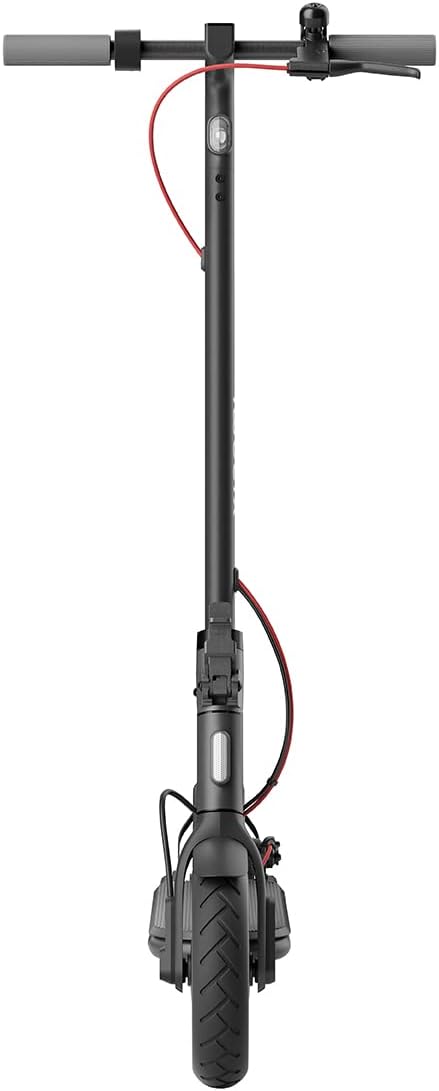
ചിത്രം 3.3: മുകളിൽ നിന്ന് താഴേക്ക് view of the handlebars, showing the central display, bell, and brake levers.
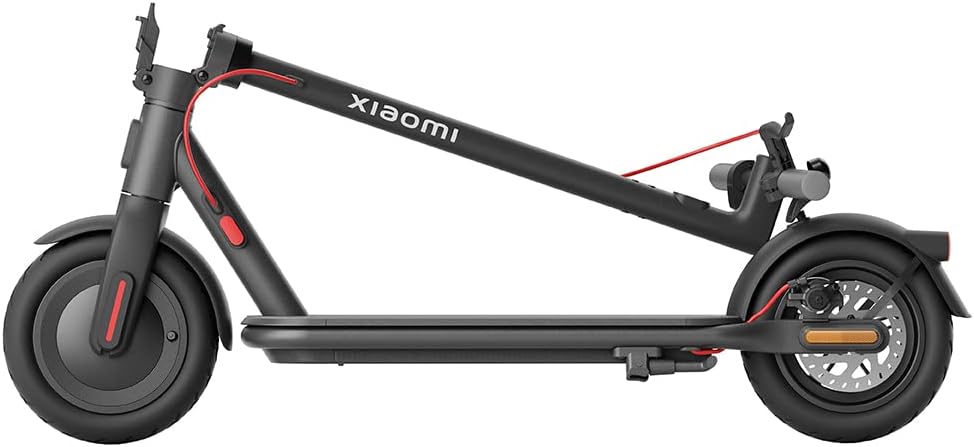
Figure 3.4: The scooter in its folded configuration, demonstrating its portability for storage or transport.
Figure 3.5: Size comparison illustrating the improved dimensions of the Xiaomi Electric Scooter 4 compared to the Electric Scooter 3, offering a more comfortable ride with increased length, height, handlebar width, and deck width.
Figure 3.6: Close-up of the 10-inch tubeless tires, designed for improved shock absorption, stability on uneven roads, and reduced puncture risk due to their deeper tread pattern.
Figure 3.7: Diagram illustrating the powerful 600W brushless Hall motor, enabling the scooter to reach speeds of up to 25 km/h and climb inclines of up to 16%.
Figure 3.8: Visual representation of the three adjustable speed levels: Pedestrian, Standard, and Sport, allowing riders to adapt to various riding conditions and preferences.
4. സജ്ജീകരണം
4.1 സ്കൂട്ടർ തുറക്കൽ
ഒരു പരന്ന പ്രതലത്തിൽ സ്കൂട്ടർ സ്ഥാപിക്കുക.
Locate the new front hinge mechanism near the base of the handlebar stem.
Release the locking mechanism by pulling the lever.
ഹാൻഡിൽബാർ സ്റ്റെം നേരെയുള്ള സ്ഥാനത്ത് ഉറപ്പിക്കുന്നത് വരെ ശ്രദ്ധാപൂർവ്വം ഉയർത്തുക. ലോക്കിംഗ് സംവിധാനം പൂർണ്ണമായും പ്രവർത്തനക്ഷമമാണെന്ന് ഉറപ്പാക്കുക.
Video 4.1: This video demonstrates the quick and easy folding and unfolding process of the Xiaomi Electric Scooter 4, highlighting the front hinge mechanism for convenient transport and storage.
4.2 പ്രാരംഭ ചാർജ്
ആദ്യ ഉപയോഗത്തിന് മുമ്പ്, സ്കൂട്ടറിന്റെ ബാറ്ററി പൂർണ്ണമായും ചാർജ് ചെയ്യുക.
Connect the charger to the charging port on the scooter and then to a power outlet.
ചാർജിംഗ് പൂർത്തിയാകുമ്പോൾ ചാർജറിലെ ഇൻഡിക്കേറ്റർ ലൈറ്റ് മാറും.
4.3 Tire Pressure Check
Although equipped with tubeless tires, it is recommended to check tire pressure regularly for optimal performance and safety. Refer to the tire sidewall for recommended pressure.
5. പ്രവർത്തന നിർദ്ദേശങ്ങൾ
5.1 പവർ ഓൺ/ഓഫ്
പവർ ഓൺ ചെയ്യാൻ, സ്ക്രീൻ പ്രകാശിക്കുന്നത് വരെ ഹാൻഡിൽബാർ ഡിസ്പ്ലേയിലെ പവർ ബട്ടൺ അമർത്തിപ്പിടിക്കുക.
പവർ ഓഫ് ചെയ്യാൻ, ഡിസ്പ്ലേ ഓഫാകും വരെ പവർ ബട്ടൺ അമർത്തിപ്പിടിക്കുക.
5.2 റൈഡിംഗ് മോഡുകൾ
The scooter offers three riding modes to suit different environments and preferences:
കാൽനട മോഡ്: Maximum speed of 6 km/h. Ideal for crowded areas or when walking alongside the scooter.
സ്റ്റാൻഡേർഡ് മോഡ്: Maximum speed of 20 km/h. Suitable for general urban commuting.
സ്പോർട്സ് മോഡ്: Maximum speed of 25 km/h. Provides maximum power and speed for experienced riders on open roads.
To switch between modes, short press the power button while the scooter is on.
5.3 സ്കൂട്ടർ ഓടിക്കുക
പ്രാരംഭ ആക്കം ലഭിക്കാൻ ഒരു കാൽ ഡെക്കിൽ വയ്ക്കുക, മറ്റേ കാൽ കൊണ്ട് തള്ളി നീക്കുക.
ചലിച്ചുകഴിഞ്ഞാൽ, മോട്ടോർ പ്രവർത്തിപ്പിക്കുന്നതിന് ആക്സിലറേറ്റർ ലിവർ സൌമ്യമായി അമർത്തുക.
ബാലൻസ് നിലനിർത്തുക, ഹാൻഡിൽബാറുകൾ ചാരിയും തിരിച്ചും ഡ്രൈവ് ചെയ്യുക.
To brake, gently squeeze the brake levers. For emergency stops, apply both brakes firmly.
5.4 Xiaomi Home App Integration
Connect your scooter to the Xiaomi Home app on your smartphone for advanced features and control:
View real-time riding data (speed, battery level, mileage).
Lock/unlock the scooter.
ഫേംവെയർ അപ്ഡേറ്റ് ചെയ്യുക.
Adjust settings and preferences.
The app provides a comprehensive overview and control over your scooter's functions.
6. പരിപാലനം
6.1 വൃത്തിയാക്കൽ
ഒരു സോഫ്റ്റ്, ഡി ക്ലീനർ ഉപയോഗിച്ച് സ്കൂട്ടർ തുടയ്ക്കുക.amp തുണി. ഉയർന്ന മർദ്ദമുള്ള വാട്ടർ ജെറ്റുകളോ കഠിനമായ ക്ലീനിംഗ് ഏജന്റുകളോ ഉപയോഗിക്കരുത്.
വൃത്തിയാക്കുന്നതിന് മുമ്പ് ചാർജിംഗ് പോർട്ട് കവർ സുരക്ഷിതമായി അടച്ചിട്ടുണ്ടെന്ന് ഉറപ്പാക്കുക.
6.2 ബാറ്ററി കെയർ
Charge the battery regularly, even if the scooter is not in use, to prolong its lifespan.
ബാറ്ററി പൂർണമായും കളയുന്നത് ഒഴിവാക്കുക.
നേരിട്ടുള്ള സൂര്യപ്രകാശത്തിൽ നിന്നും കടുത്ത താപനിലയിൽ നിന്നും മാറി തണുത്തതും വരണ്ടതുമായ സ്ഥലത്ത് സ്കൂട്ടർ സൂക്ഷിക്കുക.
6.3 ടയർ അറ്റകുറ്റപ്പണികൾ
Regularly inspect tires for wear, cuts, or punctures.
Maintain recommended tire pressure for optimal ride quality and tire longevity.
7. പ്രശ്നപരിഹാരം
If you encounter issues with your Xiaomi Electric Scooter 4, please refer to the following common troubleshooting tips:
പ്രശ്നം
സാധ്യമായ കാരണം
പരിഹാരം
സ്കൂട്ടർ ഓൺ ആകുന്നില്ല.
Low battery; loose connections
ബാറ്ററി ചാർജ് ചെയ്യുക; എല്ലാ കേബിൾ കണക്ഷനുകളും പരിശോധിക്കുക.
The Xiaomi Electric Scooter 4 comes with a limited warranty. For detailed warranty terms and conditions, please refer to the warranty card included with your product or visit the official Xiaomi website. For technical support, spare parts, or service inquiries, please contact Xiaomi customer service or an authorized service center.
You can also find additional resources and FAQs on the Xiaomi Home app or the official Xiaomi support page: www.mi.com/global/support
Ask a question about this manual
Ask about setup, troubleshooting, compatibility, parts, safety, or missing instructions. Manuals+ will review the question and use this page’s manual context to help answer it.