
1 സുരക്ഷാ വിവരങ്ങൾ
Please read this manual carefully before using the camera to ensure safe and proper operation. Keep this manual for future reference.
- ക്യാമറ വെള്ളത്തിലോ ഈർപ്പത്തിലോ തുറന്നുകാട്ടരുത്.
- ക്യാമറ താഴെയിടുകയോ ശക്തമായ ആഘാതങ്ങൾക്ക് വിധേയമാക്കുകയോ ചെയ്യരുത്.
- Do not attempt to disassemble or modify the camera. Repairs should only be performed by qualified personnel.
- നേരിട്ടുള്ള സൂര്യപ്രകാശത്തിൽ നിന്നും ഉയർന്ന താപനിലയിൽ നിന്നും ക്യാമറ അകറ്റി നിർത്തുക.
- Use only the specified battery type and charging cable.
- പ്രാദേശിക നിയന്ത്രണങ്ങൾ അനുസരിച്ച് ബാറ്ററികൾ ശരിയായി വിനിയോഗിക്കുക.
- Clean the camera lens and screen with a soft, dry cloth.
2. പാക്കേജ് ഉള്ളടക്കം
താഴെ ലിസ്റ്റ് ചെയ്തിരിക്കുന്ന എല്ലാ ഇനങ്ങളും നിങ്ങളുടെ പാക്കേജിൽ ഉൾപ്പെടുത്തിയിട്ടുണ്ടെന്ന് ഉറപ്പാക്കുക:
- Andoer Digital Camera Body
- Lithium Battery (3.7V 550mAh)
- യുഎസ്ബി ചാർജിംഗ് കേബിൾ
- സഞ്ചി
- ഉപയോക്തൃ മാനുവൽ (ഈ പ്രമാണം)

Image: Contents of the Andoer Digital Camera package, showing the camera, wrist strap, USB charging cable, carry bag, and user manual.
3. ഉൽപ്പന്നം കഴിഞ്ഞുview
3.1 ഫ്രണ്ട് View

ചിത്രം: മുൻഭാഗം view of the Andoer Digital Camera, displaying the lens, built-in flash, and indicating 2.7" TFT screen and 18 Megapixels.
3.2 പിൻഭാഗം View (Display and Controls)
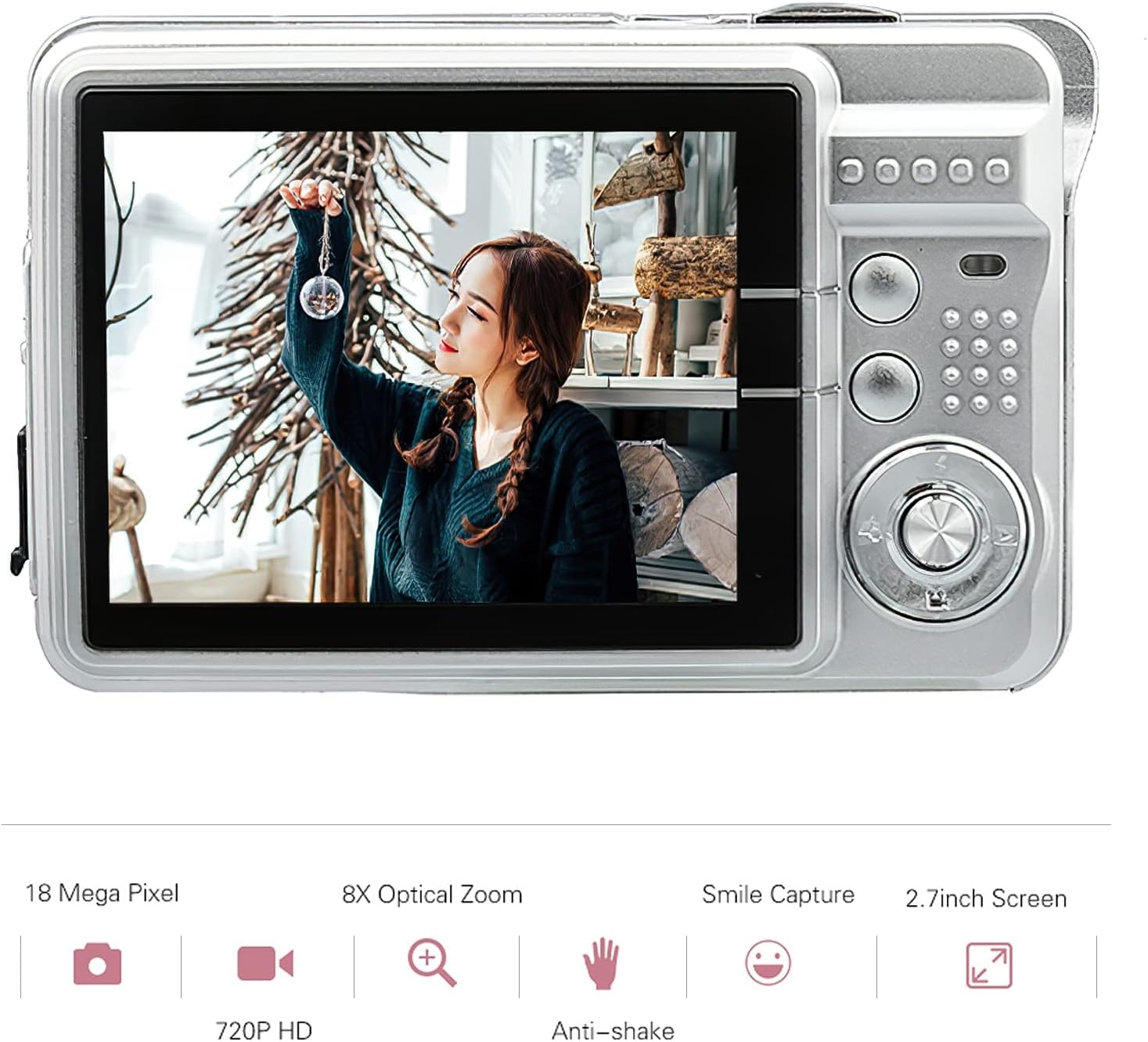
ചിത്രം: പിൻഭാഗം view of the Andoer Digital Camera, featuring the 2.7-inch TFT display and various control buttons on the right side.
The camera features a 2.7-inch TFT display for viewing photos and videos, along with intuitive controls for navigation and settings adjustment.
4. സജ്ജീകരണം
4.1 ബാറ്ററി ചാർജ് ചെയ്യുന്നു
- Open the battery compartment cover on the side of the camera.
- Insert the provided Lithium battery (3.7V 550mAh) into the compartment, ensuring correct polarity.
- ബാറ്ററി കമ്പാർട്ട്മെൻ്റ് കവർ സുരക്ഷിതമായി അടയ്ക്കുക.
- Connect the camera to a USB power source (e.g., computer, USB wall adapter) using the supplied USB charging cable.
- The charging indicator light will illuminate. Charging is complete when the light turns off or changes color (refer to camera display for battery status).
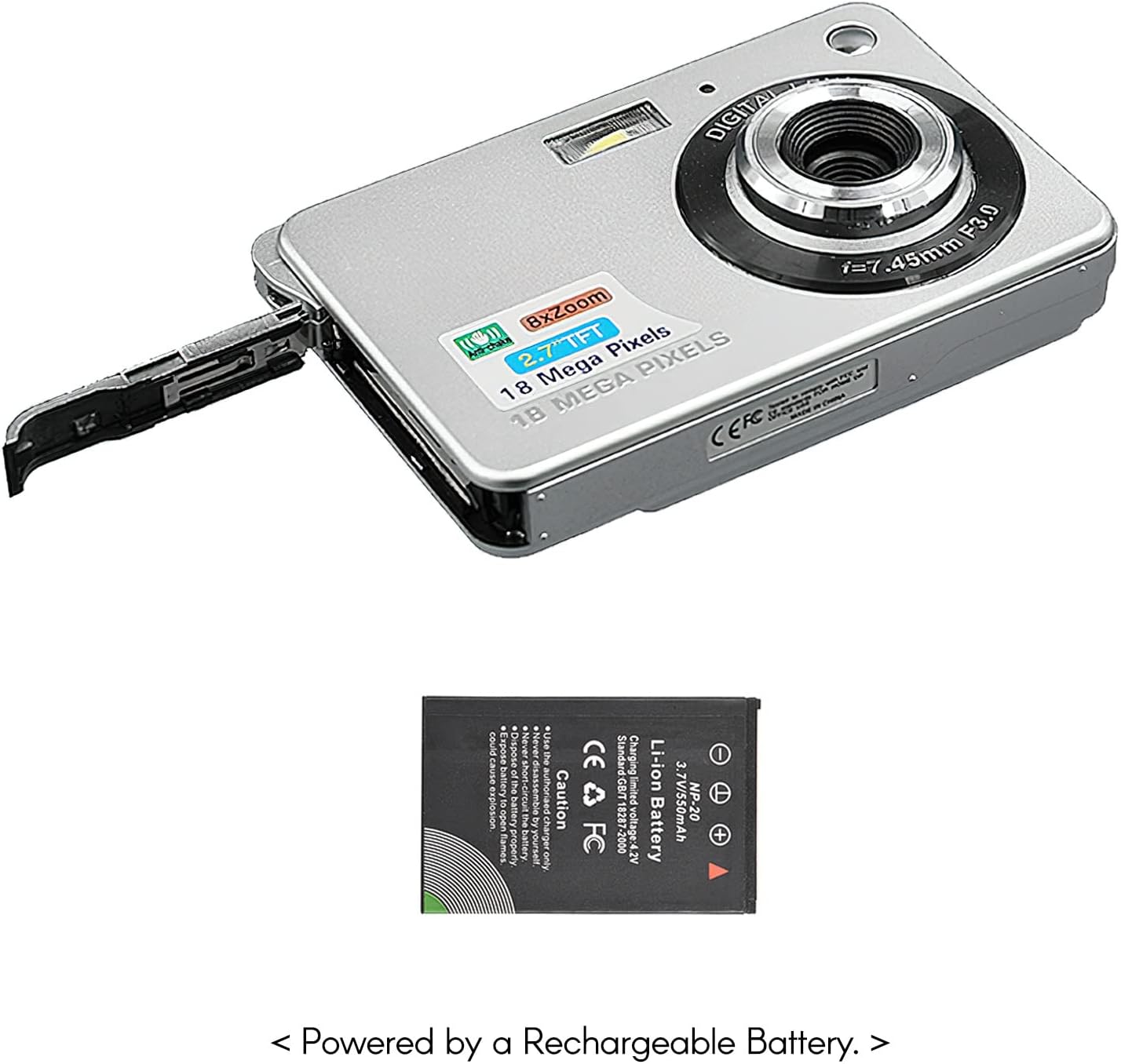
ചിത്രം: വശം view of the camera with the battery compartment open, illustrating how to insert the rechargeable lithium battery.
4.2 Inserting a Memory Card (Not Included)
This camera supports SD memory cards up to 32GB. A memory card is required to save photos and videos.
- മെമ്മറി കാർഡ് സ്ലോട്ട് കണ്ടെത്തുക, സാധാരണയായി ബാറ്ററി കമ്പാർട്ടുമെന്റിന് സമീപം.
- Insert the SD card with the metal contacts facing down (or as indicated by the diagram near the slot) until it clicks into place.
- നീക്കം ചെയ്യാൻ, കാർഡ് പുറത്തേക്ക് വരുന്നത് വരെ സൌമ്യമായി അകത്തേക്ക് തള്ളുക.
5. പ്രവർത്തന നിർദ്ദേശങ്ങൾ
5.1 പവർ ഓൺ/ഓഫ്
Press and hold the Power button (usually located on the top or side) to turn the camera on or off.
5.2 ഫോട്ടോ എടുക്കൽ
- ക്യാമറ ഓണാക്കുക.
- Frame your shot using the 2.7-inch TFT display.
- Press the Shutter button (typically on top) halfway down to focus, then press fully to capture the image.

Image: The camera's screen showing a captured image, demonstrating the 18 Megapixel photo capability.
5.3 വീഡിയോ റെക്കോർഡിംഗ്
- ക്യാമറ ഓണാക്കുക.
- Switch to video recording mode (usually via a mode button or menu option).
- Press the Record button (often marked with a red dot) to start recording. Press again to stop.

Image: The camera's screen displaying a video playback, illustrating its 720P high-definition video recording function.
5.4 ഡിജിറ്റൽ സൂം
The camera features 8X digital zoom. Use the zoom buttons (often labeled 'W' for Wide and 'T' for Telephoto) to adjust the zoom level.

Image: A visual representation of the 8x digital zoom capability, showing a scene at 1x magnification and then zoomed in at 8x.
5.5 മെനു നാവിഗേഷൻ
Press the 'Menu' button to access camera settings. Use the directional buttons to navigate and the 'OK' or 'Set' button to confirm selections. Available settings include:
- സ്വയം-ടൈമർ: Off/ 2 sec/ 5 sec/ 10 sec
- സമ്പർക്കം: EV-3 to EV+3
- വൈറ്റ് ബാലൻസ്: Auto/ Daylight/ Cloudy/ Incandescent/ Fluorescent
- സീൻ മോഡുകൾ: Auto/ Night Portrait/ Night Scenery/ Portrait/ Scenery/ Sport/ Party/ Beach/ High sensitivity
- മറ്റ് സവിശേഷതകൾ: Anti-Shake, Face Detect, Smile Capture
6. പരിപാലനം
6.1 ക്യാമറ വൃത്തിയാക്കൽ
- ക്യാമറ ബോഡി വൃത്തിയാക്കാൻ മൃദുവായ, ലിന്റ് രഹിത തുണി ഉപയോഗിക്കുക.
- For the lens and screen, use a specialized lens cleaning cloth and solution if necessary. Avoid abrasive materials.
- Do not use organic solvents to clean the camera.
6.2 ബാറ്ററി കെയർ
- ആദ്യ ഉപയോഗത്തിന് മുമ്പ് ബാറ്ററി പൂർണ്ണമായും ചാർജ് ചെയ്യുക.
- ക്യാമറ കൂടുതൽ നേരം ഉപയോഗിക്കില്ലെങ്കിൽ, ബാറ്ററി നീക്കം ചെയ്യുക.
- തണുത്തതും വരണ്ടതുമായ സ്ഥലത്ത് ബാറ്ററികൾ സൂക്ഷിക്കുക.
7. പ്രശ്നപരിഹാരം
| പ്രശ്നം | സാധ്യമായ കാരണം | പരിഹാരം |
|---|---|---|
| ക്യാമറ പവർ ഓൺ ചെയ്യുന്നില്ല. | ബാറ്ററി തീർന്നു അല്ലെങ്കിൽ തെറ്റായി ചേർത്തിരിക്കുന്നു. | ബാറ്ററി ചാർജ് ചെയ്യുക. ബാറ്ററി ശരിയായ പോളാരിറ്റിയോടെയാണ് ചേർത്തിരിക്കുന്നതെന്ന് ഉറപ്പാക്കുക. |
| ഫോട്ടോകൾ എടുക്കാനോ വീഡിയോകൾ റെക്കോർഡ് ചെയ്യാനോ കഴിയില്ല. | മെമ്മറി കാർഡ് ചേർത്തിട്ടില്ല അല്ലെങ്കിൽ കാർഡ് നിറഞ്ഞിട്ടില്ല/കേടായിട്ടില്ല. | Insert a compatible SD card. Delete unnecessary files or format the card (this will erase all data). |
| ചിത്രങ്ങൾ അവ്യക്തമാണ്. | Lens is dirty, insufficient light, or camera shake. | Clean the lens. Use the flash in low light. Hold the camera steady or use anti-shake feature. |
| ക്യാമറ മരവിക്കുന്നു അല്ലെങ്കിൽ പ്രതികരിക്കുന്നില്ല. | താൽക്കാലിക സോഫ്റ്റ്വെയർ തകരാർ. | ക്യാമറ പുനഃസജ്ജമാക്കാൻ ബാറ്ററി നീക്കം ചെയ്ത് വീണ്ടും ചേർക്കുക. |
8 സ്പെസിഫിക്കേഷനുകൾ
| ഫീച്ചർ | വിശദാംശങ്ങൾ |
|---|---|
| മോഡൽ | IAT4319650447530BC |
| ഇമേജ് സെൻസർ | CMOS സെൻസർ |
| പ്രദർശിപ്പിക്കുക | 2.7 ഇഞ്ച് TFT LCD |
| ഫോട്ടോ റെസല്യൂഷൻ | 18 മെഗാപിക്സലുകൾ വരെ |
| വീഡിയോ റെസല്യൂഷൻ | 1280x720 (720P), 720x480, 640x480 (VGA), 320x240 (QVGA) |
| ഡിജിറ്റൽ സൂം | 8X |
| ഇമേജ് സ്റ്റെബിലൈസേഷൻ | ഡിജിറ്റൽ ആന്റി-ഷേക്ക് |
| എക്സ്പോഷർ നഷ്ടപരിഹാരം | EV-3 to EV+3 |
| വൈറ്റ് ബാലൻസ് | Auto/ Daylight/ Cloudy/ Incandescent/ Fluorescent |
| File ഫോർമാറ്റ് | JPEG (Photo), AVI (Video) |
| സ്റ്റോറേജ് മീഡിയ | SD കാർഡ് (32GB വരെ, ഉൾപ്പെടുത്തിയിട്ടില്ല) |
| വൈദ്യുതി വിതരണം | 1 * Lithium battery (3.7V 550mAh) |
| പിന്തുണയ്ക്കുന്ന സിസ്റ്റം | Windows XP, VISTA, WIN7, MAC |
| ഇനത്തിൻ്റെ വലിപ്പം | 9 * 6 * 2 സെ.മീ / 3.5 * 2.4 * 0.8 ഇഞ്ച് |
| ഇനത്തിൻ്റെ ഭാരം | 90g / 3.2oz |
9. വാറൻ്റിയും പിന്തുണയും
Andoer products are designed and manufactured to the highest quality standards. For warranty information and customer support, please refer to the documentation provided at the time of purchase or visit the official Andoer webസൈറ്റ്.
If you encounter any issues not covered in this manual, please contact Andoer customer service for assistance.
ശ്രദ്ധിക്കുക: മുൻകൂർ അറിയിപ്പ് കൂടാതെ സ്പെസിഫിക്കേഷനുകൾ മാറ്റത്തിന് വിധേയമാണ്.