
ALLIMITY RC43157
ALLIMITY RC43157 Replacement Remote Control User Manual
Model: RC43157 | Brand: ALLIMITY
1. ആമുഖം
The ALLIMITY RC43157 is a replacement remote control designed to operate various Westwood and EDENWOOD television models. This remote control is ready to use without any programming required; simply insert the batteries, and it will function immediately, replicating all the essential functions of your original remote.
2. സജ്ജീകരണവും ബാറ്ററി ഇൻസ്റ്റാളേഷനും
Follow these simple steps to begin using your ALLIMITY RC43157 replacement remote control:
- ബാറ്ററി കമ്പാർട്ട്മെന്റ് തുറക്കുക: Locate the battery compartment cover on the back of the remote control. Slide or press the latch to open it.
- ബാറ്ററികൾ ചേർക്കുക: Insert two new AAA alkaline batteries (not included) into the compartment. Ensure the positive (+) and negative (-) terminals of the batteries match the markings inside the compartment.
- കമ്പാർട്ട്മെന്റ് അടയ്ക്കുക: ബാറ്ററി കമ്പാർട്ട്മെന്റ് കവർ മാറ്റിസ്ഥാപിക്കുക, അത് സുരക്ഷിതമായി സ്ഥലത്ത് ക്ലിക്ക് ചെയ്യുന്നുണ്ടെന്ന് ഉറപ്പാക്കുക.
- റിമോട്ട് പരീക്ഷിക്കുക: Point the remote control towards your compatible Westwood or EDENWOOD TV and press the Power button. The TV should respond. No additional programming is required.

ചിത്രം 1: മുൻഭാഗം view of the ALLIMITY RC43157 remote control. This image displays the full layout of buttons, including number keys, navigation, volume, channel, and dedicated app buttons.
3. Operating Instructions (Button Functions)
The ALLIMITY RC43157 remote control features a standard layout for easy operation of your television. Below is a description of the main button functions:
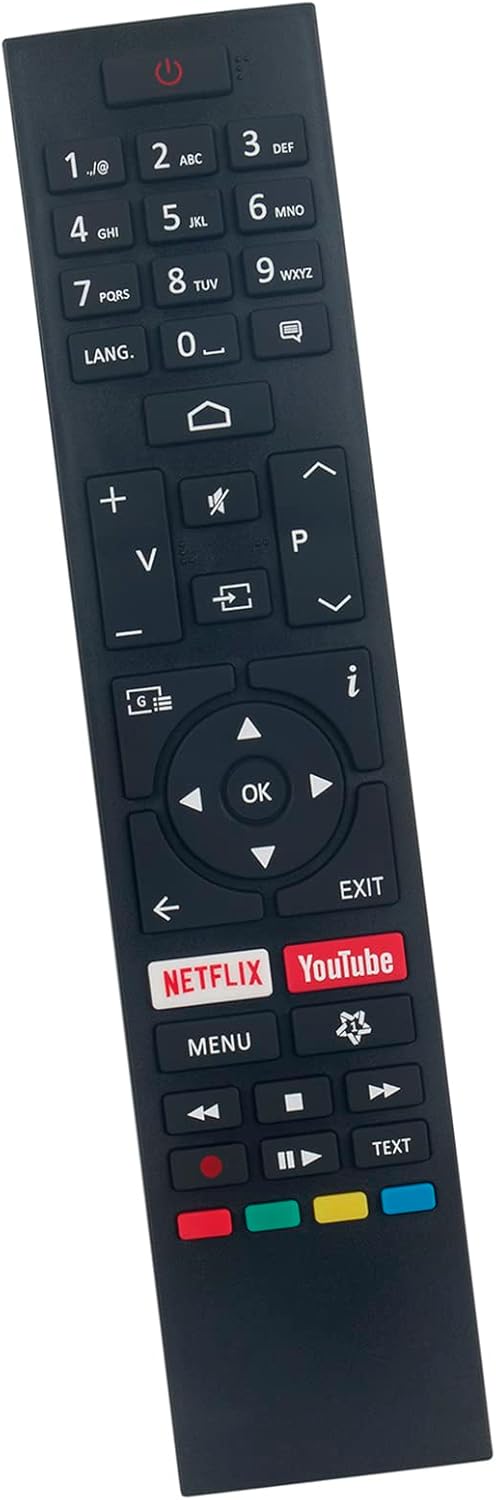
ചിത്രം 2: ആംഗിൾഡ് view of the ALLIMITY RC43157 remote control, highlighting the ergonomic design and button placement.
- ⏻ Power: ടിവി ഓണാക്കുകയോ ഓഫാക്കുകയോ ചെയ്യുന്നു.
- നമ്പർ ബട്ടണുകൾ (0-9): Selects channels directly or enters numerical input.
- ഭാഷ: ഓഡിയോ ഭാഷ അല്ലെങ്കിൽ സബ്ടൈറ്റിൽ ഓപ്ഷനുകൾ മാറ്റുന്നു.
- ⌂ Home: ടിവിയുടെ പ്രധാന മെനു അല്ലെങ്കിൽ സ്മാർട്ട് ടിവി ഇന്റർഫേസ് ആക്സസ് ചെയ്യുന്നു.
- V+/V- (Volume Up/Down): ശബ്ദ വോളിയം ക്രമീകരിക്കുന്നു.
- 🔇 Mute: ടിവി ശബ്ദം മ്യൂട്ട് ചെയ്യുകയോ അൺമ്യൂട്ട് ചെയ്യുകയോ ചെയ്യുന്നു.
- ⎌ Input/Source: ഇൻപുട്ട് ഉറവിടം (HDMI, AV, മുതലായവ) തിരഞ്ഞെടുക്കുന്നു.
- P+/P- (Channel Up/Down): ടിവി ചാനലുകൾ മാറ്റുന്നു.
- i (Info): നിലവിലെ പ്രോഗ്രാമിനെക്കുറിച്ചുള്ള വിവരങ്ങൾ പ്രദർശിപ്പിക്കുന്നു.
- ◀ ▶ ▲ ▼ (Navigation Arrows): മെനുകളിലൂടെയും ഓപ്ഷനുകളിലൂടെയും നാവിഗേറ്റ് ചെയ്യുന്നു.
- ശരി: മെനുകളിലെ തിരഞ്ഞെടുപ്പുകൾ സ്ഥിരീകരിക്കുന്നു.
- പുറത്ത്: നിലവിലെ മെനുവിൽ നിന്നോ പ്രവർത്തനത്തിൽ നിന്നോ പുറത്തുകടക്കുന്നു.
- നെറ്റ്ഫ്ലിക്സ്: നെറ്റ്ഫ്ലിക്സ് ആപ്ലിക്കേഷനിലേക്കുള്ള നേരിട്ടുള്ള ആക്സസ്.
- YouTube: YouTube ആപ്ലിക്കേഷനിലേക്ക് നേരിട്ട് പ്രവേശനം.
- മെനു: Opens the TV's main settings menu.
- ⏪, ⏸, ⏹, ⏩ (Playback Controls): Controls media playback (Rewind, Play/Pause, Stop, Fast Forward).
- വർണ്ണ ബട്ടണുകൾ (ചുവപ്പ്, പച്ച, മഞ്ഞ, നീല): Functions vary depending on the TV model and current on-screen prompts.
- വാചകം: Accesses teletext services (if supported by TV).
4. അനുയോജ്യമായ ടിവി മോഡലുകൾ
The ALLIMITY RC43157 remote control is compatible with the following Westwood and EDENWOOD television models:
- EDENWOOD ED32C01HD-VE
- EDENWOOD ED50C02UHD-VE
- EDENWOOD ED43C00UHD-VE
- EDENWOOD ED43C01UHD-VE
- EDENWOOD ED50C00UHD-VE
- EDENWOOD ED50C01UHD-VE
- EDENWOOD ED55C00UHD-VE
- EDENWOOD ED55C01UHD-VE
- EDENWOOD ED65C01UHD-VE
- Westwood WTA55UHD20B
- Westwood WTA58UHD20B
This remote is designed to replace your original remote for these specific models without the need for complex setup procedures.
5. പ്രശ്നപരിഹാരം
നിങ്ങളുടെ റിമോട്ട് കൺട്രോളിൽ പ്രശ്നങ്ങൾ അനുഭവപ്പെടുകയാണെങ്കിൽ, ഇനിപ്പറയുന്ന പൊതുവായ ട്രബിൾഷൂട്ടിംഗ് ഘട്ടങ്ങൾ പരിശോധിക്കുക:
- റിമോട്ട് പ്രതികരിക്കുന്നില്ല:
- ശരിയായ പോളാരിറ്റി (+/-) ഉപയോഗിച്ച് ബാറ്ററികൾ ശരിയായി ചേർത്തിട്ടുണ്ടെന്ന് ഉറപ്പാക്കുക.
- പഴയ ബാറ്ററികൾ പുതിയ AAA ആൽക്കലൈൻ ബാറ്ററികൾ ഉപയോഗിച്ച് മാറ്റിസ്ഥാപിക്കുക.
- റിമോട്ട് കൺട്രോളിനും ടിവിയുടെ ഇൻഫ്രാറെഡ് സെൻസറിനും ഇടയിൽ എന്തെങ്കിലും തടസ്സങ്ങളുണ്ടോയെന്ന് പരിശോധിക്കുക.
- Ensure you are within the effective operating range (up to 10 meters) and pointing the remote directly at the TV.
- പ്രവർത്തിക്കാത്ത പ്രത്യേക ബട്ടണുകൾ:
- Press the button firmly. Sometimes, debris can get under the button.
- Remove and reinsert the batteries to reset the remote.
- If only one or a few buttons are consistently unresponsive, the remote may be faulty.
- ഇടയ്ക്കിടെയുള്ള പ്രവർത്തനം:
- This can often be caused by low battery power. Replace the batteries.
- Ensure there are no strong light sources (like direct sunlight or bright fluorescent lights) interfering with the IR signal.
ഈ ഘട്ടങ്ങൾ പരീക്ഷിച്ചതിനുശേഷവും പ്രശ്നം നിലനിൽക്കുകയാണെങ്കിൽ, കൂടുതൽ സഹായത്തിനായി വിൽപ്പനക്കാരനെ ബന്ധപ്പെടുക.
6. ഉൽപ്പന്ന സവിശേഷതകൾ
| ബ്രാൻഡ് | അലിമിറ്റി |
| മോഡലിൻ്റെ പേര് | RC43157 |
| പ്രത്യേക ഫീച്ചർ | പ്രോഗ്രാമിംഗ് ആവശ്യമില്ല |
| നിറം | കറുപ്പ് |
| കണക്റ്റിവിറ്റി ടെക്നോളജി | ഇൻഫ്രാറെഡ് |
| പരമാവധി പരിധി | 10 മീറ്റർ |
| ബാറ്ററി തരം | ആൽക്കലൈൻ (AAA, ഉൾപ്പെടുത്തിയിട്ടില്ല) |
| സ്മാർട്ട് ഹോം അനുയോജ്യത | സ്മാർട്ട് ഹോം സിസ്റ്റങ്ങളുമായി പൊരുത്തപ്പെടുന്നില്ല |
| മാതൃരാജ്യം | ചൈന |
7. വാറൻ്റിയും പിന്തുണയും
This product is covered by a standard manufacturer's warranty. For specific warranty details, duration, and terms, please refer to the information provided at the time of purchase or contact the seller directly.
For technical support, troubleshooting assistance beyond what is provided in this manual, or inquiries regarding product defects, please reach out to the ALLIMITY customer support or the retailer from whom you purchased the remote control. Please have your purchase details and model number (RC43157) ready when contacting support.
Ask a question about this manual
Ask about setup, troubleshooting, compatibility, parts, safety, or missing instructions. Manuals+ will review the question and use this page’s manual context to help answer it.