
1. ആമുഖം
The HiBy FD1 is a portable USB Digital-to-Analog Converter (DAC) and headphone amplifier designed to enhance audio quality from various devices. It features dual ES9118 audio chips for high-resolution sound and supports both single-ended and balanced headphone outputs.
This device is compatible with a wide range of operating systems and devices, including Android, iOS, Windows, macOS, smartphones, computers, tablets, and digital audio players.

Image 1: The HiBy FD1 USB Headphone Ampലിഫയർ, ഷോക്asing അതിന്റെ ഒതുക്കമുള്ള ഡിസൈൻ.
പ്രധാന സവിശേഷതകൾ:
- Dual ES9118 Audio Chips: Provides high-resolution audio and enhanced decoding capabilities.
- Dual Crystal Oscillators: Lowers jitter and improves digital audio accuracy for 44.1x and 48x clocked audio signals.
- ബഹുമുഖ ഔട്ട്പുട്ടുകൾ: Includes 3.5mm single-ended (SE) and 2.5mm balanced headphone outputs.
- വിശാലമായ അനുയോജ്യത: Supports multiple system platforms including Android, iOS, Windows, and macOS.
- Lossless Audio Support: Compatible with most lossless music formats, including native DSD128 decoding.
- Hardware USB Mode Switch: Allows switching between USB Audio 1.0 and 2.0 standards.
- Driverless Plug-and-Play: No charging required; automatically powers on when connected via USB and shuts down when unplugged.
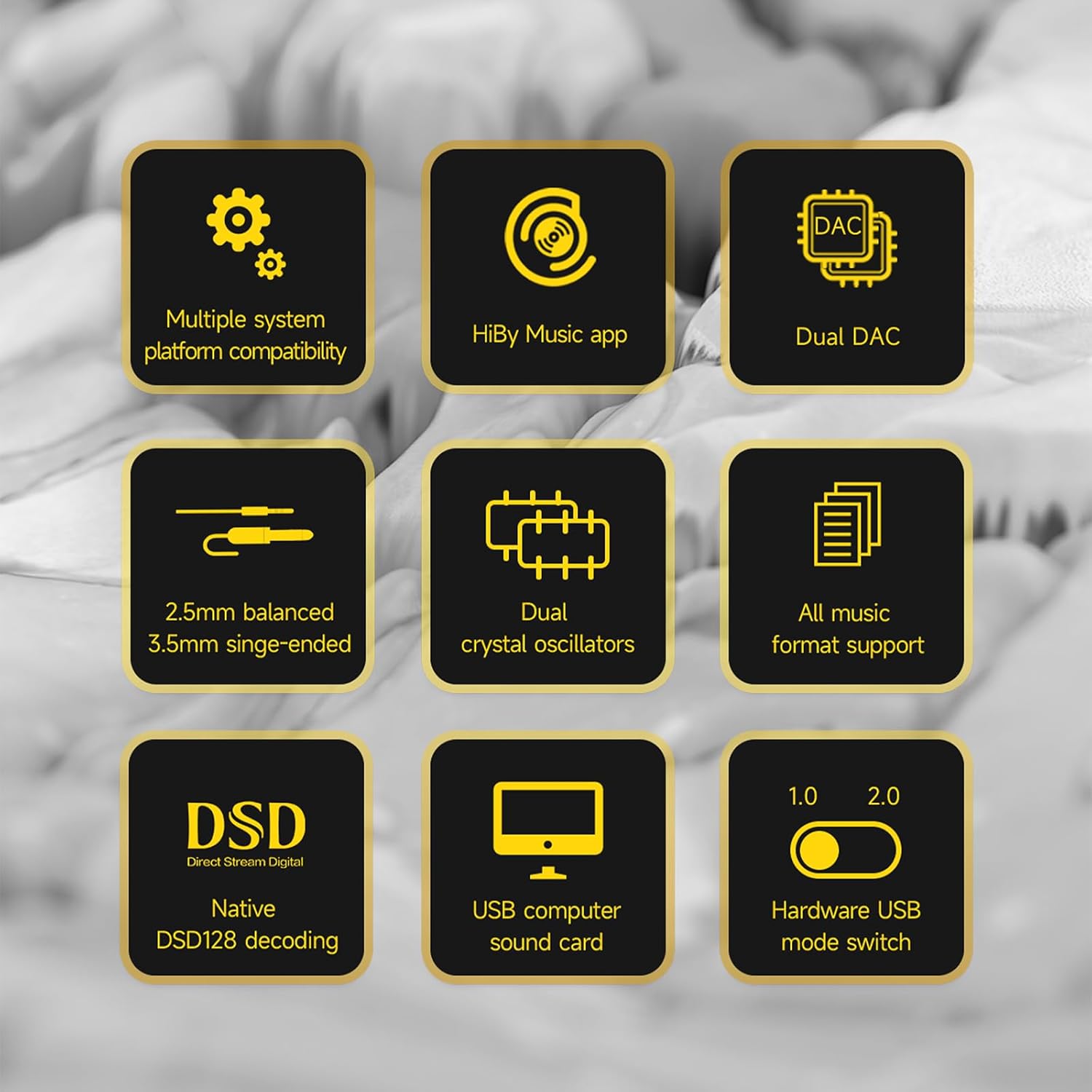
Image 2: A visual representation of the HiBy FD1's key features, including dual DAC, DSD support, and multiple system compatibility.
2. സജ്ജീകരണം
2.1 ഉപകരണങ്ങളിലേക്ക് ബന്ധിപ്പിക്കുന്നു
The HiBy FD1 connects to your source device (computer, smartphone, tablet) via its USB Type-C port. It is designed for driverless plug-and-play operation.
- For Android/Windows/macOS: Connect the FD1 using a compatible USB Type-C cable.
- For iOS Devices (iPhone/iPad): A Camera Connection Kit (CCK) cable is required for proper functionality.

Image 3: The HiBy FD1 connected to various devices, illustrating its broad compatibility with smartphones, tablets, and computers.
2.2 USB Mode Switch
The FD1 features a hardware switch to select between USB Audio 1.0 and USB Audio 2.0 standards. This switch is located on the side of the device.
- USB Audio 1.0: Provides driverless plug-and-play functionality on Windows 7/8/10. DSD audio is not supported in this mode.
- USB Audio 2.0: Offers driverless plug-and-play on Windows 10 (build 1703 and later). For DSD support on Windows, an additional driver installation may be required.

Image 4: Close-up of the HiBy FD1's hardware USB mode switch, allowing selection between 1.0 and 2.0 standards.
2.3 പവർ ഓൺ/ഓഫ്
The HiBy FD1 automatically powers on when connected to a USB source and automatically shuts down when disconnected. No external power button or charging is required as it draws power directly from the connected device.

Image 5: The HiBy FD1 connected to a smartphone and a laptop, demonstrating its plug-and-play functionality without external charging.
3. പ്രവർത്തന നിർദ്ദേശങ്ങൾ
3.1 ഹെഡ്ഫോണുകൾ ബന്ധിപ്പിക്കുന്നു
The HiBy FD1 offers two headphone output options:
- 3.5mm Single-Ended (SE) Output: For standard headphones.
- 2.5 എംഎം ബാലൻസ്ഡ് ഔട്ട്പുട്ട്: For headphones with a balanced connection, offering improved audio performance.
Connect your headphones to the appropriate port on the FD1.
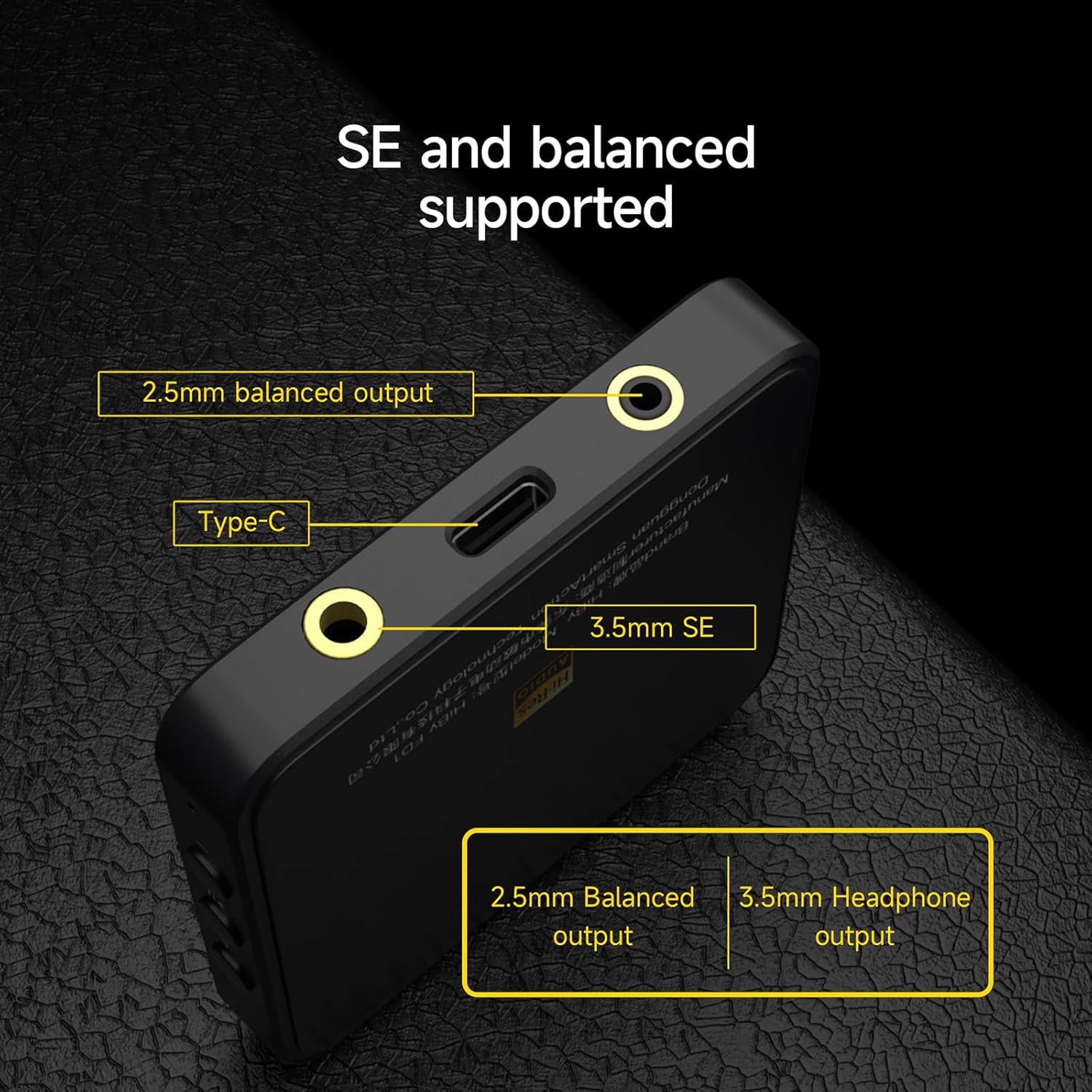
ചിത്രം 6: വിശദമായ view of the HiBy FD1's ports, highlighting the 2.5mm balanced output, Type-C input, and 3.5mm single-ended output.
3.2 Playback and Controls
Once connected, the FD1 acts as an external sound card for your device. Play audio through your preferred music application. The FD1 features hardware buttons for basic playback control:
- വോളിയം +: Tap to increase volume.
- പ്ലേ/താൽക്കാലികമായി നിർത്തുക: ഓഡിയോ പ്ലേ ചെയ്യാനോ താൽക്കാലികമായി നിർത്താനോ ടാപ്പ് ചെയ്യുക.
- വ്യാപ്തം -: Tap to decrease volume.
3.3 ഇൻഡിക്കേറ്റർ ലൈറ്റ് സ്റ്റാറ്റസ്
The FD1 includes an indicator light that changes color to reflect the current audio status and sample നിരക്ക്:

Image 7: The HiBy FD1's hardware buttons (Volume+, Play/Pause, Volume-) and a table explaining the indicator light colors for different audio statuses.
| നില | ചുവപ്പ് | പച്ച | നീല | വെള്ള |
|---|---|---|---|---|
| Connected, not playing | ||||
| Playing at PCM 32k-48kHz | അതെ | |||
| Playing at PCM 88.2k-192kHz | അതെ | |||
| Playing at DSD | അതെ |
Note: The table indicates which color is active for each status.
3.4 HiBy Music App
For optimal compatibility and advanced features, it is recommended to use the HiBy Music app, which offers an exclusive HQ USB Audio Access mode.
4. പരിപാലനം
To ensure the longevity and optimal performance of your HiBy FD1, follow these general maintenance guidelines:
- മൃദുവായതും ഉണങ്ങിയതുമായ തുണി ഉപയോഗിച്ച് തുടച്ച് ഉപകരണം വൃത്തിയായി സൂക്ഷിക്കുക. കഠിനമായ രാസവസ്തുക്കളോ ഉരച്ചിലുകളോ ഉള്ള വസ്തുക്കൾ ഉപയോഗിക്കുന്നത് ഒഴിവാക്കുക.
- നേരിട്ടുള്ള സൂര്യപ്രകാശം, തീവ്രമായ താപനില, ഉയർന്ന ഈർപ്പം എന്നിവയിൽ നിന്ന് മാറി തണുത്തതും വരണ്ടതുമായ സ്ഥലത്ത് ഉപകരണം സൂക്ഷിക്കുക.
- ഉപകരണം ഉപേക്ഷിക്കുകയോ ശക്തമായ ആഘാതങ്ങൾക്ക് വിധേയമാക്കുകയോ ചെയ്യരുത്.
- ഉപകരണം സ്വയം ഡിസ്അസംബ്ലിംഗ് ചെയ്യാനോ നന്നാക്കാനോ ശ്രമിക്കരുത്, കാരണം ഇത് വാറന്റി അസാധുവാക്കിയേക്കാം.
5. പ്രശ്നപരിഹാരം
If you encounter issues with your HiBy FD1, consider the following basic troubleshooting steps:
- ശബ്ദമില്ല:
- Ensure the FD1 is securely connected to your source device and headphones.
- Check the volume levels on both your source device and the FD1.
- Verify that the correct audio output device (HiBy FD1) is selected in your operating system's sound settings.
- Test with different headphones or a different source device to isolate the problem.
- ഉപകരണം തിരിച്ചറിഞ്ഞിട്ടില്ല:
- മറ്റൊരു USB പോർട്ട് അല്ലെങ്കിൽ കേബിൾ പരീക്ഷിക്കുക.
- Ensure the USB mode switch on the FD1 is set correctly (1.0 or 2.0) for your operating system.
- നിങ്ങളുടെ ഉറവിട ഉപകരണം പുനരാരംഭിക്കുക.
- For Windows 10 (build 1703 and later) with USB Audio 2.0 and DSD, ensure any necessary drivers are installed.
- വികലമായ ഓഡിയോ:
- Reduce the volume on your source device or the FD1.
- ഓഡിയോ ഉറപ്പാക്കുക file കേടായിട്ടില്ല.
- മറ്റ് ഇലക്ട്രോണിക് ഉപകരണങ്ങളിൽ നിന്നുള്ള ഇടപെടൽ പരിശോധിക്കുക.
ഈ ഘട്ടങ്ങൾ പ്രശ്നം പരിഹരിക്കുന്നില്ലെങ്കിൽ, കൂടുതൽ സഹായത്തിനായി പിന്തുണ വിഭാഗം പരിശോധിക്കുക.
6 സ്പെസിഫിക്കേഷനുകൾ
| ഫീച്ചർ | സ്പെസിഫിക്കേഷൻ |
|---|---|
| മോഡൽ നമ്പർ | HiBy FD1 |
| ബ്രാൻഡ് | HiBy |
| ഹാർഡ്വെയർ ഇന്റർഫേസ് | യുഎസ്ബി ടൈപ്പ്-സി |
| അനുയോജ്യമായ ഉപകരണങ്ങൾ | Desktop, Laptop, Smartphones, Tablets (Android, iOS, Windows, macOS) |
| ഡാറ്റ ലിങ്ക് പ്രോട്ടോക്കോൾ | USB |
| ഡാറ്റ കൈമാറ്റ നിരക്ക് | 441 Megabits Per Second (Max) |
| ഡിഎസി ചിപ്പുകൾ | Dual ES9118 |
| ഹെഡ്ഫോൺ ഔട്ട്പുട്ടുകൾ | 3.5mm Single-Ended, 2.5mm Balanced |
| ഡിഎസ്ഡി പിന്തുണ | Native DSD128 decoding |
| USB ഓഡിയോ മോഡുകൾ | USB Audio 1.0, USB Audio 2.0 (switchable) |
7. വാറൻ്റി വിവരങ്ങൾ
HiBy products come with a 1 വർഷത്തെ വാറൻ്റി from the date of purchase. This warranty covers manufacturing defects. If damage is not caused by human factors, parts will be replaced free of charge.
വാറൻ്റി ക്ലെയിമുകൾക്കായി നിങ്ങളുടെ വാങ്ങിയതിൻ്റെ തെളിവ് സൂക്ഷിക്കുക.
8. പിന്തുണ
For technical support, warranty claims, or further inquiries regarding your HiBy FD1, please contact HiBy customer service through their official webസൈറ്റ് അല്ലെങ്കിൽ നിങ്ങൾ ഉൽപ്പന്നം വാങ്ങിയ റീട്ടെയിലർ.
You can visit the official HiBy store on Amazon for more information: HiBy Amazon Store