
1. പ്രധാന സുരക്ഷാ നിർദ്ദേശങ്ങൾ
ഉപകരണം ഉപയോഗിക്കുന്നതിന് മുമ്പ് എല്ലാ നിർദ്ദേശങ്ങളും ശ്രദ്ധാപൂർവ്വം വായിക്കുക. ഭാവിയിലെ റഫറൻസിനായി ഈ മാനുവൽ സൂക്ഷിക്കുക.
- ഈ ഉപകരണം ഇൻഡോർ ഉപയോഗത്തിന് മാത്രമുള്ളതാണ്.
- വൈദ്യുതി വിതരണം വോള്യവുമായി പൊരുത്തപ്പെടുന്നുണ്ടെന്ന് ഉറപ്പാക്കുകtagഇ റേറ്റിംഗ് ലേബലിൽ വ്യക്തമാക്കിയിരിക്കുന്നു.
- കേടായ ചരടോ പ്ലഗോ ഉപയോഗിച്ച് യൂണിറ്റ് പ്രവർത്തിപ്പിക്കരുത്.
- യൂണിറ്റ് എപ്പോഴും പരന്നതും സ്ഥിരതയുള്ളതുമായ ഒരു പ്രതലത്തിൽ സ്ഥാപിക്കുക.
- Maintain a minimum distance of 30 cm (12 inches) from walls or other objects to ensure proper airflow.
- എയർ ഇൻലെറ്റുകൾ അല്ലെങ്കിൽ ഔട്ട്ലെറ്റുകൾ തടയരുത്.
- വൃത്തിയാക്കുന്നതിനോ അറ്റകുറ്റപ്പണികൾ നടത്തുന്നതിനോ മുമ്പ് യൂണിറ്റ് അൺപ്ലഗ് ചെയ്യുക.
- Do not insert objects into the air outlets.
- പ്രവർത്തന സമയത്ത് കുട്ടികളെയും വളർത്തുമൃഗങ്ങളെയും യൂണിറ്റിൽ നിന്ന് അകറ്റി നിർത്തുക.
2. ഉൽപ്പന്നം കഴിഞ്ഞുview
The bion HEATING Portable Air Conditioner is designed to provide efficient cooling for your indoor space. It features a compact design and easy-to-use controls.
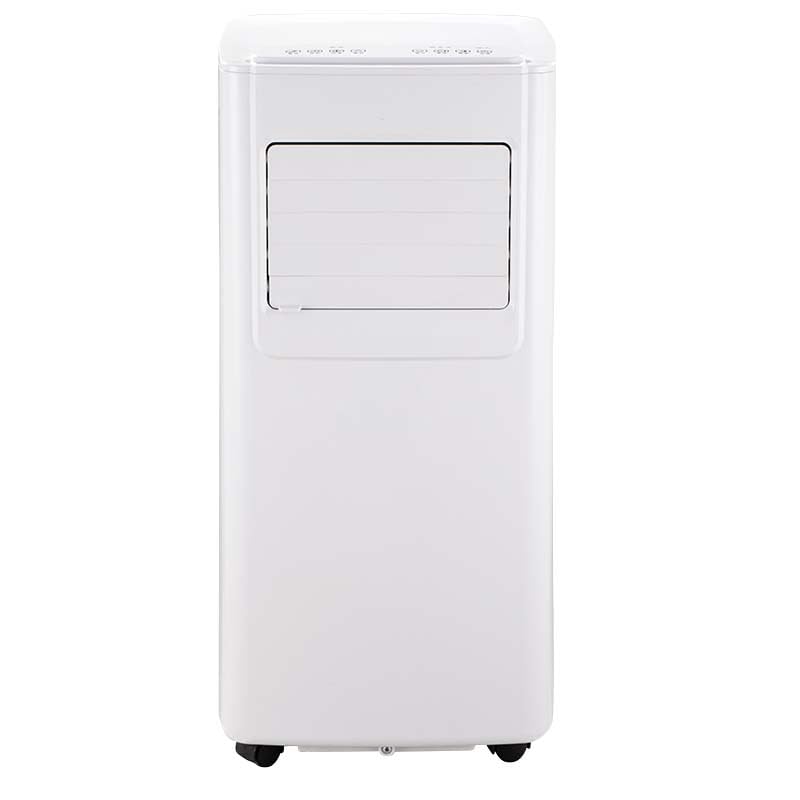
ചിത്രം 2.1: മുൻഭാഗം view of the bion HEATING Portable Air Conditioner. This image shows the main unit with its control panel and air outlet louvers.
2.1 ഘടകങ്ങൾ
- പ്രധാന എയർ കണ്ടീഷണർ യൂണിറ്റ്
- എക്സ്ഹോസ്റ്റ് ഹോസ്
- Window Sealing Kit (Adapter, Plate)
- റിമോട്ട് കൺട്രോൾ
- ഹോസ് കളയുക
2.2 നിയന്ത്രണ പാനൽ
The control panel is located on the top of the unit and includes buttons for power, mode selection, fan speed, timer, and temperature adjustment.

Figure 2.2: Illustration of the control panel. This image displays the buttons and indicators for operating the unit directly.
3. സജ്ജീകരണവും ഇൻസ്റ്റാളേഷനും
3.1 അൺപാക്കിംഗ്
- പാക്കേജിംഗിൽ നിന്ന് എയർകണ്ടീഷണറും എല്ലാ അനുബന്ധ ഉപകരണങ്ങളും ശ്രദ്ധാപൂർവ്വം നീക്കം ചെയ്യുക.
- Inspect the unit for any damage. If damaged, do not operate and contact customer support.
- ഭാവിയിലെ സംഭരണത്തിനോ ഗതാഗതത്തിനോ വേണ്ടി യഥാർത്ഥ പാക്കേജിംഗ് സൂക്ഷിക്കുക.
3.2 പ്ലേസ്മെൻ്റ്
Place the air conditioner on a firm, level surface in a location that allows for proper exhaust ventilation. Ensure there is at least 30 cm (12 inches) of clear space around the unit for optimal airflow.
3.3 എക്സ്ഹോസ്റ്റ് ഹോസ് ഇൻസ്റ്റാളേഷൻ
The exhaust hose expels hot air from the room. Proper installation is crucial for efficient cooling.
- എക്സ്ഹോസ്റ്റ് ഹോസിന്റെ ഒരു അറ്റത്ത് എക്സ്ഹോസ്റ്റ് ഹോസ് അഡാപ്റ്റർ ഘടിപ്പിക്കുക.
- എക്സ്ഹോസ്റ്റ് ഹോസിന്റെ മറ്റേ അറ്റം എയർ കണ്ടീഷണർ യൂണിറ്റിന്റെ പിൻഭാഗത്തുള്ള എക്സ്ഹോസ്റ്റ് ഔട്ട്ലെറ്റുമായി ബന്ധിപ്പിക്കുക.
- Install the window sealing plate into a partially open window. Adjust the plate to fit snugly.
- Insert the exhaust hose adapter (with hose attached) into the opening of the window sealing plate. Ensure a tight seal to prevent hot air from re-entering the room.

Figure 3.1: Diagram illustrating the correct installation of the exhaust hose and window sealing kit. This shows how to connect the hose to the unit and vent it through a window.
4. പ്രവർത്തന നിർദ്ദേശങ്ങൾ
4.1 പവർ ഓൺ/ഓഫ്
അമർത്തുക പവർ യൂണിറ്റ് ഓണാക്കാനോ ഓഫാക്കാനോ കൺട്രോൾ പാനലിലോ റിമോട്ട് കൺട്രോളിലോ ഉള്ള ബട്ടൺ.
4.2 മോഡ് തിരഞ്ഞെടുക്കൽ
അമർത്തുക മോഡ് ലഭ്യമായ ഓപ്പറേറ്റിംഗ് മോഡുകളിലൂടെ സൈക്കിൾ ചെയ്യാൻ ബട്ടൺ:
- രസകരമായ മോഡ്: Provides cooling. Adjust the temperature using the UP ഒപ്പം താഴേക്ക് ബട്ടണുകൾ.
- ഫാൻ മോഡ്: തണുപ്പിക്കാതെ വായു സഞ്ചാരം നൽകുന്നു. ഫാൻ വേഗത ക്രമീകരിക്കാൻ കഴിയും.
- ഡ്രൈ മോഡ്: Dehumidifies the air. Fan speed is typically fixed in this mode.
4.3 താപനില ക്രമീകരണം
In Cool Mode, use the UP (▲) കൂടാതെ താഴേക്ക് (▼) buttons to set the desired room temperature. The temperature range is typically 16°C to 30°C (61°F to 86°F).
4.4 ഫാൻ വേഗത ക്രമീകരണം
അമർത്തുക ഫാൻ സ്പീഡ് button to select between Low, Medium, and High fan speeds. This function is available in Cool and Fan modes.
4.5 ടൈമർ പ്രവർത്തനം
യൂണിറ്റ് യാന്ത്രികമായി ഓണാക്കാനോ ഓഫാക്കാനോ ഒരു നിർദ്ദിഷ്ട സമയം സജ്ജമാക്കാൻ ടൈമർ ഫംഗ്ഷൻ നിങ്ങളെ അനുവദിക്കുന്നു.
- ഓട്ടോ-ഓഫ് സജ്ജീകരിക്കാൻ: യൂണിറ്റ് പ്രവർത്തിക്കുമ്പോൾ, അമർത്തുക ടൈമർ ബട്ടൺ. ഉപയോഗിക്കുക UP ഒപ്പം താഴേക്ക് buttons to set the desired number of hours (1-24) after which the unit will turn off.
- ഓട്ടോ-ഓൺ സജ്ജമാക്കാൻ: യൂണിറ്റ് ഓഫായിരിക്കുമ്പോൾ, അമർത്തുക ടൈമർ ബട്ടൺ. ഉപയോഗിക്കുക UP ഒപ്പം താഴേക്ക് buttons to set the desired number of hours (1-24) after which the unit will turn on.
4.6 വിദൂര നിയന്ത്രണം
The remote control duplicates most functions of the control panel for convenient operation from a distance. Ensure the remote control batteries are correctly installed.

Figure 4.1: Image of the remote control. This shows the layout of buttons for remote operation of the air conditioner.
5. പരിപാലനം
പതിവ് അറ്റകുറ്റപ്പണികൾ മികച്ച പ്രകടനം ഉറപ്പാക്കുകയും നിങ്ങളുടെ എയർ കണ്ടീഷണറിന്റെ ആയുസ്സ് വർദ്ധിപ്പിക്കുകയും ചെയ്യുന്നു.
5.1 എയർ ഫിൽട്ടർ വൃത്തിയാക്കൽ
ഉപയോഗവും വായുവിന്റെ ഗുണനിലവാരവും അനുസരിച്ച് രണ്ടാഴ്ച കൂടുമ്പോൾ അല്ലെങ്കിൽ കൂടുതൽ തവണ എയർ ഫിൽറ്റർ വൃത്തിയാക്കണം.
- പവർ ഔട്ട്ലെറ്റിൽ നിന്ന് എയർ കണ്ടീഷണർ ഊരിമാറ്റുക.
- സാധാരണയായി യൂണിറ്റിന്റെ പിൻഭാഗത്തോ വശത്തോ എയർ ഫിൽട്ടർ പാനൽ കണ്ടെത്തുക.
- ഫിൽട്ടർ സൌമ്യമായി പുറത്തെടുത്ത് നീക്കം ചെയ്യുക.
- ഫിൽട്ടർ ചെറുചൂടുള്ള വെള്ളവും നേരിയ ഡിറ്റർജന്റും ഉപയോഗിച്ച് കഴുകുക. നന്നായി കഴുകുക.
- യൂണിറ്റിലേക്ക് വീണ്ടും ചേർക്കുന്നതിന് മുമ്പ് ഫിൽട്ടർ പൂർണ്ണമായും വായുവിൽ ഉണങ്ങാൻ അനുവദിക്കുക. നേരിട്ട് സൂര്യപ്രകാശം ഏൽക്കരുത്.

Figure 5.1: Step-by-step guide on removing and cleaning the air filter. This image demonstrates the process for maintaining air quality and unit efficiency.
5.2 വെള്ളം വറ്റിക്കൽ
The unit collects condensation during operation. When the internal water tank is full, the unit will stop operating and display an indicator (e.g., 'FL' or 'P1').
- എയർകണ്ടീഷണർ അൺപ്ലഗ് ചെയ്യുക.
- Place a shallow pan or tray under the drain outlet, located at the bottom rear of the unit.
- Remove the drain plug/cap. Water will begin to flow out.
- Once all water has drained, replace the drain plug/cap securely.
- For continuous drainage, attach the provided drain hose to the drain outlet and direct it to a floor drain or suitable container.
5.3 യൂണിറ്റ് എക്സ്റ്റീരിയർ വൃത്തിയാക്കൽ
ഒരു സോഫ്റ്റ്, ഡി ഉപയോഗിച്ച് യൂണിറ്റിൻ്റെ പുറംഭാഗം തുടയ്ക്കുകamp തുണി. കഠിനമായ രാസവസ്തുക്കളോ ഉരച്ചിലുകളുള്ള ക്ലീനറുകളോ ഉപയോഗിക്കരുത്.
6. പ്രശ്നപരിഹാരം
ഉപഭോക്തൃ പിന്തുണയുമായി ബന്ധപ്പെടുന്നതിന് മുമ്പ്, പൊതുവായ പ്രശ്നങ്ങളും പരിഹാരങ്ങളും അറിയാൻ ഇനിപ്പറയുന്ന പട്ടിക പരിശോധിക്കുക.
| പ്രശ്നം | സാധ്യമായ കാരണം | പരിഹാരം |
|---|---|---|
| യൂണിറ്റ് ഓണാക്കുന്നില്ല | വൈദ്യുതി വിതരണം ഇല്ല പവർ കോർഡ് പ്ലഗിൻ ചെയ്തിട്ടില്ല സർക്യൂട്ട് ബ്രേക്കർ തകർന്നു | പവർ ഔട്ട്ലെറ്റ് പരിശോധിക്കുക കോർഡ് സുരക്ഷിതമായി പ്ലഗ് ഇൻ ചെയ്തിട്ടുണ്ടെന്ന് ഉറപ്പാക്കുക സർക്യൂട്ട് ബ്രേക്കർ പുനഃസജ്ജമാക്കുക |
| യൂണിറ്റ് ഫലപ്രദമായി തണുപ്പിക്കുന്നില്ല. | എയർ ഫിൽട്ടർ വൃത്തികെട്ടതാണ് എക്സ്ഹോസ്റ്റ് ഹോസ് ശരിയായി ഇൻസ്റ്റാൾ ചെയ്തിട്ടില്ല ജനാലകൾ/വാതിലുകൾ തുറന്നിരിക്കുന്നു മുറി വളരെ വലുതാണ് | ശുദ്ധമായ എയർ ഫിൽട്ടർ എക്സ്ഹോസ്റ്റ് ഹോസ് സീൽ ചെയ്തിട്ടുണ്ടെന്ന് ഉറപ്പാക്കുക എല്ലാ ജാലകങ്ങളും വാതിലുകളും അടയ്ക്കുക Unit may be undersized for the room |
| വെള്ളം ചോർച്ച | ഡ്രെയിൻ പ്ലഗ് അഴിച്ചു യൂണിറ്റ് ലെവലല്ല | ഡ്രെയിൻ പ്ലഗ് മുറുക്കുക Ensure unit is on a level surface |
| Unit displays 'FL' or 'P1' | Internal water tank full | Drain the water tank as per Section 5.2 |
7 സ്പെസിഫിക്കേഷനുകൾ
| ഫീച്ചർ | വിശദാംശങ്ങൾ |
|---|---|
| മോഡൽ നമ്പർ | 8059304859823 |
| തണുപ്പിക്കൽ ശേഷി | 7000 ബി.ടി.യു |
| പവർ ഉറവിടം | ഇലക്ട്രിക്സ് |
| വാല്യംtage | 240 വോൾട്ട് |
| ഭാരം | 25 കിലോഗ്രാം |
| നിയന്ത്രണ രീതി | Remote / Manual |
| ഇൻസ്റ്റലേഷൻ തരം | Portable (Packaged) |
8. വാറൻ്റിയും പിന്തുണയും
This product comes with a standard manufacturer's warranty. For specific warranty terms and conditions, please refer to the warranty card included with your purchase or contact the retailer.
For technical assistance, troubleshooting beyond this manual, or to inquire about replacement parts, please contact bion HEATING customer support. Contact information can typically be found on the product packaging or the official bion HEATING webസൈറ്റ്.
പിന്തുണയുമായി ബന്ധപ്പെടുമ്പോൾ, ദയവായി നിങ്ങളുടെ മോഡൽ നമ്പറും (8059304859823) വാങ്ങൽ തീയതിയും ലഭ്യമാക്കുക.