
Nurati Nurati N1
Nurati N1 Sport Bluetooth 5.2 In-Ear Headphones User Manual
Model: Nurati N1

Image: Nurati N1 Sport Bluetooth 5.2 In-Ear Headphones, black with neckband design.
ആമുഖം
The Nurati N1 Sport Bluetooth 5.2 In-Ear Headphones are designed for an immersive audio experience and clear communication. Featuring a long-lasting battery, IPX6 waterproofing, and advanced noise cancellation for calls, these headphones are suitable for various activities and environments.
ബോക്സിൽ എന്താണുള്ളത്
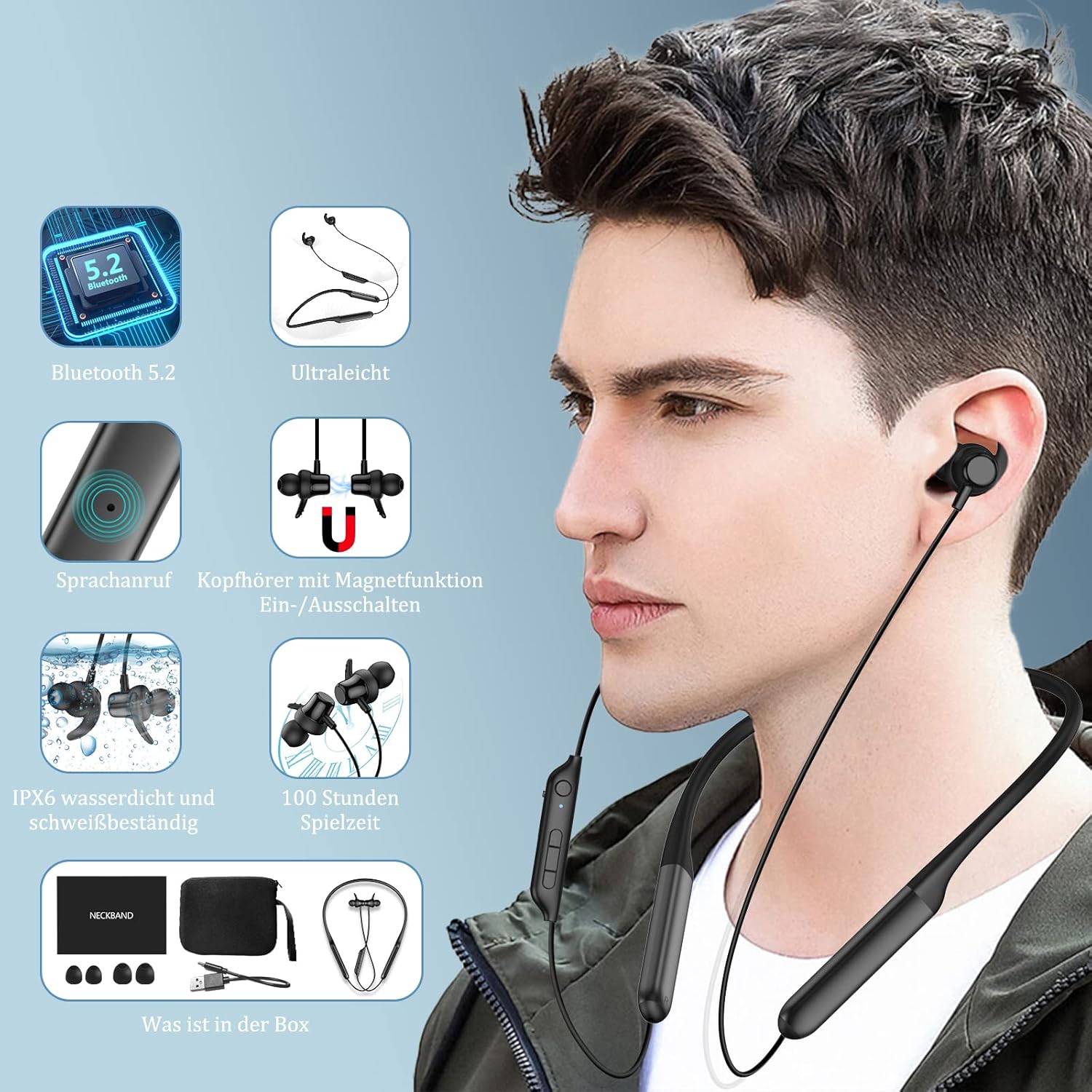
Image: Contents of the Nurati N1 headphone box, including the headphones, charging cable, ear tips, and user manual.
Your Nurati N1 package should contain the following items:
- Nurati N1 Sport Bluetooth Headphones
- യുഎസ്ബി ടൈപ്പ്-സി ചാർജിംഗ് കേബിൾ
- ഒന്നിലധികം വലുപ്പത്തിലുള്ള ചെവിക്കുപ്പികൾ
- ഉപയോക്തൃ മാനുവൽ
സജ്ജമാക്കുക
പ്രാരംഭ ചാർജിംഗ്
Before first use, fully charge your Nurati N1 headphones. Connect the provided USB Type-C cable to the charging port on the headphones and a compatible USB power source. The LED indicator will show charging status.
പവർ ഓൺ/ഓഫ്

Image: Illustration of the magnetic switch function for turning the headphones on and off.
- പവർ ഓൺ: Separate the magnetic earbuds. The headphones will automatically power on and enter pairing mode.
- പവർ ഓഫ്: Bring the magnetic earbuds together. The headphones will automatically power off.
ബ്ലൂടൂത്ത് ജോടിയാക്കൽ

Image: Step-by-step guide for Bluetooth pairing the Nurati N1 headphones with a mobile device.
- Ensure the headphones are powered on (earbuds separated).
- നിങ്ങളുടെ ഉപകരണത്തിൽ (സ്മാർട്ട്ഫോൺ, ടാബ്ലെറ്റ് മുതലായവ), ബ്ലൂടൂത്ത് പ്രവർത്തനക്ഷമമാക്കുക.
- ഇതിനായി തിരയുക available Bluetooth devices. Select "N1" from the list.
- Once connected, the headphones will indicate successful pairing.
Official Product Video: Introduction to Nurati N1
Video: A brief introduction to the Nurati N1 headphones, demonstrating key features and design.
പ്രവർത്തന നിർദ്ദേശങ്ങൾ
മൾട്ടി-ഫംഗ്ഷൻ ബട്ടണുകൾ

Image: Detailed diagram showing the layout and functions of the multi-function buttons on the Nurati N1 headphones.
| ബട്ടൺ/ആക്ഷൻ | ഫംഗ്ഷൻ |
|---|---|
| Multi-function Button (Main) | കോളുകൾ പ്ലേ ചെയ്യുക/താൽക്കാലികമായി നിർത്തുക, ഉത്തരം നൽകുക/അവസാനിപ്പിക്കുക |
| Long Press Multi-function Button (2 seconds) | Game Mode Toggle |
| Triple Press Multi-function Button | വോയ്സ് അസിസ്റ്റൻ്റ് സജീവമാക്കുക |
| Short Press '+' Button | വോളിയം കൂട്ടുക |
| Long Press '+' Button | അടുത്ത ട്രാക്ക് |
| Short Press '-' Button | വോളിയം ഡൗൺ |
| Long Press '-' Button | മുമ്പത്തെ ട്രാക്ക് |
കോളുകൾ ചെയ്യുന്നു
- The headphones feature ENC (Environmental Noise Cancellation) technology for clear phone calls by isolating background noise.
- Answer/End calls using the Multi-function Button as described above.
Official Product Video: Using the Headphones
Video: Demonstrates various ways to use the Nurati N1 headphones in daily scenarios.
മെയിൻ്റനൻസ്

Image: Nurati N1 headphones shown with water droplets, highlighting their IPX6 waterproof and sweatproof capabilities.
- വൃത്തിയാക്കൽ: ഒരു സോഫ്റ്റ്, ഡി ഉപയോഗിച്ച് ഹെഡ്ഫോണുകൾ തുടയ്ക്കുകamp തുണി. ഉരച്ചിലുകളുള്ള ക്ലീനറുകളോ ലായകങ്ങളോ ഉപയോഗിക്കരുത്.
- സംഭരണം: ഉപയോഗത്തിലില്ലാത്തപ്പോൾ, ഹെഡ്ഫോണുകൾ തണുത്തതും വരണ്ടതുമായ സ്ഥലത്ത് സൂക്ഷിക്കുക, നേരിട്ടുള്ള സൂര്യപ്രകാശത്തിൽ നിന്നും കടുത്ത താപനിലയിൽ നിന്നും അകറ്റി നിർത്തുക.
- ജല പ്രതിരോധം: The headphones are IPX6 waterproof and sweatproof, making them suitable for workouts and light rain. Do not submerge them in water or expose them to strong jets of water.
Official Product Video: IPX6 Waterproofing
Video: Demonstrates the IPX6 waterproof capabilities of the Nurati N1 headphones.
ട്രബിൾഷൂട്ടിംഗ്
If you encounter issues with your Nurati N1 headphones, please try the following steps:
- ശക്തിയില്ല: Ensure the headphones are fully charged. Separate the magnetic earbuds to power them on.
- ജോടിയാക്കാൻ കഴിയില്ല: Make sure Bluetooth is enabled on your device and the headphones are in pairing mode. Try turning Bluetooth off and on again on your device. If issues persist, try pairing with another device to rule out device-specific problems.
- മോശം ശബ്ദ നിലവാരം: Check the audio source. Ensure the headphones are within the Bluetooth range (up to 10 meters). Try adjusting the volume on both the headphones and your device.
- ഇടവിട്ടുള്ള കണക്ഷൻ: Move closer to your paired device. Avoid obstacles that might interfere with the Bluetooth signal. Ensure no other strong wireless signals are causing interference.
For further assistance, please refer to the contact information provided in your product packaging.
സ്പെസിഫിക്കേഷനുകൾ
| ഫീച്ചർ | വിശദാംശങ്ങൾ |
|---|---|
| മോഡലിൻ്റെ പേര് | Nurati N1 |
| കണക്റ്റിവിറ്റി ടെക്നോളജി | Wireless (Bluetooth 5.2 with EDR) |
| ബാറ്ററി ലൈഫ് | Up to 100 hours playtime (20 hours with 10 min charge) |
| ജല പ്രതിരോധം | IPX6 വാട്ടർപ്രൂഫ്, വിയർപ്പ് പ്രൂഫ് |
| ശബ്ദ നിയന്ത്രണം | കോളുകൾക്കുള്ള പരിസ്ഥിതി ശബ്ദ റദ്ദാക്കൽ (ENC) |
| സൗണ്ട് ക്വാളിറ്റി | HiFi Sound with high-performance dynamic driver |
| ചെവി പ്ലേസ്മെൻ്റ് | ഇൻ-ഇയർ |
| ഫോം ഫാക്ടർ | In Ear (Neckband style) |
| പ്രതിരോധം | 20 ഓം |
| ഉൽപ്പന്ന അളവുകൾ | 16.5 x 12.6 x 2.4 സെ.മീ; 30 ഗ്രാം |
| ബാറ്ററികൾ | 2 Lithium-Polymer batteries required (included) |
Key Features Visuals

Excellent Battery Life: Up to 100 hours of playtime.

Ergonomic Design: Comfortable for all-day wear.

HiFi Sound Quality & ENC: Immersive audio and clear calls.
വാറൻ്റിയും പിന്തുണയും
For warranty information and customer support, please refer to the documentation included in your product packaging or visit the official Nurati webസൈറ്റ്. ഏതെങ്കിലും വാറന്റി ക്ലെയിമുകൾക്ക് നിങ്ങളുടെ വാങ്ങലിന്റെ തെളിവ് സൂക്ഷിക്കുക.
Ask a question about this manual
Ask about setup, troubleshooting, compatibility, parts, safety, or missing instructions. Manuals+ will review the question and use this page’s manual context to help answer it.