
ആമുഖം
Thank you for choosing the MAIDeSITe M1 Pro Electric Height Adjustable Desk. This manual provides essential information for the safe and efficient use of your new desk. Please read these instructions carefully before assembly and operation, and retain them for future reference.
The MAIDeSITe M1 Pro desk is designed to enhance your workspace ergonomics, allowing seamless transitions between sitting and standing positions. It features a robust frame, a spacious desktop, and a smart control panel with memory presets and safety functions.
സുരക്ഷാ വിവരങ്ങൾ
- അസംബ്ലി ചെയ്യുന്നതിന് മുമ്പ് എല്ലാ ഘടകങ്ങളും ഉണ്ടെന്നും കേടുപാടുകൾ സംഭവിച്ചിട്ടില്ലെന്നും ഉറപ്പാക്കുക. ഏതെങ്കിലും ഭാഗങ്ങൾ നഷ്ടപ്പെട്ടാലോ തകരാറുള്ളാലോ ഉപയോഗിക്കരുത്.
- പരിക്കുകൾ ഒഴിവാക്കാൻ ഓപ്പറേഷൻ സമയത്ത് കുട്ടികളെയും വളർത്തുമൃഗങ്ങളെയും മേശയിൽ നിന്ന് അകറ്റി നിർത്തുക.
- Do not place hands or other objects near moving parts of the desk frame during height adjustment.
- Ensure the power cable is not pinched or damaged. Only use the provided power adapter.
- Do not overload the desk. The maximum load capacity is 80 kg.
- Avoid spilling liquids on the control panel or electrical components.
- ഇൻഡോർ ഉപയോഗത്തിന് മാത്രം.
പാക്കേജ് ഉള്ളടക്കം
നിങ്ങളുടെ പാക്കേജിൽ എല്ലാ ഭാഗങ്ങളും ഉൾപ്പെടുത്തിയിട്ടുണ്ടെന്ന് ദയവായി പരിശോധിക്കുക:
- Desktop sections (140 x 70 cm)
- Electric lifting columns and frame
- LED ഡിസ്പ്ലേയുള്ള നിയന്ത്രണ പാനൽ
- പവർ അഡാപ്റ്ററും കേബിളും
- Assembly hardware (screws, tools)
- Accessories: Storage bag, drawer, cable management tray, casters, hooks
- ഉപയോക്തൃ മാനുവൽ
സജ്ജീകരണവും അസംബ്ലിയും
The MAIDeSITe M1 Pro desk is designed for easy assembly. Follow the steps below using the provided tools and hardware.

ചിത്രം 1: പൊട്ടിത്തെറിച്ചു view showing all components of the MAIDeSITe M1 Pro desk, illustrating how they fit together for assembly. This includes the desktop, frame, lifting columns, control panel, and various accessories.
- ഘടകങ്ങൾ അൺപാക്ക് ചെയ്യുക: പാക്കേജിംഗിൽ നിന്ന് എല്ലാ ഭാഗങ്ങളും ശ്രദ്ധാപൂർവ്വം നീക്കം ചെയ്ത് പോറലുകൾ ഉണ്ടാകാതിരിക്കാൻ വൃത്തിയുള്ളതും മൃദുവായതുമായ ഒരു പ്രതലത്തിൽ വയ്ക്കുക.
- ഫ്രെയിം കൂട്ടിച്ചേർക്കുക: Attach the lifting columns to the crossbar and foot supports using the provided screws. Ensure all connections are secure.
- ഡെസ്ക്ടോപ്പ് അറ്റാച്ചുചെയ്യുക: Place the desktop sections onto the assembled frame. Align the pre-drilled holes and secure the desktop with the appropriate screws.
- നിയന്ത്രണ പാനൽ ഇൻസ്റ്റാൾ ചെയ്യുക: Mount the control panel to the underside of the desktop in the designated area. Connect the control panel cable to the motor control box.
- പവർ ബന്ധിപ്പിക്കുക: Plug the power adapter into the control box and then into a wall outlet.
- ആക്സസറികൾ അറ്റാച്ചുചെയ്യുക: Install the storage bag, drawer, cable management tray, and hooks as desired. Attach the casters to the foot supports if you wish to use them for mobility.
പ്രവർത്തന നിർദ്ദേശങ്ങൾ
Your MAIDeSITe M1 Pro desk features an intuitive control panel for easy height adjustment and personalized settings.
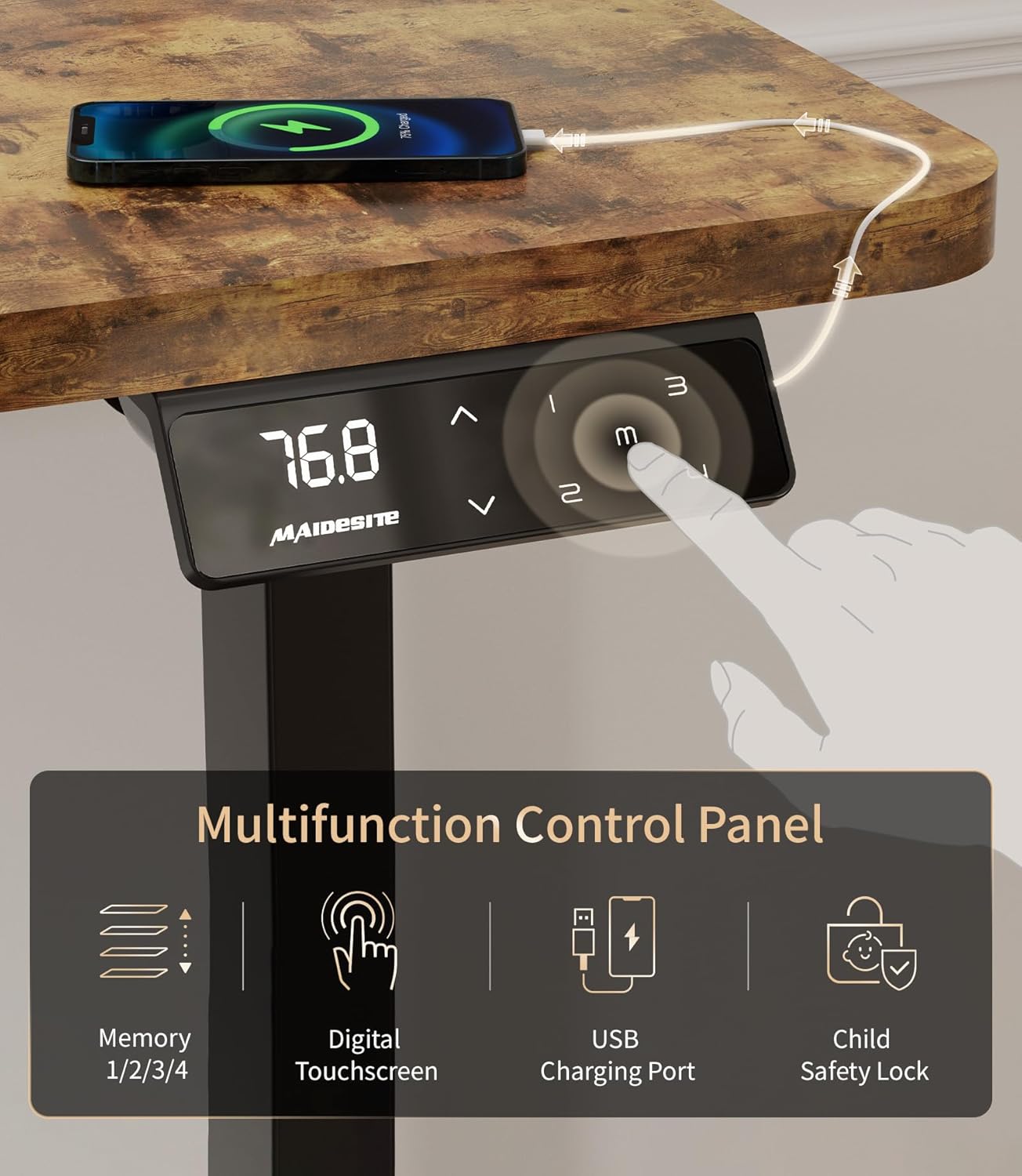
ചിത്രം 2: The multifunction control panel features an LED display, up/down arrows for adjustment, four memory preset buttons (1, 2, 3, M), a USB charging port, and a child safety lock button.
ഉയരം ക്രമീകരിക്കൽ
ഉപയോഗിക്കുക മുകളിലേക്ക് (^) ഒപ്പം താഴേക്ക് (v) arrow buttons on the control panel to adjust the desk height. The desk offers a continuous height adjustment range from 72 cm to 120 cm.

ചിത്രം 3: Visual representation of the desk's height adjustment capabilities, demonstrating comfortable sitting positions at 72cm and standing positions up to 120cm, accommodating various user heights.
മെമ്മറി പ്രീസെറ്റുകൾ
The control panel allows you to save up to four preferred height settings for quick adjustments.
- മുകളിലേക്കും താഴേക്കുമുള്ള അമ്പടയാളങ്ങൾ ഉപയോഗിച്ച് നിങ്ങൾക്ക് ആവശ്യമുള്ള ഉയരത്തിലേക്ക് ഡെസ്ക് ക്രമീകരിക്കുക.
- അമർത്തുക M ബട്ടൺ. LED ഡിസ്പ്ലേ 'S-' കാണിക്കും.
- Within 3 seconds, press one of the number buttons (1, 2, 3, അല്ലെങ്കിൽ 4) to save the current height to that preset. The display will show 'S-1', 'S-2', etc., indicating successful storage.
- To recall a saved height, simply press the corresponding number button.
കുട്ടികളുടെ സുരക്ഷാ ലോക്ക്
Activate the child safety lock to prevent accidental adjustments.

ചിത്രം 4: The child safety lock feature, indicated by 'LOC' on the display, prevents unintended height adjustments, ensuring safety in environments with children.
- To activate the lock, press and hold the M button for 5 seconds until 'LOC' appears on the display. All buttons will be disabled.
- ലോക്ക് നിർജ്ജീവമാക്കാൻ, അമർത്തിപ്പിടിക്കുക M button again for 5 seconds until 'LOC' disappears and the current height is displayed.
USB ചാർജിംഗ് പോർട്ട്
The control panel includes a built-in USB port for convenient charging of your devices.
ആന്റി-കൊളിഷൻ സിസ്റ്റം
The desk is equipped with an anti-collision system. If the desk encounters an obstacle during height adjustment, it will automatically stop and reverse slightly to prevent damage or injury.
മെയിൻ്റനൻസ്
Proper maintenance ensures the longevity and optimal performance of your MAIDeSITe M1 Pro desk.
- വൃത്തിയാക്കൽ: ഡെസ്ക്ടോപ്പും ഫ്രെയിമും ഒരു സോഫ്റ്റ്, ഡി ക്ലീനർ ഉപയോഗിച്ച് തുടയ്ക്കുക.amp cloth. Avoid abrasive cleaners or harsh chemicals that could damage the surface. The desktop surface is waterproof for easy cleaning.
- കേബിൾ മാനേജുമെന്റ്: Regularly check and organize cables using the provided cable management tray to prevent tangles and damage.
- പരിശോധന: എല്ലാ സ്ക്രൂകളും കണക്ഷനുകളും ഇറുകിയതാണെന്ന് ഉറപ്പാക്കാൻ ഇടയ്ക്കിടെ പരിശോധിക്കുക. ആവശ്യമെങ്കിൽ വീണ്ടും മുറുക്കുക.
- മോട്ടോർ കെയർ: The electric motor is maintenance-free. Do not attempt to open or lubricate the motor housing.
ട്രബിൾഷൂട്ടിംഗ്
നിങ്ങളുടെ മേശയിൽ എന്തെങ്കിലും പ്രശ്നങ്ങൾ നേരിടുകയാണെങ്കിൽ, താഴെ പറയുന്ന പൊതുവായ പ്രശ്നങ്ങളും പരിഹാരങ്ങളും പരിശോധിക്കുക:
| പ്രശ്നം | സാധ്യമായ കാരണം | പരിഹാരം |
|---|---|---|
| Desk does not move / 'LOC' displayed | കുട്ടികളുടെ സുരക്ഷാ ലോക്ക് സജീവമാണ്. | അമർത്തിപ്പിടിക്കുക M button for 5 seconds to deactivate the lock. |
| Desk stops moving / reverses during adjustment | Anti-collision system activated by an obstacle. | Remove the obstacle and resume adjustment. |
| പവർ ഇല്ല / ഡിസ്പ്ലേ ഓഫ് | Power cable disconnected or power outage. | Check power connections and wall outlet. Ensure the power adapter is securely plugged in. |
| അസമമായ ഉയരം ക്രമീകരിക്കൽ | Possible calibration issue or obstruction. | Lower the desk to its lowest position and hold the down arrow for 10 seconds to reset. Check for obstructions. |
| Motor noise is excessive | Unusual operation. | The motor is designed to be ultra-quiet (<45dB). If noise is excessive, discontinue use and contact customer support. |
സ്പെസിഫിക്കേഷനുകൾ
Detailed technical specifications for the MAIDeSITe M1 Pro Electric Height Adjustable Desk.

ചിത്രം 5: Key performance specifications of the desk, highlighting the powerful motor, smooth 25mm/s rise speed, ultra-quiet operation below 45dB, and a robust 80kg load capacity.
- മോഡൽ നമ്പർ: MJ-D2D-2-EU
- Desktop Dimensions: 140 സെ.മീ (നീളം) x 70 സെ.മീ (വീതി)
- ഉയരം ക്രമീകരിക്കൽ ശ്രേണി: 72 സെ.മീ മുതൽ 120 സെ.മീ
- ലോഡ് കപ്പാസിറ്റി: 80 കിലോ വരെ
- മോട്ടോർ തരം: ഇലക്ട്രിക്
- Rise Speed: 25 മിമി/സെ
- ശബ്ദ നില: <45 ഡിബി
- മെറ്റീരിയൽ: Carbon steel frame, Engineered wood desktop
- ഫീച്ചറുകൾ: 4 Memory Presets, USB Charging Port, Child Safety Lock, Anti-Collision System, Rounded Corners, Waterproof Surface
- ഉൾപ്പെടുത്തിയ ആക്സസറികൾ: Storage Bag, Drawer, Cable Management Tray, Hooks, Casters
- ഉൽപ്പന്ന ഭാരം: ഏകദേശം 27 കി.ഗ്രാം
വാറൻ്റിയും പിന്തുണയും
MAIDeSITe is committed to providing high-quality products and customer satisfaction.
- വാറൻ്റി: This product comes with a 5-year warranty from the date of purchase, covering manufacturing defects.
- റിട്ടേണുകൾ: You may be eligible for free returns within 30 days of purchase, subject to retailer policies.
- ഉപഭോക്തൃ പിന്തുണ: For any questions, technical assistance, or warranty claims, please contact MAIDeSITe customer support through your purchase platform or the official MAIDeSITe website. Please have your model number (MJ-D2D-2-EU) and purchase details ready.