
ആമുഖം
This manual provides detailed instructions for the assembly, operation, and maintenance of your MAIDeSITe Electric Height Adjustable Desk. Designed for ergonomic comfort, this desk allows seamless transitions between sitting and standing positions, promoting a healthier work environment. Please read this manual thoroughly before assembly and use to ensure proper function and safety.
സുരക്ഷാ വിവരങ്ങൾ
- അസംബ്ലി ചെയ്യുന്നതിനുമുമ്പ് എല്ലാ ഘടകങ്ങളും ഉണ്ടെന്നും കേടുപാടുകൾ സംഭവിച്ചിട്ടില്ലെന്നും ഉറപ്പാക്കുക.
- ജോലി സമയത്ത് കുട്ടികളെയും വളർത്തുമൃഗങ്ങളെയും മേശയിൽ നിന്ന് അകറ്റി നിർത്തുക.
- Do not overload the desk. Refer to the specifications for maximum weight capacity.
- കൺട്രോൾ പാനലിലോ ഇലക്ട്രിക്കൽ ഘടകങ്ങൾക്ക് സമീപമോ ദ്രാവകങ്ങൾ നേരിട്ട് വയ്ക്കുന്നത് ഒഴിവാക്കുക.
- Ensure sufficient clearance around the desk when adjusting height to prevent obstructions.
- If any unusual noise or movement occurs, stop operation immediately and consult the troubleshooting section.
പാക്കേജ് ഉള്ളടക്കം
Before beginning assembly, verify that all parts are included in your package. Refer to the assembly diagram for a complete list of components.
- Desk Frame (Legs, Crossbar)
- Tabletop (120 x 60 cm)
- LED ഡിസ്പ്ലേ ഉള്ള കൺട്രോൾ പാനൽ
- പവർ അഡാപ്റ്ററും കേബിളും
- Accessories: Drawer, Storage Bag, Cable Management Tray, Hooks, Casters (Wheels)
- Assembly Hardware (Screws, Allen Key, etc.)
സജ്ജീകരണവും അസംബ്ലിയും
The MAIDeSITe desk is designed for easy assembly with user-friendly instructions, included tools, and pre-drilled screw holes. It is recommended to have two people for assembly, though it can be done by one person.
അസംബ്ലി നടപടികൾ പൂർത്തിയായിview:
- ഘടകങ്ങൾ അൺപാക്ക് ചെയ്യുക: പാക്കേജിംഗിൽ നിന്ന് എല്ലാ ഭാഗങ്ങളും ശ്രദ്ധാപൂർവ്വം നീക്കം ചെയ്ത് പോറലുകൾ ഉണ്ടാകാതിരിക്കാൻ വൃത്തിയുള്ളതും മൃദുവായതുമായ ഒരു പ്രതലത്തിൽ വയ്ക്കുക.
- ഡെസ്ക് ഫ്രെയിം കൂട്ടിച്ചേർക്കുക: Attach the lifting columns to the feet, then connect the crossbar. Ensure all screws are tightened securely.
- ടേബിൾടോപ്പ് ഘടിപ്പിക്കുക: Place the tabletop onto the assembled frame, aligning the pre-drilled holes. Secure the tabletop with the provided screws.
- നിയന്ത്രണ പാനൽ ഇൻസ്റ്റാൾ ചെയ്യുക: Mount the control panel to the underside of the tabletop in the designated area. Connect the motor and power cables to the control box and then to the control panel.
- ആക്സസറികൾ ഇൻസ്റ്റാൾ ചെയ്യുക: Attach the drawer, storage bag, cable management tray, and hooks as desired. If using casters, replace the standard feet with the casters.
- പവർ ബന്ധിപ്പിക്കുക: Plug the power adapter into the control box and then into a wall outlet.

ചിത്രം: പൊട്ടിത്തെറിച്ചു view of the MAIDeSITe desk showing all components and their assembly points. This image illustrates the desk frame, tabletop sections, control panel, and various accessories like the storage bag, drawer, and cable management tray, along with the casters.

ചിത്രം: A diagram highlighting the ease of assembly, indicating user-friendly setup with included tools and pre-drilled screw holes for quick installation.
പ്രവർത്തന നിർദ്ദേശങ്ങൾ
നിയന്ത്രണ പാനൽ ഓവർview:
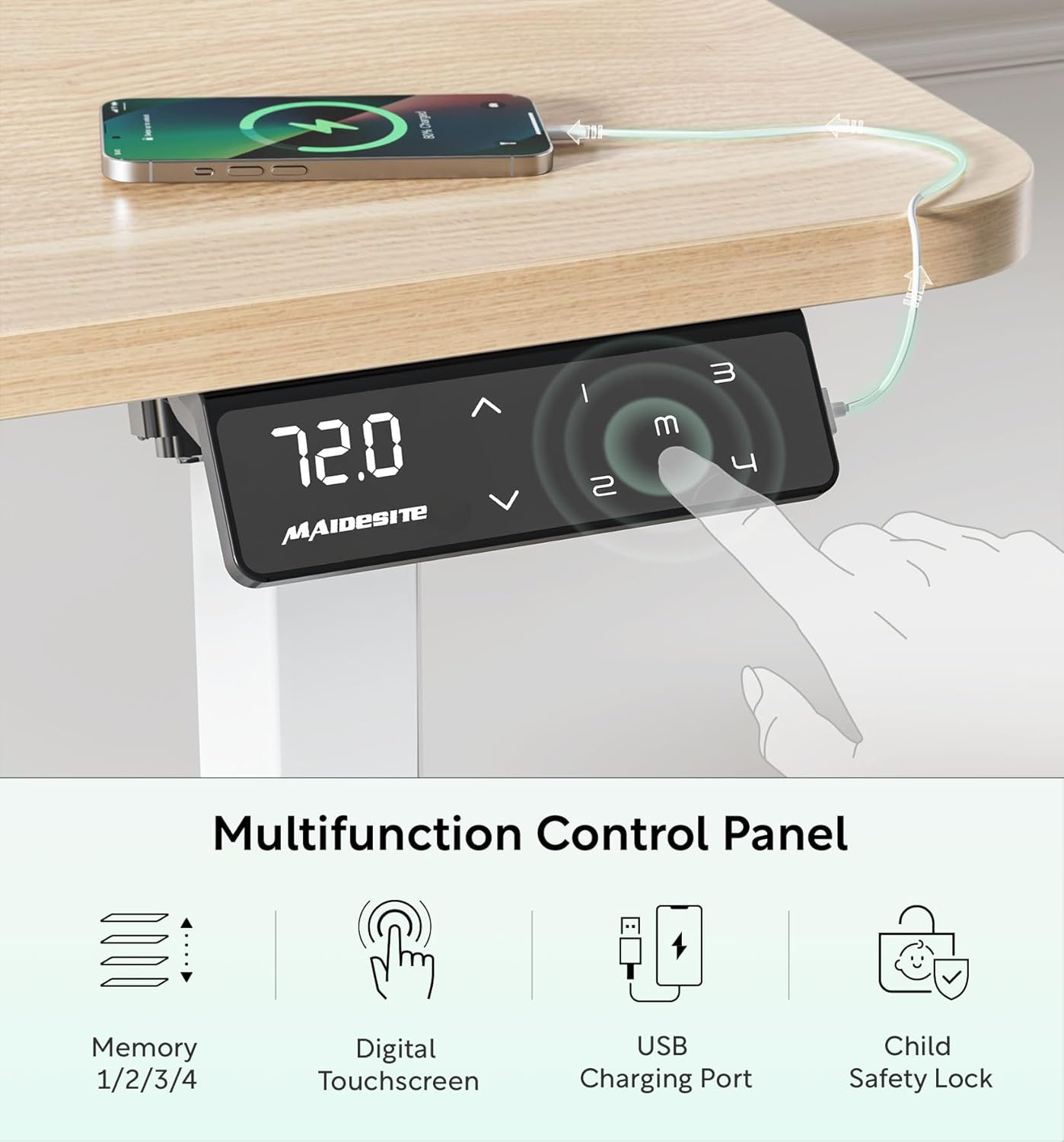
ചിത്രം: Close-up of the MAIDeSITe desk's multifunctional LED control panel. It features a digital touchscreen display showing the current height, up/down arrows for adjustment, four memory preset buttons (1, 2, 3, 4), a USB charging port, and a child safety lock button.
ഉയരം ക്രമീകരിക്കൽ:
- ഉപയോഗിക്കുക മുകളിലേക്ക് (^) ഒപ്പം താഴേക്ക് (v) arrow buttons on the control panel to manually adjust the desk height. The current height will be displayed on the LED screen.
- The desk offers continuous height adjustment from 72 cm to 120 cm.

ചിത്രം: An illustration demonstrating the desk's height adjustment range, showing different user heights and corresponding desk heights from 72cm (sitting) to 120cm (standing).
മെമ്മറി പ്രീസെറ്റുകൾ:
- The control panel features 4 programmable memory buttons (1, 2, 3, 4) to save your preferred sitting and standing heights.
- ഒരു മെമ്മറി സ്ഥാനം സജ്ജമാക്കാൻ: Adjust the desk to your desired height. Press and hold one of the memory buttons (1, 2, 3, or 4) until you hear a beep or the display flashes, indicating the height has been saved.
- To Use a Memory Position: Press the corresponding memory button (1, 2, 3, or 4) once. The desk will automatically move to the saved height.
കുട്ടികളുടെ സുരക്ഷാ ലോക്ക്:
- Activate the child safety lock to prevent accidental height adjustments.
- സജീവമാക്കുന്നതിന്: Press the lock button on the control panel. The display may show "LOC" or a lock icon.
- നിർജ്ജീവമാക്കാൻ: Press the lock button again.
ചിത്രം: A visual representation of the child lock feature on the control panel, showing the "LOC" indicator when activated.
യുഎസ്ബി ചാർജിംഗ് പോർട്ട്:
- A built-in USB port is available on the control panel for convenient charging of your electronic devices.
ആന്റി-കൊളിഷൻ സിസ്റ്റം:
- The desk is equipped with an anti-collision system that automatically stops movement if an obstruction is detected during height adjustment. This prevents damage to the desk or other objects.
- If the anti-collision system is triggered, the desk will reverse slightly. Remove the obstruction and resume adjustment.
മെയിൻ്റനൻസ്
- വൃത്തിയാക്കൽ: മേശയുടെ പ്രതലവും ഫ്രെയിമും മൃദുവായ, ഡി-ടച്ച് ഉപയോഗിച്ച് തുടയ്ക്കുക.amp cloth. Avoid abrasive cleaners or harsh chemicals that could damage the finish. The tabletop is water-resistant and easy to clean.
- കേബിൾ മാനേജുമെന്റ്: Regularly check and organize cables using the provided cable management tray to prevent tangles and damage.
- മോട്ടോർ കെയർ: The electric motor is designed for long-term use and requires minimal maintenance. Avoid exposing it to excessive moisture or extreme temperatures.
- കാസ്റ്റർ മെയിന്റനൻസ്: If using casters, periodically check them for debris and ensure they roll smoothly. Lock them when the desk is in a stationary position.
ട്രബിൾഷൂട്ടിംഗ്
If you encounter any issues with your MAIDeSITe desk, please refer to the following common troubleshooting steps:
| പ്രശ്നം | സാധ്യമായ കാരണം | പരിഹാരം |
|---|---|---|
| ഡെസ്ക് അനങ്ങുന്നില്ല. | Power cable disconnected, child lock active, motor error. | Check power connections. Deactivate child lock. Unplug the desk for 10 seconds and plug back in to reset. |
| മേശ അസമമായി നീങ്ങുന്നു അല്ലെങ്കിൽ അസാധാരണമായ ശബ്ദം ഉണ്ടാക്കുന്നു. | Uneven load, loose connections, obstruction. | Ensure weight is evenly distributed. Check all screws and connections. Remove any obstructions. |
| ആന്റി-കൊളിഷൻ സിസ്റ്റം ഇടയ്ക്കിടെ പ്രവർത്തനക്ഷമമാകുന്നു. | ചലന പാതയിൽ തടസ്സം. | മേശയുടെ ചലനത്തെ തടസ്സപ്പെടുത്തുന്ന ഒരു വസ്തുവും മേശയുടെ അടിയിലോ മുകളിലോ ഇല്ലെന്ന് ഉറപ്പാക്കുക. |
| മെമ്മറി പ്രീസെറ്റുകൾ പ്രവർത്തിക്കുന്നില്ല. | Incorrect saving procedure. | Refer to the "Memory Presets" section and ensure you are pressing and holding the button until confirmation. |
ഈ പരിഹാരങ്ങൾ പരീക്ഷിച്ചതിനുശേഷവും പ്രശ്നം നിലനിൽക്കുകയാണെങ്കിൽ, ദയവായി ഉപഭോക്തൃ പിന്തുണയുമായി ബന്ധപ്പെടുക.
സ്പെസിഫിക്കേഷനുകൾ
| ഫീച്ചർ | വിശദാംശങ്ങൾ |
|---|---|
| ബ്രാൻഡ് | മൈഡ് സൈറ്റ് |
| മോഡൽ നമ്പർ | MJ-D2D-2-EU |
| അളവുകൾ (L x W x H) | 120 x 60 x (72-120) സെ.മീ |
| ഭാരം | 27 കിലോഗ്രാം |
| നിറം | ഓക്ക് |
| മെറ്റീരിയൽ (ഫ്രെയിം) | 100% High-Quality Carbon Steel |
| Material (Tabletop) | Engineered Wood with rounded corners, water-resistant |
| ഉയരം ക്രമീകരിക്കൽ ശ്രേണി | 72 സെ.മീ മുതൽ 120 സെ.മീ |
| പരമാവധി ഭാരം ശേഷി | 80 കിലോഗ്രാം |
| മോട്ടോർ തരം | Electric, Ultra-quiet (<45dB) |
| വേഗത | 25mm/s |
| നിയന്ത്രണ പാനൽ | LED Digital Touchscreen with 4 Memory Presets, USB Charging Port, Child Safety Lock |
| സുരക്ഷാ സവിശേഷതകൾ | Anti-collision system, Child Safety Lock, Rounded Tabletop Corners |
| ആക്സസറികൾ ഉൾപ്പെടുത്തിയിട്ടുണ്ട് | Drawer, Storage Bag, Cable Management Tray, Hooks, Casters |
| അസംബ്ലി ആവശ്യമാണ് | അതെ |

ചിത്രം: A visual representation highlighting the superior specifications of the MAIDeSITe desk, including its powerful and ultra-quiet motor, 25mm/s smooth rise speed, 80kg high capacity, and anti-collision feature.
വാറൻ്റിയും പിന്തുണയും
Your MAIDeSITe Electric Height Adjustable Desk comes with a 5 വർഷത്തെ വാറൻ്റി, ensuring peace of mind regarding its quality and durability. We are committed to providing excellent customer service.
For any questions, technical assistance, or warranty claims, please contact MAIDeSITe customer support through the retailer's platform or visit our official website. Please have your model number (MJ-D2D-2-EU) and purchase date available when contacting support.
ഓൺലൈൻ ഉറവിടങ്ങൾ: For additional information, FAQs, or video tutorials, please visit the official MAIDeSITe website or the product page on the retailer's site.