1. ആമുഖം
This manual provides comprehensive instructions for the installation, operation, and maintenance of your Sernoby 2-DIN Android 11 Car Multimedia Player. Please read this manual thoroughly before using the device to ensure proper functionality and to prevent damage. Keep this manual for future reference.
2 സുരക്ഷാ വിവരങ്ങൾ
- പ്രൊഫഷണൽ ഇൻസ്റ്റാളേഷൻ: It is highly recommended to have this product installed by a qualified professional to avoid damage to the device or your vehicle's electrical system.
- വൈദ്യുതി വിതരണം: Ensure the device is connected to a 12V DC power supply with negative grounding. Incorrect voltage കേടുപാടുകൾ വരുത്തിവയ്ക്കാം.
- വയറിംഗ്: Double-check all wiring connections before powering on the device. Incorrect wiring can lead to short circuits or malfunction.
- ഡ്രൈവിംഗ് സുരക്ഷ: ഡ്രൈവിംഗിൽ നിന്ന് ശ്രദ്ധ തിരിക്കുന്ന രീതിയിൽ ഉപകരണം പ്രവർത്തിപ്പിക്കരുത്. റോഡ് സുരക്ഷയ്ക്ക് എപ്പോഴും മുൻഗണന നൽകുക.
- താപനില: ഉപകരണത്തെ തീവ്രമായ താപനിലയിലോ നേരിട്ടുള്ള സൂര്യപ്രകാശത്തിലോ ദീർഘനേരം തുറന്നുകാട്ടുന്നത് ഒഴിവാക്കുക.
3. ഉൽപ്പന്നം കഴിഞ്ഞുview
3.1 ഉൾപ്പെടുത്തിയ ഘടകങ്ങൾ
The following items are typically included with your Sernoby Car Multimedia Player:
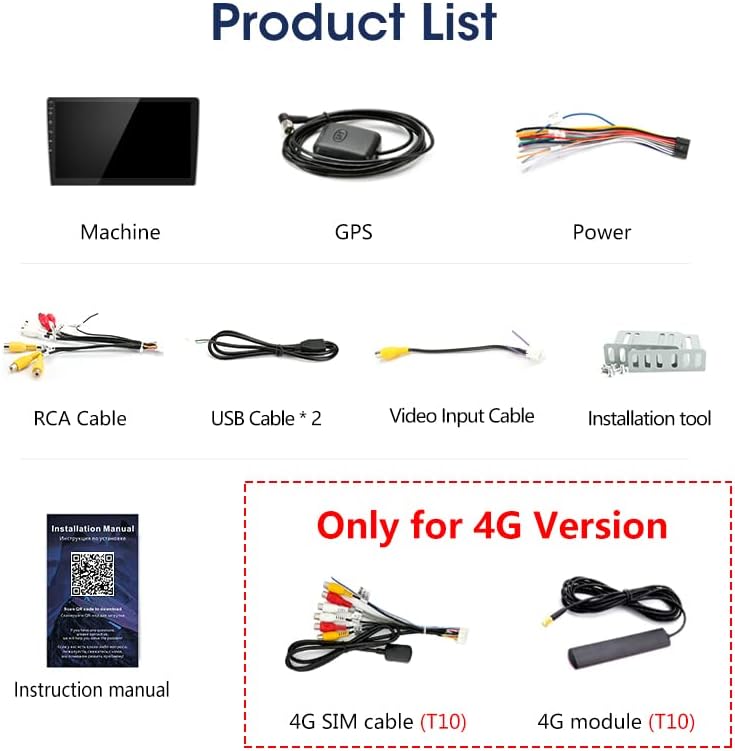
ചിത്രം 3.1: Included accessories. This image displays the main head unit, GPS antenna, power wiring harness, RCA cables, two USB cables, a video input cable, an installation tool, and the instruction manual. For 4G versions, a 4G SIM cable and 4G module are also included.
- Main Head Unit
- ജിപിഎസ് ആൻ്റിന
- പവർ വയറിംഗ് ഹാർനെസ്
- RCA കേബിളുകൾ
- യുഎസ്ബി കേബിളുകൾ (x2)
- വീഡിയോ ഇൻപുട്ട് കേബിൾ
- ഇൻസ്റ്റലേഷൻ ടൂൾ
- ഇൻസ്ട്രക്ഷൻ മാനുവൽ
- (For 4G Version only) 4G SIM Cable and 4G Module
3.2 പ്രധാന സവിശേഷതകൾ
- ആൻഡ്രോയിഡ് 11 ഓപ്പറേറ്റിംഗ് സിസ്റ്റം
- High-Resolution Touchscreen Display (10-inch)
- Integrated 4G Connectivity (on T10 variant)
- Wireless Carplay and Android Auto Support
- ഹാൻഡ്സ്-ഫ്രീ കോളിംഗിനും ഓഡിയോ സ്ട്രീമിംഗിനുമുള്ള ബ്ലൂടൂത്ത്
- ജിപിഎസ് നാവിഗേഷൻ
- സ്റ്റിയറിംഗ് വീൽ നിയന്ത്രണ അനുയോജ്യത
- പിൻഭാഗം View ക്യാമറ ഇൻപുട്ട്
- Equipped with a cooling fan for stable operation.

ചിത്രം 3.2: Hardware upgrade with an integrated cooling fan. This fan helps prevent abnormal operation caused by high temperatures during long-term use, such as restarts or unresponsive touch functions.
4. സജ്ജീകരണം
4.1 ഇൻസ്റ്റലേഷൻ മാർഗ്ഗനിർദ്ദേശങ്ങൾ
Due to the complexity of vehicle electrical systems, professional installation is strongly recommended. Incorrect installation can lead to damage to the unit, vehicle components, or personal injury. Ensure the vehicle's battery is disconnected before starting installation.
4.2 ഭൗതിക അളവുകൾ
Refer to the following diagram for the unit's dimensions to ensure proper fitment in your vehicle's dashboard.

ചിത്രം 4.1: പിൻഭാഗം view of the unit showing approximate dimensions for installation. The main body is approximately 180mm wide, 81mm high, with mounting brackets extending about 25mm on each side.
4.3 വയറിംഗ് കണക്ഷനുകൾ
Connect the wiring harness to the corresponding ports on the multimedia player and your vehicle's wiring. Typical connections include:
- ശക്തി: മഞ്ഞ വയർ കോൺസ്റ്റന്റ് 12V യിലേക്കും, ചുവന്ന വയർ ആക്സസറി 12V യിലേക്കും, കറുത്ത വയർ ഗ്രൗണ്ടിലേക്കും ബന്ധിപ്പിക്കുക.
- സ്പീക്കറുകൾ: Connect speaker wires to the vehicle's speaker system, ensuring correct polarity.
- ജിപിഎസ് ആന്റിന: Connect the GPS antenna to the dedicated port and mount it in a location with a clear view ആകാശത്തിൻ്റെ.
- USB കേബിളുകൾ: Connect the provided USB cables for external storage or device charging.
- ആർസിഎ കേബിളുകൾ: Use for external amplifiers, subwoofers, or video output.
- Reverse Camera Input: Connect the reverse camera video signal and trigger wire.
5. പ്രവർത്തന നിർദ്ദേശങ്ങൾ
5.1 പവർ ഓൺ/ഓഫ്
The unit will typically power on automatically when the vehicle's ignition is turned on. To manually power off, press and hold the power button (if available) or turn off the vehicle's ignition.
5.2 അടിസ്ഥാന നാവിഗേഷൻ
The device features a capacitive touchscreen. Tap icons to open applications, swipe to navigate menus, and use pinch-to-zoom gestures where supported.
5.3 Wireless Connections (Bluetooth, Carplay/Android Auto)
The unit supports Bluetooth for hands-free calls and audio streaming, as well as wireless Carplay and Android Auto for seamless smartphone integration.

ചിത്രം 5.1: Wireless connection capabilities. The image shows the unit's interface with various apps and a visual representation of how a phone connects via Bluetooth and Carplay to the T10 radio.
- ബ്ലൂടൂത്ത് ജോടിയാക്കൽ: Go to the Bluetooth settings on the unit, enable Bluetooth on your smartphone, search for available devices, and select the unit's name to pair.
- കാർപ്ലേ/ആൻഡ്രോയിഡ് ഓട്ടോ: Ensure your smartphone has Carplay or Android Auto enabled. Connect wirelessly via Bluetooth or Wi-Fi as prompted by the unit.
5.4 സ്റ്റിയറിംഗ് വീൽ നിയന്ത്രണം
The unit is compatible with most vehicle steering wheel controls. Configuration may be required in the unit's settings menu.

ചിത്രം 5.2: Steering wheel control integration and reverse camera display. The image highlights the ability to control the unit using existing steering wheel buttons and the automatic display of the reverse camera feed when backing up.
- Navigate to the 'Steering Wheel Control' section in the system settings.
- Follow the on-screen instructions to map your vehicle's steering wheel buttons to the desired functions on the multimedia player.
5.5 Reverse Camera Functionality
When a compatible reverse camera is connected and the vehicle is shifted into reverse gear, the unit will automatically display the camera feed on the screen, assisting with parking and maneuvering.
5.6 റേഡിയോ പ്രവർത്തനം
Access the 'Radio' application to tune into FM/AM stations. Use the scan function to find available stations or manually input frequencies.
5.7 മീഡിയ പ്ലേബാക്ക്
Connect USB drives to the provided USB ports to play audio and video files. Use the 'File Manager' or dedicated media player apps to browse and play content.
6. പരിപാലനം
- സ്ക്രീൻ ക്ലീനിംഗ്: മൃദുവായ, ലിൻ്റ് രഹിത തുണി ഉപയോഗിക്കുകampened with water or a screen cleaner specifically designed for electronics. Do not use harsh chemicals or abrasive materials.
- സോഫ്റ്റ്വെയർ അപ്ഡേറ്റുകൾ: സിസ്റ്റം സെറ്റിംഗ്സിലൂടെയോ നിർമ്മാതാവിന്റെയോ വഴി ലഭ്യമായ സോഫ്റ്റ്വെയർ അപ്ഡേറ്റുകൾക്കായി ഇടയ്ക്കിടെ പരിശോധിക്കുക. webമികച്ച പ്രകടനവും പുതിയ സവിശേഷതകളിലേക്കുള്ള ആക്സസും ഉറപ്പാക്കാൻ സൈറ്റ്.
- പൊതു പരിചരണം: Avoid spilling liquids on the unit and protect it from excessive dust.
7. പ്രശ്നപരിഹാരം
നിങ്ങളുടെ മൾട്ടിമീഡിയ പ്ലെയറിൽ പ്രശ്നങ്ങൾ നേരിടുകയാണെങ്കിൽ, ഇനിപ്പറയുന്ന പൊതുവായ പ്രശ്നങ്ങളും പരിഹാരങ്ങളും പരിശോധിക്കുക:
| പ്രശ്നം | സാധ്യമായ കാരണം | പരിഹാരം |
|---|---|---|
| ശക്തിയില്ല | Incorrect wiring, blown fuse, vehicle ignition off | Check power connections, inspect vehicle fuses, ensure ignition is on |
| ശബ്ദമില്ല | Volume too low, incorrect speaker wiring, mute activated | Increase volume, check speaker connections, disable mute function |
| ടച്ച്സ്ക്രീൻ പ്രതികരിക്കുന്നില്ല | System freeze, high temperature | Restart the unit (if possible), allow unit to cool down |
| Bluetooth/Carplay connection issues | Incorrect pairing, device compatibility, interference | Re-pair device, ensure device compatibility, move away from interference sources |
| ജിപിഎസ് സിഗ്നൽ നഷ്ടം | Antenna placement, environmental factors | ജിപിഎസ് ആന്റിന വ്യക്തമാണെന്ന് ഉറപ്പാക്കുക. view of sky, avoid tall buildings/tunnels |
8 സ്പെസിഫിക്കേഷനുകൾ
- ഓപ്പറേറ്റിംഗ് സിസ്റ്റം: ആൻഡ്രോയിഡ് 11
- സ്ക്രീൻ വലിപ്പം: 10 ഇഞ്ച്
- Processor (T10 Variant): Octa-core (2*A75 + 6*A55)
- Processor Speed (T10 Variant): 1.8 GHz
- ട്യൂണർ തരം: FM/AM
- DVD/CD Player: സംയോജിപ്പിച്ചിട്ടില്ല
- കണക്റ്റിവിറ്റി: 4G (T10 Variant), Bluetooth, Wi-Fi
- വൈദ്യുതി വിതരണം: 12V DC (നെഗറ്റീവ് ഗ്രൗണ്ട്)
- ഉൾപ്പെടുത്തിയ ആക്സസറികൾ: Installation tool, connectors, RCA cable, 2x USB cables, GPS antenna
9. വാറൻ്റിയും പിന്തുണയും
9.1 വാറന്റി നയം
This product comes with a 12-month (365-day) warranty from the date of purchase. This warranty covers manufacturing defects and malfunctions under normal use. It does not cover damage caused by improper installation, misuse, accidents, or unauthorized modifications.
9.2 ഉപഭോക്തൃ പിന്തുണ
For any product-related inquiries, technical assistance, or warranty claims, please contact our customer support. Our team is available to provide assistance and ensure your satisfaction.


