1. ആമുഖം
This user manual provides detailed instructions for the installation, operation, and maintenance of your Generic DZ41-CAN Electric Bikes LCD Display. This display is specifically designed for use with M500 and BBS0102 mid-drive motors, offering a high-contrast, large-size color display for essential riding data.
ശരിയായ പ്രവർത്തനവും സുരക്ഷയും ഉറപ്പാക്കാൻ ഉൽപ്പന്നം ഉപയോഗിക്കുന്നതിന് മുമ്പ് ദയവായി ഈ മാനുവൽ നന്നായി വായിക്കുക.
2 സുരക്ഷാ വിവരങ്ങൾ
- സവാരി ചെയ്യുന്നതിന് മുമ്പ് ഡിസ്പ്ലേ സുരക്ഷിതമായി ഘടിപ്പിച്ചിട്ടുണ്ടെന്ന് എപ്പോഴും ഉറപ്പാക്കുക.
- ഡിസ്പ്ലേ ഡിസ്പ്ലേ ചെയ്യാനോ പരിഷ്ക്കരിക്കാനോ ശ്രമിക്കരുത്. ഇത് വാറന്റി അസാധുവാക്കുകയും കേടുപാടുകൾ വരുത്തുകയും ചെയ്തേക്കാം.
- The display features a waterproof design, but avoid submerging it in water or exposing it to high-pressure water jets.
- ഒരു സോഫ്റ്റ്, ഡി ക്ലീനർ ഉപയോഗിച്ച് ഡിസ്പ്ലേ വൃത്തിയാക്കുക.amp തുണി. ഉരച്ചിലുകളുള്ള ക്ലീനറുകളോ ലായകങ്ങളോ ഉപയോഗിക്കരുത്.
- Pay attention to your surroundings while riding. Do not become overly focused on the display.
3. പാക്കേജ് ഉള്ളടക്കം
പാക്കേജിൽ ഇനിപ്പറയുന്ന ഇനങ്ങൾ ഉണ്ടോ എന്ന് പരിശോധിക്കുക:
- 1 x Generic DZ41-CAN Electric Bike Display
4. ഉൽപ്പന്നം കഴിഞ്ഞുview
4.1 Display Components
The DZ41-CAN display features a clear LCD screen and intuitive control buttons for easy operation.

ചിത്രം 1: മുൻഭാഗം view of the DZ41-CAN LCD Display.

Figure 2: Close-up of the control buttons.
- LCD സ്ക്രീൻ: Displays real-time data such as speed, battery level, assistance level, trip distance, and error messages.
- '+' ബട്ടൺ: Increases assistance level, navigates up in menus.
- '-' ബട്ടൺ: Decreases assistance level, navigates down in menus.
- 'M' (മോഡ്) ബട്ടൺ: Powers on/off, confirms selections, switches display modes.
4.2 അളവുകൾ
The compact design ensures it fits well on most handlebars.
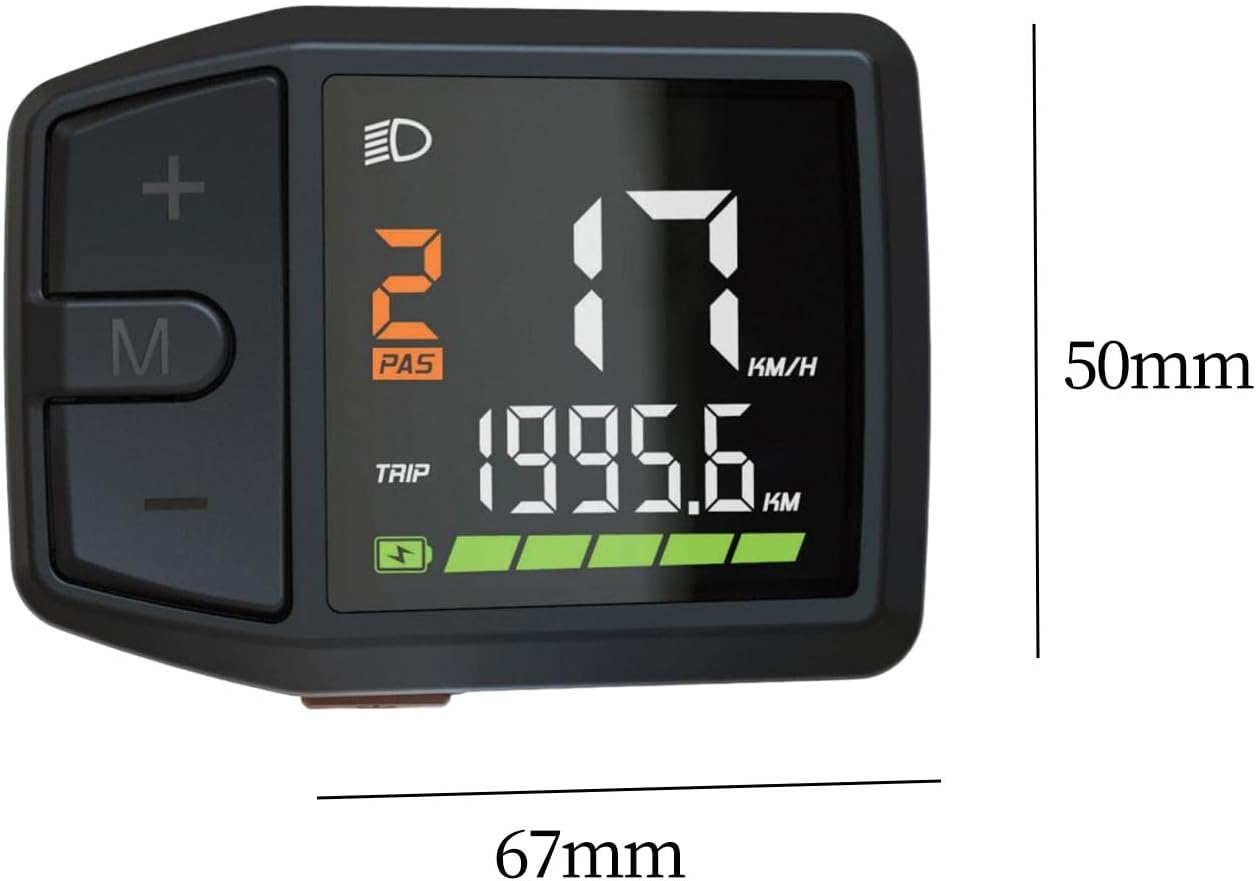
Figure 3: Display dimensions (approx. 67mm x 50mm).
5. സജ്ജീകരണവും ഇൻസ്റ്റാളേഷനും
The DZ41-CAN display is designed for easy integration with M500 and BBS0102 mid-drive motors.
- മൗണ്ടിംഗ്: Securely attach the display to your e-bike's handlebar using the provided mounting bracket. Ensure it is positioned for clear visibility and easy access to buttons.
- കേബിൾ കണക്ഷൻ: Connect the display's cable to the corresponding port on your e-bike's motor system (M500 or BBS0102). Ensure the connection is firm and secure.
- കേബിൾ മാനേജുമെന്റ്: Route the cable neatly along the bike frame, securing it with cable ties to prevent interference with moving parts.
- പ്രാരംഭ പരിശോധന: After installation, perform a quick check to ensure all connections are secure and the display powers on correctly.
6. പ്രവർത്തന നിർദ്ദേശങ്ങൾ
6.1 പവർ ഓൺ/ഓഫ്
- പവർ ഓണാക്കാൻ: Press and hold the 'M' button for approximately 2 seconds until the display illuminates.
- പവർ ഓഫ് ചെയ്യാൻ: Press and hold the 'M' button for approximately 2 seconds until the display turns off.
6.2 ഡിസ്പ്ലേ ഫംഗ്ഷനുകൾ
The display provides comprehensive data for your ride:
- വേഗത: Current riding speed (KM/H or MPH).
- ബാറ്ററി നില: Real-time battery charge indicator.
- സഹായ നില (PAS): Current pedal assist level (e.g., 0-5 or 0-9).
- യാത്രാ ദൂരം: Distance covered during the current ride.
- Total Odometer: ബൈക്ക് പിന്നിട്ട ആകെ ദൂരം.
- ഹെഡ്ലൈറ്റ് ഇൻഡിക്കേറ്റർ: Icon illuminates when headlights are active.
- പിശക് സന്ദേശങ്ങൾ: Displays codes or symbols for system malfunctions.
6.3 ബട്ടൺ പ്രവർത്തനങ്ങൾ
- '+' ബട്ടൺ: Short press to increase pedal assistance level. Long press may activate walk mode or enter settings.
- '-' ബട്ടൺ: Short press to decrease pedal assistance level. Long press may activate walk mode or enter settings.
- 'എം' ബട്ടൺ: Short press to cycle through display modes (e.g., Trip, Odometer, Max Speed, Avg Speed). Long press to power on/off.
6.4 Settings Adjustment
Specific settings adjustments (e.g., unit conversion, wheel size) may be accessible through a combination of button presses. Refer to your e-bike's main controller manual for detailed instructions on advanced settings, as the display acts as an interface.
7. പരിപാലനം
- വൃത്തിയാക്കൽ: Regularly wipe the display screen and body with a soft, lint-free, damp cloth. Avoid using harsh chemicals or abrasive materials that could scratch the screen.
- സംഭരണം: When not in use for extended periods, store the e-bike and display in a cool, dry place, away from direct sunlight and extreme temperatures.
- കേബിൾ പരിശോധന: Periodically check the display cable and connectors for any signs of wear, damage, or corrosion. Ensure connections remain secure.
8. പ്രശ്നപരിഹാരം
If you encounter issues with your DZ41-CAN display, refer to the table below for common problems and solutions.
| പ്രശ്നം | സാധ്യമായ കാരണം | പരിഹാരം |
|---|---|---|
| Display does not power on. | Loose cable connection; Low e-bike battery; Faulty display. | Check all cable connections; Charge e-bike battery; Contact support if issue persists. |
| No speed reading. | Speed sensor issue; Loose motor connection. | Check speed sensor alignment and connection; Ensure motor connection is secure. |
| Incorrect data displayed. | Incorrect settings (e.g., wheel size); Sensor malfunction. | Verify settings through the display or e-bike controller; Check sensor for damage. |
| ഡിസ്പ്ലേ ഒരു പിശക് കോഡ് കാണിക്കുന്നു. | System malfunction; Specific component error. | Refer to your e-bike's main controller manual for error code definitions and solutions. |
9 സ്പെസിഫിക്കേഷനുകൾ
| ഫീച്ചർ | വിശദാംശങ്ങൾ |
|---|---|
| മോഡൽ | DZ41-CAN |
| അനുയോജ്യത | Bafang M500, BBS0102 mid-drive motors |
| ഡിസ്പ്ലേ തരം | LCD, High Contrast Color |
| സ്ക്രീൻ വലിപ്പം | 6.7 സെൻ്റീമീറ്റർ |
| മെറ്റീരിയൽ | PP and PC |
| വാട്ടർപ്രൂഫ് ഡിസൈൻ | അതെ |
| മൗണ്ടിംഗ് തരം | ഹാൻഡിൽബാർ മൗണ്ട് |
| ഹ്യൂമൻ ഇന്റർഫേസ് ഇൻപുട്ട് | ബട്ടണുകൾ |
| നിറം | കറുപ്പ് |
10. വാറൻ്റിയും പിന്തുണയും
For warranty information and technical support, please refer to the documentation provided with your e-bike or contact the seller directly. Keep your purchase receipt as proof of purchase.

