
ആമുഖം
Thank you for choosing the AWEI T61 Wireless Bluetooth Earbuds. This manual provides detailed instructions on how to set up, operate, and maintain your earbuds to ensure optimal performance and longevity. Please read this manual thoroughly before using the product.
പാക്കേജ് ഉള്ളടക്കം
പാക്കേജിൽ എല്ലാ ഇനങ്ങളും ഉണ്ടെന്ന് ഉറപ്പാക്കുക:
- AWEI T61 Wireless Bluetooth Earbuds (Left and Right)
- വയർലെസ് ചാർജിംഗ് കേസ്
- യുഎസ്ബി ചാർജിംഗ് കേബിൾ
- Earbud Covers (S/M/L sizes)
- ഉപയോക്തൃ മാനുവൽ
ഉൽപ്പന്നം കഴിഞ്ഞുview
The AWEI T61 earbuds are designed for a comfortable and secure fit, offering high-fidelity audio and reliable wireless connectivity.

Image: AWEI T61 Wireless Bluetooth Earbuds shown inside their open charging case. The earbuds are black with a sleek design, and the charging case is also black with a circular indicator light.
പ്രധാന സവിശേഷതകൾ:
- ബ്ലൂടൂത്ത് 5.3: Provides stable and low-latency wireless connection.
- ENC Smart Noise Cancellation: കോൾ വ്യക്തത വർദ്ധിപ്പിക്കുന്നു.
- 13 എംഎം ഡൈനാമിക് ഡ്രൈവറുകൾ: Delivers high-fidelity stereo sound.
- IPX6 വാട്ടർപ്രൂഫ്: Resistant to heavy rain and sweat.
- ഗെയിം/സംഗീതം ഡ്യുവൽ മോഡ്: Optimized audio profiles for gaming and music.
- നീണ്ട ബാറ്ററി ലൈഫ്: Up to 8 hours playback per charge, 48 hours with charging case.
സജ്ജമാക്കുക
1. ഇയർബഡുകളും കേസും ചാർജ് ചെയ്യുന്നു
ആദ്യമായി ഉപയോഗിക്കുന്നതിന് മുമ്പ്, ഇയർബഡുകളും ചാർജിംഗ് കേസും പൂർണ്ണമായും ചാർജ് ചെയ്യുക.
- യുഎസ്ബി ചാർജിംഗ് കേബിൾ കേസിലെ ചാർജിംഗ് പോർട്ടിലേക്കും ഒരു പവർ സ്രോതസ്സിലേക്കും ബന്ധിപ്പിക്കുക.
- ചാർജിംഗ് കേസിലെ ഇൻഡിക്കേറ്റർ ലൈറ്റ് ചാർജിംഗ് നില കാണിക്കും.
- ഇയർബഡുകൾ ചാർജിംഗ് കെയ്സിൽ വയ്ക്കുക. അവ സ്വയമേവ ചാർജ് ചെയ്യാൻ തുടങ്ങും.
- A full charge provides approximately 6-8 hours of music playback for the earbuds, and the charging case offers multiple recharges for a total of up to 48 hours of use.

Image: Diagram illustrating the battery life of the AWEI T61 earbuds, showing 6 hours play time, 5 hours talk time, 300 hours standby time, and 300mAh battery capacity for the case.
2. നിങ്ങളുടെ ഉപകരണവുമായി ജോടിയാക്കുന്നു
The AWEI T61 earbuds feature a Hall Switch for quick pairing.
- പ്രാരംഭ ജോടിയാക്കൽ:
- ചാർജിംഗ് കേസ് തുറക്കുക. ഇയർബഡുകൾ സ്വയമേവ ഓണാകുകയും ജോടിയാക്കൽ മോഡിലേക്ക് പ്രവേശിക്കുകയും ചെയ്യും.
- നിങ്ങളുടെ ഉപകരണത്തിൽ (സ്മാർട്ട്ഫോൺ, ടാബ്ലെറ്റ് മുതലായവ), ബ്ലൂടൂത്ത് പ്രവർത്തനക്ഷമമാക്കുക.
- ഇതിനായി തിരയുക "AWEI T61" in the list of available Bluetooth devices and select it to connect.
- Once connected, you will hear a confirmation tone, and the indicator light on the earbuds may change.
- യാന്ത്രിക പുനഃസംയോജനം: After the first successful pairing, the earbuds will automatically connect to the last paired device when you open the charging case.

Image: A visual representation of the AWEI T61 earbud highlighting its internal components and the Bluetooth 5.3 technology, emphasizing a smooth and stable connection.
പ്രവർത്തന നിർദ്ദേശങ്ങൾ
1. ഇയർബഡുകൾ ധരിക്കുന്നു
Choose the earbud covers (S/M/L) that provide the most comfortable and secure fit for your ears. Insert the earbuds gently into your ear canal and rotate them slightly until they feel snug and stable.
2. ടച്ച് നിയന്ത്രണങ്ങൾ
The AWEI T61 earbuds feature intuitive touch controls on each earbud. Specific functions may vary slightly by device, but common controls include:
- പ്ലേ/താൽക്കാലികമായി നിർത്തുക: ഇയർബഡുകളിൽ ഏതെങ്കിലുമൊന്നിൽ ഒറ്റ ടാപ്പ് ചെയ്യുക.
- അടുത്ത ട്രാക്ക്: വലതുവശത്തെ ഇയർബഡിൽ രണ്ടുതവണ ടാപ്പ് ചെയ്യുക.
- മുമ്പത്തെ ട്രാക്ക്: ഇടതുവശത്തെ ഇയർബഡിൽ രണ്ടുതവണ ടാപ്പ് ചെയ്യുക.
- ഉത്തരം/അവസാന കോൾ: ഇയർബഡുകളിൽ ഏതെങ്കിലുമൊന്നിൽ ഒറ്റ ടാപ്പ് ചെയ്യുക.
- കോൾ നിരസിക്കുക: ഏതെങ്കിലും ഇയർബഡിൽ 2 സെക്കൻഡ് അമർത്തിപ്പിടിക്കുക.
- വോയ്സ് അസിസ്റ്റന്റിനെ സജീവമാക്കുക: ഇയർബഡുകളിൽ ഏതെങ്കിലുമൊന്നിൽ മൂന്ന് തവണ ടാപ്പ് ചെയ്യുക.
- വോളിയം നിയന്ത്രണം: (Specific gesture may vary, refer to device settings or experiment with long presses if not covered by single/double/triple tap).
3. Game/Music Dual Mode
The earbuds offer a dual mode for optimized audio experience. Switch between modes to enhance your listening for either gaming or music.
- സ്വിച്ചിംഗ് മോഡുകൾ: (Specific gesture not provided in feature bullets, typically a long press or specific tap sequence. User may need to refer to quick start guide or experiment.)
- ഗെയിം മോഡ്: Enhances sound details like footsteps and gunfire for an immersive gaming experience.
- സംഗീത മോഡ്: ഒരു സമതുലിതമായ ഓഡിയോ പ്രോ നൽകുന്നുfile for general music listening.

ചിത്രം: പൊട്ടിത്തെറിച്ച ഒരു view diagram of an AWEI T61 earbud, showcasing its internal 13mm dynamic driver components responsible for delivering high-fidelity and surging stereo sound.
മെയിൻ്റനൻസ്
1. വൃത്തിയാക്കൽ
- ഇയർബഡുകളും ചാർജിംഗ് കെയ്സും മൃദുവായതും ഉണങ്ങിയതും ലിന്റ് രഹിതവുമായ തുണി ഉപയോഗിച്ച് പതിവായി വൃത്തിയാക്കുക.
- Remove earbud covers and clean them with mild soap and water, then dry thoroughly before reattaching.
- ഉരച്ചിലുകളുള്ള ക്ലീനറുകളോ ലായകങ്ങളോ ഉപയോഗിക്കരുത്.
2. ജല പ്രതിരോധം (IPX6)
The AWEI T61 earbuds are rated IPX6 waterproof, meaning they are protected against powerful water jets. This makes them suitable for use during strenuous exercise and in rainy conditions.
- ഇയർബഡുകൾ വെള്ളത്തിൽ മുക്കരുത്.
- ചാർജ് ചെയ്യുന്നതിനുമുമ്പ് ചാർജിംഗ് പോർട്ട് ഡ്രൈ ആണെന്ന് ഉറപ്പാക്കുക.
- ചാർജിംഗ് കേസ് വാട്ടർപ്രൂഫ് അല്ല.

Image: A pair of AWEI T61 earbuds shown with water droplets, illustrating their IPX6 waterproof and anti-sweat nano coating, indicating resistance to rain and sweat.
ട്രബിൾഷൂട്ടിംഗ്
| ഇഷ്യൂ | സാധ്യമായ പരിഹാരം |
|---|---|
| ഇയർബഡുകൾ ജോടിയാക്കുന്നില്ല/കണക്റ്റ് ചെയ്യുന്നില്ല. |
|
| ശബ്ദമില്ല അല്ലെങ്കിൽ കുറഞ്ഞ ശബ്ദമില്ല. |
|
| ഒരു ഇയർബഡ് പ്രവർത്തിക്കുന്നില്ല. |
|
| ചാർജിംഗ് കേസ് ചാർജ് ചെയ്യുന്നില്ല. |
|
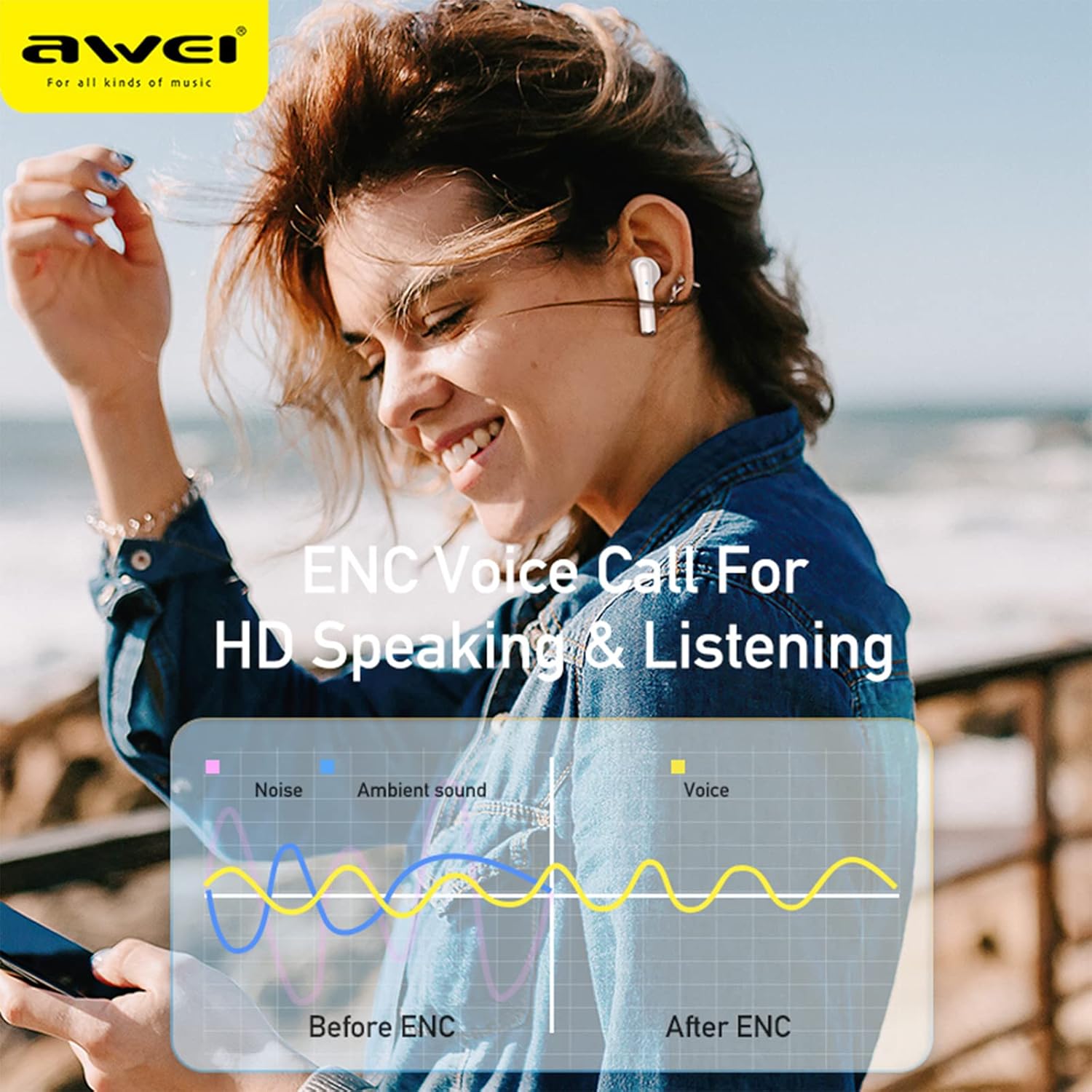
Image: A graphic illustrating the effect of ENC (Environmental Noise Cancellation) on voice calls, showing how noise and ambient sound are reduced to provide clearer voice transmission before and after ENC processing.
സ്പെസിഫിക്കേഷനുകൾ
| മോഡലിൻ്റെ പേര് | AWEI T61 |
| ബ്ലൂടൂത്ത് പതിപ്പ് | 5.3 |
| പിന്തുണയ്ക്കുന്ന പ്രോട്ടോക്കോളുകൾ | HSP, HFP, A2DP, AVRCP |
| ഡ്രൈവർ വലിപ്പം | 13 എംഎം ഡൈനാമിക് |
| ശബ്ദ നിയന്ത്രണം | ENC Smart Noise Cancellation (for calls) |
| വാട്ടർ റെസിസ്റ്റൻസ് റേറ്റിംഗ് | IPX6 |
| ഇയർബഡ് പ്ലേടൈം | 6-8 മണിക്കൂർ (ഒറ്റ ചാർജ്) |
| ആകെ പ്ലേടൈം (കേസിനൊപ്പം) | 48 മണിക്കൂർ വരെ |
| ചാർജിംഗ് കേസ് ബാറ്ററി | 300mAh |
| ഉൽപ്പന്ന അളവുകൾ | 10 x 10 x 4 സെ.മീ |
| ഭാരം | 180 ഗ്രാം |
| ബാറ്ററികൾ | 1 ലിഥിയം അയോൺ ബാറ്ററി (ഉൾപ്പെടുത്തിയിരിക്കുന്നു) |
വാറൻ്റിയും പിന്തുണയും
AWEI products are designed and manufactured to the highest quality standards. For information regarding warranty coverage, technical support, or customer service, please refer to the warranty card included in your package or visit the official AWEI webസൈറ്റ്.
വാറൻ്റി ക്ലെയിമുകൾക്കായി നിങ്ങളുടെ വാങ്ങിയതിൻ്റെ തെളിവ് സൂക്ഷിക്കുക.