
ആമുഖം
Thank you for choosing the UXD Bluetooth Wireless Earphones. This manual provides essential information for setting up, operating, maintaining, and troubleshooting your new earphones. Please read it carefully to ensure optimal performance and longevity of your device. These earphones feature Bluetooth 5.0 connectivity, IPX7 waterproofing, CVC 8.0 noise cancellation for clear calls, and up to 20 hours of playtime.

Image: UXD Bluetooth Wireless Earphones, a general view ഉൽപ്പന്നത്തിൻ്റെ.
പാക്കേജ് ഉള്ളടക്കം
ആരംഭിക്കുന്നതിന് മുമ്പ്, എല്ലാ ഇനങ്ങളും ഉണ്ടെന്ന് ഉറപ്പാക്കാൻ പാക്കേജ് ഉള്ളടക്കങ്ങൾ പരിശോധിക്കുക:
- UXD Bluetooth Wireless Earphones
- മൈക്രോ-യുഎസ്ബി ചാർജിംഗ് കേബിൾ
- Three (3) Pairs of Eartips (Small, Medium, Large)
- Three (3) Pairs of Cable Management Clips
- ഉപയോക്തൃ മാനുവൽ

Image: All items included in the UXD Bluetooth Wireless Earphones package, including the earphones, charging cable, various eartips, and clips.
സജ്ജമാക്കുക
1. ഇയർഫോണുകൾ ചാർജ് ചെയ്യുന്നു
Before first use, fully charge the earphones. A full charge takes approximately 2 hours and provides up to 20 hours of playtime.
- Connect the micro-USB charging cable to the charging port on the earphone's control unit.
- കേബിളിന്റെ മറ്റേ അറ്റം ഒരു USB പവർ അഡാപ്റ്ററുമായി (ഉൾപ്പെടുത്തിയിട്ടില്ല) അല്ലെങ്കിൽ ഒരു കമ്പ്യൂട്ടറിന്റെ USB പോർട്ടുമായി ബന്ധിപ്പിക്കുക.
- The LED indicator on the control unit will show the charging status (e.g., red for charging, blue for fully charged).

Image: A man exercising while wearing the UXD Bluetooth Wireless Earphones, highlighting the 20-hour playtime feature.
2. ബ്ലൂടൂത്ത് ജോടിയാക്കൽ
Pair your earphones with your Bluetooth-enabled device to begin listening.
- Ensure the earphones are fully charged and turned off.
- Press and hold the Multi-function button (usually the center button on the control unit) for approximately 5-7 seconds until the LED indicator flashes red and blue alternately, indicating pairing mode.
- നിങ്ങളുടെ ഉപകരണത്തിൽ (സ്മാർട്ട്ഫോൺ, ടാബ്ലെറ്റ് മുതലായവ), ബ്ലൂടൂത്ത് പ്രവർത്തനക്ഷമമാക്കി ലഭ്യമായ ഉപകരണങ്ങൾക്കായി തിരയുക.
- Select "UXD Earphones" (or similar name) from the list of found devices.
- Once connected, the LED indicator on the earphones will flash blue slowly or turn solid blue. You will also hear an audible confirmation.
- The earphones support Bluetooth 5.0 for a stable connection up to 10 meters (30 feet).

ചിത്രം: വിശദമായ ഒരു ചിത്രം view of the earphone's control unit, emphasizing the stable Bluetooth 5.0 technology.
പ്രവർത്തന നിർദ്ദേശങ്ങൾ
1. പവർ ഓൺ/ഓഫ്
- പവർ ഓൺ: Press and hold the Multi-function button for 3 seconds until the LED flashes blue and you hear a power-on prompt.
- പവർ ഓഫ്: Press and hold the Multi-function button for 3 seconds until the LED flashes red and you hear a power-off prompt.
2. സംഗീതം പ്ലേബാക്ക്
- പ്ലേ/താൽക്കാലികമായി നിർത്തുക: മൾട്ടി-ഫംഗ്ഷൻ ബട്ടൺ ഒരിക്കൽ അമർത്തുക.
- അടുത്ത ട്രാക്ക്: വോളിയം അപ്പ് (+) ബട്ടൺ അമർത്തിപ്പിടിക്കുക.
- മുമ്പത്തെ ട്രാക്ക്: വോളിയം ഡൗൺ (-) ബട്ടൺ അമർത്തിപ്പിടിക്കുക.
3. കോൾ മാനേജ്മെന്റ്
The earphones feature CVC 8.0 noise cancellation for clear voice calls.
- ഉത്തരം/അവസാന കോൾ: മൾട്ടി-ഫംഗ്ഷൻ ബട്ടൺ ഒരിക്കൽ അമർത്തുക.
- കോൾ നിരസിക്കുക: മൾട്ടി-ഫംഗ്ഷൻ ബട്ടൺ 2 സെക്കൻഡ് അമർത്തിപ്പിടിക്കുക.
- അവസാന നമ്പർ വീണ്ടും ഡയൽ ചെയ്യുക: മൾട്ടി-ഫംഗ്ഷൻ ബട്ടൺ ഇരട്ട-അമർത്തുക.
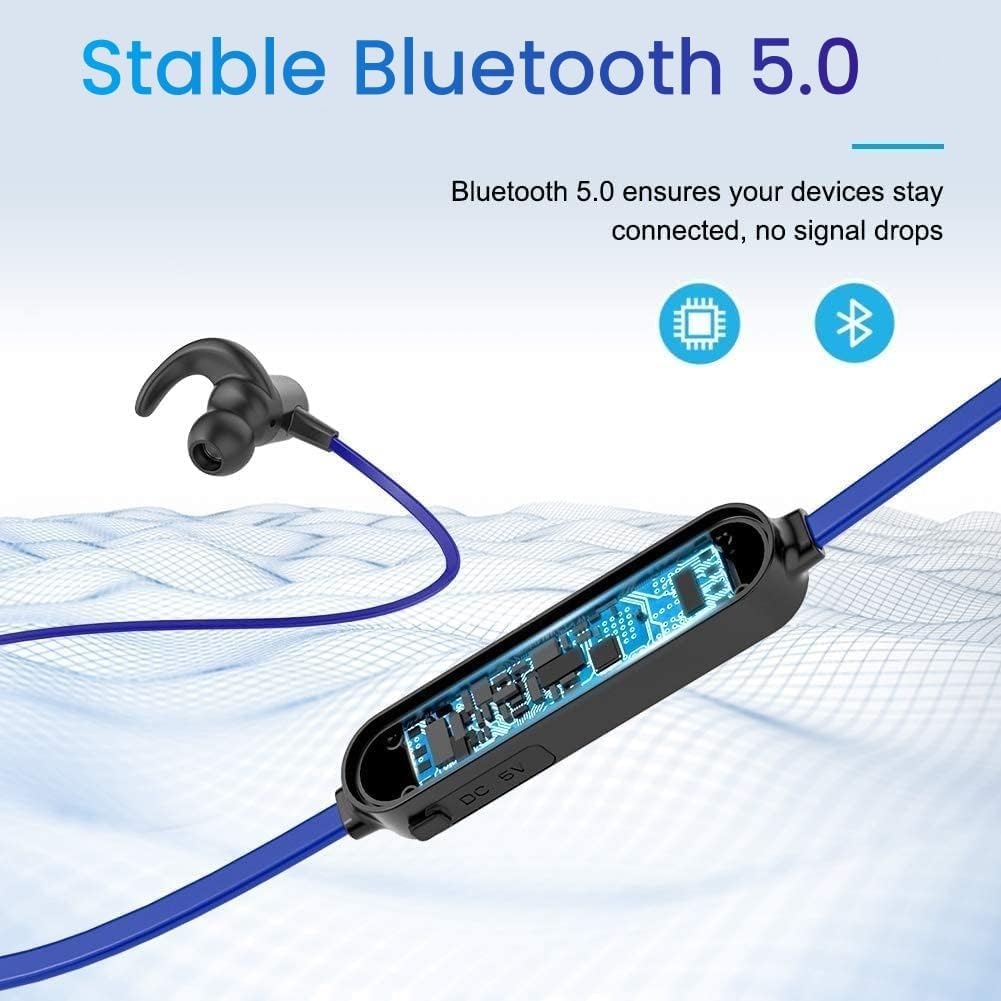
Image: A woman using the UXD Bluetooth Wireless Earphones, demonstrating the clear voice call feature powered by CVC 8.0 technology.
4. വോളിയം നിയന്ത്രണം
- വോളിയം വർദ്ധിപ്പിക്കുക: വോളിയം അപ്പ് (+) ബട്ടൺ അമർത്തുക.
- വോളിയം കുറയ്ക്കുക: വോളിയം ഡൗൺ (-) ബട്ടൺ അമർത്തുക.
മെയിൻ്റനൻസ്
ശരിയായ അറ്റകുറ്റപ്പണി നിങ്ങളുടെ ഇയർഫോണുകളുടെ ദീർഘായുസ്സും പ്രകടനവും ഉറപ്പാക്കുന്നു.
- വൃത്തിയാക്കൽ: ഇയർഫോണുകൾ വൃത്തിയാക്കാൻ മൃദുവായതും ഉണങ്ങിയതുമായ തുണി ഉപയോഗിക്കുക. കഠിനമായ രാസവസ്തുക്കളോ ഉരച്ചിലുകളോ ഉള്ള വസ്തുക്കൾ ഉപയോഗിക്കരുത്.
- ഇയർടിപ്പുകൾ: Regularly remove and clean the eartips with mild soap and water. Ensure they are completely dry before reattaching.
- സംഭരണം: ഉപയോഗത്തിലില്ലാത്തപ്പോൾ, ഇയർഫോണുകൾ തണുത്തതും വരണ്ടതുമായ സ്ഥലത്ത് സൂക്ഷിക്കുക, നേരിട്ടുള്ള സൂര്യപ്രകാശത്തിൽ നിന്നും കടുത്ത താപനിലയിൽ നിന്നും അകന്നുനിൽക്കുക.
- ജല പ്രതിരോധം: The earphones are IPX7 waterproof, meaning they can withstand submersion in up to 1 meter of water for 30 minutes. However, they are not designed for swimming or prolonged underwater use. Always ensure the charging port cover is securely closed to maintain water resistance.

Image: The UXD Bluetooth Wireless Earphones shown with water droplets, emphasizing their IPX7 waterproof capability.
ട്രബിൾഷൂട്ടിംഗ്
നിങ്ങളുടെ ഇയർഫോണുകളിൽ പ്രശ്നങ്ങൾ നേരിടുകയാണെങ്കിൽ, ഇനിപ്പറയുന്ന പൊതുവായ പരിഹാരങ്ങൾ പരിശോധിക്കുക:
- Earphones will not turn on: ഇയർഫോണുകൾ പൂർണ്ണമായും ചാർജ് ചെയ്തിട്ടുണ്ടെന്ന് ഉറപ്പാക്കുക.
- ഉപകരണവുമായി ജോടിയാക്കാൻ കഴിയില്ല:
- Ensure the earphones are in pairing mode (LED flashing red and blue).
- നിങ്ങളുടെ ഉപകരണത്തിൽ ബ്ലൂടൂത്ത് പ്രവർത്തനക്ഷമമാക്കിയിട്ടുണ്ടെന്ന് ഉറപ്പാക്കുക.
- Move the earphones closer to your device (within 10 meters).
- Turn off and on both the earphones and your device, then try pairing again.
- നിങ്ങളുടെ ഉപകരണത്തിലെ മുൻ ബ്ലൂടൂത്ത് കണക്ഷനുകൾ മായ്ക്കുക.
- ശബ്ദമില്ല അല്ലെങ്കിൽ കുറഞ്ഞ ശബ്ദം:
- Check the volume level on both the earphones and your connected device.
- ഇയർഫോണുകൾ നിങ്ങളുടെ ഉപകരണവുമായി ശരിയായി ബന്ധിപ്പിച്ചിട്ടുണ്ടെന്ന് ഉറപ്പാക്കുക.
- വ്യത്യസ്ത ഓഡിയോ ഉറവിടങ്ങൾ പ്ലേ ചെയ്യാൻ ശ്രമിക്കുക.
- ഇടവിട്ടുള്ള കണക്ഷൻ:
- ഇയർഫോണുകൾക്കും നിങ്ങളുടെ ഉപകരണത്തിനും ഇടയിൽ തടസ്സങ്ങളൊന്നുമില്ലെന്ന് ഉറപ്പാക്കുക.
- തടസ്സം സൃഷ്ടിച്ചേക്കാവുന്ന മറ്റ് വയർലെസ് ഉപകരണങ്ങളിൽ നിന്ന് മാറുക.
- Keep the earphones within the 10-meter Bluetooth range.
സ്പെസിഫിക്കേഷനുകൾ
| ഫീച്ചർ | വിശദാംശങ്ങൾ |
|---|---|
| മോഡൽ നമ്പർ | erfver |
| ബ്രാൻഡ് | UXD |
| കണക്റ്റിവിറ്റി | വയർലെസ് ബ്ലൂടൂത്ത് 5.0 |
| ബാറ്ററി തരം | ലിഥിയം-പോളിമർ |
| കളിസമയം | 20 മണിക്കൂർ വരെ |
| ചാർജിംഗ് സമയം | ഏകദേശം 2 മണിക്കൂർ |
| ജല പ്രതിരോധം | IPX7 |
| മൈക്രോഫോൺ | Integrated with CVC 8.0 |
| ഫോം ഫാക്ടർ | ഇൻ-ഇയർ |
| Impedance (Sensitivity) | 15 ഓം |
| മെറ്റീരിയൽ | സിലിക്കൺ |
| നിയന്ത്രണ രീതി | വിദൂര നിയന്ത്രണം |
വാറൻ്റിയും പിന്തുണയും
Your UXD Bluetooth Wireless Earphones come with the following:
- 30 ദിവസത്തെ പണം തിരികെ നൽകാനുള്ള ഗ്യാരണ്ടി.
- 3-month product replacement warranty.
For any product inquiries, technical support, or warranty claims, please contact UXD customer service through the platform where you purchased the product. Please have your model number (erfver) and purchase details ready.