
YABER K2s
YABER K2s 4K Smart Projector User Manual
Model: K2s | Brand: YABER
1. ആമുഖം
Thank you for choosing the YABER K2s 4K Smart Projector. This manual provides essential information for setting up, operating, and maintaining your projector to ensure optimal performance and longevity. The YABER K2s combines advanced projection technology with smart features, including Android TV 11, high brightness, superior audio, and intelligent auto-correction, to deliver an immersive entertainment experience.

Figure 1.1: The YABER K2s Projector showcasing its smart entertainment capabilities with popular streaming services.
2 പ്രധാന സവിശേഷതകൾ
- Android TV 11 Built-in: Access over 9,000 apps and 1,000,000+ movies from platforms like Netflix, Prime Video, and YouTube directly through the integrated Android TV dongle.
- അതിശയിപ്പിക്കുന്ന ചിത്ര നിലവാരം: Native 1080p resolution with 4K support and 800 ANSI Lumens brightness for vivid, detailed, and bright images.
- Superior Audio Experience: Co-created with JBL, featuring dual JBL stereo speakers with Dolby Audio support for 360° immersive sound. Can also function as a standalone Bluetooth speaker.
- Advanced Auto Screen Adaptation: Equipped with auto focus and auto keystone correction for instant, perfectly aligned, and sharp visuals.
- NFC Screencast: Effortlessly cast content from your NFC-enabled phone by simply tapping it on the projector.
- അലക്സാ വോയ്സ് കൺട്രോൾ: Seamlessly control your projector, switch signals, open apps, and adjust volume using voice commands when paired with Alexa.
- വൈഫൈ 6 കണക്റ്റിവിറ്റി: Ensures ultra-high-speed and stable transmission for smooth streaming and gaming, 45% faster than previous generations.
- ശാന്തമായ പ്രവർത്തനം: Designed with a quiet mode, operating at less than 28dB, and an auto-sleep mode for undisturbed viewing.

ചിത്രം 2.1: ഓവർview of the YABER K2s projector's core features.
3. സജ്ജീകരണ ഗൈഡ്
3.1 അൺപാക്കിംഗും പ്ലേസ്മെന്റും
Carefully remove all components from the packaging. Place the projector on a stable, flat surface or mount it on a ceiling or tripod. Ensure adequate ventilation around the projector.
3.2 പവർ കണക്ഷൻ
- പ്രൊജക്ടറിന്റെ പവർ ഇൻപുട്ട് പോർട്ടിലേക്ക് പവർ കോർഡ് ബന്ധിപ്പിക്കുക.
- പവർ കോർഡിൻ്റെ മറ്റേ അറ്റം ഒരു പവർ ഔട്ട്ലെറ്റിലേക്ക് പ്ലഗ് ചെയ്യുക.
- പ്രൊജക്ടറിലോ റിമോട്ട് കൺട്രോളിലോ ഉള്ള പവർ ബട്ടൺ അമർത്തി അത് ഓണാക്കുക.
3.3 പ്രാരംഭ സജ്ജീകരണവും നെറ്റ്വർക്ക് കണക്ഷനും
Upon first power-on, the projector will guide you through the initial setup process for the Android TV dongle. Follow the on-screen prompts to:
- നിങ്ങളുടെ ഭാഷ തിരഞ്ഞെടുക്കുക.
- Connect to a Wi-Fi network (WiFi 6 recommended for best performance).
- Sign in with your Google account to access the Google Play Store and its applications.
3.4 Image Adjustment (Auto Focus & Keystone)
The YABER K2s features automatic focus and keystone correction. Once the projector is powered on and positioned, it will automatically adjust the image for clarity and shape. If manual adjustment is needed, navigate to the settings menu using the remote control.

Figure 3.1: The projector's auto focus and keystone correction ensure a perfect view നിമിഷങ്ങൾക്കുള്ളിൽ.
4. പ്രവർത്തന നിർദ്ദേശങ്ങൾ
4.1 ആൻഡ്രോയിഡ് ടിവി നാവിഗേറ്റ് ചെയ്യൽ
Use the provided remote control to navigate the Android TV interface. The home screen provides access to installed apps, recommended content, and settings. You can download additional apps from the Google Play Store.

Figure 4.1: The Android TV interface with access to 9000+ apps.
4.2 ബാഹ്യ ഉപകരണങ്ങൾ ബന്ധിപ്പിക്കുന്നു
The YABER K2s supports various connectivity options:
- എച്ച്ഡിഎംഐ: Connect laptops, gaming consoles, or other HDMI-enabled devices. The projector supports HDMI ARC and HDMI CEC.
- USB: മീഡിയ പ്ലേ ചെയ്യുക fileഒരു USB ഡ്രൈവിൽ നിന്ന് നേരിട്ട്.
- ബ്ലൂടൂത്ത്: മെച്ചപ്പെടുത്തിയ ഓഡിയോയ്ക്കായി ബാഹ്യ ബ്ലൂടൂത്ത് സ്പീക്കറുകളോ ഹെഡ്ഫോണുകളോ ബന്ധിപ്പിക്കുക.
4.3 NFC Screencast
To use NFC Screencast, ensure your smartphone has NFC enabled. Simply tap your phone to the designated NFC area on the projector to mirror your phone's screen content.
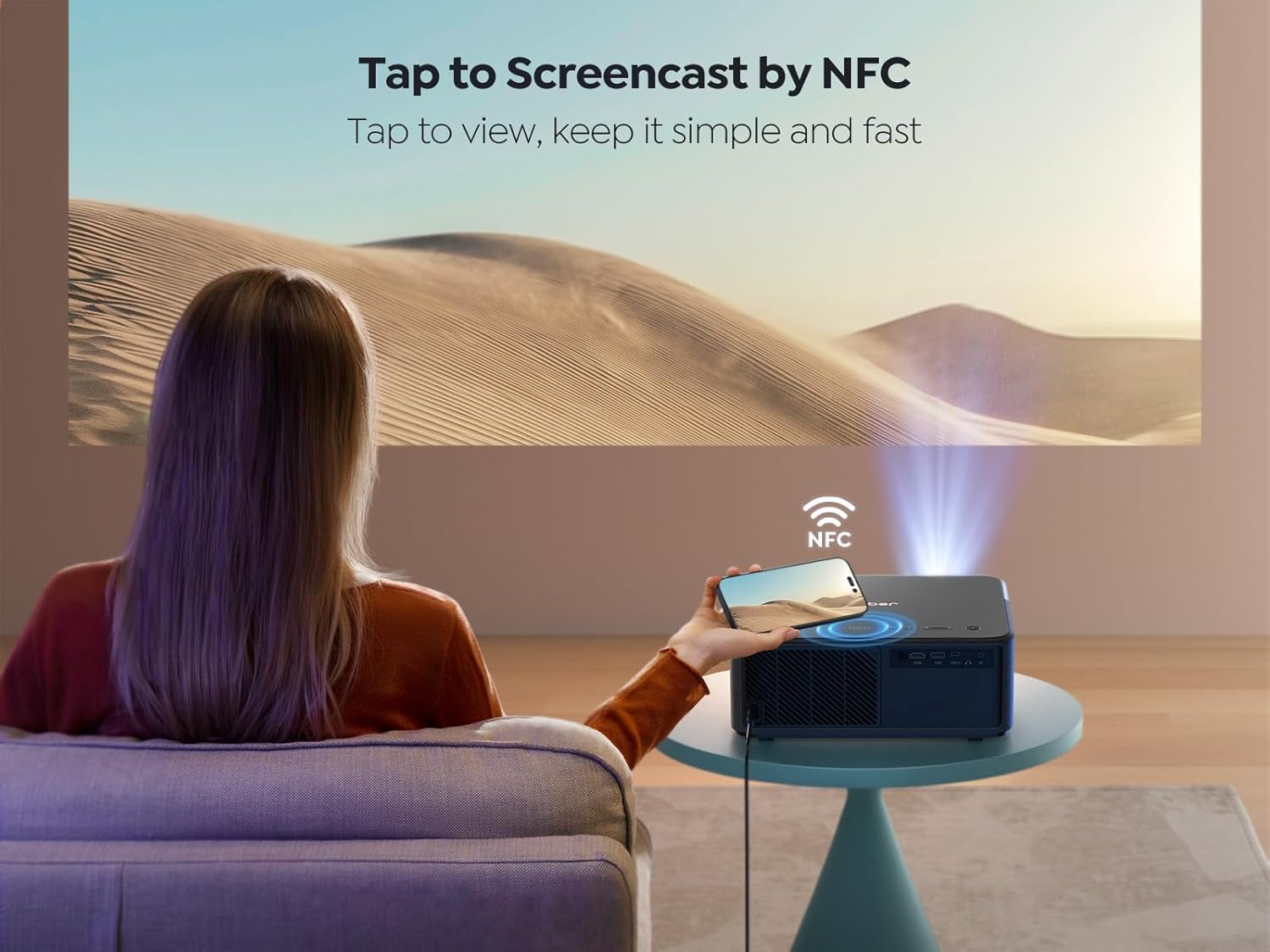
Figure 4.2: Tap to Screencast by NFC for quick content sharing.
4.4 അലക്സാ വോയ്സ് കൺട്രോൾ
Pair your YABER K2s with an Alexa-enabled device to control it using voice commands. For example, say "Alexa, open Netflix on projector" or "Alexa, adjust volume on K2s."

Figure 4.3: Hands-free control with Alexa smart voice control.
4.5 ഓഡിയോ ക്രമീകരണങ്ങൾ
The projector's dual JBL speakers with Dolby Audio provide rich sound. You can adjust audio settings through the Android TV interface. To use the projector as a standalone Bluetooth speaker, simply turn off the projection screen in the settings.

Figure 4.4: Experience 360° immersive audio with JBL and Dolby Audio.
4.6 Quiet Mode and Ambient Mode
The K2s features a quiet mode for reduced fan noise, ideal for undisturbed viewing. Additionally, an ambient mode allows you to project calming visuals like starry skies or bonfires, enhancing your environment.

Figure 4.5: Enjoy lower noise with energy saving in Quiet Mode.
5. പരിപാലനം
5.1 ലെൻസ് വൃത്തിയാക്കൽ
പ്രൊജക്ടർ ലെൻസ് മൃദുവായി തുടയ്ക്കാൻ ഒപ്റ്റിക്കൽ ലെൻസുകൾക്കായി പ്രത്യേകം രൂപകൽപ്പന ചെയ്ത മൃദുവായ, ലിന്റ് രഹിത തുണി ഉപയോഗിക്കുക. അബ്രസീവ് ക്ലീനറുകളോ അമിതമായ ബലമോ ഉപയോഗിക്കുന്നത് ഒഴിവാക്കുക, കാരണം ഇത് ലെൻസിൽ പോറൽ വീഴ്ത്താൻ സാധ്യതയുണ്ട്.
5.2 പൊതു പരിചരണം
- പ്രൊജക്ടർ വൃത്തിയുള്ളതും പൊടി രഹിതവുമായ അന്തരീക്ഷത്തിൽ സൂക്ഷിക്കുക.
- അമിതമായി ചൂടാക്കുന്നത് തടയാൻ ശരിയായ വായുസഞ്ചാരം ഉറപ്പാക്കുക. എയർ വെൻ്റുകളെ തടയരുത്.
- When not in use, cover the lens with the provided lens cap to protect it from dust and scratches.
- പ്രൊജക്ടർ തണുത്തതും വരണ്ടതുമായ സ്ഥലത്ത് സൂക്ഷിക്കുക.
6. പ്രശ്നപരിഹാരം
6.1 വൈദ്യുതിയില്ല
- Check if the power cord is securely connected to both the projector and the power outlet.
- പവർ ഔട്ട്ലെറ്റ് പ്രവർത്തനക്ഷമമാണെന്ന് ഉറപ്പാക്കുക.
- Try pressing the power button on the projector itself, not just the remote.
6.2 No Image/Poor Image Quality
- ലെൻസ് തൊപ്പി നീക്കം ചെയ്തിട്ടുണ്ടോയെന്ന് പരിശോധിക്കുക.
- Check the input source. Ensure the correct HDMI or USB input is selected.
- Perform auto focus and keystone correction again.
- Clean the projector lens if it appears smudged.
- മുറി ഒപ്റ്റിമൽ ആയി ആവശ്യത്തിന് ഇരുണ്ടതാണെന്ന് ഉറപ്പാക്കുക. viewing.

Figure 6.1: The 800 ANSI Lumens brightness ensures clear and vibrant images.
6.3 വൈ-ഫൈ കണക്റ്റിവിറ്റി പ്രശ്നങ്ങൾ
- നിങ്ങളുടെ വൈഫൈ റൂട്ടർ ഓണാണെന്നും ശരിയായി പ്രവർത്തിക്കുന്നുണ്ടെന്നും ഉറപ്പാക്കുക.
- നൽകിയ വൈഫൈ പാസ്വേഡ് ശരിയാണോ എന്ന് പരിശോധിക്കുക.
- Move the projector closer to the Wi-Fi router to improve signal strength.
- Restart both the projector and your Wi-Fi router.

Figure 6.2: WiFi 6 provides fast, stable, and smooth experience for gaming and streaming.
7 സ്പെസിഫിക്കേഷനുകൾ
| ബ്രാൻഡ് | യാബർ |
| മോഡൽ | K2s |
| ഡിസ്പ്ലേ ടെക്നോളജി | എൽസിഡി |
| നേറ്റീവ് റെസല്യൂഷൻ | 1920 x 1080 (1080P) |
| പിന്തുണയുള്ള റെസല്യൂഷൻ | 4K |
| തെളിച്ചം | 800 ആൻസി ലുമെൻസ് |
| ശബ്ദ നില | < 28 dB |
| ഓപ്പറേറ്റിംഗ് സിസ്റ്റം | ആൻഡ്രോയിഡ് ടിവി 11 |
| ഓഡിയോ | Dual JBL Stereo Speakers, Dolby Audio Support |
| കണക്റ്റിവിറ്റി | HDMI ARC, HDMI CEC, WiFi 6 (5G+2.4G), Bluetooth, USB |
| പ്രത്യേക സവിശേഷതകൾ | Auto Focus, Auto Keystone Correction, NFC Screencast, Alexa Voice Control, Quiet Mode, Auto Sleep Mode |
| ഉൽപ്പന്ന അളവുകൾ | 29 x 27 x 12.6 സെ.മീ |
| ഭാരം | 4.45 കി.ഗ്രാം |
8. വാറൻ്റിയും പിന്തുണയും
YABER is committed to providing excellent customer service and support for your K2s projector.
8.1 വാറൻ്റി വിവരങ്ങൾ
- 6-Month Money Back Guarantee: If you are not satisfied with your purchase, you may be eligible for a refund within six months.
- 3 വർഷത്തെ അറ്റകുറ്റപ്പണി വാറന്റി: The projector is covered by a three-year repair warranty from the date of purchase.
- ആജീവനാന്ത സാങ്കേതിക പിന്തുണ: YABER provides lifetime technical assistance for your product.
8.2 ഉപഭോക്തൃ പിന്തുണ
For any questions, technical assistance, or warranty claims, please contact YABER customer support:
- ഇമെയിൽ പിന്തുണ: service@yaber.com (Available 24/7)
Ask a question about this manual
Ask about setup, troubleshooting, compatibility, parts, safety, or missing instructions. Manuals+ will review the question and use this page’s manual context to help answer it.