
1. ആമുഖം
The Ugoos X4Q Plus is an advanced Android TV Box designed to enhance your home entertainment experience. Powered by the Amlogic S905X4 Quad Core Cortex-A55 CPU and running on Android 11, this device offers robust performance for streaming, gaming, and various applications. It supports AV1 HDR, 4K 60fps video playback, and features comprehensive connectivity options including dual-band Wi-Fi, Bluetooth 5.1, and Gigabit Ethernet.

Image 1.1: Ugoos X4Q Plus Android TV Box.
വീഡിയോ 1.1: കഴിഞ്ഞുview of the Ugoos X4Q Plus Android TV Box, highlighting its features, specifications, and included accessories.
2. പാക്കേജ് ഉള്ളടക്കം
താഴെ പറയുന്ന ഇനങ്ങൾക്കായി ബോക്സ് ചെക്ക് ചെയ്യുക:
- Ugoos X4Q Plus TV Box
- BT റിമോട്ട് കൺട്രോൾ
- HD കേബിൾ (HDMI)
- Power Adapter (DC 5V/2.5A, Type C, US Plug)
- ഇംഗ്ലീഷ് ഉപയോക്തൃ മാനുവൽ

Image 2.1: All items included in the Ugoos X4Q Plus package.
3. ഉൽപ്പന്ന സവിശേഷതകൾ
- പ്രോസസ്സർ: Amlogic S905X4 Quad Core Cortex-A55 CPU.
- ഓപ്പറേറ്റിംഗ് സിസ്റ്റം: ആൻഡ്രോയിഡ് 11.
- മെമ്മറിയും സംഭരണവും: 4 ജിബി റാം + 64 ജിബി റോം.
- വീഡിയോ ഔട്ട്പുട്ട്: Supports 4K 60fps, H.265, AV1 encoded, and 4K HDR content.
- കണക്റ്റിവിറ്റി: Dual-band 2.4G/5G WiFi (IEEE 802.11 a/b/g/n/ac with 2T2R MIMO), 1000Mbps Ethernet, Bluetooth 5.1 LE.
- തുറമുഖങ്ങൾ: USB 2.0, USB 3.0, HDMI, SPDIF, TF Card slot, DC 5V (Type C).
- പ്രത്യേക സവിശേഷതകൾ: DLNA, Miracast, OTA updater for firmware.
Image 3.1: The Ugoos X4Q Plus runs on Android 11 OS.
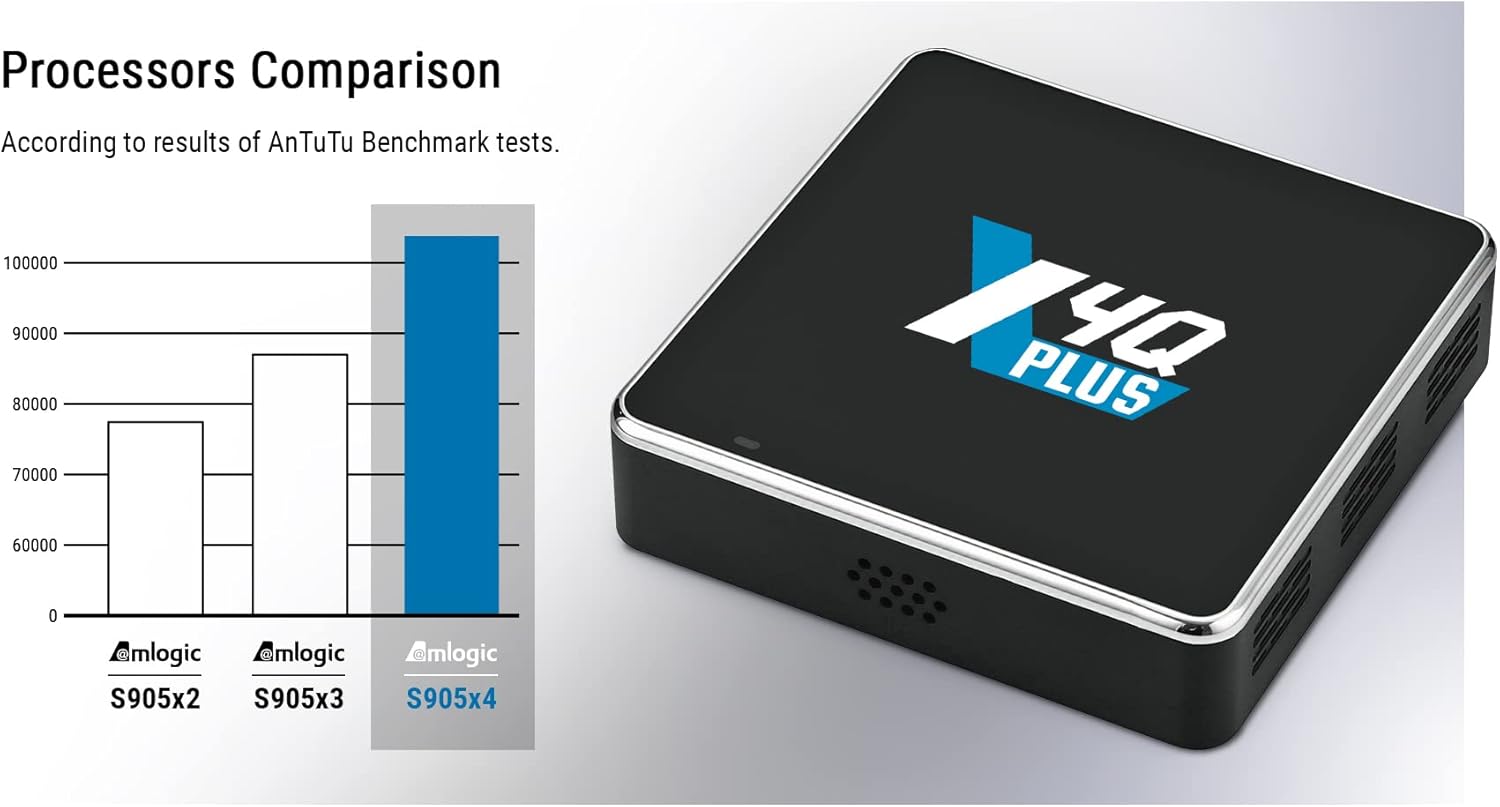
Image 3.2: Processor comparison highlighting the Amlogic S905X4 performance.
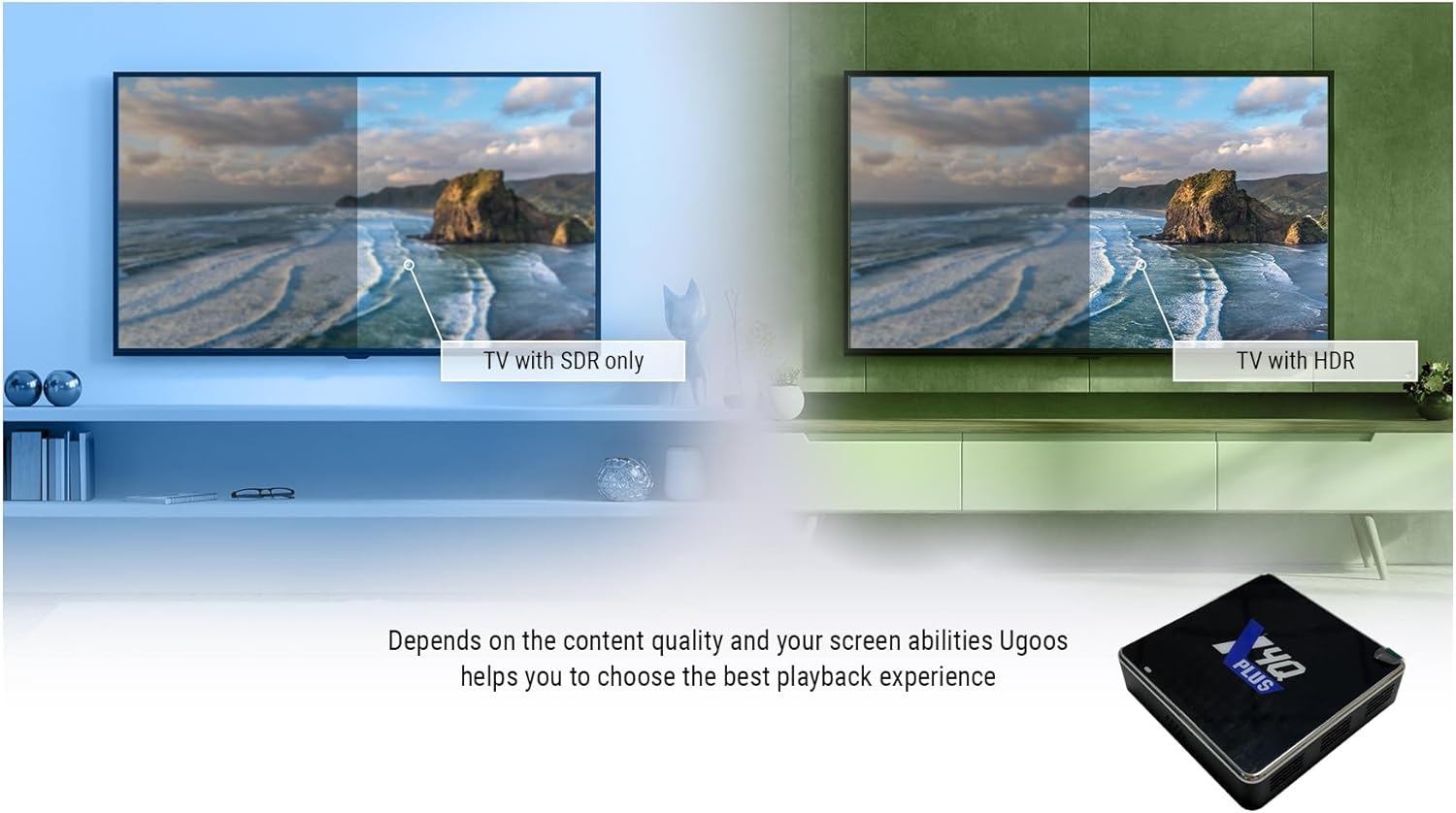
Image 3.3: Visual comparison demonstrating the enhanced quality of 4K HDR content.
4. സജ്ജീകരണ ഗൈഡ്
- ടിവിയിലേക്ക് കണക്റ്റ് ചെയ്യുക: Connect the Ugoos X4Q Plus TV Box to your television using the provided HDMI cable. Ensure the HDMI cable is securely plugged into both the TV Box and an available HDMI input on your TV.
- പവർ കണക്ഷൻ: Connect the Type-C power adapter to the DC 5V port on the TV Box, then plug the adapter into a power outlet.
- നെറ്റ്വർക്ക് കണക്ഷൻ:
- വയർ: For a stable connection, connect an Ethernet cable from your router to the LAN port on the TV Box.
- വയർലെസ്: Alternatively, you can connect to Wi-Fi during the initial setup process.
- പവർ ഓൺ: ഉപകരണം യാന്ത്രികമായി ഓണാകണം. അല്ലെങ്കിൽ, റിമോട്ട് കൺട്രോളിലെ പവർ ബട്ടൺ അമർത്തുക.
- പ്രാരംഭ സജ്ജീകരണം: Follow the on-screen instructions to complete the initial setup, including language selection, network configuration, and Google account login.

ചിത്രം 4.1: കഴിഞ്ഞുview of the various ports and interfaces on the Ugoos X4Q Plus, including DC-5V (Type C), HDMI, USB 2.0 OTG, LAN, SPDIF, USB 3.0, and TF-CARD slot.
5. പ്രവർത്തന നിർദ്ദേശങ്ങൾ
5.1 അടിസ്ഥാന നാവിഗേഷൻ
- Use the directional buttons on the remote control to navigate through menus and select items.
- അമർത്തുക OK തിരഞ്ഞെടുക്കലുകൾ സ്ഥിരീകരിക്കുന്നതിനുള്ള ബട്ടൺ.
- അമർത്തുക തിരികെ മുമ്പത്തെ സ്ക്രീനിലേക്ക് മടങ്ങാനുള്ള ബട്ടൺ.
- അമർത്തുക വീട് button to go to the main Android home screen.
5.2 ആപ്ലിക്കേഷനുകൾ ഇൻസ്റ്റാൾ ചെയ്യുന്നു
The Ugoos X4Q Plus supports Google Play Store and APK installation:
- ഗൂഗിൾ പ്ലേ സ്റ്റോർ: Access the Google Play Store from the home screen to download and install your favorite streaming apps, games, and utilities.
- APK Installation: For apps not available on Google Play, you can download APK files from trusted sources and install them via a file manager. Ensure 'Unknown sources' installation is enabled in security settings if required.
5.3 മീഡിയ പ്ലേബാക്ക്
The device supports various video and audio formats, including AV1, H.265, MP3, AAC, WMA, RM, FLAC, and Ogg. You can play media from:
- Connected USB drives (USB 2.0, USB 3.0).
- TF cards.
- Network shares (DLNA, Miracast).
- Streaming services (e.g., YouTube).
6. റിമോട്ട് കൺട്രോൾ നിർദ്ദേശങ്ങൾ
6.1 Pairing Ugoos Remote UR01-BLE
To pair the Bluetooth remote control:
- അമർത്തിപ്പിടിക്കുക വോളിയം ഡൗൺ ഒപ്പം വോളിയം കൂട്ടുക ഒരേസമയം ബട്ടണുകൾ.
- The red light on the remote will start to flash slowly after 3 seconds, indicating it has entered standby mode.
- On your TV Box, navigate to the Bluetooth search function in the settings.
- Wait until it finds "Ugoos Remote" in the list.
- Select "Ugoos Remote" to initiate pairing and accept any system requests.
- The red light on the Ugoos remote control will turn off if the pairing is successful.
6.2 Remote Control Button IR Setting (IR Learning)
This function is available only for the ശക്തി button on the remote control to learn infrared signals from another remote:
- പിടിക്കുക ശക്തി button on the Ugoos remote for about 3 seconds. The red light will flash slowly. Release the button once the red light stays on, indicating it's in IR learning mode.
- Position the Ugoos remote and the remote you wish to copy from (e.g., your TV remote) head-to-head, about 3-5 cm apart.
- Press the desired button on your TV remote (e.g., its power button). The red light on the Ugoos remote will flash twice and then stay on, indicating successful learning.
- The Ugoos remote will automatically exit IR learning state after about 10 seconds of inactivity.

Image 6.1: Detailed instructions for pairing the Bluetooth remote and setting up IR learning for the power button.
7 സ്പെസിഫിക്കേഷനുകൾ
| ഫീച്ചർ | വിശദാംശങ്ങൾ |
|---|---|
| ബ്രാൻഡ് | Ugoos |
| മോഡലിൻ്റെ പേര് | X4Q Plus |
| ഓപ്പറേറ്റിംഗ് സിസ്റ്റം | ആൻഡ്രോയിഡ് 11 |
| പ്രോസസ്സർ | Amlogic S905X4 Quad Core Cortex-A55 |
| റാം | 4 ജിബി |
| ROM | 64 ജിബി |
| കണക്റ്റിവിറ്റി ടെക്നോളജി | Ethernet (1000Mbps), Wi-Fi (2.4G/5G Dual-band, MIMO), Bluetooth 5.1 LE |
| വീഡിയോ റെസല്യൂഷൻ | 4K @ 60fps |
| Video Codecs Supported | AV1, H.265, VP9 Profile-2, H.264 AVC, MPEG-2, MPEG-1 |
| ഓഡിയോ ഫോർമാറ്റുകൾ പിന്തുണയ്ക്കുന്നു | MP3, AAC, WMA, RM, FLAC, ഓഗ് |
| തുറമുഖങ്ങൾ | HDMI, USB 2.0, USB 3.0, SPDIF, LAN, TF Card, DC 5V (Type C) |
| പ്രത്യേക സവിശേഷതകൾ | DLNA, Miracast, OTA Updater |
| അളവുകൾ | 3.46 x 3.46 x 0.86 ഇഞ്ച് |
| ഇനത്തിൻ്റെ ഭാരം | 1.21 പൗണ്ട് |
| പവർ അഡാപ്റ്റർ | DC 5V/2.5A (ടൈപ്പ് C) |
8. പരിപാലനം
- വൃത്തിയാക്കൽ: ഉപകരണം വൃത്തിയാക്കാൻ മൃദുവായതും ഉണങ്ങിയതുമായ തുണി ഉപയോഗിക്കുക. ദ്രാവക ക്ലീനറുകളോ ഉരച്ചിലുകളുള്ള വസ്തുക്കളോ ഒഴിവാക്കുക.
- വെൻ്റിലേഷൻ: Ensure the TV Box is placed in a well-ventilated area to prevent overheating. Do not block the ventilation holes.
- സോഫ്റ്റ്വെയർ അപ്ഡേറ്റുകൾ: The device supports OTA (Over-The-Air) updates. Regularly check for and install available software updates to ensure optimal performance and security.
- പവർ സൈക്കിൾ: If the device becomes unresponsive, disconnect the power adapter, wait for 10 seconds, and then reconnect it to perform a power cycle.
9. പ്രശ്നപരിഹാരം
- ശക്തിയില്ല: പവർ അഡാപ്റ്റർ ഉപകരണത്തിലേക്കും പ്രവർത്തിക്കുന്ന ഒരു പവർ ഔട്ട്ലെറ്റിലേക്കും സുരക്ഷിതമായി ബന്ധിപ്പിച്ചിട്ടുണ്ടെന്ന് ഉറപ്പാക്കുക.
- ചിത്രം ഇല്ല: Verify the HDMI cable is correctly connected to both the TV Box and the TV. Ensure the TV input source is set to the correct HDMI port.
- ശബ്ദമില്ല: Check the volume settings on both the TV Box and your television. Ensure audio cables (if used) are properly connected.
- Wi-Fi കണക്ഷൻ പ്രശ്നങ്ങൾ: Restart your router and the TV Box. Re-enter the Wi-Fi password if necessary. Ensure the TV Box is within range of your Wi-Fi router.
- റിമോട്ട് കൺട്രോൾ പ്രതികരിക്കുന്നില്ല: Check the batteries in the remote control. If it's a Bluetooth remote, ensure it is properly paired (refer to Section 6.1).
- ആപ്പുകൾ ക്രാഷാകുന്നു/ഫ്രീസാകുന്നു: Try clearing the cache of the problematic app in the Android settings. If the issue persists, reinstall the app.
10. വാറൻ്റിയും പിന്തുണയും
The Ugoos X4Q Plus Android TV Box comes with a standard manufacturer's warranty. Please refer to the warranty card included in your package for specific terms and conditions. For technical support, troubleshooting assistance, or warranty claims, please contact your retailer or visit the official Ugoos support webസൈറ്റ്.
വാറന്റി ആവശ്യങ്ങൾക്കായി വാങ്ങിയതിന്റെ തെളിവായി നിങ്ങളുടെ വാങ്ങൽ രസീത് സൂക്ഷിക്കുക.