
T700
T700 PRO MAX Smartwatch User Manual
മോഡൽ: T700
ആമുഖം
Thank you for choosing the Generic T700 PRO MAX Smartwatch. This device features a 45mm full touch display, Bluetooth 5.2 connectivity, and supports Bluetooth calling. It provides comprehensive health monitoring including heart rate, calorie tracking, and step counting, along with music control and app notifications. This manual will guide you through the setup, operation, and maintenance of your new smartwatch.
സുരക്ഷാ വിവരങ്ങൾ
- ഉപകരണം ഡിസ്അസംബ്ലിംഗ് ചെയ്യാനോ പരിഷ്ക്കരിക്കാനോ ശ്രമിക്കരുത്.
- ഉയർന്ന താപനിലയിൽ നിന്നും നേരിട്ടുള്ള സൂര്യപ്രകാശത്തിൽ നിന്നും ഉപകരണം അകറ്റി നിർത്തുക.
- ശക്തമായ കാന്തിക മണ്ഡലങ്ങളിലേക്ക് ഉപകരണം തുറന്നുകാട്ടുന്നത് ഒഴിവാക്കുക.
- Use only the provided charger for wireless charging.
- പുതിയ വ്യായാമ പദ്ധതികൾ ആരംഭിക്കുന്നതിന് മുമ്പ് ഒരു മെഡിക്കൽ പ്രൊഫഷണലിനെ സമീപിക്കുക, പ്രത്യേകിച്ച് നിങ്ങൾക്ക് മുൻകാല ആരോഗ്യപ്രശ്നങ്ങൾ ഉണ്ടെങ്കിൽ.
- The device is water resistant, but not waterproof. Avoid prolonged submersion or use in hot water.
ബോക്സിൽ എന്താണുള്ളത്
പാക്കേജ് തുറക്കുമ്പോൾ, താഴെ പറയുന്ന എല്ലാ ഇനങ്ങളും ഉണ്ടെന്ന് ഉറപ്പാക്കുക:
- T700 PRO MAX Smartwatch
- വയർലെസ് ചാർജർ
- ഉപയോക്തൃ മാനുവൽ (ഈ പ്രമാണം)
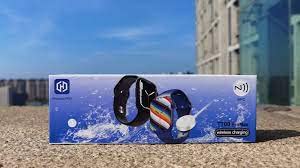
Image: The retail box for the T700 PRO MAX Smartwatch, indicating the contents.
ഉൽപ്പന്നം കഴിഞ്ഞുview
Familiarize yourself with the components of your T700 PRO MAX Smartwatch.
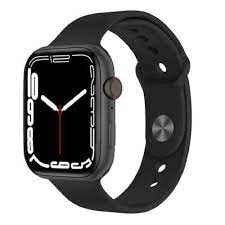
ചിത്രം: മുൻഭാഗം view of the T700 PRO MAX Smartwatch, displaying a digital watch face and the side button/crown.
- Full Touch Display: 45mm IPS LCD screen for interactive control.
- സൈഡ് ബട്ടൺ/കിരീടം: നാവിഗേഷൻ, പവർ ഓൺ/ഓഫ്, ഹോം സ്ക്രീനിലേക്ക് മടങ്ങൽ എന്നിവയ്ക്കായി ഉപയോഗിക്കുന്നു.
- ഹൃദയമിടിപ്പ് സെൻസർ: ആരോഗ്യ നിരീക്ഷണത്തിനായി വാച്ചിന്റെ പിൻഭാഗത്ത് സ്ഥിതിചെയ്യുന്നു.
- മൈക്രോഫോൺ: For Bluetooth calling.
- സ്പീക്കർ: For Bluetooth calling and audio playback.
സജ്ജമാക്കുക
1. സ്മാർട്ട് വാച്ച് ചാർജ് ചെയ്യുന്നു
Before first use, fully charge your smartwatch. The T700 PRO MAX supports wireless charging.
- Connect the wireless charger to a USB power adapter (not included) and plug it into a power outlet.
- Place the back of your smartwatch onto the charging pad. Ensure the watch is correctly aligned with the charger.
- വാച്ച് ഡിസ്പ്ലേ ചാർജിംഗ് സ്റ്റാറ്റസ് സൂചിപ്പിക്കും. പൂർണ്ണമായി ചാർജ് ചെയ്യാൻ ഏകദേശം 2-3 മണിക്കൂർ അനുവദിക്കുക.
2. നിങ്ങളുടെ സ്മാർട്ട്ഫോണുമായി ജോടിയാക്കൽ
To utilize all features, pair your smartwatch with your smartphone via Bluetooth.
- Ensure your smartwatch is powered on.
- നിങ്ങളുടെ സ്മാർട്ട്ഫോണിൽ, ബ്ലൂടൂത്ത് പ്രവർത്തനക്ഷമമാക്കുക.
- Download and install the companion application for the T700 PRO MAX (refer to the watch screen or packaging for app name/QR code).
- Open the companion app and follow the on-screen instructions to search for and connect to your smartwatch.
- നിങ്ങളുടെ ഫോണിലും സ്മാർട്ട് വാച്ചിലും പെയറിംഗ് അഭ്യർത്ഥന സ്ഥിരീകരിക്കുക.
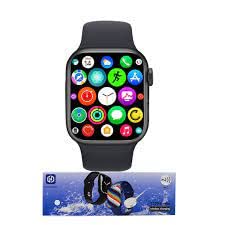
Image: The T700 PRO MAX Smartwatch screen showing a grid of various application icons, indicating its smart features.
പ്രവർത്തന നിർദ്ദേശങ്ങൾ
അടിസ്ഥാന നാവിഗേഷൻ
- ടച്ച് സ്ക്രീൻ: മെനുകളിലൂടെയും സ്ക്രീനുകളിലൂടെയും നാവിഗേറ്റ് ചെയ്യാൻ ഇടത്തേക്ക്/വലത്തേക്ക്, മുകളിലേക്കും താഴേക്കും സ്വൈപ്പ് ചെയ്യുക. ഒരു ഇനം തിരഞ്ഞെടുക്കാൻ ടാപ്പ് ചെയ്യുക.
- സൈഡ് ബട്ടൺ/കിരീടം: സ്ക്രീൻ ഉണർത്താനോ ഹോം സ്ക്രീനിലേക്ക് മടങ്ങാനോ ആപ്പ് മെനു ആക്സസ് ചെയ്യാനോ അമർത്തുക. ലിസ്റ്റുകളിലൂടെ സ്ക്രോൾ ചെയ്യാൻ (ബാധകമെങ്കിൽ) തിരിക്കുക.
Bluetooth Calling and Dialing
ജോടിയാക്കിയാൽ, നിങ്ങളുടെ വാച്ചിൽ നിന്ന് നേരിട്ട് കോളുകൾ വിളിക്കാനും സ്വീകരിക്കാനും കഴിയും.
- ഒരു കോൾ ചെയ്യുന്നു: Access the dialer or contacts list on the watch, then tap to dial a number or select a contact.
- ഒരു കോൾ സ്വീകരിക്കുന്നു: ഒരു കോൾ വരുമ്പോൾ, വാച്ച് കോളർ ഐഡി പ്രദർശിപ്പിക്കും. മറുപടി നൽകാൻ പച്ച ഐക്കണിൽ ടാപ്പ് ചെയ്യുക അല്ലെങ്കിൽ നിരസിക്കാൻ ചുവപ്പ് ഐക്കണിൽ ടാപ്പ് ചെയ്യുക.
ആപ്പ് അറിയിപ്പുകൾ
നിങ്ങളുടെ സ്മാർട്ട്ഫോൺ ആപ്പുകളിൽ നിന്നുള്ള അറിയിപ്പുകൾ നിങ്ങളുടെ വാച്ചിൽ നേരിട്ട് സ്വീകരിക്കുക.
- Ensure app notifications are enabled in the companion app on your smartphone.
- വാച്ച് ഫെയ്സിന്റെ മുകളിൽ നിന്ന് താഴേക്ക് സ്വൈപ്പ് ചെയ്യുക view സമീപകാല അറിയിപ്പുകൾ.
Music Play & Pause
നിങ്ങളുടെ കണക്റ്റുചെയ്ത സ്മാർട്ട്ഫോണിൽ സംഗീത പ്ലേബാക്ക് നിയന്ത്രിക്കുക.
- Access the music control feature on your watch.
- You can play, pause, skip tracks, and adjust volume directly from your wrist.
ആരോഗ്യ നിരീക്ഷണം
The T700 PRO MAX includes various health tracking features.
- Heart Rate Meter: Access the heart rate app on the watch to measure your current heart rate. For best results, wear the watch snugly on your wrist.
- Calorie Meter: Tracks estimated calories burned based on your activity.
- ഘട്ടങ്ങളുടെ എണ്ണം: Automatically counts your daily steps.
- Data can be synchronized with the companion app for detailed analysis and historical trends.
മെയിൻ്റനൻസ്
- വൃത്തിയാക്കൽ: മൃദുവായതും ഉണങ്ങിയതുമായ തുണി ഉപയോഗിച്ച് വാച്ചും സ്ട്രാപ്പും പതിവായി തുടയ്ക്കുക. കഠിനമായ അഴുക്കിന്, അല്പം ഡി ക്ലീനർ ഉപയോഗിക്കുക.amp cloth and then dry thoroughly. Do not use harsh chemicals or abrasive materials.
- ജല പ്രതിരോധം: The T700 PRO MAX is water resistant. This means it can withstand splashes, rain, and brief immersion. It is not suitable for swimming, showering with hot water, or diving. Avoid pressing buttons while the watch is wet.
- സംഭരണം: ദീർഘനേരം ഉപയോഗിക്കാത്തപ്പോൾ, വാച്ച് തണുത്തതും വരണ്ടതുമായ സ്ഥലത്ത് സൂക്ഷിക്കുക.
ട്രബിൾഷൂട്ടിംഗ്
| പ്രശ്നം | സാധ്യമായ പരിഹാരം |
|---|---|
| വാച്ച് ഓണാകുന്നില്ല | Ensure the watch is fully charged. Press and hold the side button for several seconds. |
| സ്മാർട്ട്ഫോണുമായി ജോടിയാക്കാൻ കഴിയില്ല |
|
| അറിയിപ്പുകൾ ദൃശ്യമാകുന്നില്ല |
|
| കൃത്യമല്ലാത്ത ആരോഗ്യ ഡാറ്റ | വാച്ച് നിങ്ങളുടെ കൈത്തണ്ടയിൽ നന്നായി ധരിച്ചിട്ടുണ്ടെന്ന് ഉറപ്പാക്കുക, അധികം അയഞ്ഞതോ അധികം ഇറുകിയതോ അല്ല. വാച്ചിന്റെ പിൻഭാഗത്തുള്ള സെൻസർ വൃത്തിയാക്കുക. |
| ചെറിയ ബാറ്ററി ലൈഫ് | Reduce screen brightness, turn off unnecessary features, and limit frequent screen wake-ups. Ensure proper charging. |
സ്പെസിഫിക്കേഷനുകൾ
| ഫീച്ചർ | വിശദാംശങ്ങൾ |
|---|---|
| മോഡലിൻ്റെ പേര് | T700 പ്രോ മാക്സ് |
| മോഡൽ നമ്പർ | T700 |
| ബ്രാൻഡ് | ജനറിക് |
| പ്രദർശിപ്പിക്കുക | 45mm Full Touch IPS LCD (240 x 240 Resolution) |
| ബ്ലൂടൂത്ത് പതിപ്പ് | 5.2 |
| ചാർജിംഗ് തരം | വയർലെസ് ചാർജിംഗ് |
| പ്രത്യേക സവിശേഷതകൾ | Bluetooth Calling, App Notifications, Heart Rate Meter, Calorie Meter, Step Count, Music Play & Pause, Water Resistant |
| ഉൽപ്പന്ന അളവുകൾ | 4.4 x 3.8 x 1.09 സെ.മീ (44 x 38 x 11 മില്ലിമീറ്റർ) |
| അനുയോജ്യമായ ഉപകരണങ്ങൾ | Smartphones (via companion app) |
വാറൻ്റിയും പിന്തുണയും
For warranty information and customer support, please refer to the warranty card included with your product or contact the manufacturer directly. Keep your purchase receipt as proof of purchase.
Manufacturer: ELEMENTS INDUSTRIES
For further assistance, please visit the official product support webസൈറ്റ് അല്ലെങ്കിൽ നിങ്ങളുടെ റീട്ടെയിലറെ ബന്ധപ്പെടുക.
Ask a question about this manual
Ask about setup, troubleshooting, compatibility, parts, safety, or missing instructions. Manuals+ will review the question and use this page’s manual context to help answer it.