
1. ഉൽപ്പന്നം കഴിഞ്ഞുview
This Hikity Android Car Stereo is designed for Hyundai Sonata models from 2010 to 2015. It features a 9-inch HD 1080P capacitive touchscreen, a 4-Core CPU processor with 2GB RAM and 64GB ROM, and supports wireless CarPlay, Android Auto, GPS navigation, WiFi, RDS, Bluetooth, and EQ settings. A backup camera is included.
പ്രധാന സവിശേഷതകൾ:
- ഓപ്പറേറ്റിംഗ് സിസ്റ്റം: Latest Android Operating System
- പ്രോസസ്സർ: 4 Core CPU
- മെമ്മറി: 2 ജിബി റാം + 64 ജിബി റോം
- ഡിസ്പ്ലേ: 9-inch HD 1080P Capacitive Touch Screen
- കണക്റ്റിവിറ്റി: Wireless CarPlay, Wired Android Auto/Mirror Link, WiFi, Bluetooth, USB
- നാവിഗേഷൻ: Built-in GPS Navigation (online and offline support)
- ഓഡിയോ: FM RDS, Built-in EQ with various music effects
- അധിക സവിശേഷതകൾ: Backup camera included, support for front camera/DVR, Steering Wheel Control (non-CANBUS), 2 USB inputs, Subwoofer and microphone output, customizable UI themes, Split Screen functionality.
Note: This unit does NOT support the original car amplifier. An extra protocol box and harness may be required if needed.
2. സജ്ജീകരണവും ഇൻസ്റ്റാളേഷനും
2.1 പാക്കേജ് ഉള്ളടക്കം
Before installation, please verify all components are present:
- 1 x കാർ സ്റ്റീരിയോ
- 1 x പവർ കേബിൾ
- 1 x ജിപിഎസ് ആന്റിന
- 1 x പിൻ ക്യാമറ ഇൻപുട്ട് കേബിൾ
- 1 x RCA കേബിൾ
- 2 x USB കേബിൾ
- 1 x ഇൻസ്ട്രക്ഷൻ മാനുവൽ
- Accessories and Installation Tool (as pictured)

Image: Package contents including the car stereo, various cables, and a backup camera.
2.2 Car Model Compatibility
This car stereo is specifically designed for Hyundai Sonata models from 2010 to 2015. Please confirm your original car center console matches Model A as shown in the image below. This product only supports option A.

Image: Car Models Attention - Visual guide for compatible Hyundai Sonata console types.
2.3 വയറിംഗ് നിർദ്ദേശങ്ങൾ
Follow the wiring diagram carefully for proper installation. Ensure all connections are secure.

Image: Autoradio Wiring Diagram.
ബാക്കപ്പ് ക്യാമറ കണക്ഷൻ:
The included backup camera requires specific wiring:
- Connect the BACK line (usually red) to the positive pole of the car's reversing light.
- Connect the negative pole of the car's reversing light to the camera's ground.
- Plug the camera's video output into the 'Rear Camera Input' on the stereo.
Video: Demonstrates how to connect the backup camera to the car stereo system.

ചിത്രം: പിൻഭാഗം View Camera Wiring Diagram.
3. പ്രവർത്തന നിർദ്ദേശങ്ങൾ
3.1 Basic Interface and Navigation
The stereo features a user-friendly Android interface. Swipe left or right to access different screens and applications. The main interface provides quick access to essential functions.

Image: Before and After installation of the car stereo in a Hyundai Sonata.

Image: Multiple UI Theme options for customization.
3.2 റേഡിയോ പ്രവർത്തനങ്ങൾ
Access the Radio application to tune into FM/AM stations. You can manually scan, auto-search, and save your favorite stations. The RDS feature provides additional station information.
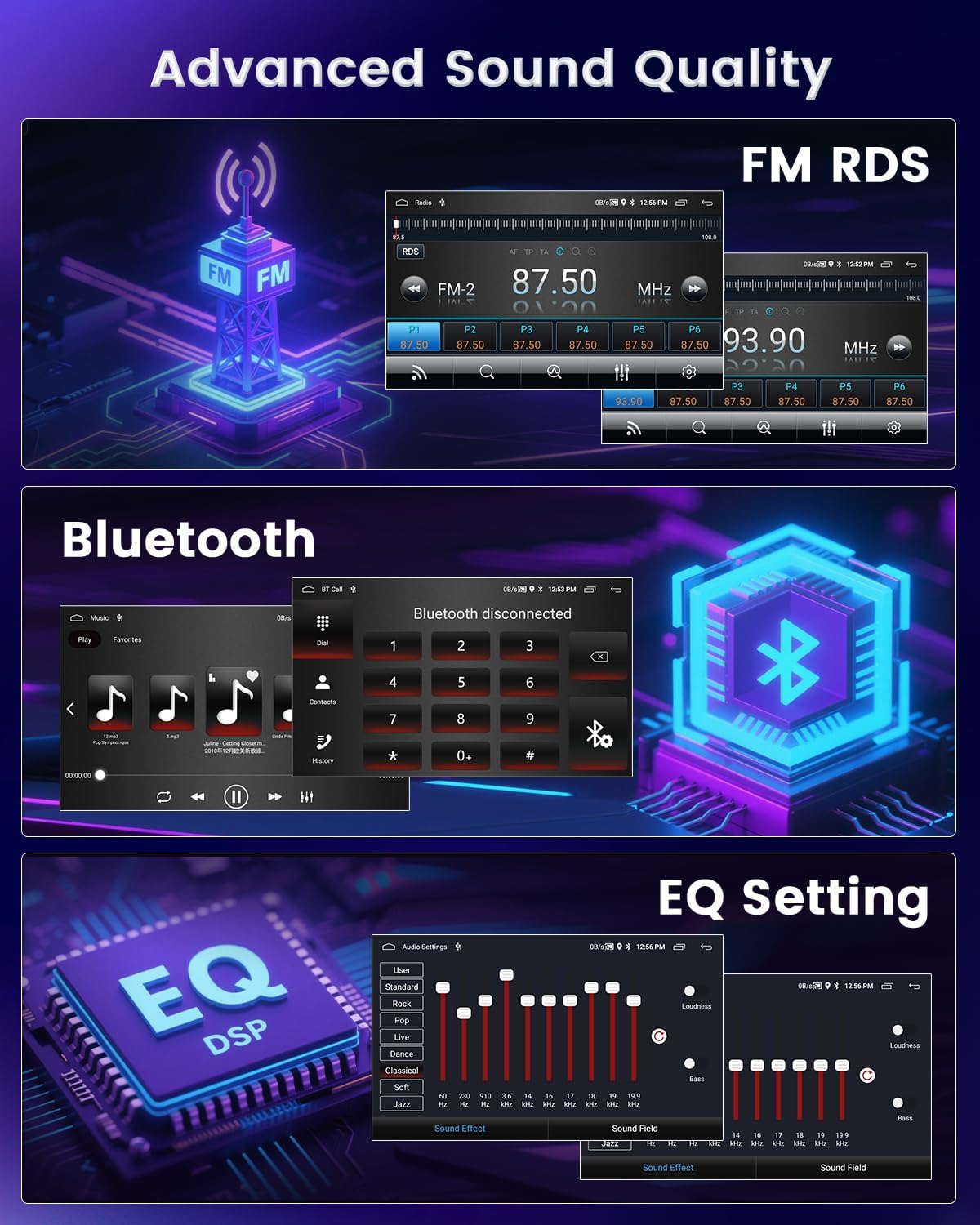
Image: FM RDS Radio Interface.
Video: Demonstrates various functions of the Android car radio, including music, radio, and settings.
3.3 Music and Video Playback
Play music and videos from local storage, USB devices, or streaming apps via WiFi. The 1080P capacitive touch screen ensures a clear viewഅനുഭവം.

Image: 2.5D 1080P Touchscreen.

Image: Video playback on the car stereo.
3.4 ബ്ലൂടൂത്ത് കണക്റ്റിവിറ്റി
Pair your smartphone via Bluetooth to make calls, send messages, and stream audio. The device name is typically 'CarBT' and the default PIN is '0000'.
Image: Bluetooth Interface.
Video: Demonstrates Bluetooth pairing and calling features on the Android car stereo.
3.5 വയർലെസ് കാർപ്ലേയും ആൻഡ്രോയിഡ് ഓട്ടോയും
Seamlessly integrate your iOS or Android phone for navigation, audio playback, and voice control. Connect via Bluetooth or USB for wired Android Auto/Mirror Link.

Image: Wired/Wireless Phone Connectivity.

Image: CarPlay and Android Auto Connection Steps.
Video: Wireless CarPlay and Android Auto Operating Instructions.
3.6 ജിപിഎസ് നാവിഗേഷൻ
Utilize the built-in GPS for navigation. Connect to WiFi for online maps or use offline maps for areas without internet access.

Image: WiFi Connection and GPS Navigation.
3.7 സ്റ്റിയറിംഗ് വീൽ നിയന്ത്രണം
Program your steering wheel buttons to control stereo functions for a safer driving experience. This unit supports non-CANBUS steering wheel controls.

Image: Steering Wheel Control setup.
3.8 സ്പ്ലിറ്റ് സ്ക്രീൻ പ്രവർത്തനം
സ്പ്ലിറ്റ്-സ്ക്രീൻ സവിശേഷത നാവിഗേഷൻ, മ്യൂസിക് പ്ലേബാക്ക് പോലുള്ള രണ്ട് ആപ്ലിക്കേഷനുകൾ ഒരേസമയം പ്രവർത്തിപ്പിക്കാൻ നിങ്ങളെ അനുവദിക്കുന്നു.

Image: Split Screen Display.
3.9 EQ Settings and Voice Assistant
Customize your audio experience with the built-in EQ and various music effects. Use the voice assistant for hands-free control of functions like calling, navigation, and music.

Image: EQ Setting and Voice Assistant.
4. പരിപാലനം
To ensure the longevity and optimal performance of your Hikity Android Car Stereo, follow these maintenance guidelines:
- വൃത്തിയാക്കൽ: Use a soft, dry cloth to clean the screen and exterior. Avoid abrasive cleaners or solvents that could damage the display or finish.
- താപനില: യൂണിറ്റ് തീവ്രമായ താപനിലയിൽ തുറന്നുകാട്ടുന്നത് ഒഴിവാക്കുക. വാഹന ഉപയോഗത്തിനായി രൂപകൽപ്പന ചെയ്തിട്ടുണ്ടെങ്കിലും, വളരെ ഉയർന്നതോ താഴ്ന്നതോ ആയ താപനിലയിൽ ദീർഘനേരം എക്സ്പോഷർ ചെയ്യുന്നത് പ്രകടനത്തെ ബാധിച്ചേക്കാം.
- സോഫ്റ്റ്വെയർ അപ്ഡേറ്റുകൾ: Periodically check for software updates to ensure you have the latest features and bug fixes. Updates can typically be found in the system settings or on the manufacturer's webസൈറ്റ്.
- കേബിൾ കണക്ഷനുകൾ: Ensure all cables are securely connected. Loose connections can lead to intermittent functionality or poor performance.
5. പ്രശ്നപരിഹാരം
നിങ്ങളുടെ കാർ സ്റ്റീരിയോയിൽ പ്രശ്നങ്ങൾ നേരിടുകയാണെങ്കിൽ, ഇനിപ്പറയുന്ന പൊതുവായ പ്രശ്നങ്ങളും പരിഹാരങ്ങളും പരിശോധിക്കുക:
- സൗണ്ട് ഔട്ട്പുട്ട് ഇല്ല: If there is no sound, especially after installation, check all speaker wiring connections. Some vehicles may require additional adapters or modifications to integrate with the OEM sound system, particularly if an original car amplifier is present. The unit does not support original car amplifiers directly.
- ബാക്കപ്പ് ക്യാമറ പ്രദർശിപ്പിക്കുന്നില്ല: Ensure the rear camera input cable is securely plugged into the stereo. Verify the camera's power and ground connections to the car's reversing light are correct. Check the reverse video resolution settings in the stereo's menu.
- വയർലെസ് കാർപ്ലേ/ആൻഡ്രോയിഡ് ഓട്ടോ കണക്റ്റിവിറ്റി പ്രശ്നങ്ങൾ: Ensure Bluetooth is enabled on both your phone and the stereo. Confirm the correct device is paired. For Zlink connections, follow the on-screen instructions for Bluetooth and hotspot setup.
- GPS Signal Problems: Ensure the GPS antenna is properly installed and has a clear line of sight to the sky. If using offline maps, ensure they are downloaded and up-to-date.
- സ്റ്റിയറിംഗ് വീൽ നിയന്ത്രണങ്ങൾ പ്രവർത്തിക്കുന്നില്ല: This unit supports non-CANBUS steering wheel controls. Ensure the steering wheel control wires are correctly connected and programmed through the stereo's settings menu.
- Screen Unresponsive/Incorrect Touch: Perform a touch calibration if the screen is unresponsive or registers touches incorrectly.
Video: Guide on how to check your car radio reverse video resolution settings.
6 സ്പെസിഫിക്കേഷനുകൾ
| ഫീച്ചർ | വിശദാംശങ്ങൾ |
|---|---|
| ഇനത്തിൻ്റെ ഭാരം | 3.69 പൗണ്ട് |
| ഉൽപ്പന്ന അളവുകൾ | 18.5 x 12.9 x 3.5 ഇഞ്ച് |
| ഡിസ്പ്ലേ വലിപ്പം | 9 ഇഞ്ച് |
| ഡിസ്പ്ലേ റെസല്യൂഷൻ | 1024x768 |
| വോയ്സ് കമാൻഡ് | മൈക്രോഫോൺ, ടച്ച്സ്ക്രീൻ |
| മോഡലിൻ്റെ പേര് | GPS Car Stereo |
| വാഹന സേവന തരം | കാർ |
| കണക്റ്റിവിറ്റി ടെക്നോളജി | ബ്ലൂടൂത്ത്, യുഎസ്ബി, വൈ-ഫൈ, വയർലെസ്സ് |
| മാപ്പ് തരം | ലോകമെമ്പാടും |
| ഓഡിയോ put ട്ട്പുട്ട് മോഡ് | സ്റ്റീരിയോ |
| മൗണ്ടിംഗ് തരം | ഡാഷ്ബോർഡ് മ .ണ്ട് |
7. വാറൻ്റിയും പിന്തുണയും
7.1 വാറൻ്റി വിവരങ്ങൾ
Hikity offers a 15-day Money-Back Guarantee, a 12-month Replacement Warranty, and life-time Technical Support for this product.
7.2 ഉപഭോക്തൃ പിന്തുണ
For any technical assistance, troubleshooting, or warranty claims, please contact Hikity customer support. You can typically find contact information on the product packaging or the official Hikity webസൈറ്റ്.