
xpr 3300e
Pdflie Dual PTT Earpiece User Manual
Model: xpr 3300e
ആമുഖം
Thank you for choosing the Pdflie Dual PTT Earpiece. This professional-grade earpiece is designed for clear and reliable communication with compatible Motorola two-way radios. Featuring a unique dual Push-To-Talk (PTT) button design for enhanced durability and user convenience, an electret speaker for clear audio, and an omni-directional microphone for effective voice transmission in various environments. This manual provides detailed instructions for setup, operation, maintenance, and troubleshooting to ensure optimal performance of your earpiece.
സുരക്ഷാ വിവരങ്ങൾ
- Do not expose the earpiece to extreme temperatures, moisture, or corrosive substances.
- Avoid dropping or subjecting the earpiece to strong impacts.
- Keep the earpiece away from strong magnetic fields.
- Do not attempt to disassemble or modify the earpiece. This will void the warranty and may cause damage.
- Clean the earpiece regularly as instructed in the Maintenance section to prevent debris buildup.
- Ensure the earpiece is securely connected to your radio before use to prevent accidental disconnection.
പാക്കേജ് ഉള്ളടക്കം
നിങ്ങളുടെ പാക്കേജിൽ എല്ലാ ഇനങ്ങളും ഉണ്ടെന്ന് ദയവായി പരിശോധിക്കുക:
- 1 x Pdflie Dual PTT Earpiece for Motorola XPR Series

ചിത്രം: കഴിഞ്ഞുview of the Pdflie Dual PTT Earpiece, showing the acoustic tube, main PTT unit, secondary PTT/microphone, and radio connector.
സജ്ജമാക്കുക
Follow these steps to set up your Pdflie Dual PTT Earpiece:
- Inspect the Earpiece: Carefully unpackage the earpiece and inspect it for any visible damage.
- റേഡിയോയുമായി ബന്ധിപ്പിക്കുക: Locate the multi-pin connector on your earpiece. Align the connector with the corresponding port on your Motorola radio (XPR, XIR, MTP/Tetra, or DP/DEP series). Push firmly until it clicks into place, ensuring a secure connection.

ചിത്രം: വിശദമായത് view of the earpiece's multi-pin connector designed for Motorola radios.
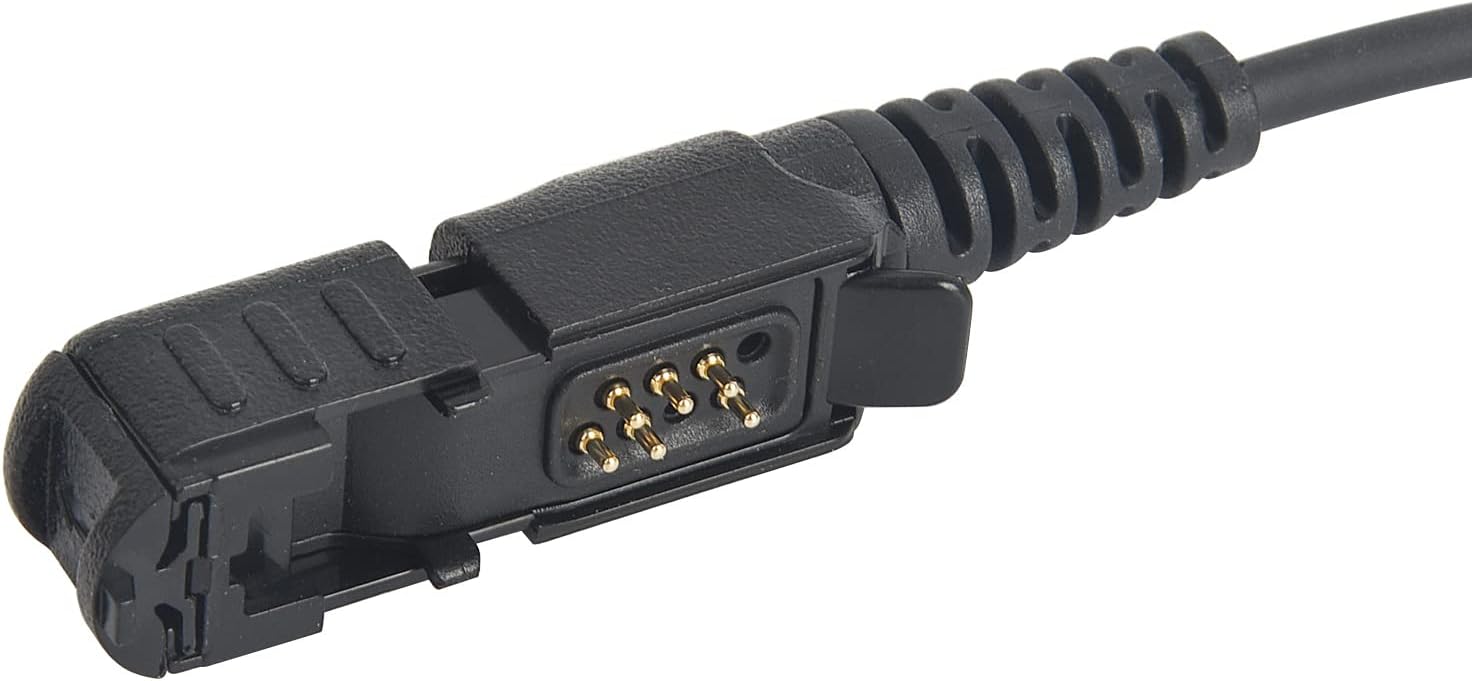
Image: A closer look at the gold-plated contact pins on the earpiece connector, ensuring reliable electrical connection.
- Position the Acoustic Tube: Gently insert the clear acoustic tube into your ear. Adjust the earpiece for a comfortable and secure fit.

Image: The transparent acoustic tube and soft earbud, designed for discreet and comfortable wear.
- Secure the PTT Unit: Use the integrated clip on the main PTT unit to attach it to your clothing (e.g., collar, lapel) in a convenient and accessible location.

Image: The cable splitter leading to the main PTT unit, which features a sturdy clip for attachment to clothing.
For a visual guide on setting up the earpiece, please watch the official product video:
Video: This video demonstrates the physical components of the earpiece, including the connector, PTT buttons, and acoustic tube, providing a visual overview ഉൽപ്പന്നത്തിൻ്റെ.
പ്രവർത്തന നിർദ്ദേശങ്ങൾ
Once the earpiece is connected to your radio, you can begin communication:
- ഓഡിയോ സ്വീകരിക്കുന്നു: Audio from your radio will be transmitted directly through the acoustic tube to your ear. Ensure the earpiece is properly seated for clear reception.
- ട്രാൻസ്മിറ്റിംഗ് ഓഡിയോ (പുഷ്-ടു-ടോക്ക്): The earpiece features a dual PTT design for convenience and durability.
- Main PTT Button: Located on the front of the main PTT unit, this button is typically pressed with your thumb or finger.
- Side PTT Button: An additional PTT button is located on the side of the main PTT unit, offering an alternative pressing method.
- To transmit, press and hold either the main PTT button or the side PTT button. Speak clearly into the omni-directional microphone.
- ട്രാൻസ്മിറ്റ് നിർത്തി റിസീവ് മോഡിലേക്ക് മടങ്ങാൻ PTT ബട്ടൺ വിടുക.
- കുറിപ്പ്: The dual PTT buttons operate on a single channel and cannot be used for two separate channels simultaneously. They provide redundant functionality for user preference and increased durability.

Image: The primary Push-To-Talk (PTT) button, located on the face of the main control unit.

ചിത്രം: സൈഡ് പ്രോfile of the PTT unit, highlighting the secondary PTT button and the robust clothing clip.

Image: The secondary PTT button, which also houses the omni-directional microphone for voice pickup.
മെയിൻ്റനൻസ്
Proper care will extend the life of your earpiece:
- വൃത്തിയാക്കൽ: ഒരു സോഫ്റ്റ് ഉപയോഗിക്കുക, ഡിamp cloth to wipe down the earpiece and cables. Do not use harsh chemicals or abrasive cleaners.
- Acoustic Tube: The clear acoustic tube can be detached and cleaned with mild soap and water. Ensure it is completely dry before reattaching.
- സംഭരണം: When not in use, store the earpiece in a clean, dry place, away from direct sunlight and extreme temperatures. Avoid tangling the cables.
- പരിശോധന: Periodically check the cables and connectors for any signs of wear or damage.
ട്രബിൾഷൂട്ടിംഗ്
If you encounter issues with your earpiece, refer to the following table:
| പ്രശ്നം | സാധ്യമായ കാരണം | പരിഹാരം |
|---|---|---|
| ഇയർപീസിൽ നിന്ന് ഓഡിയോ ഇല്ല | Loose connection; Radio volume too low; Earpiece damage | Ensure connector is fully inserted; Increase radio volume; Test with another earpiece if available. |
| Muffled or distorted audio | Acoustic tube blockage; Damaged speaker; Poor radio signal | Clean acoustic tube; Check radio signal strength; Contact support if issue persists. |
| ട്രാൻസ്മിറ്റ് ചെയ്യാൻ കഴിയില്ല (PTT പ്രവർത്തിക്കുന്നില്ല) | Loose connection; PTT button malfunction; Radio not in transmit mode | Ensure connector is fully inserted; Press PTT firmly; Check radio settings. |
| Microphone not picking up voice | Microphone blocked; Damaged microphone; Incorrect PTT usage | Ensure microphone is clear; Speak directly into microphone; Ensure PTT is held down during transmission. |
സ്പെസിഫിക്കേഷനുകൾ
| ഫീച്ചർ | വിശദാംശങ്ങൾ |
|---|---|
| മോഡലിൻ്റെ പേര് | xpr 3300e |
| കണക്റ്റിവിറ്റി ടെക്നോളജി | വയർഡ് |
| വയർലെസ് കമ്മ്യൂണിക്കേഷൻ ടെക്നോളജി | റേഡിയോ |
| മെറ്റീരിയൽ | Plastic, Silicone, or Thermoplastic Elastomer (TPE) |
| ഉൽപ്പന്നത്തിൻ്റെ പ്രത്യേക ഉപയോഗങ്ങൾ | Professional Communication |
| ഉൽപ്പന്നത്തിനുള്ള ശുപാർശിത ഉപയോഗങ്ങൾ | Calling, Music |
| നിയന്ത്രണ തരം | Call Control (Dual PTT) |
| കേബിൾ സവിശേഷത | Reinforced PU cable with Kevlar fiber |
| ജല പ്രതിരോധ നില | വാട്ടർ റെസിസ്റ്റൻ്റ് അല്ല |
| ഇനത്തിൻ്റെ ഭാരം | 2.11 ഔൺസ് |
| നിറം | കറുപ്പ് |
| ചെവി പ്ലേസ്മെൻ്റ് | ചെവിയിൽ |
| ഫോം ഫാക്ടർ | ചെവിയിൽ |
| ശബ്ദ നിയന്ത്രണം | സൗണ്ട് ഐസൊലേഷൻ |
അനുയോജ്യത
This earpiece is compatible with the following Motorola radio series and models:
- XPR Series: XPR3000, XPR3300, XPR3500, XPR3000e, XPR3500e, XPR3300e, XPR 3000, XPR 3300, XPR 3500, XPR 3000e, XPR 3500e
- XIR Series: XIR P6600, XIRP P6620, XIR P6600i, XIRE8600, XIRE8608, XIRP6620, XIRP6600, XiR P6608, XiR P6620, XiR P6628
- MTP/Tetra Series: MTP3100, MTP3150, MTP3250, Tetra MTP3100, Tetra MTP3150, Tetra MTP3200, Tetra MTP3250
- DP/DEP Series: DEP550, DEP570, DEP500e, DP2000, DP2400, DP2600, DP3441, DP2600
വാറൻ്റി വിവരങ്ങൾ
This product comes with a standard manufacturer's warranty. For specific details regarding warranty coverage, duration, and terms, please refer to the warranty card included with your purchase or contact the seller directly. Keep your proof of purchase for warranty claims.
ഉപഭോക്തൃ പിന്തുണ
If you have any questions, require technical assistance, or need to report an issue with your Pdflie Dual PTT Earpiece, please contact our customer support team. Refer to your purchase documentation for contact details or visit the seller's page on the platform where you purchased the product.
Ask a question about this manual
Ask about setup, troubleshooting, compatibility, parts, safety, or missing instructions. Manuals+ will review the question and use this page’s manual context to help answer it.