
1. ആമുഖം
Thank you for choosing the Havit MS1038 Programmable RGB Gaming Mouse. This manual provides essential information for setting up, operating, maintaining, and troubleshooting your new gaming mouse. Please read this guide thoroughly to ensure optimal performance and longevity of your device.
2. ഉൽപ്പന്നം കഴിഞ്ഞുview
The Havit MS1038 is a high-performance wired gaming mouse designed for precision and customization. It features a high-precision optical sensor, adjustable DPI settings up to 8000, 7 programmable buttons, and dynamic RGB backlighting to enhance your gaming experience.
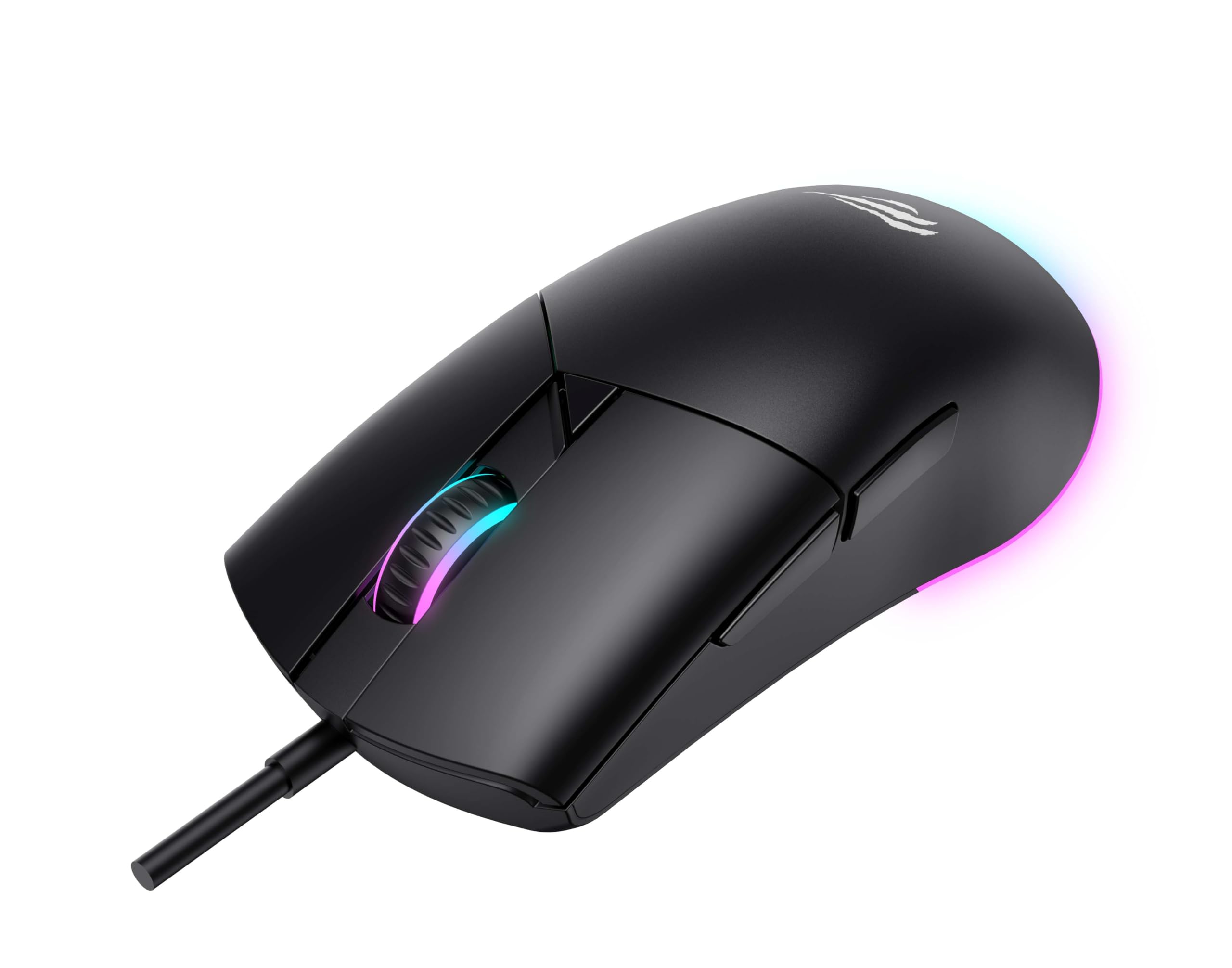
ചിത്രം 1: മുൻഭാഗം view of the Havit MS1038 Gaming Mouse, showcasinഅതിന്റെ എർഗണോമിക് ഡിസൈനും RGB ലൈറ്റിംഗും.
3 സ്പെസിഫിക്കേഷനുകൾ
| ഫീച്ചർ | വിശദാംശങ്ങൾ |
|---|---|
| ബ്രാൻഡ് | ഹവിറ്റ് |
| മോഡൽ | MS1038 |
| നിറം | കറുപ്പ് |
| കണക്റ്റിവിറ്റി | USB (വയർഡ്) |
| പ്രത്യേക സവിശേഷതകൾ | RGB Backlight, Programmable Buttons, High-Precision Optical Sensor |
| അനുയോജ്യമായ ഉപകരണങ്ങൾ | പിസി, ലാപ്ടോപ്പ്, ടാബ്ലെറ്റ് |
| മോഷൻ ഡിറ്റക്ഷൻ | ഒപ്റ്റിക്കൽ |
| ഡിപിഐ ക്രമീകരണങ്ങൾ | 1200-2400-3200-4800-6400-8000 DPI |
| ബട്ടണുകളുടെ എണ്ണം | 7 |
| പ്രധാന ആയുസ്സ് | 3,000,000 ക്ലിക്കുകൾ |
| കേബിൾ നീളം | 1.6 മീറ്റർ |
| ഓപ്പറേറ്റിംഗ് വോളിയംtage | 5V |
| ഓപ്പറേറ്റിംഗ് കറൻ്റ് | 150mA |
| ചിപ്പ് | SPCP199C |
| അളവുകൾ (L*W*H) | 121 x 64 x 42 മിമി |
| ഉൽപ്പന്ന ഭാരം | 82 ഗ്രാം |
| ബാറ്ററികൾ ആവശ്യമാണ് | ഇല്ല |
| പവർ ഉറവിടം | കോർഡഡ് |
| അനുയോജ്യമായ OS | വിൻഡോസ്, മാക്, ലിനക്സ് |
| മാതൃരാജ്യം | ചൈന |
4. സജ്ജീകരണ ഗൈഡ്
- മൗസ് അൺപാക്ക് ചെയ്യുക: Carefully remove the Havit MS1038 mouse from its packaging.
- കമ്പ്യൂട്ടറുമായി ബന്ധിപ്പിക്കുക: നിങ്ങളുടെ കമ്പ്യൂട്ടറിൽ ലഭ്യമായ USB പോർട്ടിലേക്ക് മൗസിന്റെ USB കണക്റ്റർ പ്ലഗ് ചെയ്യുക.
- ഡ്രൈവർ ഇൻസ്റ്റാളേഷൻ: The mouse is typically plug-and-play. Your operating system (Windows, Mac, Linux) should automatically detect and install the necessary drivers. Allow a few moments for the installation to complete.
- സോഫ്റ്റ്വെയർ ഇൻസ്റ്റാളേഷൻ (ഓപ്ഷണൽ): For advanced customization of programmable buttons and RGB lighting, download the official Havit MS1038 software from the manufacturer's webസൈറ്റ്. ഇൻസ്റ്റാളേഷനായി ഓൺ-സ്ക്രീൻ നിർദ്ദേശങ്ങൾ പാലിക്കുക.
5. പ്രവർത്തന നിർദ്ദേശങ്ങൾ
5.1 അടിസ്ഥാന പ്രവർത്തനങ്ങൾ
- ഇടത് ക്ലിക്ക്: പ്രാഥമിക പ്രവർത്തനം.
- വലത് ക്ലിക്കിൽ: Secondary action, typically opens context menus.
- സ്ക്രോൾ വീൽ: Scrolls content up or down. Pressing the scroll wheel often acts as a middle click.
5.2 ഡിപിഐ അഡ്ജസ്റ്റ്മെന്റ്
The Havit MS1038 features a dedicated DPI button (usually located behind the scroll wheel) to cycle through different sensitivity settings. Each press will switch to the next DPI level, indicated by a change in the RGB lighting color or pattern.
- Available DPI settings: 1200, 2400, 3200, 4800, 6400, 8000.
- Select the DPI that best suits your preference for gaming or general use.
5.3 പ്രോഗ്രാം ചെയ്യാവുന്ന ബട്ടണുകൾ
The mouse has 7 buttons, including the standard left/right click, scroll wheel, DPI button, and additional side buttons. These additional buttons can be customized using the Havit MS1038 software.

ചിത്രം 2: വശം view of the Havit MS1038 Gaming Mouse, highlighting the additional programmable buttons.
6. ഇഷ്ടാനുസൃതമാക്കൽ
To unlock the full potential of your Havit MS1038 mouse, utilize the dedicated software (available for download from the Havit official webസൈറ്റ്). ഈ സോഫ്റ്റ്വെയർ നിങ്ങളെ ഇനിപ്പറയുന്നവ അനുവദിക്കുന്നു:
- റീമാപ്പ് ബട്ടണുകൾ: Assign custom functions, macros, or keyboard shortcuts to any of the 7 programmable buttons.
- Adjust DPI Stages: Fine-tune the DPI levels and assign specific values to each stage.
- RGB ലൈറ്റിംഗ് നിയന്ത്രിക്കുക: Choose from various lighting effects, colors, and brightness levels to personalize your mouse's appearance.
- പ്രോ സൃഷ്ടിക്കുകfiles: വിവിധ ഗെയിമുകൾക്കോ ആപ്ലിക്കേഷനുകൾക്കോ വേണ്ടി വ്യത്യസ്ത കോൺഫിഗറേഷനുകൾ സംരക്ഷിക്കുക.
7. പരിപാലനം
Proper care ensures the longevity and performance of your mouse.
- വൃത്തിയാക്കൽ: മൗസിന്റെ പ്രതലം തുടയ്ക്കാൻ മൃദുവായതും ഉണങ്ങിയതുമായ ഒരു തുണി ഉപയോഗിക്കുക. കഠിനമായ അഴുക്കിന്, ചെറുതായി dampതുണിയിൽ വെള്ളം അല്ലെങ്കിൽ നേരിയ ക്ലീനിംഗ് ലായനി ഉപയോഗിക്കുക. കഠിനമായ രാസവസ്തുക്കൾ ഒഴിവാക്കുക.
- സെൻസർ പരിചരണം: Keep the optical sensor on the underside of the mouse clean and free from dust or debris. Use a cotton swab if necessary.
- കേബിൾ മാനേജുമെന്റ്: കേടുപാടുകൾ ഒഴിവാക്കാൻ മൂർച്ചയുള്ള വളവുകളോ യുഎസ്ബി കേബിളിൽ അമിതമായി വലിക്കുന്നതോ ഒഴിവാക്കുക.
- സംഭരണം: ഉപയോഗത്തിലില്ലാത്തപ്പോൾ, കടുത്ത താപനിലയിൽ നിന്ന് മാറി വൃത്തിയുള്ളതും വരണ്ടതുമായ ഒരു സ്ഥലത്ത് മൗസ് സൂക്ഷിക്കുക.
8. പ്രശ്നപരിഹാരം
If you encounter issues with your Havit MS1038 mouse, refer to the following common solutions:
- മൗസ് പ്രതികരിക്കുന്നില്ല:
- പ്രവർത്തിക്കുന്ന ഒരു USB പോർട്ടിലേക്ക് USB കേബിൾ സുരക്ഷിതമായി പ്ലഗ് ചെയ്തിട്ടുണ്ടെന്ന് ഉറപ്പാക്കുക.
- മൗസ് മറ്റൊരു യുഎസ്ബി പോർട്ടിലേക്ക് പ്ലഗ് ചെയ്യാൻ ശ്രമിക്കുക.
- നിങ്ങളുടെ കമ്പ്യൂട്ടർ പുനരാരംഭിക്കുക.
- ക്രമരഹിതമായ കഴ്സർ ചലനം:
- മൗസിന്റെ അടിയിലുള്ള ഒപ്റ്റിക്കൽ സെൻസർ വൃത്തിയാക്കുക.
- Ensure you are using the mouse on a clean, non-reflective surface or a mouse pad.
- ഏതെങ്കിലും സോഫ്റ്റ്വെയർ വൈരുദ്ധ്യങ്ങളോ കാലഹരണപ്പെട്ട ഡ്രൈവറുകളോ ഉണ്ടോയെന്ന് പരിശോധിക്കുക.
- RGB ലൈറ്റിംഗ് പ്രവർത്തിക്കുന്നില്ല:
- മൗസ് ശരിയായി ബന്ധിപ്പിച്ചിട്ടുണ്ടെന്ന് ഉറപ്പാക്കുക.
- If using customization software, ensure lighting effects are enabled and configured correctly.
- ബട്ടണുകൾ പ്രവർത്തിക്കുന്നില്ല:
- If programmable buttons are not working as expected, check the settings in the Havit MS1038 software.
- Ensure no other software is interfering with mouse button assignments.
9. വാറൻ്റിയും പിന്തുണയും
The Havit MS1038 Programmable RGB Gaming Mouse comes with a 1 വർഷത്തെ വാറൻ്റി വാങ്ങിയ തീയതി മുതൽ. സാധാരണ ഉപയോഗത്തിലുള്ള നിർമ്മാണ വൈകല്യങ്ങൾ ഈ വാറന്റി ഉൾക്കൊള്ളുന്നു.
For technical support, warranty claims, or further assistance, please contact Havit customer service through their official website or your local retailer. Please have your proof of purchase ready when contacting support.


