
AWEI S1 Ultra
AWEI S1 Ultra Wireless Earbuds User Manual
Model: S1 Ultra
Brand: AWEI
1. സജ്ജീകരണ ഗൈഡ്
1.1 പാക്കേജ് ഉള്ളടക്കം
ആരംഭിക്കുന്നതിന് മുമ്പ്, എല്ലാ ഇനങ്ങളും നിങ്ങളുടെ പാക്കേജിൽ ഉൾപ്പെടുത്തിയിട്ടുണ്ടെന്ന് ദയവായി പരിശോധിക്കുക:
- AWEI S1 Ultra Wireless Earbuds
- ചാർജിംഗ് കേസ്
- USB-C ചാർജിംഗ് കേബിൾ
- ഉപയോക്തൃ മാനുവൽ
- എസ്/എം/എൽ എർട്ടിപ്സ്
1.2 Initial Charging & Protective Film Removal
Upon first use, ensure the earbuds are fully charged. It is crucial to remove the blue insulation film from the charging contacts on the earbuds before placing them in the charging case. Failure to do so will prevent charging.

Remove the protective film from the earbud charging contacts before first use.
Place both earbuds into the charging case. The indicator lights on the earbuds will illuminate to confirm charging. Connect the USB-C cable to the charging case and a power source. A full charge for the earbuds takes approximately 1.5 hours, and the charging case takes 1 hour.

The charging case provides up to 24 hours of total playtime, with 6 hours on a single earbud charge.
1.3 ബ്ലൂടൂത്ത് ജോടിയാക്കൽ
The AWEI S1 Ultra earbuds utilize advanced Bluetooth 5.3 technology for stable and efficient connection.
- ഇയർബഡുകൾ ചാർജ് ചെയ്തിട്ടുണ്ടെന്നും ചാർജിംഗ് കെയ്സിൽ വച്ചിട്ടുണ്ടെന്നും ഉറപ്പാക്കുക.
- ചാർജിംഗ് കെയ്സിന്റെ ലിഡ് തുറക്കുക. ഇയർബഡുകൾ സ്വയമേവ ജോടിയാക്കൽ മോഡിലേക്ക് പ്രവേശിക്കും.
- നിങ്ങളുടെ ഉപകരണത്തിൽ (സ്മാർട്ട്ഫോൺ, ടാബ്ലെറ്റ് മുതലായവ), ബ്ലൂടൂത്ത് ക്രമീകരണങ്ങളിലേക്ക് നാവിഗേറ്റ് ചെയ്യുക.
- ഇതിനായി തിരയുക "AWEI S1 Ultra" in the list of available devices.
- Select "AWEI S1 Ultra" to connect. A voice prompt will confirm successful pairing.
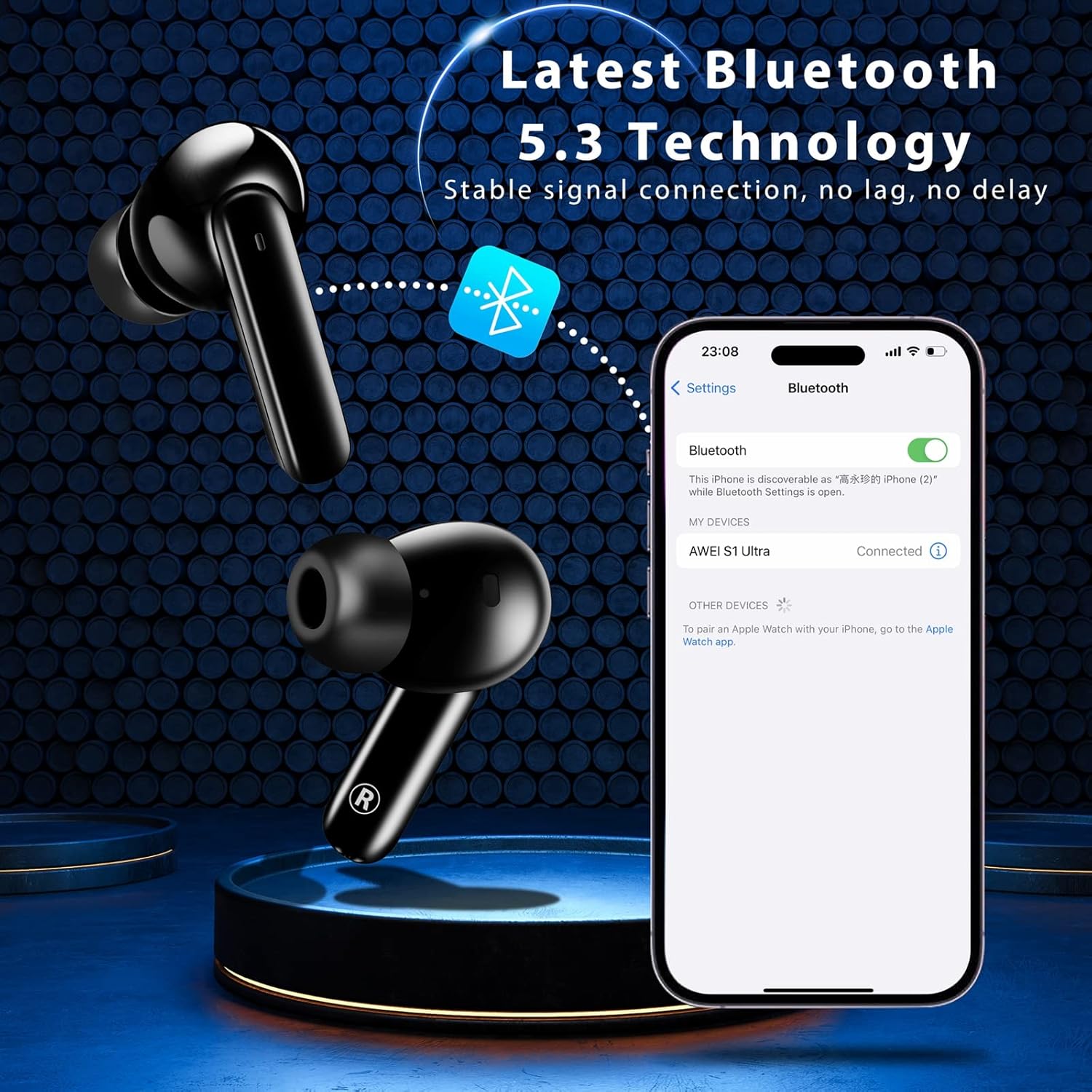
Pairing the earbuds with your device via Bluetooth 5.3.
2. പ്രവർത്തന നിർദ്ദേശങ്ങൾ
2.1 സ്മാർട്ട് ടച്ച് നിയന്ത്രണങ്ങൾ
The AWEI S1 Ultra earbuds feature intuitive touch controls for managing calls, music, and voice assistant functions.
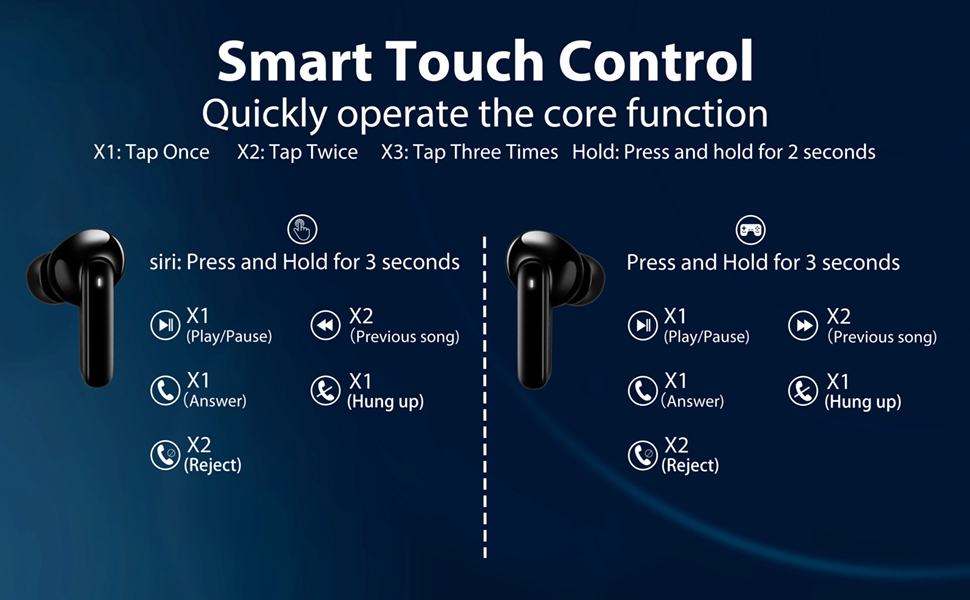
Refer to this diagram for detailed touch control commands.
- പ്ലേ/താൽക്കാലികമായി നിർത്തുക: Tap once (X1) on either L/R earbud.
- മുൻ ഗാനം: Tap twice (X2) on the Left earbud.
- അടുത്ത ഗാനം: Tap twice (X2) on the Right earbud.
- വോളിയം കൂട്ടുക: Long press the Right earbud for 2 seconds.
- വോളിയം താഴേക്ക്: Long press the Left earbud for 2 seconds.
- വോയ്സ് അസിസ്റ്റന്റ്: Long press the Left earbud for 3 seconds.
- Game Mode On/Off: Tap three times (X3) on either L/R earbud.
2.2 കോൾ മാനേജ്മെന്റ്
Manage your calls directly from the earbuds:
- മറുപടി കോൾ: Tap once (X1) on either L/R earbud.
- ഹാംഗ് അപ്പ് കോൾ: Tap once (X1) on either L/R earbud during a call.
- കോൾ നിരസിക്കുക: Long press either L/R earbud for 2 seconds.
This video demonstrates how to answer, hang up, and reject calls using the earbud touch controls.
2.3 Music and Game Dual-Mode
The earbuds offer a dual-mode function to optimize your audio experience for either music or gaming. In Game Mode, the earbuds provide low latency for improved audio-video synchronization, which is beneficial for gaming where precise sound cues are important.
3. പരിപാലനം
3.1 ജല പ്രതിരോധം (IPX7)
The AWEI S1 Ultra earbuds feature an IPX7 waterproof nano-coating, providing protection against heavy rain and sweat. This makes them suitable for intense workouts and various weather conditions. However, they are not designed for swimming or prolonged submersion.

IPX7 rating ensures protection against sweat and splashes.
3.2 വൃത്തിയാക്കൽ
Regularly clean your earbuds and charging case to maintain optimal performance and hygiene. Use a soft, dry, lint-free cloth. Avoid using abrasive materials, solvents, or aerosol sprays.
3.3 Eartip Selection and Replacement
The earbuds come with S/M/L eartips to ensure a comfortable and secure fit. Experiment with different sizes to find the best seal for your ears, which is crucial for optimal sound quality and noise isolation.

Choose the eartip size that provides the best fit and comfort.
4. പ്രശ്നപരിഹാരം
4.1 കണക്റ്റിവിറ്റി പ്രശ്നങ്ങൾ
If your earbuds are not connecting to your device:
- Ensure the earbuds are fully charged and the protective film has been removed from the charging contacts.
- Verify Bluetooth is enabled on your device and the earbuds are in pairing mode (open case lid).
- Try forgetting "AWEI S1 Ultra" from your device's Bluetooth list and re-pairing.
- Move closer to your device to ensure you are within the 10-meter Bluetooth range.
4.2 ചാർജിംഗ് പ്രശ്നങ്ങൾ
If your earbuds or charging case are not charging:
- Confirm the blue protective film has been removed from the earbud charging contacts.
- Check that the USB-C cable is securely connected to both the case and the power source.
- മറ്റൊരു USB-C കേബിളോ പവർ അഡാപ്റ്ററോ ഉപയോഗിക്കാൻ ശ്രമിക്കുക.
- ഇയർബഡുകളിലെയും കേസിലെയും ചാർജിംഗ് കോൺടാക്റ്റുകൾ വൃത്തിയുള്ളതും അവശിഷ്ടങ്ങളില്ലാത്തതുമാണെന്ന് ഉറപ്പാക്കുക.
4.3 ശബ്ദ നിലവാര പ്രശ്നങ്ങൾ
If you experience intermittent sound or poor audio quality:
- ഇയർബഡുകൾ നിങ്ങളുടെ ചെവിയിൽ ശരിയായി ഘടിപ്പിച്ചിട്ടുണ്ടെന്നും നല്ല സീലിങ്ങിനായി ശരിയായ ഇയർടിപ്പ് വലുപ്പമാണ് ഉപയോഗിക്കുന്നതെന്നും ഉറപ്പാക്കുക.
- മറ്റ് വയർലെസ് ഉപകരണങ്ങളിൽ നിന്നുള്ള ഇടപെടൽ പരിശോധിക്കുക.
- നിങ്ങളുടെ ഉപകരണവുമായി ഇയർബഡുകൾ വീണ്ടും ജോടിയാക്കുക.
4.4 Touch Control Sensitivity
If the touch controls are too sensitive or unresponsive:
- ടച്ച് നിയന്ത്രണങ്ങൾ ഉപയോഗിക്കുമ്പോൾ നിങ്ങളുടെ വിരലുകൾ വൃത്തിയുള്ളതും വരണ്ടതുമാണെന്ന് ഉറപ്പാക്കുക.
- Practice the touch gestures as per the diagram in Section 2.1. Some users may require a brief period to adapt to the sensitivity.
5 സ്പെസിഫിക്കേഷനുകൾ
| ഫീച്ചർ | വിശദാംശങ്ങൾ |
|---|---|
| മോഡലിൻ്റെ പേര് | S1 Ultra Earbud |
| കണക്റ്റിവിറ്റി ടെക്നോളജി | ബ്ലൂടൂത്ത് 5.3 |
| ഓഡിയോ ഡ്രൈവർ തരം | ഡൈനാമിക് ഡ്രൈവർ |
| ഓഡിയോ ഡ്രൈവർ വലിപ്പം | 13 മില്ലിമീറ്റർ |
| ബാറ്ററി ലൈഫ് (ഇയർബഡുകൾ) | 6 മണിക്കൂർ (ഒറ്റ ചാർജ്) |
| ആകെ പ്ലേടൈം (കേസിനൊപ്പം) | 24 മണിക്കൂർ |
| ചാർജിംഗ് സമയം (ഇയർബഡുകൾ) | 1.5 മണിക്കൂർ |
| ചാർജിംഗ് സമയം (കേസ്) | 1 മണിക്കൂർ |
| ജല പ്രതിരോധ നില | IPX7 |
| ബ്ലൂടൂത്ത് ശ്രേണി | 10 മീറ്റർ |
| നിയന്ത്രണ തരം | ടച്ച് നിയന്ത്രണം |
| ഇനത്തിൻ്റെ ഭാരം | 170 ഗ്രാം (6 ഔൺസ്) |
| മെറ്റീരിയൽ | പ്ലാസ്റ്റിക് |
| നിറം | കറുപ്പ് |
6. വാറണ്ടിയും പിന്തുണയും
For warranty information, product support, or to explore other AWEI products, please visit the official AWEI store or contact their customer service directly.
Ask a question about this manual
Ask about setup, troubleshooting, compatibility, parts, safety, or missing instructions. Manuals+ will review the question and use this page’s manual context to help answer it.