
1. ആമുഖം
This manual provides instructions for the proper use and maintenance of your Promate Velcon Wireless Neckband Earphones. Please read this manual thoroughly before using the product to ensure optimal performance and longevity.
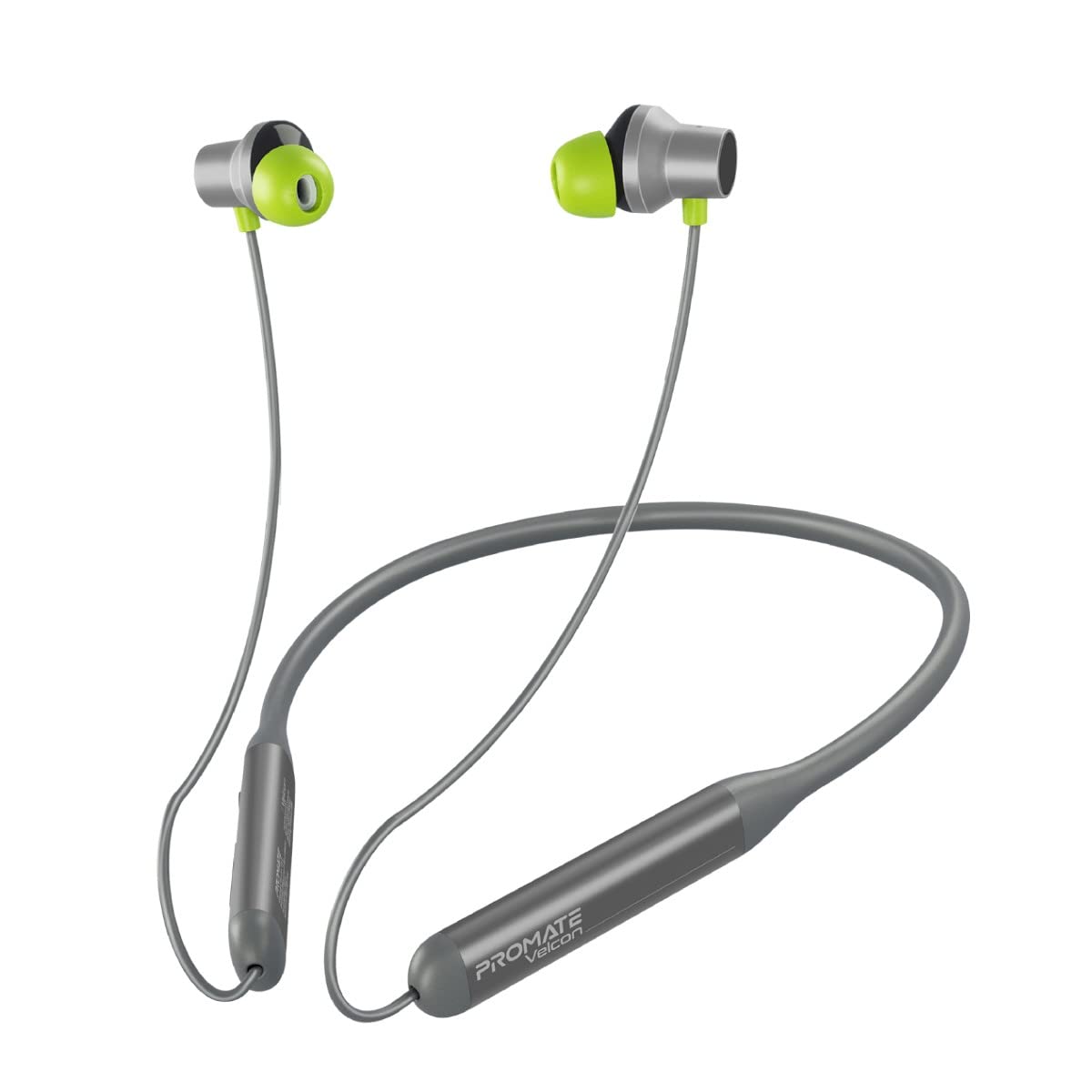
Image 1.1: Promate Velcon Wireless Neckband Earphones, showcasing നെക്ക്ബാൻഡും ഇൻ-ഇയർ ഡിസൈനും.
2. പാക്കേജ് ഉള്ളടക്കം
പാക്കേജിൽ എല്ലാ ഇനങ്ങളും ഉണ്ടെന്ന് ഉറപ്പാക്കുക:
- Promate Velcon Wireless Neckband Earphones
- ചാർജിംഗ് കേബിൾ
- ഉപയോക്തൃ മാനുവൽ
3. സജ്ജീകരണം
3.1 ഇയർഫോണുകൾ ചാർജ് ചെയ്യുന്നു
Before first use, fully charge the earphones. Connect the provided charging cable to the charging port on the neckband and to a compatible USB power source. The LED indicator will show charging status and turn off or change color when fully charged.

Image 3.1: The Promate Velcon neckband earphones highlighting the extended battery life of up to 35 hours on a single charge.
3.2 പവർ ഓൺ/ഓഫ്
- പവർ ഓണാക്കാൻ: Press and hold the Multi-function button until the LED indicator flashes.
- പവർ ഓഫ് ചെയ്യാൻ: Press and hold the Multi-function button until the LED indicator turns off.
3.3 ബ്ലൂടൂത്ത് ജോടിയാക്കൽ
- ഇയർഫോണുകൾ ഓഫാക്കിയിട്ടുണ്ടെന്ന് ഉറപ്പാക്കുക.
- ജോടിയാക്കൽ മോഡ് സൂചിപ്പിക്കുന്ന LED ഇൻഡിക്കേറ്റർ ചുവപ്പും നീലയും മാറിമാറി മിന്നുന്നതുവരെ മൾട്ടി-ഫംഗ്ഷൻ ബട്ടൺ അമർത്തിപ്പിടിക്കുക.
- നിങ്ങളുടെ ഉപകരണത്തിൽ (സ്മാർട്ട്ഫോൺ, ടാബ്ലെറ്റ്, ലാപ്ടോപ്പ്), ബ്ലൂടൂത്ത് പ്രവർത്തനക്ഷമമാക്കി ലഭ്യമായ ഉപകരണങ്ങൾക്കായി തിരയുക.
- Select "Promate Velcon" from the list of devices.
- കണക്റ്റുചെയ്തുകഴിഞ്ഞാൽ, LED സൂചകം പതുക്കെ നീലയായി മിന്നുന്നു.
3.4 Dual Pairing
The earphones support connecting to two devices simultaneously. After pairing with the first device, disable Bluetooth on the first device. Pair the earphones with the second device. Re-enable Bluetooth on the first device; the earphones should automatically connect to both.
4. പ്രവർത്തന നിർദ്ദേശങ്ങൾ
4.1 മ്യൂസിക് പ്ലേബാക്ക്
- പ്ലേ/താൽക്കാലികമായി നിർത്തുക: മൾട്ടി-ഫംഗ്ഷൻ ബട്ടൺ ഒറ്റത്തവണ അമർത്തുക.
- അടുത്ത ട്രാക്ക്: വോളിയം അപ്പ് ബട്ടൺ അമർത്തിപ്പിടിക്കുക.
- മുമ്പത്തെ ട്രാക്ക്: വോളിയം ഡൗൺ ബട്ടൺ അമർത്തിപ്പിടിക്കുക.
- വോളിയം കൂട്ടുക: വോളിയം അപ്പ് ബട്ടൺ ചുരുക്കി അമർത്തുക.
- വോളിയം താഴേക്ക്: വോളിയം ഡൗൺ ബട്ടൺ ചുരുക്കി അമർത്തുക.

Image 4.1: Illustration of the Promate Velcon earphones delivering clear stereo sound with powerful bass, mellow midrange, and precise treble.
4.2 കോൾ മാനേജ്മെന്റ്
- ഉത്തരം/അവസാന കോൾ: മൾട്ടി-ഫംഗ്ഷൻ ബട്ടൺ ഒറ്റത്തവണ അമർത്തുക.
- കോൾ നിരസിക്കുക: മൾട്ടി-ഫംഗ്ഷൻ ബട്ടൺ അമർത്തിപ്പിടിക്കുക.
- The integrated high-grade microphone allows for clear hands-free communication.

Image 4.2: A user wearing the Promate Velcon neckband earphones, demonstrating the comfort fit and anti-slip design suitable for an active lifestyle, also enabling convenient call access.
4.3 Active Noise Cancellation (ANC) and Ambient Sound Mode
The earphones feature Active Noise Cancellation (ANC) to reduce ambient noise and an Ambient Sound Mode to allow you to hear your surroundings.
- ANC/ആംബിയന്റ് മോഡ് ടോഗിൾ ചെയ്യുക: Press the ANC button (if available, or refer to specific button on your device).

Image 4.3: Visual representation of the earphones' dual mode functionality, offering both 25dB Active Noise Cancellation and Ambient Sound Mode.

Image 4.4: Close-up of an earphone illustrating the Active Noise Cancellation feature, showing sound wave reduction.
4.4 വോയ്സ് അസിസ്റ്റന്റ്
Activate your device's voice assistant (Siri, Google Assistant) by triple-pressing the Multi-function button.
5. പരിപാലനവും പരിചരണവും
To ensure the longevity and performance of your earphones, follow these guidelines:
- വൃത്തിയാക്കൽ: ഇയർഫോണുകൾ വൃത്തിയാക്കാൻ മൃദുവായതും ഉണങ്ങിയതുമായ തുണി ഉപയോഗിക്കുക. അബ്രസീവ് ക്ലീനറുകളോ ലായകങ്ങളോ ഉപയോഗിക്കരുത്.
- ജല പ്രതിരോധം: The earphones are IPX4 sweat-resistant, meaning they can withstand splashes of water and sweat. Do not submerge them in water or expose them to heavy rain.
- സംഭരണം: നേരിട്ടുള്ള സൂര്യപ്രകാശത്തിൽ നിന്നും കടുത്ത താപനിലയിൽ നിന്നും മാറി തണുത്തതും വരണ്ടതുമായ സ്ഥലത്ത് ഇയർഫോണുകൾ സൂക്ഷിക്കുക.
- കേടുപാടുകൾ ഒഴിവാക്കുക: Do not drop, disassemble, or modify the earphones.

Image 5.1: The Promate Velcon earphones demonstrating their IPX4 water resistance, suitable for protection against sweat and splashes.
6. പ്രശ്നപരിഹാരം
If you encounter issues with your Promate Velcon earphones, refer to the following common solutions:
- Earphones not powering on: ഇയർഫോണുകൾ പൂർണ്ണമായും ചാർജ് ചെയ്തിട്ടുണ്ടെന്ന് ഉറപ്പാക്കുക.
- ഉപകരണവുമായി ജോടിയാക്കാൻ കഴിയുന്നില്ല:
- Ensure the earphones are in pairing mode (LED flashing red and blue).
- നിങ്ങളുടെ ഉപകരണത്തിൽ ബ്ലൂടൂത്ത് പ്രവർത്തനക്ഷമമാക്കിയിട്ടുണ്ടെന്ന് ഉറപ്പാക്കുക.
- ഇയർഫോണുകൾ നിങ്ങളുടെ ഉപകരണത്തിന് അടുത്തേക്ക് നീക്കുക.
- Try restarting both the earphones and your device.
- ശബ്ദമില്ല അല്ലെങ്കിൽ മോശം ശബ്ദ നിലവാരം:
- ഇയർഫോണുകളിലും കണക്റ്റുചെയ്ത ഉപകരണത്തിലും വോളിയം ലെവലുകൾ പരിശോധിക്കുക.
- ഇയർഫോണുകൾ ശരിയായി ജോടിയാക്കി ബന്ധിപ്പിച്ചിട്ടുണ്ടെന്ന് ഉറപ്പാക്കുക.
- Try disconnecting and re-pairing the earphones.
- ഇയർ ടിപ്പുകളിൽ നിന്നും സ്പീക്കർ ഗ്രില്ലുകളിൽ നിന്നും അവശിഷ്ടങ്ങൾ വൃത്തിയാക്കുക.
- ANC ഫലപ്രദമായി പ്രവർത്തിക്കുന്നില്ല: Ensure the ear tips provide a good seal in your ear canal. Adjust the fit if necessary.
7 സ്പെസിഫിക്കേഷനുകൾ
| ബ്രാൻഡ് | പ്രോത്സാഹിപ്പിക്കുക |
| മോഡലിൻ്റെ പേര് | VELCON.GREY |
| ചെവി പ്ലേസ്മെൻ്റ് | ചെവിയിൽ |
| ശബ്ദ നിയന്ത്രണം | സജീവ നോയ്സ് റദ്ദാക്കൽ |
| ബ്ലൂടൂത്ത് പതിപ്പ് | 5.0 |
| ബ്ലൂടൂത്ത് ശ്രേണി | 10 മീറ്റർ |
| ബാറ്ററി ശരാശരി ആയുസ്സ് | 35 മണിക്കൂർ |
| ജല പ്രതിരോധ നില | IPX4 (വാട്ടർ റെസിസ്റ്റൻ്റ്) |
| നിയന്ത്രണ രീതി | സ്പർശിക്കുക |
| അനുയോജ്യമായ ഉപകരണങ്ങൾ | സെൽഫോണുകൾ, ഡെസ്ക്ടോപ്പുകൾ, ലാപ്ടോപ്പുകൾ, ടാബ്ലെറ്റുകൾ |
| ഇനത്തിൻ്റെ ഭാരം | 110 ഗ്രാം |
8. വാറൻ്റിയും പിന്തുണയും
8.1 വാറൻ്റി വിവരങ്ങൾ
The Promate Velcon Wireless Neckband Earphones come with a 2 വർഷത്തെ വാറൻ്റി വാങ്ങിയ തീയതി മുതൽ. ഈ വാറന്റി നിർമ്മാണ വൈകല്യങ്ങൾ ഉൾക്കൊള്ളുന്നു. വാറന്റി ക്ലെയിമുകൾക്കായി നിങ്ങളുടെ വാങ്ങിയതിന്റെ തെളിവ് സൂക്ഷിക്കുക.
8.2 ഉപഭോക്തൃ പിന്തുണ
For technical support or warranty inquiries, please contact Promate Technologies:
- നിർമ്മാതാവ്: Promate Technologies
- ഇറക്കുമതിക്കാരന്റെ കോൺടാക്റ്റ്: 8 C Floor 2nd Plot, 192 Kitab Mahal Dadabhai Nawroji Road New Excelsior Cinema, Fort Mumbai, Maharashtra - 400051
- ഫോൺ: +912266159295
- ഇമെയിൽ: dhanesh@rtc.net