
ബെൻഫെയ് 000344ഗ്രേ
BENFEI HDMI to DisplayPort Cable (Model 000344grey) - User Manual
Model: 000344grey | Brand: BENFEI
1. ആമുഖം
This manual provides detailed instructions for the proper use and maintenance of your BENFEI HDMI to DisplayPort Cable. This cable is designed to connect an HDMI source device to a DisplayPort monitor or display, supporting high-resolution video and audio transmission. Please read this manual thoroughly before use to ensure optimal performance and longevity of your product.
2 പ്രധാന സവിശേഷതകൾ
- Unidirectional Signal Flow: Converts HDMI 2.0b signals from a source device (e.g., PC, PS5, Xbox) to DisplayPort 1.4 signals for a DisplayPort monitor. Note: This cable is not bi-directional.
- ഉയർന്ന റെസല്യൂഷൻ പിന്തുണ: Supports resolutions up to 3840x2160@60Hz (4K@60Hz), 2K@144Hz, 2K@120Hz, 1080P@165Hz, 1080P@144Hz, and 1080P@120Hz.
- വിപുലമായ ഓഡിയോ: Supports 8 channels of digital audio with a sampling rate up to 192kHz and sample size up to 24 bits, including HBR audio.
- നീണ്ടുനിൽക്കുന്ന നിർമ്മാണം: Features a braided nylon cable for enhanced durability and a premium aluminum alloy casing for improved heat insulation and stable signal transfer.
- വിശാലമായ അനുയോജ്യത: Compatible with devices such as PCs, laptops, PS3/PS4/PS5, Xbox One/360, Chromebook, Mac mini, and more.
- External Power Requirement: Requires external power via a USB cord to provide sufficient voltage for the internal chipset, ensuring stable operation.
3. സജ്ജീകരണ നിർദ്ദേശങ്ങൾ
- തുറമുഖങ്ങൾ തിരിച്ചറിയുക: Locate the HDMI output port on your source device (e.g., computer, game console) and the DisplayPort input port on your monitor or display.
- എച്ച്ഡിഎംഐ കണക്റ്റുചെയ്യുക: Plug the HDMI end of the BENFEI cable (labeled "Source") into the HDMI output port of your source device.
- ഡിസ്പ്ലേ പോർട്ട് ബന്ധിപ്പിക്കുക: Plug the DisplayPort end of the BENFEI cable (labeled "Screen") into the DisplayPort input port of your monitor or display.
- Provide External Power: Connect the attached USB power cable to a USB port on your source device, monitor, or a separate USB power adapter. This is crucial for the cable's internal chipset to function correctly.
- പവർ ഓൺ ഉപകരണങ്ങൾ: Turn on your source device and your monitor.
- ഡിസ്പ്ലേ ക്രമീകരണങ്ങൾ കോൺഫിഗർ ചെയ്യുക: If the display does not automatically appear, access your monitor's input selection menu and choose the correct DisplayPort input. For optimal resolution and refresh rate, adjust your display settings on your source device (e.g., Windows Display Settings, macOS System Preferences, console display settings).

Image: The BENFEI HDMI to DisplayPort cable showing the HDMI (Source), DisplayPort (Screen), and USB (Power) connectors. This illustrates the unidirectional nature of the cable and the need for external power.

Image: A compatibility diagram illustrating various HDMI source devices (laptops, PCs, gaming consoles) that can connect to DisplayPort displays (projectors, TVs, monitors) using the BENFEI cable, highlighting the universal compatibility and the USB power requirement.
4. പ്രവർത്തന നിർദ്ദേശങ്ങൾ
Once the cable is correctly connected and powered, your HDMI source device should detect the DisplayPort monitor. You can then configure your display settings as follows:
- റെസല്യൂഷനും പുതുക്കൽ നിരക്കും: Ensure your source device's display settings are configured to utilize the maximum supported resolution and refresh rate for your monitor and the cable (e.g., 4K@60Hz, 2K@144Hz).
- ഡിസ്പ്ലേ മോഡുകൾ:
- മിറർ മോഡ്: Duplicate your source device's screen onto the DisplayPort monitor.
- വിപുലീകരണ മോഡ്: Extend your desktop across multiple monitors, allowing for increased workspace.
- ഓഡിയോ ഔട്ട്പുട്ട്: Verify that the audio output on your source device is set to the DisplayPort monitor for sound transmission.
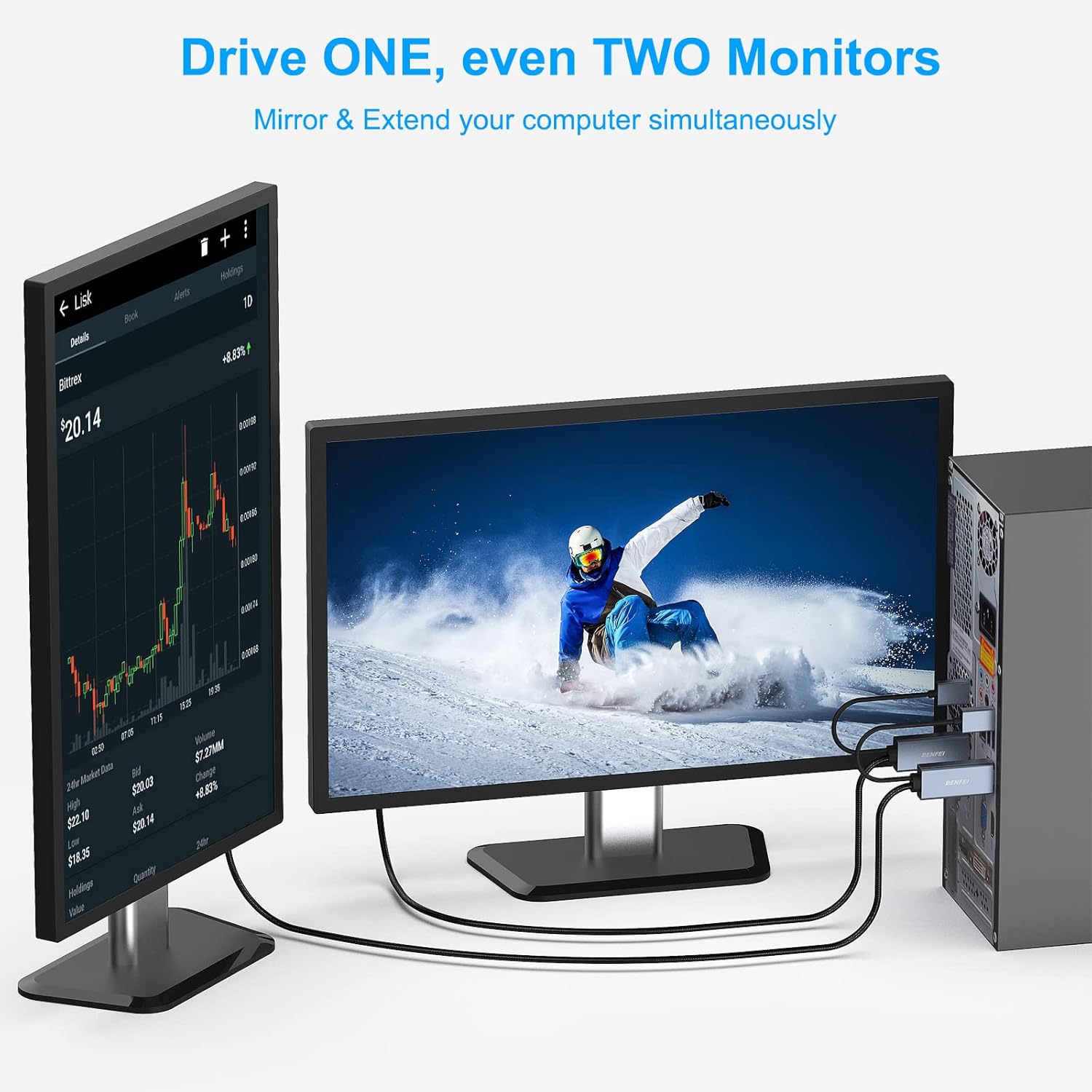
Image: A laptop connected to a large external monitor, both displaying the same image of a horse, demonstrating the cable's ability to mirror content at high resolutions like 4K@60Hz.

Image: A desktop computer connected to two monitors, one showing a stock chart and the other a scenic view, demonstrating the capability to drive multiple monitors in extended mode.
5. പരിപാലനവും പരിചരണവും
- വൃത്തിയാക്കൽ: കേബിളും കണക്ടറുകളും വൃത്തിയാക്കാൻ മൃദുവായതും ഉണങ്ങിയതുമായ തുണി ഉപയോഗിക്കുക. ലിക്വിഡ് ക്ലീനറുകളോ ലായകങ്ങളോ ഉപയോഗിക്കുന്നത് ഒഴിവാക്കുക.
- സംഭരണം: When not in use, store the cable in a cool, dry place, away from direct sunlight and extreme temperatures. Avoid tight coiling or bending the cable sharply to prevent damage to the internal wires.
- കൈകാര്യം ചെയ്യൽ: Always grasp the connector housing when plugging or unplugging the cable. Avoid pulling directly on the cable itself.
- പരിശോധന: Periodically inspect the cable for any signs of wear, fraying, or damage. Discontinue use if damage is observed.
6. പ്രശ്നപരിഹാരം
| പ്രശ്നം | സാധ്യമായ കാരണം | പരിഹാരം |
|---|---|---|
| മോണിറ്ററിൽ ഡിസ്പ്ലേ ഇല്ല. |
|
|
| മിന്നുന്നതോ അസ്ഥിരമായതോ ആയ ഡിസ്പ്ലേ. |
|
|
| ഓഡിയോ ഇല്ല. |
|
|
| Color quality appears washed out. |
|
|

Image: An Xbox Series S connected to a monitor, displaying a racing game. This image emphasizes the unidirectional signal flow from the HDMI source to the DisplayPort monitor, crucial for correct setup.
7 സ്പെസിഫിക്കേഷനുകൾ
| ഫീച്ചർ | വിശദാംശങ്ങൾ |
|---|---|
| മോഡൽ നമ്പർ | 000344 ഗ്രേ |
| ബ്രാൻഡ് | ബെൻഫെയ് |
| കേബിൾ നീളം | 6 അടി (1.8 മീറ്റർ) |
| കണക്റ്റർ തരം | HDMI Male (Source) to DisplayPort Male (Screen) with USB-A (Power) |
| HDMI Input Version | HDMI 2.0b |
| DisplayPort Output Version | ഡിസ്പ്ലേ പോർട്ട് 1.4 |
| Max Resolution (Video) | 3840x2160@60Hz (4K@60Hz) |
| പിന്തുണയ്ക്കുന്ന പ്രമേയങ്ങൾ | 2K@144Hz, 2K@120Hz, 1080P@165Hz, 1080P@144Hz, 1080P@120Hz |
| ഓഡിയോ പിന്തുണ | 8 channels digital, up to 192kHz sampling rate, 24 bits sample size, HBR audio |
| HDCP പിന്തുണ | HDCP 1.4/2.3 |
| HDR പിന്തുണ | HDR10 |
| കേബിൾ മെറ്റീരിയൽ | ബ്രെയ്ഡഡ് നൈലോൺ |
| കണക്റ്റർ ഹൗസിംഗ് | പ്രീമിയം അലുമിനിയം അലോയ് |
| നിറം | കറുപ്പ് |
| പവർ ആവശ്യകത | External USB Power (for chipset) |
| അനുയോജ്യമായ ഉപകരണങ്ങൾ | PC, PS 3/4/5, Chromebook, Mac mini, Xbox One, Xbox 360, Laptop, Ultrabook, Notebook, Raspberry Pi, Intel Nuc, Roku, Set Top Box, TV BOX, Apple MacBook Pro with Retina Display, Apple TV |
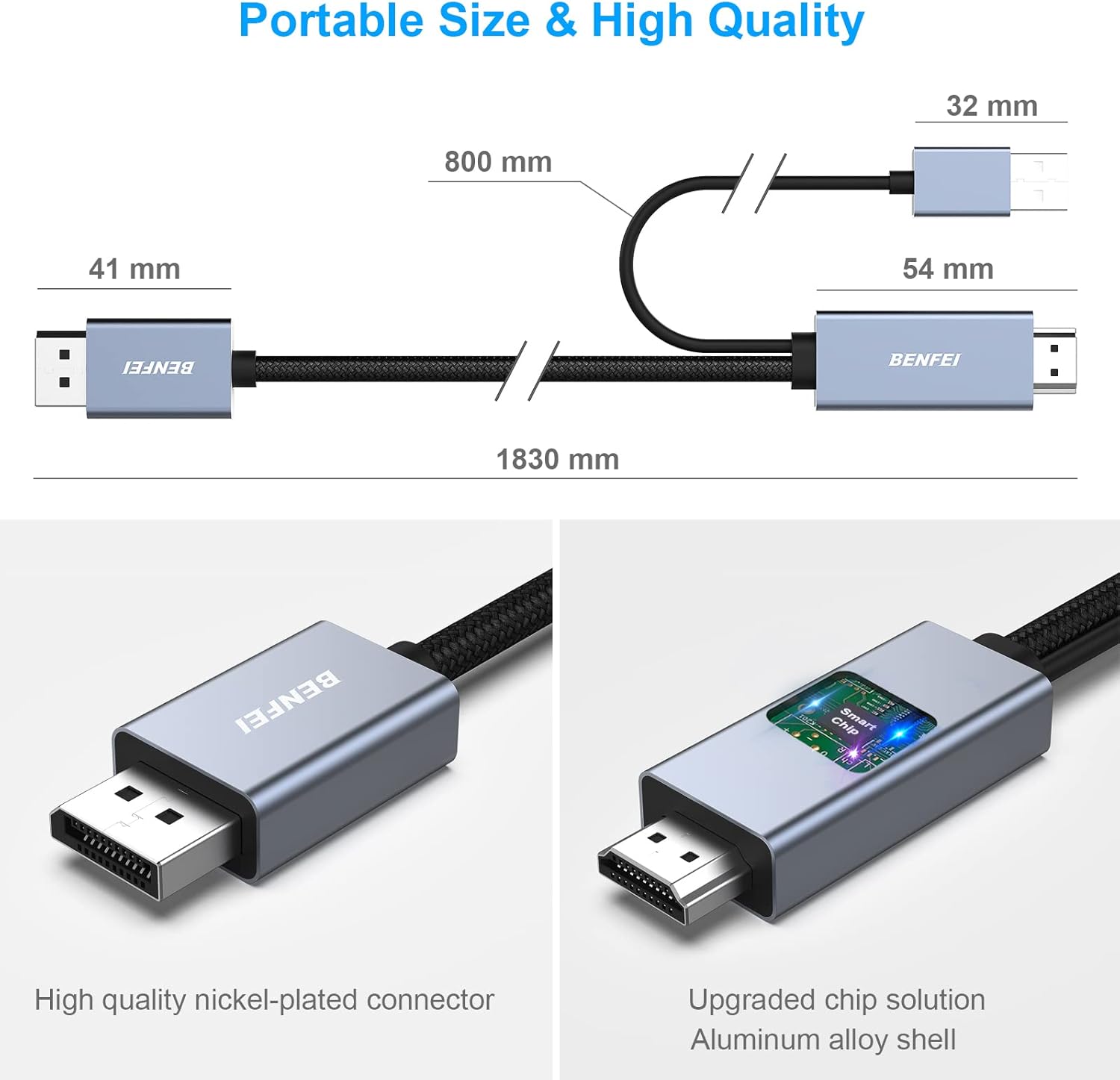
ചിത്രം: വിശദമായത് view of the cable's construction, highlighting the high-quality nickel-plated connector, the upgraded chip solution within the aluminum alloy shell, and the overall dimensions for reference.

Image: A technical comparison table detailing the supported resolutions, refresh rates, HDMI/DisplayPort versions, HDCP, HDR, and HBR2 features of the BENFEI cable, emphasizing its advanced capabilities.
8. വാറൻ്റിയും പിന്തുണയും
The BENFEI HDMI to DisplayPort Cable comes with an exclusive 18-month warranty. This warranty ensures long-term satisfaction with your purchase. For any issues, questions, or support needs, please contact BENFEI customer service. Our friendly and easy-to-reach customer service team is available to assist you timely.
For further assistance, please visit the official BENFEI store or contact their support channels.
9. ഉൽപ്പന്ന വീഡിയോകൾ
ഉൽപ്പന്നം കഴിഞ്ഞുview വീഡിയോ
വീഡിയോ: ഒരു ലഘു ഉൽപ്പന്നത്തെക്കുറിച്ച്view of the BENFEI HDMI to DisplayPort Cable, demonstrating its features and connections. This video is provided by Amazon Product Imaging (Seller).
Ask a question about this manual
Ask about setup, troubleshooting, compatibility, parts, safety, or missing instructions. Manuals+ will review the question and use this page’s manual context to help answer it.