
1. ആമുഖം
വാങ്ങിയതിന് നന്ദി.asing the SODLK T300 120W Portable Bluetooth Speaker. This manual provides essential information for setting up, operating, and maintaining your speaker. Please read it thoroughly before use to ensure optimal performance and longevity of your device. Keep this manual for future reference.
2 സുരക്ഷാ വിവരങ്ങൾ
- സ്പീക്കറിനെ തീവ്രമായ താപനിലയിലോ, നേരിട്ടുള്ള സൂര്യപ്രകാശത്തിലോ, ഉയർന്ന ആർദ്രതയിലോ തുറന്നുകാട്ടരുത്.
- സ്പീക്കറെ ശക്തമായ ആഘാതങ്ങൾക്ക് വിധേയമാക്കുകയോ താഴെയിടുകയോ ചെയ്യുന്നത് ഒഴിവാക്കുക.
- സ്പീക്കർ സ്വയം ഡിസ്അസംബ്ലിംഗ് ചെയ്യുകയോ നന്നാക്കുകയോ പരിഷ്കരിക്കുകയോ ചെയ്യരുത്. ഏതെങ്കിലും അറ്റകുറ്റപ്പണികൾക്ക് യോഗ്യതയുള്ള സേവന ഉദ്യോഗസ്ഥരെ ബന്ധപ്പെടുക.
- സ്പീക്കർ വെള്ളത്തിൽ നിന്നും മറ്റ് ദ്രാവകങ്ങളിൽ നിന്നും അകറ്റി നിർത്തുക. ഈ ഉൽപ്പന്നം വാട്ടർപ്രൂഫ് അല്ല.
- ചാർജ് ചെയ്യാൻ നൽകിയിരിക്കുന്ന യുഎസ്ബി കേബിൾ മാത്രം ഉപയോഗിക്കുക.
- Do not operate the speaker at excessively high volumes for prolonged periods to prevent hearing damage.
3. പാക്കേജ് ഉള്ളടക്കം
പാക്കേജിൽ ഇനിപ്പറയുന്ന ഇനങ്ങൾ ഉണ്ടോ എന്ന് പരിശോധിക്കുക:
- SODLK T300 ബ്ലൂടൂത്ത് സ്പീക്കർ
- യുഎസ്ബി ചാർജിംഗ് കേബിൾ
- ഉപയോക്തൃ മാനുവൽ
4. ഉൽപ്പന്നം കഴിഞ്ഞുview
The SODLK T300 is a powerful portable Bluetooth speaker designed for robust audio performance. It features a durable exterior, integrated handle, and dynamic LED lighting on the sides. The speaker incorporates advanced audio technology for a rich sound experience.

ചിത്രം: മുൻഭാഗം view of the SODLK T300 Portable Bluetooth Speaker, showcasing its black finish, front grille, and side LED lights.
Internally, the T300 is equipped with a sophisticated driver system to deliver its 120W output. This includes multiple dynamic driver units and vibrating diaphragms for enhanced bass and clear audio reproduction.
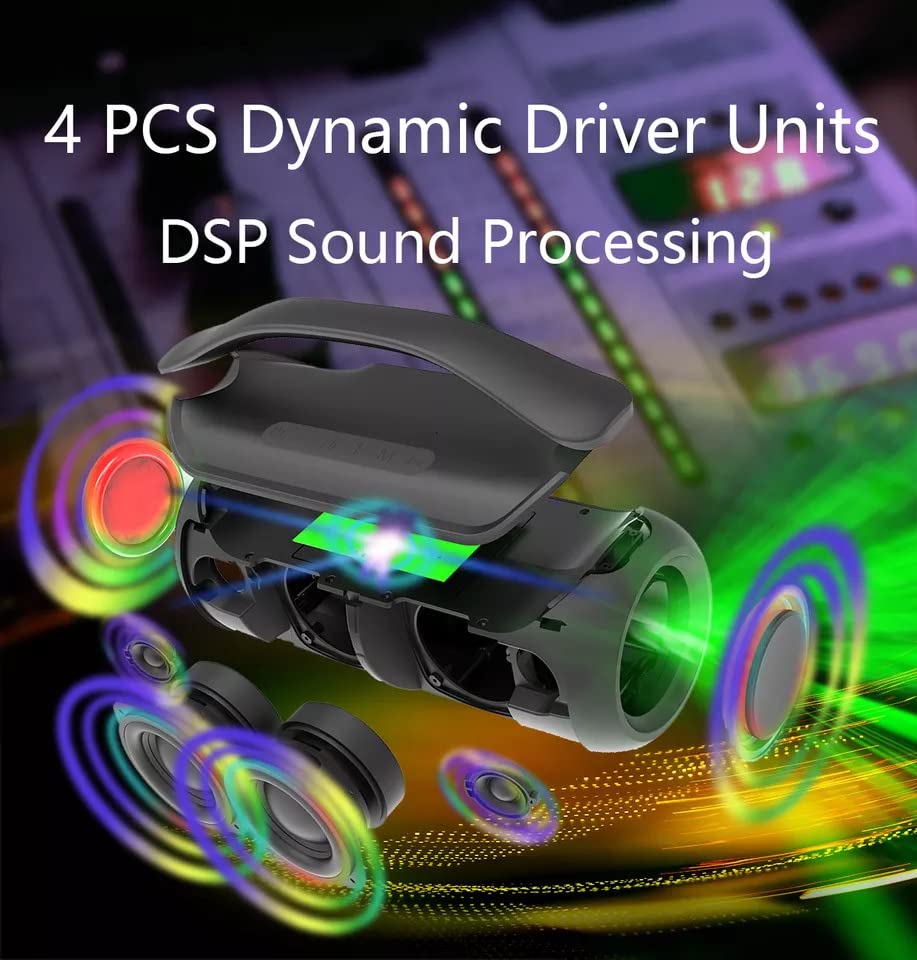
ചിത്രം: പൊട്ടിത്തെറിച്ച ഒരു view illustrating the internal components of the SODLK T300 speaker, highlighting the 4 dynamic driver units and DSP sound processing.
5. സജ്ജീകരണം
5.1 സ്പീക്കർ ചാർജ് ചെയ്യുന്നു
Before first use, fully charge the speaker. Connect the provided USB charging cable to the speaker's charging port and a compatible USB power adapter (not included). The LED indicator will show charging status and turn off or change color when fully charged.
5.2 പവർ ഓൺ/ഓഫ്
- പവർ ഓണാക്കാൻ: Press and hold the Power button for a few seconds until the LED lights illuminate and you hear an audible prompt.
- പവർ ഓഫ് ചെയ്യാൻ: Press and hold the Power button again for a few seconds until the LED lights turn off and you hear an audible prompt.
6. പ്രവർത്തന നിർദ്ദേശങ്ങൾ
6.1 ബ്ലൂടൂത്ത് ജോടിയാക്കൽ
The SODLK T300 features Bluetooth 5.1 for a stable and efficient wireless connection.

Image: Graphic illustrating the benefits of Bluetooth 5.1 connectivity for the SODLK T300, including faster and stronger connection, lower power consumption, better sound, more stable transfer, and higher noise reduction.
- Ensure the speaker is powered on and in Bluetooth pairing mode (the LED indicator will typically flash blue).
- നിങ്ങളുടെ ഉപകരണത്തിൽ (സ്മാർട്ട്ഫോൺ, ടാബ്ലെറ്റ്, കമ്പ്യൂട്ടർ), ബ്ലൂടൂത്ത് പ്രവർത്തനക്ഷമമാക്കി ലഭ്യമായ ഉപകരണങ്ങൾക്കായി തിരയുക.
- Select "SODLK T300" from the list of devices.
- Once paired, the speaker will indicate a successful connection, and the LED light will change.
6.2 TWS (ട്രൂ വയർലെസ് സ്റ്റീരിയോ) കണക്ഷൻ
To connect two SODLK T300 speakers for a stereo sound experience:
- രണ്ട് സ്പീക്കറുകളും ഓണാക്കിയിട്ടുണ്ടെന്നും ഏതെങ്കിലും ബ്ലൂടൂത്ത് ഉപകരണവുമായി ബന്ധിപ്പിച്ചിട്ടില്ലെന്നും ഉറപ്പാക്കുക.
- On one speaker, press the TWS button. It will enter TWS pairing mode.
- രണ്ട് സ്പീക്കറുകളും പരസ്പരം യാന്ത്രികമായി ബന്ധിപ്പിക്കും. കണക്റ്റ് ചെയ്തുകഴിഞ്ഞാൽ, ഒരു സ്പീക്കർ മാസ്റ്റർ (ഇടത് ചാനൽ) ആയും മറ്റൊന്ന് സ്ലേവ് (വലത് ചാനൽ) ആയും പ്രവർത്തിക്കും.
- വിഭാഗം 6.1-ൽ വിവരിച്ചിരിക്കുന്നതുപോലെ ബ്ലൂടൂത്ത് വഴി നിങ്ങളുടെ ഉപകരണം മാസ്റ്റർ സ്പീക്കറുമായി ബന്ധിപ്പിക്കുക.
6.3 Playing Music from Various Sources
The SODLK T300 supports multiple playback modes:
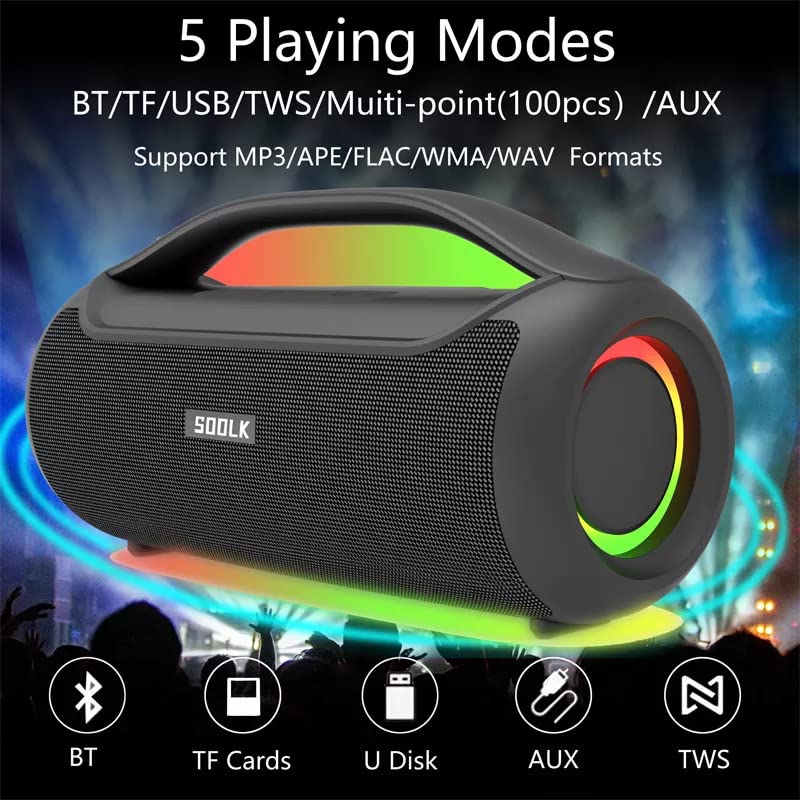
Image: Visual representation of the 5 playing modes supported by the SODLK T300: Bluetooth (BT), TF Cards, U Disk (USB), AUX, and TWS. It also indicates support for MP3/APE/FLAC/WMA/WAV formats.
- ബ്ലൂടൂത്ത്: Connect your device wirelessly as described in section 6.1.
- TF കാർഡ്: ഓഡിയോ ഉള്ള ഒരു TF (മൈക്രോ എസ്ഡി) കാർഡ് ചേർക്കുക fileTF കാർഡ് സ്ലോട്ടിലേക്ക് s. സ്പീക്കർ സ്വയമേവ TF കാർഡ് മോഡിലേക്ക് മാറുകയും പ്ലേബാക്ക് ആരംഭിക്കുകയും ചെയ്യും.
- യുഎസ്ബി ഡിസ്ക്: ഓഡിയോ ഉള്ള ഒരു USB ഫ്ലാഷ് ഡ്രൈവ് ചേർക്കുക fileUSB പോർട്ടിലേക്ക് s. സ്പീക്കർ സ്വയമേവ USB മോഡിലേക്ക് മാറുകയും പ്ലേബാക്ക് ആരംഭിക്കുകയും ചെയ്യും.
- AUX ഇൻപുട്ട്: Connect an external audio device using a 3.5mm AUX cable (not included) to the AUX port. The speaker will switch to AUX mode.
Use the speaker's control buttons to play/pause, skip tracks, and adjust volume.
6.4 EQ Playing Modes
The speaker offers three equalizer (EQ) modes to optimize your listening experience for different music genres.

Image: Graphic displaying the three EQ playing modes of the SODLK T300: HIFI 6D Surround, Vocal, and Deep Bass, with illustrative icons for each.
Press the EQ button to cycle through the following modes:
- HIFI 6D Surround: ആഴത്തിലുള്ളതും വിശാലവുമായ ശബ്ദങ്ങൾ നൽകുന്നുtage.
- വോക്കൽ: Enhances clarity for vocals, ideal for podcasts or acoustic music.
- ഡീപ് ബാസ്: Boosts low frequencies for a more impactful bass response.
6.5 LED ലൈറ്റ് കൺട്രോൾ
The SODLK T300 features dynamic LED lights. Press the Light button to cycle through different lighting modes or to turn the lights off.
6.6 NFC Connection (Near Field Communication)
For compatible devices, NFC allows for quick and easy Bluetooth pairing.
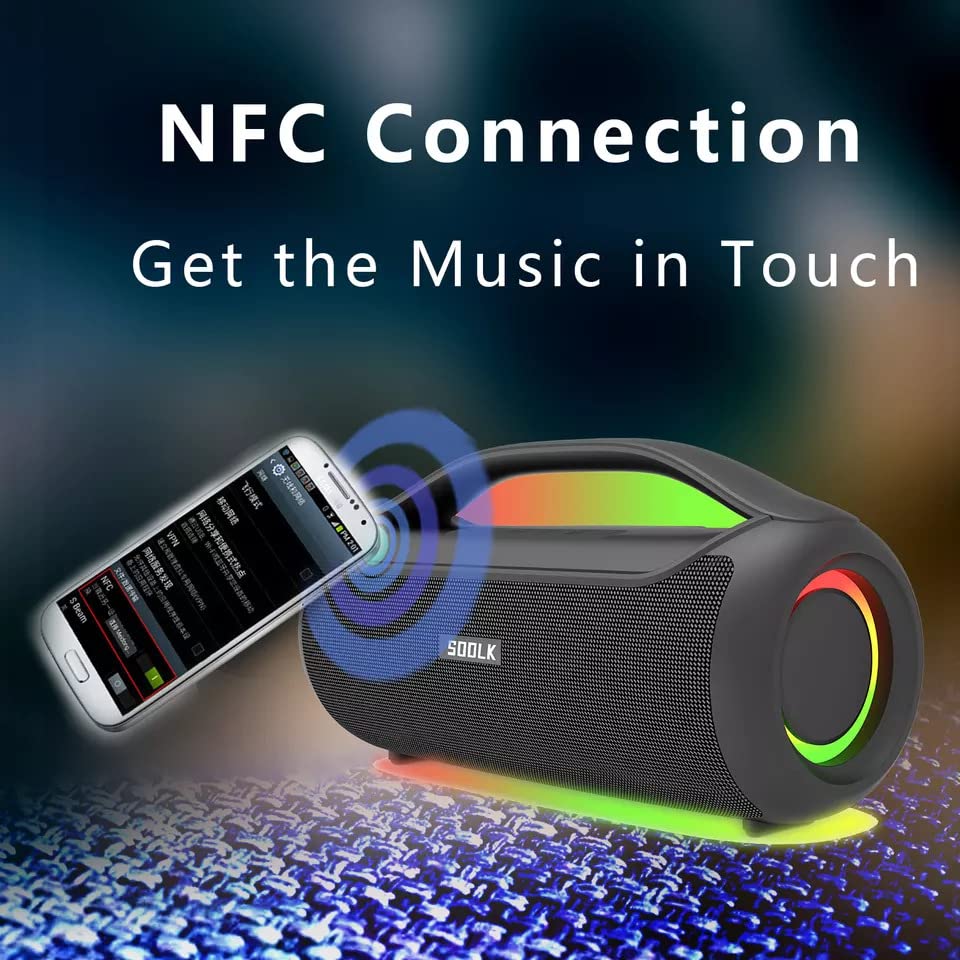
Image: A smartphone being tapped against the SODLK T300 speaker, illustrating the NFC connection process for instant music pairing.
- നിങ്ങളുടെ സ്മാർട്ട്ഫോണിലോ ഉപകരണത്തിലോ NFC പ്രവർത്തനക്ഷമമാക്കിയിട്ടുണ്ടെന്ന് ഉറപ്പാക്കുക.
- Tap your NFC-enabled device gently against the NFC area on the speaker.
- Your device will prompt you to connect via Bluetooth. Confirm the connection.
7. പരിപാലനം
7.1 വൃത്തിയാക്കൽ
മൃദുവായതും ഉണങ്ങിയതുമായ തുണി ഉപയോഗിച്ച് സ്പീക്കർ തുടയ്ക്കുക. അബ്രാസീവ് ക്ലീനറുകൾ, ആൽക്കഹോൾ അല്ലെങ്കിൽ മറ്റ് കെമിക്കൽ ലായകങ്ങൾ എന്നിവ ഉപയോഗിക്കരുത്, കാരണം ഇവ ഉപരിതലത്തിന് കേടുവരുത്തും.
7.2 സംഭരണം
ദീർഘനേരം ഉപയോഗിക്കാത്തപ്പോൾ, നേരിട്ടുള്ള സൂര്യപ്രകാശത്തിൽ നിന്നും കടുത്ത താപനിലയിൽ നിന്നും അകന്ന് തണുത്തതും വരണ്ടതുമായ സ്ഥലത്ത് സ്പീക്കർ സൂക്ഷിക്കുക. ബാറ്ററിയുടെ ആരോഗ്യം നിലനിർത്താൻ കുറഞ്ഞത് മൂന്ന് മാസത്തിലൊരിക്കൽ സ്പീക്കർ ചാർജ് ചെയ്യാൻ ശുപാർശ ചെയ്യുന്നു.
8. പ്രശ്നപരിഹാരം
| പ്രശ്നം | സാധ്യമായ കാരണം | പരിഹാരം |
|---|---|---|
| സ്പീക്കർ പവർ ഓൺ ചെയ്യുന്നില്ല. | കുറഞ്ഞ ബാറ്ററി. | സ്പീക്കർ പൂർണ്ണമായും ചാർജ് ചെയ്യുക. |
| ശബ്ദമില്ല. | Volume too low; incorrect input mode; device not paired. | Increase volume; switch to correct input mode (BT, AUX, TF, USB); re-pair Bluetooth device. |
| ബ്ലൂടൂത്ത് ജോടിയാക്കൽ പരാജയപ്പെട്ടു. | സ്പീക്കർ ജോടിയാക്കൽ മോഡിൽ ഇല്ല; ഉപകരണം ബ്ലൂടൂത്ത് ഓഫാണ്; സ്പീക്കറിൽ നിന്ന് വളരെ അകലെയാണ്. | Ensure speaker is in pairing mode; enable Bluetooth on device; move device closer to speaker. |
| TWS കണക്ഷൻ പരാജയപ്പെട്ടു. | സ്പീക്കറുകൾ ഇതിനകം തന്നെ മറ്റൊരു ഉപകരണത്തിലേക്ക് കണക്റ്റ് ചെയ്തിട്ടുണ്ട്; വളരെ അകലെയാണ്. | Disconnect speakers from other devices; ensure speakers are close to each other. |
9 സ്പെസിഫിക്കേഷനുകൾ
Detailed technical specifications for the SODLK T300 speaker:
| ഫീച്ചർ | സ്പെസിഫിക്കേഷൻ |
|---|---|
| മോഡലിൻ്റെ പേര് | T300 |
| സ്പീക്കർ തരം | പോർട്ടബിൾ സ്പീക്കർ |
| പ്രത്യേക ഫീച്ചർ | Subwoofer, LED Light, TWS Connection |
| കണക്റ്റിവിറ്റി ടെക്നോളജി | Bluetooth 5.1, Auxiliary, TF Card, USB |
| വയർലെസ് കമ്മ്യൂണിക്കേഷൻ | ബ്ലൂടൂത്ത് |
| സ്പീക്കർ പരമാവധി ഔട്ട്പുട്ട് പവർ | 120 വാട്ട്സ് |
| ഓഡിയോ put ട്ട്പുട്ട് മോഡ് | സ്റ്റീരിയോ |
| സറൗണ്ട് സൗണ്ട് ചാനൽ കോൺഫിഗറേഷൻ | 6D |
| പവർ ഉറവിടം | ബാറ്ററി പവർ |
| നിയന്ത്രണ രീതി | ടച്ച് ബട്ടണുകൾ |
| ഉൽപ്പന്ന അളവുകൾ | 11.2D x 29.2W x 10.1H സെന്റീമീറ്ററുകൾ |
| വാട്ടർപ്രൂഫ് ആണ് | ഇല്ല |
| ഉൾപ്പെടുത്തിയ ഘടകങ്ങൾ | USB Cable, Speaker, User Manual |
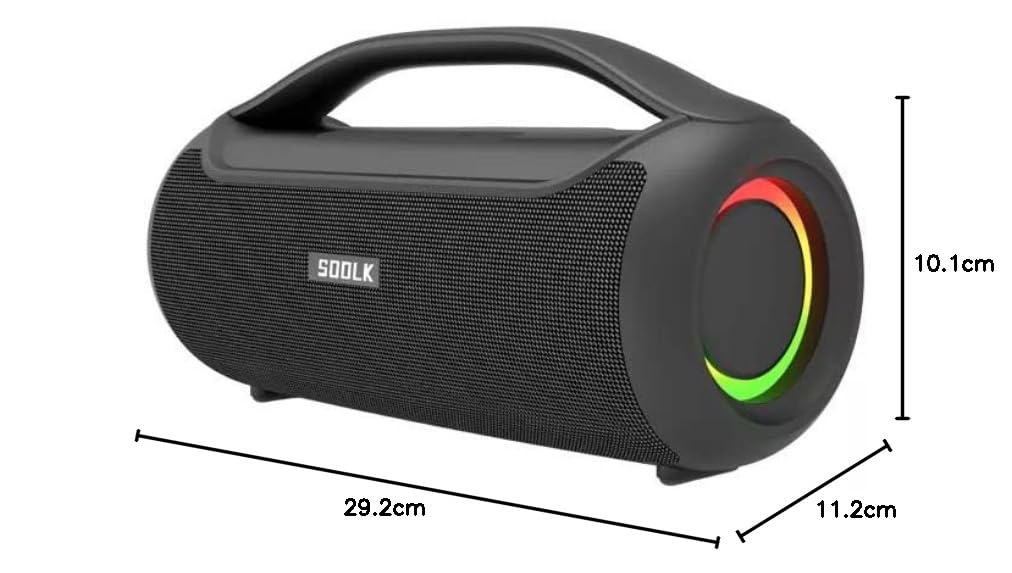
Image: Diagram showing the dimensions of the SODLK T300 speaker: 29.2cm (width), 11.2cm (depth), and 10.1cm (height).
10. വാറൻ്റിയും പിന്തുണയും
The SODLK T300 speaker comes with a 1 വർഷത്തെ വാറൻ്റി വാങ്ങിയ തീയതി മുതൽ. സാധാരണ ഉപയോഗത്തിലുള്ള നിർമ്മാണ വൈകല്യങ്ങളും പ്രവർത്തനക്ഷമതയും ഈ വാറന്റി ഉൾക്കൊള്ളുന്നു. ദുരുപയോഗം, അപകടങ്ങൾ, അനധികൃത പരിഷ്കാരങ്ങൾ, അല്ലെങ്കിൽ സാധാരണ തേയ്മാനം എന്നിവ മൂലമുണ്ടാകുന്ന നാശനഷ്ടങ്ങൾക്ക് ഇത് പരിരക്ഷ നൽകുന്നില്ല.
For warranty claims, technical support, or any inquiries, please contact your retailer or the SODLK customer service department with your purchase details.