
1. ആമുഖം
The TechniSat Viola CD-1 is a compact and versatile portable stereo CD player, also known as a boombox. It features a CD player, FM radio tuner, Bluetooth audio streaming, and stereo speakers. Designed for both home and portable use, it can be powered by an AC adapter or batteries, making it suitable for various environments.

Image: TechniSat Viola CD-1 in a modern office environment, demonstrating its versatile placement.
2 സുരക്ഷാ വിവരങ്ങൾ
ഈ ഉപകരണം പ്രവർത്തിപ്പിക്കുന്നതിന് മുമ്പ് എല്ലാ സുരക്ഷാ നിർദ്ദേശങ്ങളും വായിച്ച് മനസ്സിലാക്കുക. ഭാവിയിലെ റഫറൻസിനായി ഈ മാനുവൽ സൂക്ഷിക്കുക.
- മഴയോ ഈർപ്പമോ ഉപകരണത്തെ തുറന്നുകാട്ടരുത്.
- വെന്റിലേഷൻ തുറക്കൽ തടയരുത്.
- Ensure proper power supply (AC adapter or specified batteries).
- ഉയർന്ന താപനിലയും നേരിട്ടുള്ള സൂര്യപ്രകാശവും ഒഴിവാക്കുക.
- യൂണിറ്റ് ഡിസ്അസംബ്ലിംഗ് ചെയ്യാനോ പരിഷ്ക്കരിക്കാനോ ശ്രമിക്കരുത്. എല്ലാ സേവനങ്ങളും യോഗ്യതയുള്ള ഉദ്യോഗസ്ഥർക്ക് റഫർ ചെയ്യുക.
3. പാക്കേജ് ഉള്ളടക്കം
പാക്കേജിൽ എല്ലാ ഇനങ്ങളും ഉണ്ടെന്ന് ഉറപ്പാക്കുക:
- TechniSat Viola CD-1 Portable CD Radio
- AC Power Cable (150 cm)
- ഇൻസ്ട്രക്ഷൻ മാനുവൽ
4. ഉൽപ്പന്നം കഴിഞ്ഞുview
4.1 ഫ്രണ്ട് പാനൽ നിയന്ത്രണങ്ങൾ

Image: Close-up of the TechniSat Viola CD-1's control panel and display.
The front panel features a digital display and various control buttons for playback, mode selection, and volume adjustment.
4.2 Rear Panel and Side Connections
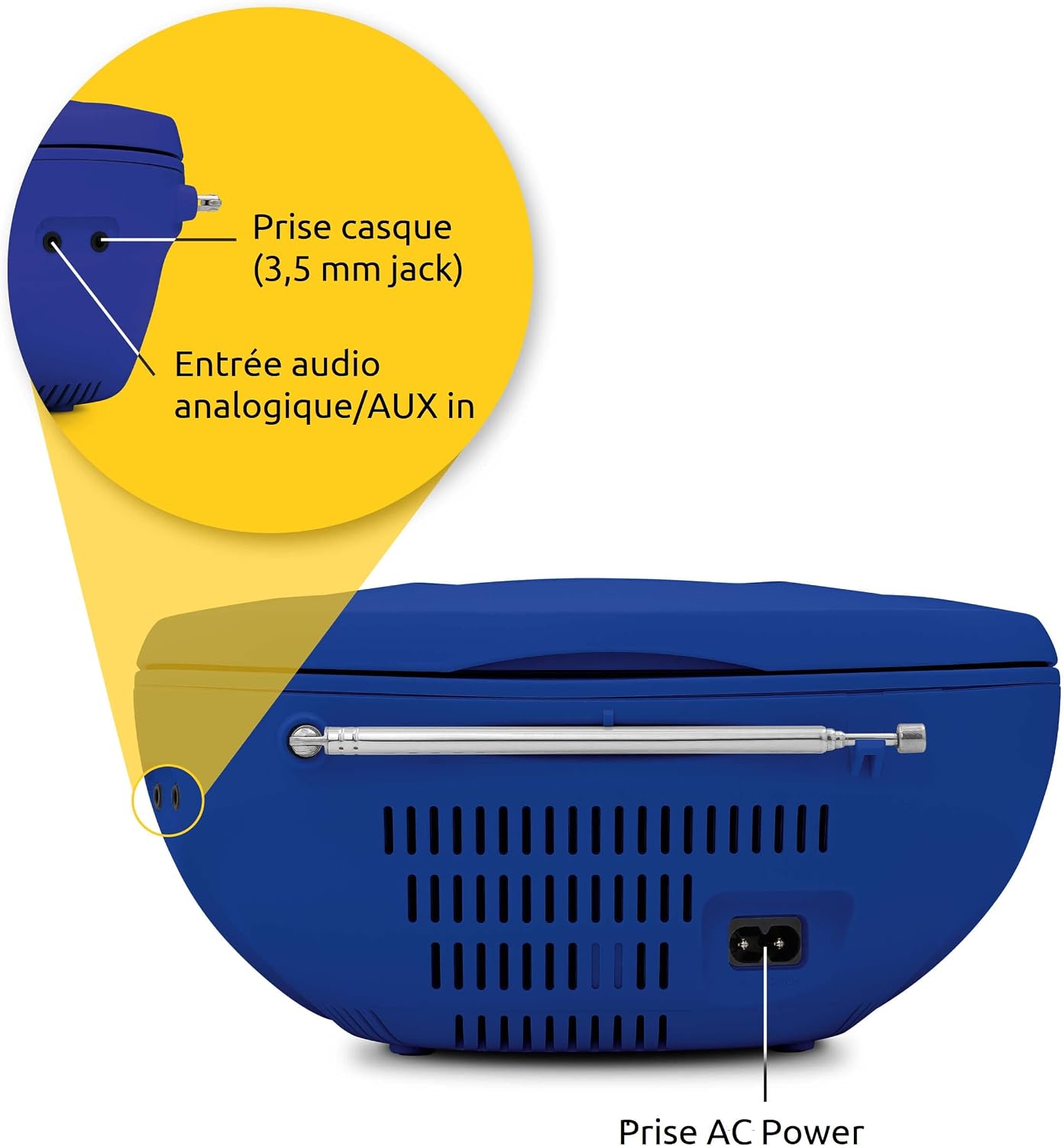
ചിത്രം: വിശദമായത് view of the rear and side ports, including headphone jack, AUX in, and AC power input.
- Headphone Jack (3.5 mm): സ്വകാര്യ ശ്രവണത്തിനായി.
- AUX ഇതിൽ: ബാഹ്യ ഓഡിയോ ഉപകരണങ്ങൾ ബന്ധിപ്പിക്കുക.
- എസി പവർ ഇൻപുട്ട്: നൽകിയിരിക്കുന്ന വൈദ്യുതി കേബിൾ ബന്ധിപ്പിക്കുക.
- എഫ്എം ടെലിസ്കോപ്പിക് ആന്റിന: Extend for optimal FM radio reception.
5. സജ്ജീകരണം
5.1 ഉപകരണം പവർ ചെയ്യുന്നു
The Viola CD-1 can be powered by AC mains or batteries.
- എസി പവർ: Insert the AC power cable into the AC input on the rear of the unit and plug the other end into a standard wall outlet.
- ബാറ്ററി പവർ: Open the battery compartment on the bottom of the unit. Insert 6 x 1.5V C-type (R14) batteries, ensuring correct polarity. Close the compartment securely.

Image: The Viola CD-1 being used outdoors, demonstrating its battery-powered portability.
5.2 ആന്റിന സജ്ജീകരണം
For optimal FM radio reception, fully extend the telescopic antenna located on the rear of the unit. Adjust its position for the best signal quality.
6. പ്രവർത്തന നിർദ്ദേശങ്ങൾ
6.1 പവർ ഓൺ/ഓഫ്
അമർത്തുക ശക്തി button (usually centrally located) to turn the unit on or off.
6.2 സിഡി പ്ലേബാക്ക്

Image: The Viola CD-1 with its top-loading CD compartment open, ready for disc insertion.
- സിഡി കമ്പാർട്ട്മെന്റ് ലിഡ് തുറക്കുക.
- ലേബൽ വശം മുകളിലേക്ക് അഭിമുഖീകരിക്കുന്ന തരത്തിൽ സ്പിൻഡിൽ ഒരു സിഡി (ഓഡിയോ സിഡി അല്ലെങ്കിൽ എംപി3 സിഡി) വയ്ക്കുക.
- സിഡി കമ്പാർട്ട്മെന്റ് ലിഡ് സുരക്ഷിതമായി അടയ്ക്കുക.
- അമർത്തുക മോഡ് സിഡി മോഡ് തിരഞ്ഞെടുക്കാനുള്ള ബട്ടൺ.
- അമർത്തുക പ്ലേ/താൽക്കാലികമായി നിർത്തുക പ്ലേബാക്ക് ആരംഭിക്കുന്നതിനുള്ള ബട്ടൺ.
- ഉപയോഗിക്കുക ഒഴിവാക്കുക/തിരയുക buttons (forward/backward arrows) to navigate tracks.
- For MP3 CDs, use the ആൽബം button to switch between folders.
6.3 എഫ്എം റേഡിയോ പ്രവർത്തനം

Image: Visual representation of FM radio waves, indicating the device's radio functionality.
- ടെലിസ്കോപ്പിക് ആന്റിന നീട്ടുക.
- അമർത്തുക മോഡ് എഫ്എം റേഡിയോ മോഡ് തിരഞ്ഞെടുക്കാൻ ബട്ടൺ.
- അമർത്തുക സ്കാൻ ചെയ്യുക ലഭ്യമായ സ്റ്റേഷനുകൾ സ്വയമേവ തിരയാനും സംഭരിക്കാനുമുള്ള ബട്ടൺ.
- ഉപയോഗിക്കുക പ്രോഗ്രാം/മെമ്മറി സംഭരിച്ച സ്റ്റേഷനുകളിലൂടെ സൈക്കിൾ ചെയ്യാനുള്ള ബട്ടണുകൾ.
6.4 ബ്ലൂടൂത്ത് ഓഡിയോ സ്ട്രീമിംഗ്

Image: The Viola CD-1 paired with a smartphone, demonstrating wireless Bluetooth audio streaming.
- അമർത്തുക മോഡ് button to select Bluetooth mode. The display will indicate 'BT' or a similar pairing status.
- Enable Bluetooth on your smartphone or other mobile device.
- ഇതിനായി തിരയുക available devices and select "VIOLA CD-1" to pair.
- Once paired, you can stream audio wirelessly from your device to the Viola CD-1.
6.5 AUX ഇൻപുട്ട്
To connect an external audio source:
- Connect a 3.5mm audio cable from your external device's headphone or line-out jack to the AUX In port on the Viola CD-1.
- അമർത്തുക മോഡ് AUX മോഡ് തിരഞ്ഞെടുക്കാൻ ബട്ടൺ.
- നിങ്ങളുടെ ബാഹ്യ ഉപകരണത്തിൽ നിന്ന് പ്ലേബാക്കും ശബ്ദവും നിയന്ത്രിക്കുക.
6.6 ഹെഡ്ഫോൺ ഉപയോഗം
For private listening, plug 3.5mm headphones into the headphone jack. The internal speakers will automatically mute.
7. പരിപാലനം
To ensure the longevity and optimal performance of your Viola CD-1:
- വൃത്തിയാക്കൽ: യൂണിറ്റിന്റെ പുറംഭാഗം വൃത്തിയാക്കാൻ മൃദുവായതും ഉണങ്ങിയതുമായ തുണി ഉപയോഗിക്കുക. അബ്രസീവ് ക്ലീനറുകളോ ലായകങ്ങളോ ഉപയോഗിക്കരുത്.
- സിഡി ലെൻസ്: If CD playback issues occur, use a specialized CD lens cleaner disc.
- സംഭരണം: ദീർഘനേരം ഉപയോഗിക്കാത്തപ്പോൾ, ബാറ്ററികൾ നീക്കം ചെയ്ത് തണുത്തതും വരണ്ടതുമായ സ്ഥലത്ത് യൂണിറ്റ് സൂക്ഷിക്കുക.
8. പ്രശ്നപരിഹാരം
| പ്രശ്നം | സാധ്യമായ കാരണം | പരിഹാരം |
|---|---|---|
| ശക്തിയില്ല | AC cable not connected; Batteries depleted or incorrectly inserted. | എസി കണക്ഷൻ പരിശോധിക്കുക; ബാറ്ററികൾ മാറ്റിസ്ഥാപിക്കുക അല്ലെങ്കിൽ ശരിയായ പോളാരിറ്റി ഉറപ്പാക്കുക. |
| ശബ്ദമില്ല | ശബ്ദം വളരെ കുറവാണ്; ഹെഡ്ഫോണുകൾ കണക്റ്റുചെയ്തു; തെറ്റായ മോഡ് തിരഞ്ഞെടുത്തു. | Increase volume; Disconnect headphones; Select correct mode (CD, FM, BT, AUX). |
| സിഡി ഒഴിവാക്കുകയോ പ്ലേ ചെയ്യാതിരിക്കുകയോ ചെയ്യുന്നു | CD dirty or scratched; CD inserted incorrectly; Lens dirty. | സിഡി വൃത്തിയാക്കുകയോ മാറ്റി സ്ഥാപിക്കുകയോ ചെയ്യുക; സിഡി ശരിയായി വീണ്ടും ചേർക്കുക; ഒരു സിഡി ലെൻസ് ക്ലീനർ ഉപയോഗിക്കുക. |
| മോശം എഫ്എം സ്വീകരണം | ആന്റിന നീട്ടിയിട്ടില്ല അല്ലെങ്കിൽ തെറ്റായി സ്ഥാപിച്ചിട്ടില്ല. | ടെലിസ്കോപ്പിക് ആന്റിന പൂർണ്ണമായും നീട്ടി ക്രമീകരിക്കുക. |
| ബ്ലൂടൂത്ത് ജോടിയാക്കൽ പരാജയം | Device not in pairing mode; Viola CD-1 not discoverable; Distance too far. | Ensure Viola CD-1 is in Bluetooth mode; Check device's Bluetooth settings; Move devices closer. |
9 സ്പെസിഫിക്കേഷനുകൾ
| ഫീച്ചർ | സ്പെസിഫിക്കേഷൻ |
|---|---|
| മോഡൽ | Viola CD-1 |
| ബ്രാൻഡ് | ടെക്നിസാറ്റ് |
| സിഡി പ്ലെയർ | Supports Audio CD, CD-R, CD-RW, MP3 CD |
| റേഡിയോ ട്യൂണർ | എഫ്എം (യുകെഡബ്ല്യു) |
| ബ്ലൂടൂത്ത് | Audio Streaming (Reception) |
| സ്പീക്കറുകൾ | Stereo, 2 x 1 Watt RMS |
| കണക്റ്റിവിറ്റി | AUX In (3.5mm Jack), Headphone Out (3.5mm Jack) |
| വൈദ്യുതി വിതരണം | AC (230V) or 6 x 1.5V C-type (R14) Batteries |
| അളവുകൾ (L x H x D) | 21.5 x 10.0 x 21.5 സെ.മീ |
| ഭാരം | 828 ഗ്രാം |
| മോഡൽ നമ്പർ | 0002/2980 |
10. വാറൻ്റിയും പിന്തുണയും
Warranty information for the TechniSat Viola CD-1 is not explicitly provided in the product details. Please refer to your purchase documentation or contact your retailer for specific warranty terms and conditions.
For technical support or further assistance, please visit the official TechniSat webസൈറ്റ് അല്ലെങ്കിൽ അവരുടെ ഉപഭോക്തൃ സേവന വിഭാഗവുമായി ബന്ധപ്പെടുക.