
1. ആമുഖം
This manual provides essential information for the proper installation, operation, and maintenance of the Novastar A5S Plus LED Display Receiving Card. Please read this manual thoroughly before using the product to ensure optimal performance and longevity. The Novastar A5S Plus is an advanced receiving card designed to enhance the display effects of LED screens.
2. ഉൽപ്പന്നം കഴിഞ്ഞുview ഫീച്ചറുകളും
The Novastar A5S Plus Receiving Card offers significant improvements in display quality and control capabilities for LED screens. Key features include:
- കളർ മാനേജ്മെന്റ്: Supports standard color gamuts (Rec.709 / DCI-P3 / Rec.2020) and custom color profiles for precise color reproduction.
- 18bit+ Grayscale Enhancement: Improves LED display grayscale by up to 4 times, preventing grayscale loss at low brightness levels and ensuring smoother image transitions.
- Pixel-Level Brightness and Chroma Calibration: Integrates with NovaStar's calibration system to adjust brightness and chroma for each pixel, achieving high consistency across the display.
- Quick Adjustment of Dark or Bright Lines: Corrects brightness discrepancies at module or cabinet seams for a uniform visual experience.
- Multi-batch Adjustment: Allows brightness adjustment of cabinets or modules to minimize display variations caused by different production batches.
- കുറഞ്ഞ ലേറ്റൻസി: Reduces video source latency to 1 frame for PWM driver ICs. Custom firmware may be required for DCLK continuous PWM driver ICs.
- 3D പ്രവർത്തനം: Compatible with controllers that support 3D output.
- Individual Gamma Adjustment for RGB: Works with NovaLCT to allow separate adjustment of red, green, and blue gamma, improving image uniformity at low grayscale and correcting white balance offset.
- 90° Image Rotation: Supports image rotation in multiples of 90° (0°/90°/180°/270°).
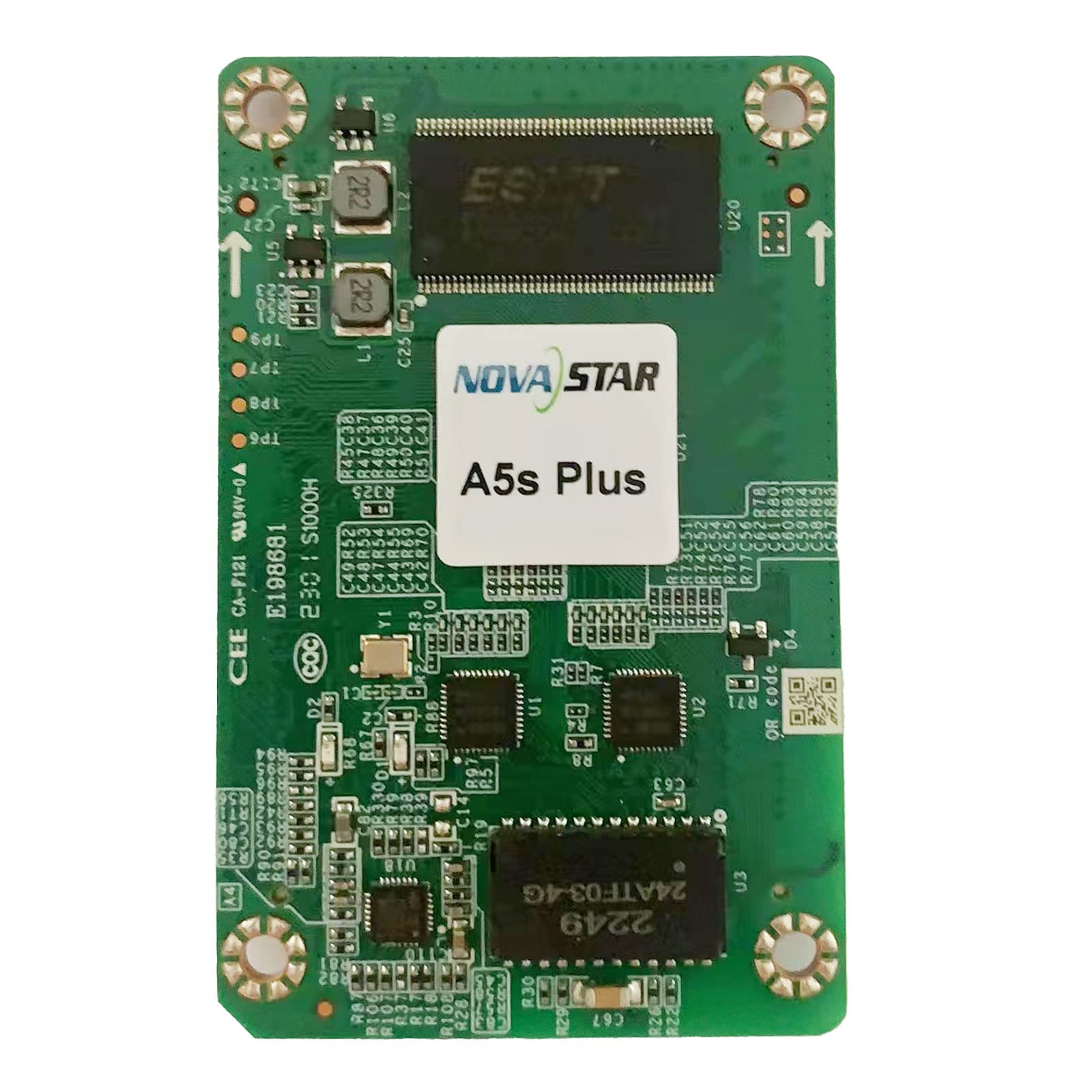
ഒരു ഓവർഹെഡ് view of the Novastar A5S Plus LED Display Receiving Card, showcasing its green circuit board with various electronic components, connectors, and integrated circuits. Two prominent multi-pin connectors are visible on the left and right edges, designed for connecting to LED modules. Key components include resistors, capacitors, and a large integrated circuit labeled '2249 24ATF-03-4G' at the bottom.
3. പാക്കേജ് ഉള്ളടക്കം
പാക്കേജ് തുറക്കുമ്പോൾ, എല്ലാ ഇനങ്ങളും അവിടെയുണ്ടെന്നും കേടുപാടുകൾ സംഭവിച്ചിട്ടില്ലെന്നും ദയവായി പരിശോധിക്കുക:
- Novastar A5S Plus Receiving Card
- ഉയർന്ന സാന്ദ്രത കണക്റ്റർ
- Assembly network transformer
- ഉപയോക്തൃ മാനുവൽ (ഈ പ്രമാണം)
4. സജ്ജീകരണ നിർദ്ദേശങ്ങൾ
Follow these general steps for installing the Novastar A5S Plus Receiving Card into your LED display system:
- പവർ ഓഫ്: Ensure all power to the LED display and control system is disconnected before installation.
- സ്ലോട്ട് കണ്ടെത്തുക: Identify the designated receiving card slot within your LED display module or cabinet.
- കാർഡ് ചേർക്കുക: Carefully insert the Novastar A5S Plus card into the slot, ensuring it is seated firmly and correctly. Avoid applying excessive force.
- Connect Data Cables: Connect the data cables from the LED modules to the multi-pin connectors on the receiving card (e.g., JH1, JH2).
- നെറ്റ്വർക്ക് കേബിളുകൾ ബന്ധിപ്പിക്കുക: Connect the network cables from the sending card or control system to the appropriate network ports on the receiving card.
- പവർ ഓൺ: Once all connections are secure, restore power to the LED display and control system.
- സോഫ്റ്റ്വെയർ കോൺഫിഗറേഷൻ: Use Novastar's control software (e.g., NovaLCT) to configure the receiving card parameters, including screen resolution, module type, and display settings. Refer to the software's user guide for detailed configuration steps.
5. പ്രവർത്തന നിർദ്ദേശങ്ങൾ
The Novastar A5S Plus operates in conjunction with a Novastar sending card and control software. Basic operation involves:
- സിസ്റ്റം പവർ-അപ്പ്: Power on the sending card, then the LED display modules.
- സോഫ്റ്റ്വെയർ നിയന്ത്രണം: Launch the Novastar control software (e.g., NovaLCT) on your computer.
- പ്രദർശന കോൺഫിഗറേഷൻ: Load the saved configuration file for your LED screen. If necessary, perform initial setup or adjustments.
- ഉള്ളടക്ക പ്ലേബാക്ക്: Use the software to send video or image content to the LED display.
- സവിശേഷത ഉപയോഗം: Access advanced features like color management, pixel-level calibration, and image rotation through the control software interface to optimize display quality.
- സിസ്റ്റം ഷട്ട്ഡൗൺ: Power off the LED display modules first, then the sending card.
6. പരിപാലനം
Proper maintenance ensures the longevity and reliable performance of your Novastar A5S Plus Receiving Card:
- പതിവ് വൃത്തിയാക്കൽ: Keep the card and its connectors free from dust and debris. Use a soft, dry brush or compressed air for cleaning. Ensure power is off before cleaning.
- പരിസ്ഥിതി നിയന്ത്രണം: Operate the card within recommended temperature and humidity ranges to prevent damage.
- ഫേംവെയർ അപ്ഡേറ്റുകൾ: Periodically check the Novastar official website for firmware updates. Apply updates as recommended to benefit from new features and bug fixes.
- സുരക്ഷിത കണക്ഷനുകൾ: Regularly inspect all cable connections to ensure they are secure and free from wear or damage.
- ശരിയായ കൈകാര്യം ചെയ്യൽ: When handling the card, always use anti-static precautions to prevent electrostatic discharge (ESD) damage.
7. പ്രശ്നപരിഹാരം
If you encounter issues with your Novastar A5S Plus Receiving Card, consider the following:
- ഡിസ്പ്ലേ/ഭാഗിക ഡിസ്പ്ലേ ഇല്ല:
- Check power supply to the LED modules and receiving card.
- Verify all data and network cables are securely connected.
- Ensure the receiving card configuration in the control software matches the physical display setup.
- Test with a known working receiving card if available.
- മിന്നിമറയുന്ന/അസ്ഥിരമായ ഡിസ്പ്ലേ:
- അയഞ്ഞ കേബിൾ കണക്ഷനുകൾ പരിശോധിക്കുക.
- Ensure the network cable quality is sufficient and within recommended lengths.
- Verify refresh rate settings in the control software.
- Incorrect Colors/Image Distortion:
- Perform color calibration using NovaStar's calibration system.
- Check gamma and color management settings in the control software.
- Ensure the correct module type is selected in the software configuration.
- Card Not Detected by Software:
- Verify network connectivity between the sending card and the receiving card.
- Ensure the control software is up-to-date.
- Check the status indicators (LEDs) on the receiving card for error codes.
For persistent issues, contact Novastar technical support.
8 സ്പെസിഫിക്കേഷനുകൾ
| ഫീച്ചർ | സ്പെസിഫിക്കേഷൻ |
|---|---|
| മോഡലിൻ്റെ പേര് | A5S Plus |
| ലോഡിംഗ് കപ്പാസിറ്റി | 512 × 384 പിക്സലുകൾ |
| Parallel RGB Data Groups | 32 |
| Serial Data Groups | 64 |
| ഗ്രാഫിക്സ് കോപ്രൊസസർ | [Integrated] |
| വീഡിയോ ഔട്ട്പുട്ട് ഇൻ്റർഫേസ് | HDMI, DVI (via sending card) |
| അനുയോജ്യമായ ഉപകരണങ്ങൾ | Desktop (as part of LED display system) |
| ഡിസ്പ്ലേ റെസല്യൂഷൻ പരമാവധി | 320 x 256 (per card, typical) |
| ഗ്രാഫിക്സ് കാർഡ് ഇൻ്റർഫേസ് | PCI-Express x16 (for sending card connection) |
| ബിൽറ്റ്-ഇൻ മീഡിയ | High-density connector, Assembly network transformer |
| നിർമ്മാതാവ് | നോവസ്റ്റാർ |
9. വാറൻ്റിയും പിന്തുണയും
Novastar products typically come with a limited warranty. Please refer to the warranty card included with your product or visit the official Novastar website for detailed warranty terms and conditions. For technical assistance, troubleshooting, or product inquiries, please contact Novastar customer support through their official channels.