1. ആമുഖം
This manual provides essential instructions for the operation and maintenance of your new Generic replacement remote control. This remote is designed to work with Tesla 43V505BUS Smart LCD LED HDTV TVs, as well as other compatible Audio/Video Players and Projectors. Please read this manual carefully before use to ensure proper functionality and to understand its features.
2. ഉൽപ്പന്നം കഴിഞ്ഞുview
The replacement remote control is an aftermarket product designed to offer basic functionality for your compatible devices. It features an ergonomic design made from durable ABS material for comfortable handling.
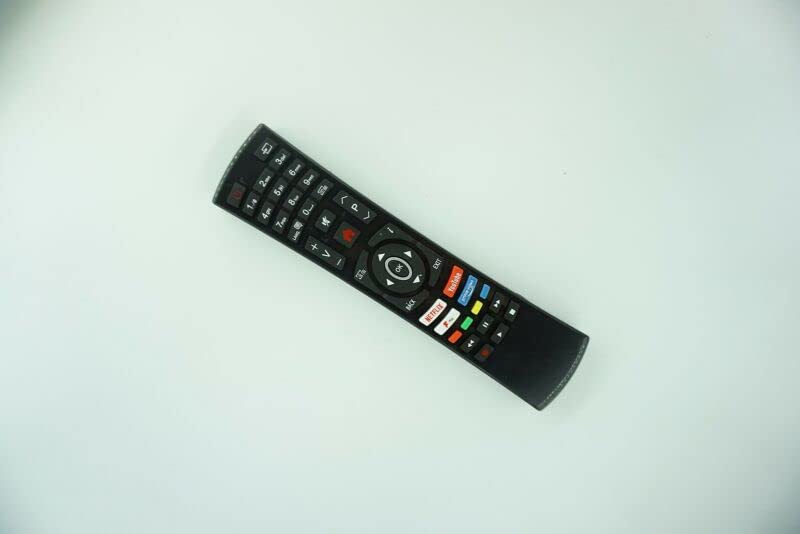
ചിത്രം 1: ഫ്രണ്ട് view of the Generic Replacement Remote Control. The remote is black with various buttons for numbers, volume, channel, navigation, and quick access to streaming services like Netflix and YouTube.
This remote utilizes Infrared (IR) wireless communication for reliable control of your devices.
3. സജ്ജീകരണം
3.1 ബാറ്ററി ഇൻസ്റ്റാളേഷൻ
- റിമോട്ട് കൺട്രോളിന്റെ പിൻഭാഗത്ത് ബാറ്ററി കമ്പാർട്ട്മെന്റ് കണ്ടെത്തുക.
- ബാറ്ററി കമ്പാർട്ട്മെൻ്റ് കവർ തുറക്കുക.
- രണ്ട് (2) AAA ബാറ്ററികൾ ഇടുക, പോസിറ്റീവ് (+) ഉം നെഗറ്റീവ് (-) ടെർമിനലുകളും കമ്പാർട്ടുമെന്റിനുള്ളിലെ അടയാളപ്പെടുത്തലുകളുമായി ശരിയായി വിന്യസിക്കുന്നുണ്ടെന്ന് ഉറപ്പാക്കുക.
- ബാറ്ററി കമ്പാർട്ട്മെൻ്റ് കവർ സുരക്ഷിതമായി അടയ്ക്കുക.
കുറിപ്പ്: റിമോട്ട് കൺട്രോളിനൊപ്പം ബാറ്ററികൾ ഉൾപ്പെടുത്തിയിട്ടില്ല.
3.2 പ്രാരംഭ ജോടിയാക്കൽ / പ്രോഗ്രാമിംഗ്
This replacement remote control requires no programming or setup. Once batteries are installed, it is ready for immediate use with compatible devices.
4. പ്രവർത്തന നിർദ്ദേശങ്ങൾ
Point the remote control directly at the infrared receiver on your device (e.g., TV, DVD player, projector) and press the desired button.
4.1 അടിസ്ഥാന പ്രവർത്തനങ്ങൾ
- പവർ ബട്ടൺ: ഉപകരണം ഓണാക്കുകയോ ഓഫാക്കുകയോ ചെയ്യുന്നു.
- നമ്പർ ബട്ടണുകൾ (0-9): നേരിട്ടുള്ള ചാനൽ തിരഞ്ഞെടുപ്പിനായി.
- Volume Up/Down (+V/-V): വോളിയം ലെവൽ ക്രമീകരിക്കുന്നു.
- Channel Up/Down (+P/-P): ചാനലുകൾ മാറ്റുന്നു.
- നാവിഗേഷൻ ബട്ടണുകൾ (മുകളിലേക്ക്, താഴേക്ക്, ഇടത്, വലത്, ശരി): മെനു നാവിഗേഷനും തിരഞ്ഞെടുപ്പിനും ഉപയോഗിക്കുന്നു.
- ബാക്ക്/എക്സിറ്റ് ബട്ടണുകൾ: മുമ്പത്തെ സ്ക്രീനിലേക്ക് മടങ്ങുന്നു അല്ലെങ്കിൽ ഒരു മെനുവിൽ നിന്ന് പുറത്തുകടക്കുന്നു.
- ദ്രുത ആക്സസ് ബട്ടണുകൾ: Dedicated buttons for popular streaming services like Netflix and YouTube (functionality depends on device compatibility).
പ്രധാന കുറിപ്പ്: As this is an aftermarket replacement remote control, some advanced functions or specific features of your original remote may not be supported or may operate differently. This is not indicative of a product defect.
4.2 അനുയോജ്യമായ ഉപകരണങ്ങൾ
This remote is compatible with a variety of devices, including:
- Television (HDTV, Smart LCD LED TV)
- Audio/Video Players
- DVD/Blu-ray Players
- ഹോം തിയറ്റർ സിസ്റ്റംസ്
- സെറ്റ് ടോപ്പ് ബോക്സുകൾ
- സ്റ്റീരിയോ സിസ്റ്റംസ്
- പ്രൊജക്ടറുകൾ
5. പരിപാലനം
5.1 ബാറ്ററി കെയർ
- Remove batteries from the remote control if it will not be used for an extended period to prevent leakage.
- പഴയതും പുതിയതുമായ ബാറ്ററികൾ മിക്സ് ചെയ്യരുത്.
- വ്യത്യസ്ത തരം ബാറ്ററികൾ (ഉദാ: ആൽക്കലൈൻ, റീചാർജ് ചെയ്യാവുന്നവ) കൂട്ടിക്കലർത്തരുത്.
- ഉപയോഗിച്ച ബാറ്ററികൾ പ്രാദേശിക നിയന്ത്രണങ്ങൾ അനുസരിച്ച് ഉത്തരവാദിത്തത്തോടെ നീക്കം ചെയ്യുക.
5.2 വൃത്തിയാക്കൽ
മൃദുവായതും ഉണങ്ങിയതുമായ തുണി ഉപയോഗിച്ച് റിമോട്ട് കൺട്രോൾ തുടയ്ക്കുക. ലിക്വിഡ് ക്ലീനറുകളോ ഉരച്ചിലുകളുള്ള വസ്തുക്കളോ ഉപയോഗിക്കുന്നത് ഒഴിവാക്കുക, കാരണം ഇവ ഉപരിതലത്തിനോ ആന്തരിക ഘടകങ്ങളോ കേടുവരുത്തും.
6. പ്രശ്നപരിഹാരം
- റിമോട്ട് പ്രതികരിക്കുന്നില്ല:
- Ensure the remote is pointed directly at the device's IR receiver.
- ബാറ്ററികൾ ശരിയായ പോളാരിറ്റിയോടെ ശരിയായി ഇൻസ്റ്റാൾ ചെയ്തിട്ടുണ്ടോയെന്ന് പരിശോധിക്കുക.
- പഴയ ബാറ്ററികൾ പുതിയവ ഉപയോഗിച്ച് മാറ്റിസ്ഥാപിക്കുക.
- റിമോട്ടിനും ഉപകരണത്തിനും ഇടയിൽ തടസ്സങ്ങളൊന്നുമില്ലെന്ന് ഉറപ്പാക്കുക.
- ചില പ്രവർത്തനങ്ങൾ പ്രവർത്തിക്കുന്നില്ല:
- This is a replacement remote control, and some functions may not be identical to the original remote. This is considered normal operation for a universal or replacement remote.
- Verify that your device model is listed as compatible.
- ഹ്രസ്വ പ്രക്ഷേപണ ദൂരം:
- ബാറ്ററികൾ പുതിയവ ഉപയോഗിച്ച് മാറ്റിസ്ഥാപിക്കുക.
- Ensure there are no strong light sources or other IR devices interfering with the signal.
7 സ്പെസിഫിക്കേഷനുകൾ
| ഫീച്ചർ | വിശദാംശങ്ങൾ |
|---|---|
| ബ്രാൻഡ് | ജനറിക് |
| മോഡൽ നമ്പർ (ASIN) | B0BZ7M8XCT |
| കണക്റ്റിവിറ്റി ടെക്നോളജി | ഇൻഫ്രാറെഡ് (IR) |
| പവർ ഉറവിടം | 2 x AAA ബാറ്ററികൾ (ഉൾപ്പെടുത്തിയിട്ടില്ല) |
| മെറ്റീരിയൽ | എബിഎസ്/പ്ലാസ്റ്റിക് |
| പിന്തുണയ്ക്കുന്ന ഉപകരണങ്ങളുടെ പരമാവധി എണ്ണം | 1 |
| അനുയോജ്യമായ ഉപകരണങ്ങൾ | DVD/Blu-ray Player, Home Theater, Set Top Box, Stereo System, Television |
| നിറം | Black or white (color sent randomly) |
8. വാറൻ്റിയും പിന്തുണയും
Warranty information for this Generic replacement remote control is not provided in this manual. For specific warranty details or technical support, please contact the seller or retailer from whom you purchased the product. It is recommended to retain your proof of purchase for any warranty claims.