
1. ആമുഖം
Thank you for choosing the AKAMATE Marine Boat Radio Receiver. This manual provides detailed instructions for the proper installation, operation, and maintenance of your new marine stereo. Please read this manual thoroughly before using the product to ensure optimal performance and safety. Keep this manual for future reference.

ചിത്രം: മുൻഭാഗം view of the AKAMATE Marine Boat Radio Receiver, showcasing അതിന്റെ ഡിസ്പ്ലേ, നിയന്ത്രണ ബട്ടണുകൾ.
2 സുരക്ഷാ വിവരങ്ങൾ
Always observe the following safety precautions to avoid injury or damage to the unit:
- Ensure proper wiring and connections to prevent electrical short circuits.
- യൂണിറ്റ് കേടായാലോ തകരാറിലായാലും അത് പ്രവർത്തിപ്പിക്കരുത്.
- Keep the unit away from extreme temperatures and direct sunlight for prolonged periods.
- This unit is IPX5 water-resistant, meaning it can withstand water jets. However, it is not designed for submersion.
- ഏതെങ്കിലും അറ്റകുറ്റപ്പണികൾ അല്ലെങ്കിൽ ഇൻസ്റ്റാളേഷൻ നടത്തുന്നതിന് മുമ്പ് എല്ലായ്പ്പോഴും വൈദ്യുതി വിച്ഛേദിക്കുക.

Image: The marine radio unit shown with water and mud splashes, highlighting its IPX5 water and mudproof capabilities, which also helps prevent display fogging.
3. ബോക്സിൽ എന്താണുള്ളത്?
ഇൻസ്റ്റാളേഷൻ ആരംഭിക്കുന്നതിന് മുമ്പ് എല്ലാ ഘടകങ്ങളും നിലവിലുണ്ടെന്ന് ഉറപ്പാക്കുക:
- AKAMATE Marine Bluetooth Audio Receiver
- Installation Kits (mounting hardware)
- ISO Harness (wiring harness)
- ഉപയോക്തൃ മാനുവൽ (ഈ പ്രമാണം)

Image: Visual representation of the product packaging contents, including the marine radio, installation hardware, wiring harness, and user manual.
4. ഉൽപ്പന്നം കഴിഞ്ഞുview
The AKAMATE Marine Boat Radio Receiver features a user-friendly design with a clear display and intuitive controls.
പ്രധാന സവിശേഷതകൾ:
- 2.8'' LCD Display: Sunlight-viewable screen for clear visibility in various conditions.
- 7-Color Backlight Buttons: Customizable button illumination for enhanced aesthetics and visibility.
- മൾട്ടി-ഫംഗ്ഷൻ നോബ്: Central rotary knob for volume control and menu navigation.
- IPX5 ജല പ്രതിരോധം: Designed to withstand water jets and harsh marine environments.
- AM/FM റേഡിയോ: Store up to 30 preset stations (12 AM / 18 FM).
- ബ്ലൂടൂത്ത് ഓഡിയോ സ്ട്രീമിംഗ്: Wireless music playback from compatible devices.
- യുഎസ്ബി 2.0 പോർട്ട്: Supports thumb drives up to 64GB for MP3, WMA, FLAC playback.
- RCA Aux Input: ബാഹ്യ ഓഡിയോ ഉപകരണങ്ങൾ ബന്ധിപ്പിക്കുക.
- RCA ഔട്ട്പുട്ടുകൾ: ബാഹ്യ കണക്ഷൻ ഉറപ്പാക്കാൻ ampലൈഫയറുകളും സബ് വൂഫറുകളും.
- 5-Band Preset EQ: Audio customization options.

Image: The marine radio unit mounted on an ATV, highlighting its 2.8-inch clear LCD display, 7-color backlight buttons, and crisp knob for easy use in various lighting conditions.
5. ഇൻസ്റ്റാളേഷൻ ഗൈഡ്
Proper installation is crucial for the performance and longevity of your marine stereo. It is recommended to have this unit installed by a qualified professional.
5.1 Mounting the Unit:
- Choose a suitable location on your boat or vehicle dashboard that is protected from direct water spray and excessive heat.
- Ensure there is sufficient depth behind the mounting surface for the unit (2.84 inches / 7.2 cm).
- Use a hole saw to create a circular opening of approximately 2.89 inches (7.34 cm) in diameter.
- Insert the unit into the opening and secure it using the provided installation kits.
5.2 വയറിംഗ് കണക്ഷനുകൾ:
Refer to the wiring diagram below for correct connections. Always ensure the power source is disconnected before making any wiring connections.
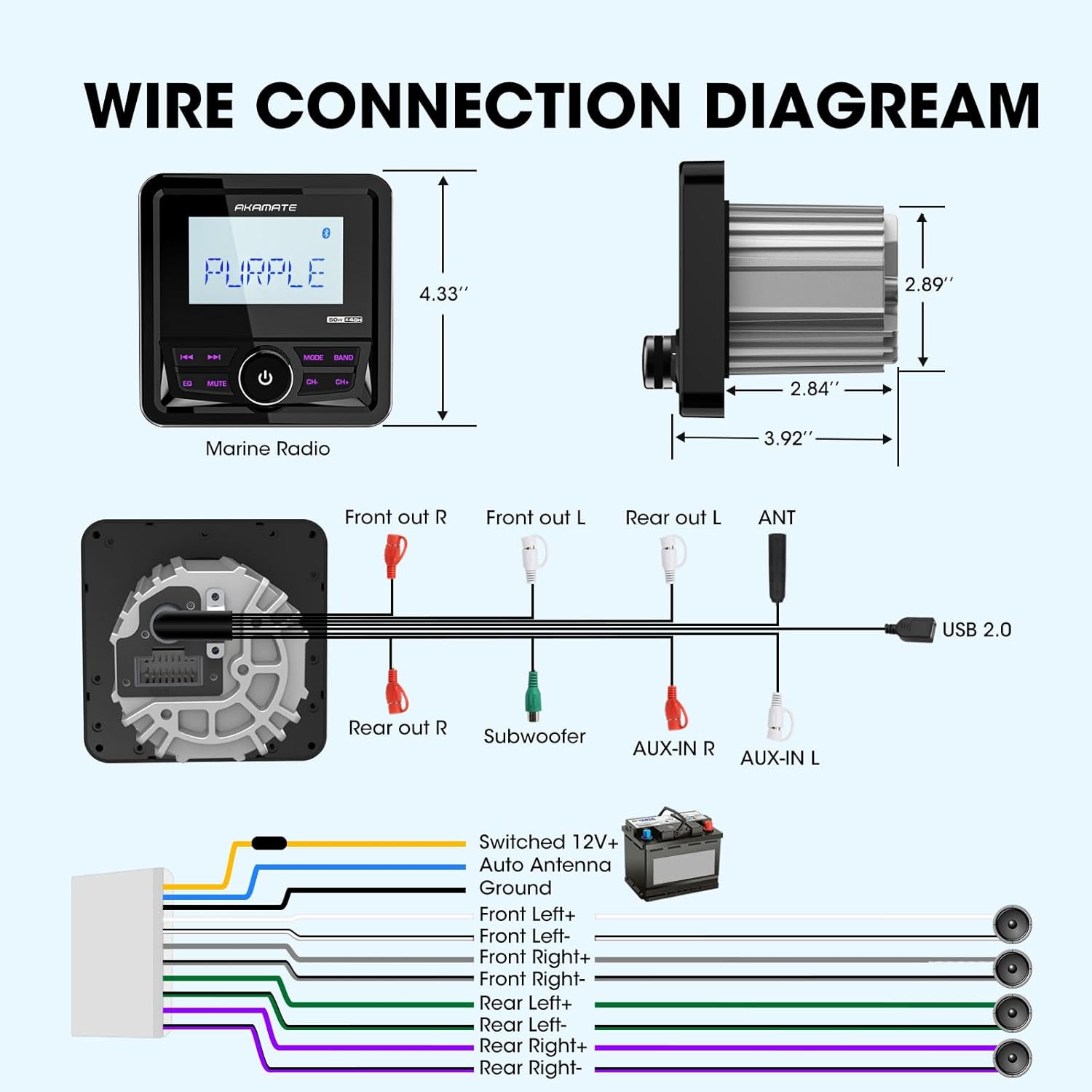
Image: A comprehensive wiring diagram illustrating connections for power, ground, speakers (Front Left/Right, Rear Left/Right), subwoofer, AUX-in, and USB 2.0.
- പവർ (മഞ്ഞ): Connect to Switched 12V+ (Ignition).
- ഗ്രൗണ്ട് (കറുപ്പ്): ഒരു സോളിഡ് ഷാസി ഗ്രൗണ്ട് പോയിന്റിലേക്ക് കണക്റ്റ് ചെയ്യുക.
- Auto Antenna (Blue): പവർ ആൻ്റിനയുമായി ബന്ധിപ്പിക്കുക അല്ലെങ്കിൽ ampലൈഫയർ റിമോട്ട് ടേൺ-ഓൺ ലീഡ്.
- Speaker Outputs (White, Gray, Green, Purple pairs): Connect to your boat's speakers. Ensure correct polarity (+/-).
- RCA Outputs (Red/White): ബാഹ്യമായി ബന്ധിപ്പിക്കുക amplifiers for front, rear, and subwoofer channels.
- AUX-IN (Red/White): ബാഹ്യ ഓഡിയോ ഉറവിടങ്ങൾ ബന്ധിപ്പിക്കുക.
- USB 2.0: USB സംഭരണ ഉപകരണങ്ങൾ ബന്ധിപ്പിക്കുക.
6. പ്രവർത്തന നിർദ്ദേശങ്ങൾ
6.1 പവർ ഓൺ/ഓഫ്:
Press the central knob to turn the unit ON or OFF.
6.2 Source Selection:
Press the "MODE" button to cycle through available sources: FM, AM, Bluetooth, USB, AUX.
6.3 റേഡിയോ പ്രവർത്തനം (AM/FM):
- ട്യൂണിംഗ്: Use the "CH-" and "CH+" buttons to manually tune or seek stations.
- ബാൻഡ് തിരഞ്ഞെടുക്കൽ: FM1, FM2, FM3, AM1, AM2 എന്നിവയ്ക്കിടയിൽ മാറാൻ "BAND" ബട്ടൺ അമർത്തുക.
- പ്രീസെറ്റ് സ്റ്റേഷനുകൾ: The unit can store 18 FM and 12 AM preset stations. To save a station, tune to the desired frequency, then press and hold one of the numeric preset buttons (if available, or use the "EQ" button for auto-store if applicable, manual does not specify).

Image: The marine radio unit showing its AM/FM radio function and demonstrating Bluetooth audio streaming connectivity with a smartphone.
6.4 Bluetooth Operation:
- ജോടിയാക്കൽ: Select "Bluetooth" mode. On your mobile device, search for "AKAMATE" (or similar name) in the Bluetooth settings and pair.
- ഓഡിയോ സ്ട്രീമിംഗ്: Once paired, you can stream audio from your device to the stereo. Use the "CH-" and "CH+" buttons for track navigation (previous/next).
6.5 USB/AUX Operation:
- USB: Insert a USB flash drive (up to 64GB) into the USB port. The unit will automatically switch to USB mode and begin playback of supported audio files (MP3, WMA, FLAC). Use "CH-" and "CH+" for track navigation.
- ഓക്സ്: Connect an external audio device to the AUX-IN ports using an appropriate cable. Select "AUX" mode to play audio from the connected device.

Image: The marine radio unit highlighting its input capabilities, including USB (up to 64GB), AUX-IN, and compatibility with MP3 players and smartphones, along with its 200 watts peak power output.
6.6 Audio Settings (EQ & Time Set):
- പ്രീസെറ്റ് EQ: Press the "EQ" button to cycle through preset equalizer modes (e.g., Rock, Pop, Classic, Flat). The unit features a 5-band preset EQ.
- സമയ സജ്ജീകരണം: The unit allows for time setting in 12-hour format. Refer to the on-screen prompts or specific button combinations (often involving holding the "EQ" or "MUTE" button) to enter time setting mode.

Image: The marine radio unit displaying its 5-band preset EQ function and time setting capability. Below, examples of compatible vehicles like motorcycles, yachts, golf carts, and ATVs are shown.
7. പരിപാലനം
To ensure the longevity and optimal performance of your AKAMATE Marine Boat Radio Receiver, follow these maintenance guidelines:
- വൃത്തിയാക്കൽ: ഒരു സോഫ്റ്റ് ഉപയോഗിക്കുക, ഡിamp cloth to wipe the unit's surface. Do not use abrasive cleaners or solvents.
- കണക്ഷനുകൾ: എല്ലാ വയറിംഗ് കണക്ഷനുകളും സുരക്ഷിതമാണെന്നും തുരുമ്പെടുക്കലിൽ നിന്ന് മുക്തമാണെന്നും ഉറപ്പാക്കാൻ ഇടയ്ക്കിടെ പരിശോധിക്കുക.
- സംഭരണം: If the unit will not be used for an extended period, store it in a cool, dry place.
- വാട്ടർ എക്സ്പോഷർ: While IPX5 rated, avoid prolonged exposure to direct high-pressure water jets. After exposure to saltwater, gently rinse with fresh water and dry thoroughly.
8. പ്രശ്നപരിഹാരം
നിങ്ങളുടെ യൂണിറ്റിൽ പ്രശ്നങ്ങൾ നേരിടുകയാണെങ്കിൽ, പൊതുവായ പ്രശ്നങ്ങളും പരിഹാരങ്ങളും അറിയാൻ താഴെയുള്ള പട്ടിക പരിശോധിക്കുക.
| പ്രശ്നം | സാധ്യമായ കാരണം | പരിഹാരം |
|---|---|---|
| പവർ ഇല്ല | അയഞ്ഞ പവർ കണക്ഷൻ; ഫ്യൂസ് പൊട്ടി; വാഹന ബാറ്ററി ചാർജ് കുറവാണ്. | Check power and ground wires; Replace fuse; Charge vehicle battery. |
| ശബ്ദമില്ല | സ്പീക്കർ വയറുകൾ വിച്ഛേദിക്കപ്പെട്ടു; ശബ്ദം വളരെ കുറവാണ്; മ്യൂട്ട് ഫംഗ്ഷൻ സജീവമാണ്. | സ്പീക്കർ കണക്ഷനുകൾ പരിശോധിക്കുക; ശബ്ദം വർദ്ധിപ്പിക്കുക; മ്യൂട്ട് നിർജ്ജീവമാക്കുക. |
| ബ്ലൂടൂത്ത് കണക്റ്റുചെയ്യുന്നില്ല | Device not in pairing mode; Unit not in Bluetooth mode; Interference. | Ensure device is discoverable; Select Bluetooth mode on unit; Move closer to unit. |
| USB പ്ലേബാക്ക് പിശക് | പിന്തുണയ്ക്കുന്നില്ല file ഫോർമാറ്റ്; യുഎസ്ബി ഡ്രൈവ് കേടായി; യുഎസ്ബി ഡ്രൈവ് വളരെ വലുതാണ്. | ഉറപ്പാക്കുക files are MP3/WMA/FLAC; Reformat USB drive; Use a drive up to 64GB. |
| Display Foggy | Condensation due to temperature changes. | This unit has anti-foggy features, but in extreme conditions, minor condensation may occur. It should clear up as temperatures equalize. Ensure proper sealing during installation. |
9 സ്പെസിഫിക്കേഷനുകൾ
| ഫീച്ചർ | സ്പെസിഫിക്കേഷൻ |
|---|---|
| മോഡൽ നമ്പർ | Marine Boats Radio |
| പവർ ഔട്ട്പുട്ട് | Up to 200 Watts Peak Power (4 channels) |
| ഓപ്പറേറ്റിംഗ് വോളിയംtage | DC 12V |
| ഡിസ്പ്ലേ തരം | 2.8'' LCD Display |
| വാട്ടർ റെസിസ്റ്റൻസ് റേറ്റിംഗ് | IPX5 |
| USB പിന്തുണ | USB 2.0, up to 64GB |
| പിന്തുണയ്ക്കുന്ന ഓഡിയോ ഫോർമാറ്റുകൾ | MP3, WMA, FLAC, etc. |
| ബ്ലൂടൂത്ത് പതിപ്പ് | ബ്ലൂടൂത്ത് 5.0 |
| അളവുകൾ (L x W x H) | 4.33'' (length) x 2.89'' (body diameter) x 2.84'' (depth) |
| ഇനത്തിൻ്റെ ഭാരം | 1.2 പൗണ്ട് |
10. വാറൻ്റിയും പിന്തുണയും
AKAMATE products are designed for reliability and performance. For warranty information, please refer to the warranty card included with your product or contact AKAMATE customer support.
If you require technical assistance or have questions regarding your product, please contact our customer support team through the official AKAMATE website or the retailer where you purchased the product. Please have your model number and purchase date ready when contacting support.
കുറിപ്പ്: ഉൽപ്പന്ന സവിശേഷതകളും സവിശേഷതകളും മുൻകൂർ അറിയിപ്പ് കൂടാതെ മാറ്റത്തിന് വിധേയമാണ്.