
VILTROX JYC-03342
VILTROX AF 75mm f/1.2 XF Fuji X-Mount Lens Instruction Manual
Model: JYC-03342
ആമുഖം
വാങ്ങിയതിന് നന്ദി.asing the VILTROX AF 75mm f/1.2 XF lens. This high-performance APS-C prime lens is designed for Fujifilm X-Mount cameras, offering an ultra-large f/1.2 aperture for exceptional low-light performance and beautiful background blur. This manual provides detailed instructions for its proper use, setup, and maintenance to ensure optimal performance and longevity.
ബോക്സിൽ എന്താണുള്ളത്

This image displays all items included in the product packaging, ensuring you have received all necessary components.
- VILTROX AF 75mm f/1.2 XF Mount Lens
- Lotus-shaped Lens Hood
- ഫ്രണ്ട് ലെൻസ് ക്യാപ്
- പിൻ ലെൻസ് തൊപ്പി
- ചുമക്കുന്ന ബാഗ്
- ഉപയോക്തൃ മാനുവൽ
ഉൽപ്പന്ന സവിശേഷതകൾ
- F1.2 Ultra-Large Aperture: The first VILTROX lens with an F1.2 ultra-large aperture, featuring 11 ultra-round aperture blades for natural and smooth bokeh, creating a shallow depth of field.
- Medium Telephoto Prime Lens: A 75mm focal length (equivalent to approximately 115mm on APS-C) suitable for various scenes including portraits, landscapes, and event photography.
- Excellent Autofocus Performance: Utilizes an STM + lead screw motor for accurate and responsive autofocus, supporting eye-control and animal focus.
- AF/MF Focus Switch: A dedicated switch on the lens body allows for convenient toggling between autofocus and manual focus modes.
- Automatic/Manual Aperture Adjustment: Offers flexibility with an aperture knob for automatic adjustment (A mode) and a manual aperture ring for precise control.
- വിപുലമായ ഒപ്റ്റിക്കൽ ഡിസൈൻ: Composed of 16 elements in 11 groups, including 3 ED (Extra-low Dispersion) glass elements and 4 high refractive index glass elements to correct dispersion and reduce aberrations.
- നാനോ കോട്ടിംഗ് ടെക്നോളജി: Reduces flare and ghosting, ensuring sharp images even in backlit conditions.
സജ്ജമാക്കുക
ലെൻസ് ഘടിപ്പിക്കുന്നു

This image highlights the lens mount and the AF/MF switch, crucial for attaching the lens and selecting focus mode.
Align the red dot on the lens barrel with the corresponding mark on your Fujifilm X-Mount camera body. Rotate the lens clockwise until it clicks into place. Ensure the lens is securely mounted before use.
ലെൻസ് ഹുഡ് അറ്റാച്ചുചെയ്യുന്നു
Align the lens hood with the front of the lens, matching the alignment marks. Rotate the hood clockwise until it locks securely. The lotus-shaped hood helps to prevent stray light from entering the lens and causing flare.
Removing Lens Caps
Remove the front and rear lens caps before attaching the lens to the camera or beginning photography. Always replace them when the lens is not in use to protect the optical elements.
ലെൻസ് പ്രവർത്തിപ്പിക്കൽ
Focus Mode Selection (AF/MF)
This image clearly shows the AF/MF switch located on the side of the lens barrel, allowing users to easily toggle between autofocus and manual focus.
Locate the AF/MF switch on the side of the lens barrel. Slide the switch to 'AF' for autofocus or 'MF' for manual focus. In AF mode, the lens will automatically focus when the camera's shutter button is half-pressed. In MF mode, rotate the focus ring on the lens to adjust focus manually.
അപ്പേർച്ചർ അഡ്ജസ്റ്റ്മെൻ്റ്

ഈ ചിത്രം വിശദമായ ഒരു വിവരണം നൽകുന്നു view of the aperture ring and its f-stop markings, from f/1.2 to f/16, along with the 'A' setting for automatic aperture control.
The lens features an aperture ring with markings from F1.2 to F16, and an 'A' setting.
- Automatic Aperture: Turn the aperture ring to the 'A' position. The camera will then control the aperture automatically or allow you to set it via the camera's controls.
- Manual Aperture: Rotate the aperture ring to your desired F-stop (e.g., F1.2, F2.8, F8). This allows for direct, tactile control over depth of field and exposure.
ഫേംവെയർ അപ്ഡേറ്റുകൾ
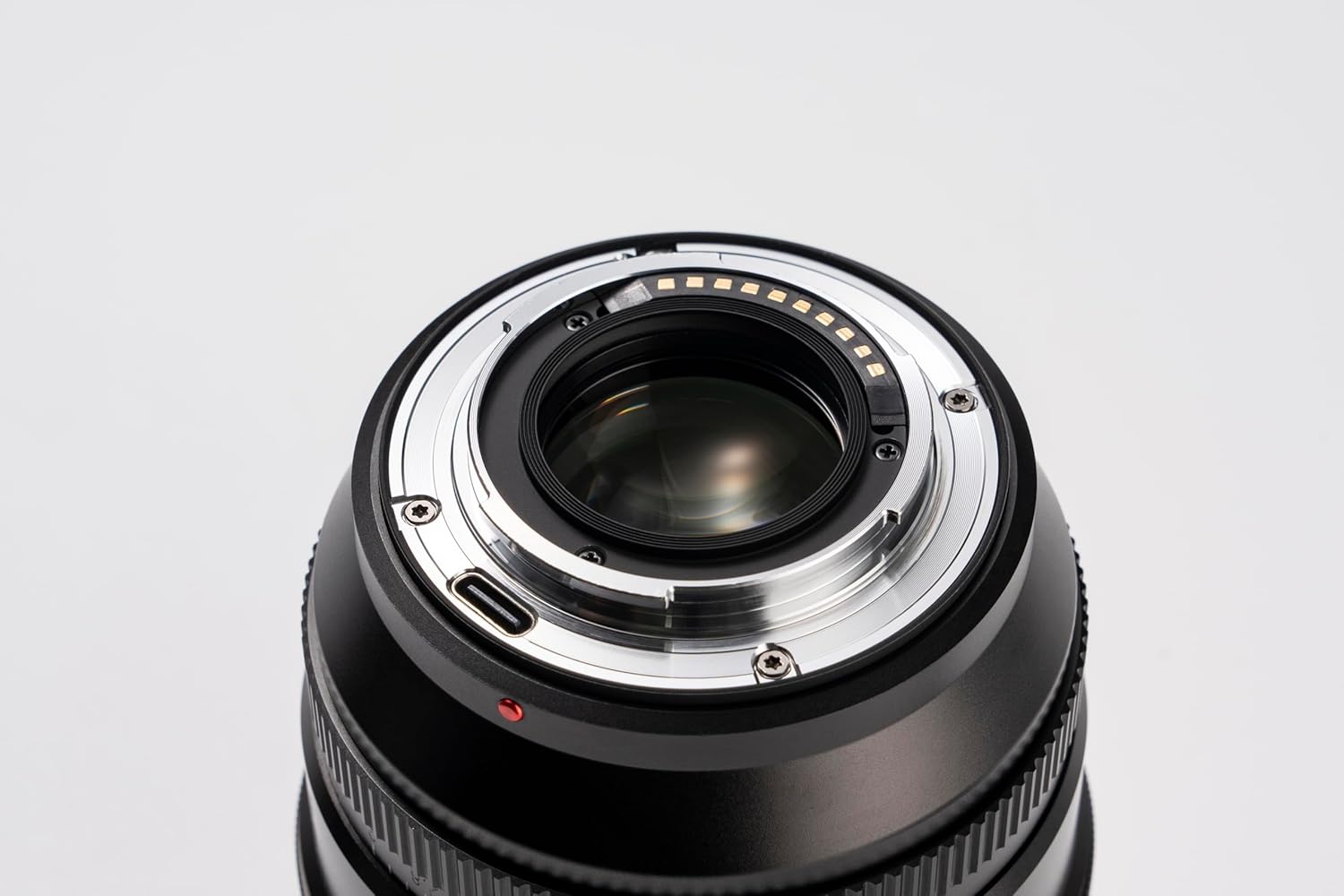
This image shows the rear of the lens, including the electronic contacts for communication with the camera and the USB-C port for firmware updates.
The lens is equipped with a USB-C port for firmware updates. Visit the official VILTROX website for the latest firmware and instructions on how to update your lens to ensure optimal performance and compatibility with new camera models.
മെയിൻ്റനൻസ്
- ലെൻസ് വൃത്തിയാക്കൽ: Use a soft, lint-free microfiber cloth specifically designed for optics to clean the lens elements. For stubborn smudges, use a small amount of lens cleaning solution applied to the cloth, not directly to the lens. Avoid touching the glass surfaces with your fingers.
- ലെൻസ് ബോഡി വൃത്തിയാക്കൽ: Wipe the lens body with a dry, soft cloth. Do not use organic solvents such as paint thinner or benzene.
- സംഭരണം: When not in use, store the lens with both front and rear caps attached in a cool, dry place, away from direct sunlight and high humidity. Consider using a desiccant to prevent mold growth, especially in humid environments.
- ആഘാതം ഒഴിവാക്കുക: Protect the lens from drops and impacts, which can damage the optical elements or internal mechanisms.
- താപനില തീവ്രത: Avoid exposing the lens to extreme temperatures, both hot and cold, for prolonged periods.
ട്രബിൾഷൂട്ടിംഗ്
| പ്രശ്നം | സാധ്യമായ കാരണം | പരിഹാരം |
|---|---|---|
| ക്യാമറയ്ക്ക് ലെൻസ് തിരിച്ചറിയാൻ കഴിയുന്നില്ല. | Improperly mounted lens; dirty contacts; outdated firmware. | Ensure lens is securely mounted. Clean lens and camera contacts with a clean, dry cloth. Check VILTROX webഫേംവെയർ അപ്ഡേറ്റുകൾക്കായുള്ള സൈറ്റ്. |
| ഓട്ടോഫോക്കസ് മന്ദഗതിയിലാണ് അല്ലെങ്കിൽ കൃത്യമല്ല. | Low light conditions; subject too close/far; dirty contacts; outdated firmware. | Ensure adequate lighting. Check focus range (0.88m to ∞). Clean contacts. Update firmware. Try manual focus if AF struggles. |
| Images are blurry or soft | തെറ്റായ ഫോക്കസ്; ക്യാമറ കുലുക്കം; ലെൻസ് ഘടകങ്ങൾ വൃത്തികെട്ടതാണ്. | Verify focus. Use a faster shutter speed or tripod. Clean lens elements. |
| അപ്പേർച്ചർ റിംഗ് പ്രതികരിക്കുന്നില്ല | Ring set to 'A' mode; mechanical issue. | Ensure aperture ring is set to a specific F-stop if manual control is desired. If issue persists, contact support. |
സ്പെസിഫിക്കേഷനുകൾ
| ഫീച്ചർ | വിശദാംശങ്ങൾ |
|---|---|
| മോഡൽ | AF 75mm F1.2 XF |
| ലെൻസ് മൗണ്ട് | ഫ്യൂജിഫിലിം എക്സ്-മൗണ്ട് |
| സെൻസർ ഫോർമാറ്റ് | എപിഎസ്-സി |
| ഫോക്കൽ ലെങ്ത് | 75mm (equivalent to approx. 115mm on APS-C) |
| അപ്പർച്ചർ ശ്രേണി | F1.2 - F16 |
| അപ്പർച്ചർ ബ്ലേഡുകളുടെ എണ്ണം | 11 (ultra-round) |
| ഒപ്റ്റിക്കൽ ഘടന | 16 elements in 11 groups (including 3 ED, 4 high refractive index) |
| ഫോക്കസ് മോഡ് | AF (inner AF) / MF |
| ഡ്രൈവ് സിസ്റ്റം | STM + lead screw motor |
| Viewing ആംഗിൾ | 21.35° |
| ഫിൽട്ടർ വ്യാസം | φ77 മി.മീ |
| ഫോക്കസ് റേഞ്ച് | 0.88m to ∞ |
| പരമാവധി മാഗ്നിഫിക്കേഷൻ | 0.1X |
| ഉൽപ്പന്ന അളവുകൾ | φ87 x 101 mm (approx. 3.42 x 3.97 inches) |
| ഉൽപ്പന്ന ഭാരം | ഏകദേശം. 670 ഗ്രാം (1.48 പൗണ്ട്) |
വാറൻ്റിയും പിന്തുണയും
VILTROX provides a limited warranty for this product. Please refer to the warranty card included in your product packaging for specific terms and conditions. For technical support, firmware updates, or service inquiries, please visit the official VILTROX webസൈറ്റിൽ ബന്ധപ്പെടുകയോ അവരുടെ ഉപഭോക്തൃ സേവന വിഭാഗവുമായി ബന്ധപ്പെടുകയോ ചെയ്യുക. വാറന്റി ക്ലെയിമുകൾക്കുള്ള വാങ്ങലിന്റെ തെളിവായി നിങ്ങളുടെ വാങ്ങൽ രസീത് സൂക്ഷിക്കുക.
Official VILTROX Store: VILTROX Official Store on Amazon
Ask a question about this manual
Ask about setup, troubleshooting, compatibility, parts, safety, or missing instructions. Manuals+ will review the question and use this page’s manual context to help answer it.