
B0C135YQKX
User Manual for Generic Remote Control
Model: B0C135YQKX
1. ആമുഖം
This document provides instructions for the Generic replacement remote control, designed for use with various portable Bluetooth party PA DJ speaker systems, including specific models like Ridgeway QS-1238 D1208, REX Speaker, Sytech SY-XTR27BT, and Soundart SPM-W8400M. This remote functions as an infrared (IR) replacement and requires no complex setup or coding.
It is crucial to verify that your original remote or speaker system is compatible with this replacement. Please compare your current remote with the images provided in this manual to ensure compatibility before use.
2. സജ്ജീകരണം
2.1 ബാറ്ററി ഇൻസ്റ്റാളേഷൻ
The remote control requires 1 CR2 battery (not included). Follow these steps to install the battery:
- റിമോട്ട് കൺട്രോളിന്റെ പിൻഭാഗത്ത് ബാറ്ററി കമ്പാർട്ട്മെന്റ് കണ്ടെത്തുക.
- സ്ലൈഡ് ചെയ്ത് ബാറ്ററി കവർ തുറക്കുക.
- Insert the CR2 battery, ensuring the correct polarity (+ and -) as indicated inside the compartment.
- ബാറ്ററി കവർ സുരക്ഷിതമായി അടയ്ക്കുക.
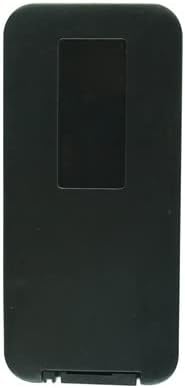
ചിത്രം 2.1: പിൻഭാഗം view റിമോട്ട് കൺട്രോളിന്റെ, ബാറ്ററി കമ്പാർട്ട്മെന്റ് ഹൈലൈറ്റ് ചെയ്യുന്നു.
This image displays the back of the remote control, which is black and rectangular. A rectangular indentation is visible at the top, indicating the location of the battery compartment cover. This is where the CR2 battery should be inserted.
2.2 പ്രാരംഭ ഉപയോഗം
This remote control is an infrared replacement and does not require any special setup, pairing, or code programming. Once the battery is correctly installed, it should be ready for immediate use with compatible speaker systems.
3. പ്രവർത്തന നിർദ്ദേശങ്ങൾ
Point the remote control directly at the infrared receiver on your speaker system. Ensure there are no obstructions between the remote and the speaker.

ചിത്രം 3.1: മുൻഭാഗം view ബട്ടൺ ലേഔട്ടുള്ള റിമോട്ട് കൺട്രോളിന്റെ.
This image shows the front face of the remote control, which is silver-grey with various circular buttons. Key buttons include Power (red), Mode, Mute, Play/Pause, Previous/Next Track, Volume Up/Down, EQ, Number Pad (0-9), Repeat, and Scan.
3.1 ബട്ടൺ പ്രവർത്തനങ്ങൾ
- ശക്തി (Red button with universal power symbol): സ്പീക്കർ സിസ്റ്റം ഓൺ അല്ലെങ്കിൽ ഓഫ് ചെയ്യുന്നു.
- മോഡ്: Cycles through different input modes (e.g., Bluetooth, USB, SD card, FM radio).
- Mute (Speaker icon with a cross): ഓഡിയോ ഔട്ട്പുട്ട് നിശബ്ദമാക്കുകയോ അൺമ്യൂട്ടുചെയ്യുകയോ ചെയ്യുന്നു.
- Play/Pause (Triangle and two vertical lines icon): Starts or pauses playback of media.
- Previous/Next Track (Double arrow pointing left/right with a vertical line): Skips to the previous or next track/station.
- വോള്യ- / വോള്യ+: Decreases or increases the volume level.
- EQ (Purple button with "EQ" text): Adjusts the equalizer settings (if supported by the speaker).
- നമ്പർ പാഡ് (0-9): Used for direct track selection or FM radio frequency input.
- ആർപിടി (ആവർത്തിക്കുക): Toggles repeat modes for media playback.
- സ്കാൻ: Initiates a scan for FM radio stations.
4. പരിപാലനം
4.1 ബാറ്ററി മാറ്റിസ്ഥാപിക്കൽ
When the remote control's range decreases or buttons become unresponsive, it is likely time to replace the battery. Refer to Section 2.1 for battery installation instructions.
4.2 വൃത്തിയാക്കൽ
To clean the remote control, use a soft, dry cloth. Do not use liquid cleaners, aerosols, or abrasive materials, as these can damage the remote's surface or internal components.
4.3 സംഭരണം
Store the remote control in a cool, dry place away from direct sunlight and extreme temperatures. If the remote will not be used for an extended period, it is recommended to remove the battery to prevent leakage.
5. പ്രശ്നപരിഹാരം
- റിമോട്ട് പ്രതികരിക്കുന്നില്ല:
- ബാറ്ററി ശരിയായി ഇൻസ്റ്റാൾ ചെയ്തിട്ടുണ്ടെന്നും തീർന്നിട്ടില്ലെന്നും ഉറപ്പാക്കുക. ആവശ്യമെങ്കിൽ മാറ്റിസ്ഥാപിക്കുക.
- Check for any obstructions between the remote control and the speaker system's IR receiver.
- Ensure you are within the effective operating range of the speaker's IR receiver.
- Remote functions are incorrect or limited:
- This remote is a replacement. Verify that your specific speaker model is listed as compatible in the product title or description.
- Consult your speaker system's original manual to confirm the correct remote control type and functions it supports.
- If your speaker model is not explicitly mentioned as compatible, the remote may not function correctly or fully. In such cases, please contact the seller for assistance.
6 സ്പെസിഫിക്കേഷനുകൾ
| ഫീച്ചർ | വിശദാംശങ്ങൾ |
|---|---|
| മോഡൽ ASIN | B0C135YQKX |
| ബ്രാൻഡ് | ജനറിക് |
| കണക്റ്റിവിറ്റി ടെക്നോളജി | ഇൻഫ്രാറെഡ് (IR) |
| കൺട്രോളർ തരം | ബട്ടൺ നിയന്ത്രണം |
| പവർ ഉറവിടം | 1 CR2 battery (not included) |
| നിറം | Random (as per product listing) |
| പ്രത്യേക ഫീച്ചർ | പോർട്ടബിൾ |
7. വാറൻ്റിയും പിന്തുണയും
This product is a replacement remote control. For any issues, questions, or concerns regarding compatibility or functionality, please contact the seller directly through the platform where the purchase was made. Please refer to your purchase details for seller contact information.
It is recommended to retain your purchase receipt or order confirmation for any support inquiries.
Ask a question about this manual
Ask about setup, troubleshooting, compatibility, parts, safety, or missing instructions. Manuals+ will review the question and use this page’s manual context to help answer it.