
1. ആമുഖം
The Yanmai USB Microphone is a versatile condenser microphone designed for various applications including streaming, podcasting, recording, and online communication on PC, PS4/5, and Mac. It features adjustable RGB lighting with 11 color modes, a quick mute button with LED indicators, and independent volume control knobs for the microphone and earphone monitoring. The microphone includes a built-in pop filter and anti-vibration mount to ensure clear audio capture by minimizing unwanted noise and vibrations. Its plug-and-play design allows for easy setup without additional drivers.
2. ബോക്സിൽ എന്താണുള്ളത്?
- Yanmai USB Condenser Microphone
- ട്രൈപോഡ് സ്റ്റാൻഡ്
- USB കേബിൾ (USB-C മുതൽ USB-A വരെ)
- പോപ്പ് ഫിൽട്ടർ
- ഷോക്ക് മൗണ്ട്
- ഉപയോക്തൃ മാനുവൽ
3. ഉൽപ്പന്നം കഴിഞ്ഞുview
Familiarize yourself with the components and controls of your Yanmai USB Microphone.

Figure 3.1: Yanmai USB Microphone with included accessories.
3.1. നിയന്ത്രണങ്ങളും സൂചകങ്ങളും
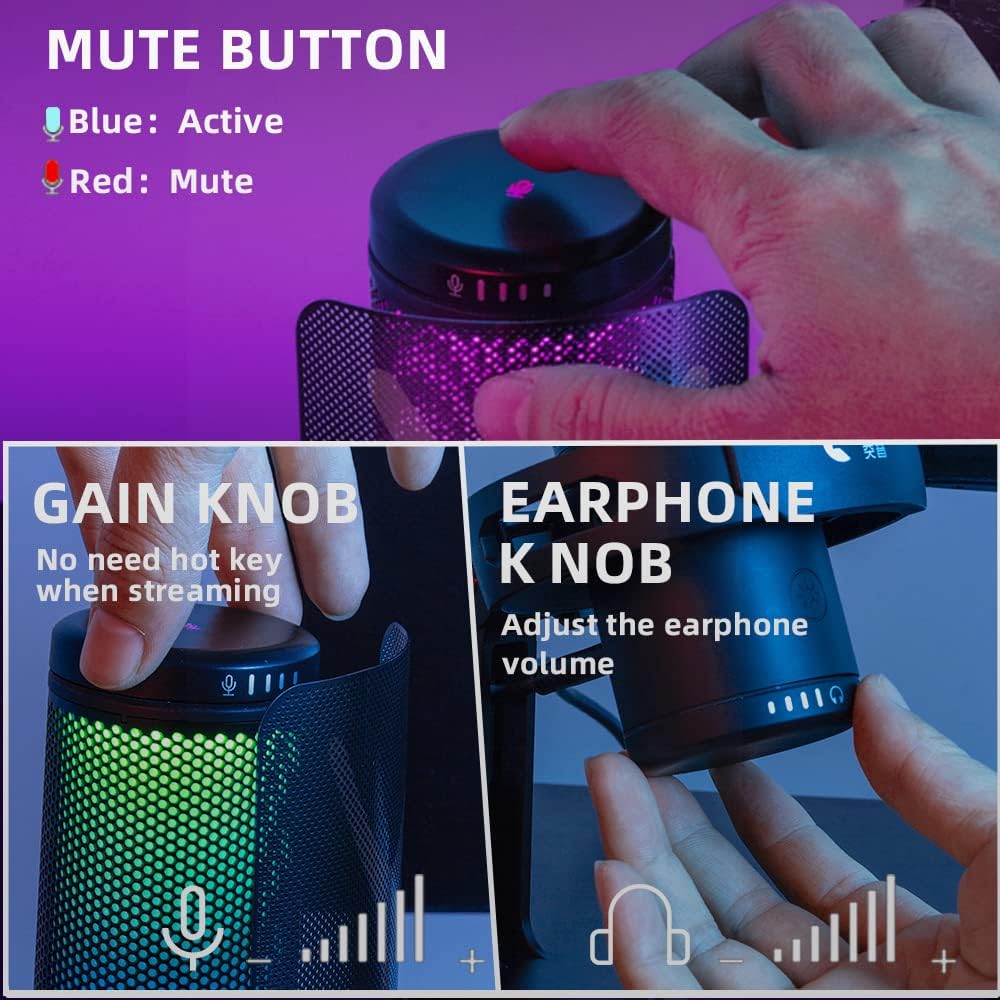
Figure 3.2: Mute Button, Gain Knob, and Earphone Volume Knob.
- Mute Button (Top): Tap to mute/unmute the microphone. A red LED indicates muted status, while a blue LED indicates active/monitoring status.
- Gain Knob (Front): Adjusts the microphone input sensitivity (gain). Rotate clockwise to increase gain, counter-clockwise to decrease.
- Earphone Volume Knob (Bottom): Controls the volume of the connected headphones for real-time audio monitoring.

Figure 3.3: RGB Control Button.
- RGB Control Button (Bottom): Cycles through 11 different RGB lighting modes, including static colors, dynamic multi-color gradients, and dynamic solid-color gradients.
4. സജ്ജീകരണം
The Yanmai USB Microphone is designed for easy plug-and-play setup.
- Assemble the Microphone: Attach the microphone to the included tripod stand or a compatible arm stand using the shock mount. Ensure it is securely fastened.
- ഉപകരണത്തിലേക്ക് കണക്റ്റുചെയ്യുക: Connect the USB-C end of the provided USB cable to the microphone and the USB-A end to an available USB port on your computer (PC, Mac) or gaming console (PS4, PS5).
- System Recognition: Your operating system (Windows, macOS) or console should automatically detect and install the necessary drivers. No additional software installation is typically required.
- Select as Input Device: Navigate to your device's sound settings and select the Yanmai USB Microphone as your default audio input device.
- Connect Headphones (Optional): For real-time monitoring, plug your headphones into the 3.5mm jack located at the bottom of the microphone.

Figure 4.1: Multi-device compatibility for easy setup.
5. പ്രവർത്തന നിർദ്ദേശങ്ങൾ
5.1. Adjusting Microphone Gain
ഉപയോഗിക്കുക ഗെയിൻ നോബ് on the front of the microphone to adjust the input sensitivity. This controls how loud your voice or sound source will be captured. Adjust it to prevent clipping (distortion) while ensuring your audio is clear and audible.
5.2. നിശബ്ദ പ്രവർത്തനം
ടാപ്പ് ചെയ്യുക നിശബ്ദ ബട്ടൺ on the top of the microphone to instantly mute or unmute your audio. The LED indicator will change from blue (active) to red (muted) to provide visual confirmation.
5.3. തത്സമയ നിരീക്ഷണം
If headphones are connected to the 3.5mm jack, you can monitor your audio in real-time without latency. Use the Earphone Volume Knob at the bottom of the microphone to adjust the monitoring volume to a comfortable level.
5.4. Adjusting Microphone Angle
The thumbscrew on the desktop microphone stand allows you to tilt the microphone to achieve the optimal recording angle. Position the microphone directly towards the sound source (e.g., your mouth) for best audio capture.

Figure 5.1: Microphone support for arm stand for flexible positioning.
5.5. Typical Usage Scenarios

Figure 5.2: Microphone in use for gaming, video calls, and music recording.
- ഗെയിമിംഗ്: Position the microphone to capture your voice clearly while minimizing keyboard and mouse noise, thanks to the built-in anti-vibration mount and pop filter.
- Video Calls/Conferences: Ensures clear communication for online meetings and distance learning.
- പോഡ്കാസ്റ്റിംഗ്/റെക്കോർഡിംഗ്: The condenser capsule and pop filter contribute to vivid and clear sound for vocal recordings.
6. RGB ലൈറ്റിംഗ് മോഡുകൾ
The microphone features bicolored RGB lighting with 11 distinct color modes. Press the RGB നിയന്ത്രണ ബട്ടൺ on the bottom of the microphone to cycle through these modes.

Figure 6.1: Multiple RGB Lighting Modes.
- Static Solid Color: Displays a single, constant color.
- Dynamic Multi-color Gradient: Colors transition smoothly through multiple hues.
- Dynamic Solid-color Gradient: A single color gradually changes in brightness or shade.
7. പരിപാലനം
To ensure the longevity and optimal performance of your Yanmai USB Microphone, follow these maintenance guidelines:
- വൃത്തിയാക്കൽ: Use a soft, dry cloth to wipe the microphone's surface. Avoid using abrasive cleaners or solvents.
- സംഭരണം: Store the microphone in a cool, dry place away from direct sunlight and extreme temperatures.
- കൈകാര്യം ചെയ്യുന്നു: Handle the microphone with care. Avoid dropping it or subjecting it to strong impacts, which can damage internal components.
- കേബിൾ കെയർ: Do not bend or crimp the USB cable excessively. Always grasp the plug, not the cable, when disconnecting.
8. പ്രശ്നപരിഹാരം
If you encounter issues with your Yanmai USB Microphone, refer to the following common solutions:
| പ്രശ്നം | സാധ്യമായ കാരണം | പരിഹാരം |
|---|---|---|
| Microphone not detected by computer/console. | Loose connection, incorrect USB port, driver issue, system settings. |
|
| ശബ്ദമില്ല അല്ലെങ്കിൽ കുറഞ്ഞ ശബ്ദ ഔട്ട്പുട്ട്. | Microphone muted, gain too low, incorrect input device selected, application settings. |
|
| വികലമായ അല്ലെങ്കിൽ വ്യക്തമല്ലാത്ത ഓഡിയോ. | Gain too high, microphone too close, environmental noise. |
|
| RGB ലൈറ്റിംഗ് പ്രവർത്തിക്കുന്നില്ല. | Power issue, button malfunction. |
|
9 സ്പെസിഫിക്കേഷനുകൾ
| ഫീച്ചർ | വിശദാംശങ്ങൾ |
|---|---|
| മോഡൽ നമ്പർ | SF |
| മൈക്രോഫോൺ ഫോം ഫാക്ടർ | ട്രൈ-ക്യാപ്സ്യൂൾ അറേ |
| പോളാർ പാറ്റേൺ | ഏകദിശ |
| കണക്റ്റിവിറ്റി ടെക്നോളജി | USB |
| കണക്റ്റർ തരം | USB-C മുതൽ USB-A വരെ |
| പവർ ഉറവിടം | കോർഡഡ് ഇലക്ട്രിക് |
| ഹാർഡ്വെയർ പ്ലാറ്റ്ഫോം | ലാപ്ടോപ്പ്, പി.സി |
| അനുയോജ്യമായ ഉപകരണങ്ങൾ | Audio Interface, iOS, macOS, Windows, Desktop, Laptop, PS4/PS5, Personal Computer |
| ഫ്രീക്വൻസി പ്രതികരണം | 20 KHz |
| ഓഡിയോ സെൻസിറ്റിവിറ്റി | 35 ഡി.ബി |
| ഇനത്തിൻ്റെ ഭാരം | 1.55 പൗണ്ട് |
| അളവുകൾ (പാക്കേജ്) | 10.6 x 6.8 x 4.4 ഇഞ്ച് |
| നിറം | GM7 |
| പ്രത്യേക സവിശേഷതകൾ | Headphones Jack, RGB Lights, RGB Control Key, Mute Function, Monitoring Volume Control, Microphone Stand, Pop Filter, Shock Mount, USB Connection, Mic Gain Control |
10. വാറൻ്റിയും പിന്തുണയും
For warranty information or technical support, please refer to the contact details provided on the product packaging or the official Yanmai webസൈറ്റ്. ഏതെങ്കിലും വാറന്റി ക്ലെയിമുകൾക്ക് വാങ്ങിയതിന്റെ തെളിവായി നിങ്ങളുടെ വാങ്ങൽ രസീത് സൂക്ഷിക്കുക.