
ആമുഖം
This manual provides detailed instructions for the setup, operation, and maintenance of your HOETEK L51 Smartwatch. Please read this manual thoroughly before using the device to ensure proper function and to maximize your user experience. Keep this manual for future reference.
സുരക്ഷാ വിവരങ്ങൾ
- ഉപകരണം വേർപെടുത്താനോ പരിഷ്ക്കരിക്കാനോ ശ്രമിക്കരുത്. ഇത് കേടുപാടുകൾക്ക് കാരണമായേക്കാം, വാറന്റി അസാധുവാക്കിയേക്കാം.
- Keep the device away from extreme temperatures, direct sunlight, and strong magnetic fields.
- Avoid exposing the device to chemicals or corrosive substances.
- The device is IP67 waterproof, meaning it is resistant to dust and can withstand immersion in water up to 1 meter for 30 minutes. It is not suitable for hot water baths, saunas, or deep diving.
- Consult a medical professional before starting any new exercise regimen, especially if you have pre-existing health conditions. The health data provided by the watch is for reference only and should not be used for medical diagnosis.
- Ensure the charging contacts are clean and dry before charging to prevent corrosion or damage.
പാക്കേജ് ഉള്ളടക്കം
പാക്കേജിൽ ഇനിപ്പറയുന്ന ഇനങ്ങൾ ഉണ്ടോ എന്ന് പരിശോധിക്കുക:
- HOETEK L51 Smartwatch
- ചാർജിംഗ് കേബിൾ
- ഉപയോക്തൃ മാനുവൽ
ഏതെങ്കിലും ഇനങ്ങൾ നഷ്ടപ്പെട്ടാലോ കേടുപാടുകൾ സംഭവിച്ചാലോ, ദയവായി ഉപഭോക്തൃ പിന്തുണയുമായി ബന്ധപ്പെടുക.
ഉൽപ്പന്നം കഴിഞ്ഞുview
The HOETEK L51 Smartwatch features a 1.95-inch full-touch color display and a durable design. It includes a built-in microphone and Hi-Fi speaker for Bluetooth calls, and a high-performance sensor for health monitoring.

ചിത്രം: മുൻഭാഗം view of the HOETEK L51 Smartwatch, showcasing അതിന്റെ വലിയ ഡിസ്പ്ലേയും മിനുസമാർന്ന രൂപകൽപ്പനയും.

ചിത്രം: പിൻഭാഗം view of the HOETEK L51 Smartwatch, highlighting the optical sensors for heart rate monitoring and charging contacts.
സജ്ജമാക്കുക
1. സ്മാർട്ട് വാച്ച് ചാർജ് ചെയ്യുന്നു
പ്രാരംഭ ഉപയോഗത്തിന് മുമ്പ്, നിങ്ങളുടെ സ്മാർട്ട് വാച്ച് പൂർണ്ണമായും ചാർജ് ചെയ്യുക. വാച്ചിന്റെ പിൻഭാഗത്തുള്ള ചാർജിംഗ് കോൺടാക്റ്റുകളുമായി മാഗ്നറ്റിക് ചാർജിംഗ് കേബിൾ ബന്ധിപ്പിച്ച് USB എൻഡ് ഒരു പവർ അഡാപ്റ്ററിലേക്കോ (ഉൾപ്പെടുത്തിയിട്ടില്ല) കമ്പ്യൂട്ടറിന്റെ USB പോർട്ടിലേക്കോ പ്ലഗ് ചെയ്യുക. വാച്ച് ഡിസ്പ്ലേ ചാർജിംഗ് നില സൂചിപ്പിക്കും.
2. ആപ്പ് ഇൻസ്റ്റാളേഷൻ
To unlock the full features of your smartwatch, download and install the "Da Fit" application on your smartphone. You can find the app on the App Store (for iOS devices) or Google Play Store (for Android devices).
- Scan the QR code in the manual or on the watch (if available) to directly download the app.
- ഇതിനായി തിരയുക "Da Fit" in your phone's app store.
3. നിങ്ങളുടെ സ്മാർട്ട്ഫോണുമായി ജോടിയാക്കൽ
After installing the "Da Fit" app, follow these steps to pair your smartwatch:
- നിങ്ങളുടെ സ്മാർട്ട്ഫോണിൽ ബ്ലൂടൂത്ത് പ്രവർത്തനക്ഷമമാക്കിയിട്ടുണ്ടെന്ന് ഉറപ്പാക്കുക.
- "Da Fit" ആപ്പ് തുറന്ന് ഒരു അക്കൗണ്ട് സൃഷ്ടിക്കുക അല്ലെങ്കിൽ ലോഗിൻ ചെയ്യുക.
- ആപ്പിനുള്ളിലെ "ഉപകരണം" അല്ലെങ്കിൽ "ഉപകരണം ചേർക്കുക" വിഭാഗത്തിലേക്ക് നാവിഗേറ്റ് ചെയ്യുക.
- The app will search for available devices. Select "L51" or the corresponding device name from the list.
- നിങ്ങളുടെ ഫോണിലും സ്മാർട്ട് വാച്ചിലും പെയറിംഗ് അഭ്യർത്ഥന സ്ഥിരീകരിക്കുക.
- For Bluetooth call functionality, you may need to pair the watch separately as an audio device in your phone's Bluetooth settings (look for "L51_Audio" or similar).
ജോടിയാക്കിക്കഴിഞ്ഞാൽ, വാച്ച് ആപ്പുമായി ഡാറ്റ സമന്വയിപ്പിക്കും, നിങ്ങൾക്ക് ക്രമീകരണങ്ങൾ ഇഷ്ടാനുസൃതമാക്കാനും കഴിയും.
പ്രവർത്തന നിർദ്ദേശങ്ങൾ
അടിസ്ഥാന നാവിഗേഷൻ
- ടച്ച് സ്ക്രീൻ: മെനുകളിലൂടെയും ഫംഗ്ഷനുകളിലൂടെയും നാവിഗേറ്റ് ചെയ്യാൻ ഇടത്തോട്ടോ വലത്തോട്ടോ മുകളിലേക്കോ താഴേക്കോ സ്വൈപ്പ് ചെയ്യുക. ഒരു ഓപ്ഷൻ തിരഞ്ഞെടുക്കാൻ ടാപ്പ് ചെയ്യുക.
- സൈഡ് ബട്ടൺ/കിരീടം: Press to wake up the screen, return to the home screen, or access the app menu. Rotate the crown (if applicable) to scroll through lists or zoom.
ബ്ലൂടൂത്ത് കോൾ പ്രവർത്തനം
The HOETEK L51 Smartwatch allows you to make and receive calls directly from your wrist, thanks to its built-in microphone and Hi-Fi speaker.
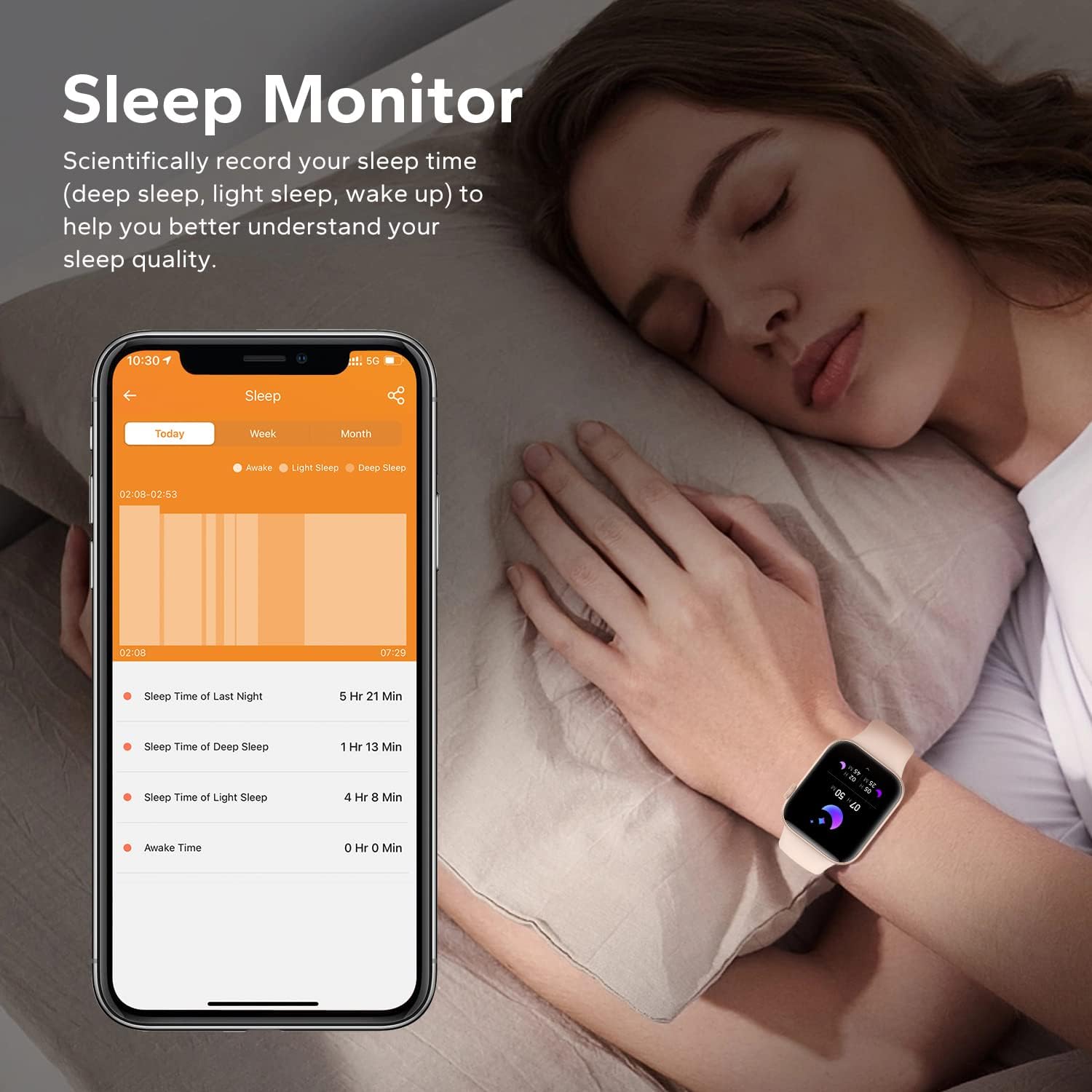
Image: The smartwatch screen showing a dial pad and call history, demonstrating its Bluetooth call capabilities.
- കോളുകൾ ചെയ്യുന്നു: Access the dial pad on the watch or select a contact from your synchronized phonebook to initiate a call.
- കോളുകൾ സ്വീകരിക്കുന്നു: ഒരു കോൾ വരുമ്പോൾ, വാച്ച് കോളർ ഐഡി പ്രദർശിപ്പിക്കും. നിങ്ങൾക്ക് വാച്ചിൽ നിന്ന് നേരിട്ട് കോൾ സ്വീകരിക്കാനോ നിരസിക്കാനോ കഴിയും.
- പതിവ് കോൺടാക്റ്റുകൾ: Add frequently used contacts through the "Da Fit" app for quick access on your watch.
Custom Dials
Personalize your smartwatch with over 200 available watch faces. You can also upload your own photos (family, pets, etc.) to create custom dials through the "Da Fit" app.
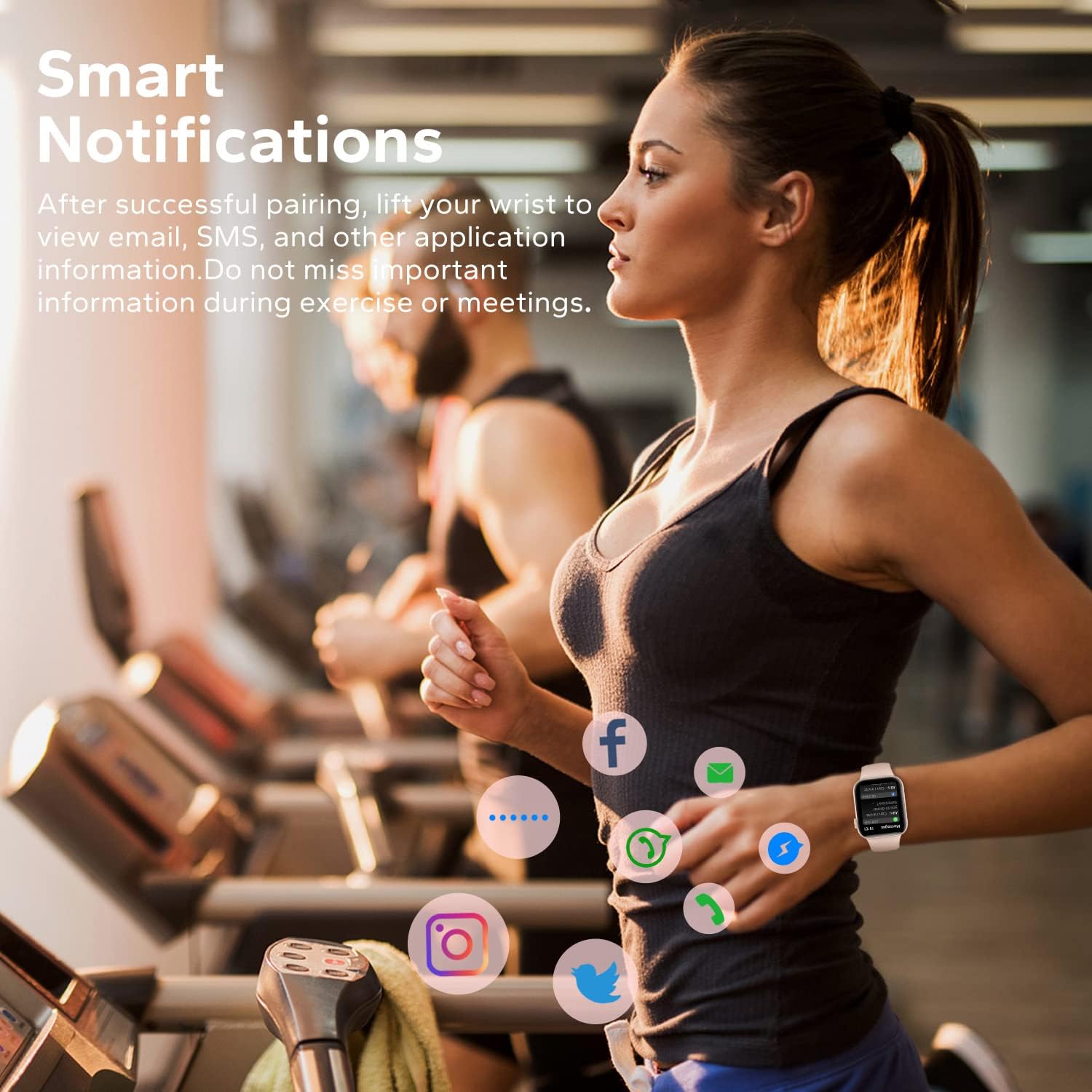
Image: The smartwatch displaying a customized watch face with a space-themed background, illustrating the customization feature.
സ്പോർട്സ് മോഡുകളും ആക്റ്റിവിറ്റി ട്രാക്കിംഗും
The activity tracker records daily steps, calories burned, and distance. It offers over 120 sports modes, including walking, running, cycling, yoga, hiking, rope skipping, and football, to cater to various exercise needs.
Image: The smartwatch screen showing icons for different sports modes and a data display for calories, distance, and steps.
- ഒരു പ്രവർത്തനം ആരംഭിക്കുന്നതിന് മുമ്പ് വാച്ച് മെനുവിൽ നിന്ന് നിങ്ങൾക്ക് ആവശ്യമുള്ള സ്പോർട്സ് മോഡ് തിരഞ്ഞെടുക്കുക.
- The watch will track relevant metrics for the chosen activity.
- Review your activity records in the "Da Fit" app for detailed analysis.
ആരോഗ്യ നിരീക്ഷണം
The smartwatch features a high-performance sensor for continuous health monitoring.
- ഹൃദയമിടിപ്പ് നിരീക്ഷണം: നിങ്ങളുടെ ഹൃദയമിടിപ്പ് 24/7 ട്രാക്ക് ചെയ്യുന്നു. View real-time data on the watch and historical trends in the "Da Fit" app.
- സ്ലീപ്പ് മോണിറ്റർ: Scientifically records your sleep patterns, including deep sleep, light sleep, and awake time. Analyze your sleep quality through the "Da Fit" app to better understand your body's state.
Image: A smartphone screen showing detailed sleep data from the "Da Fit" app, including deep, light, and awake sleep durations, with the smartwatch visible on a wrist.
സ്മാർട്ട് അറിയിപ്പുകൾ
Receive notifications for calls, SMS, and various social media apps (Facebook, Twitter, WhatsApp, Instagram, Messenger, etc.) directly on your wrist. Simply raise your wrist to view ഇൻകമിംഗ് അലേർട്ടുകൾ.

Image: A person wearing the smartwatch while exercising, with icons of various social media apps floating around the watch, indicating smart notification functionality.
Other Practical Functions
The HOETEK L51 Smartwatch includes additional features to enhance your daily life:
- ഉദാസീനമായ ഓർമ്മപ്പെടുത്തൽ: നിഷ്ക്രിയത്വ കാലയളവുകൾക്ക് ശേഷം നീങ്ങാൻ നിങ്ങളെ അറിയിക്കുന്നു.
- അലാറം ക്ലോക്ക്: വാച്ചിൽ നിന്നോ ആപ്പിൽ നിന്നോ നേരിട്ട് അലാറങ്ങൾ സജ്ജമാക്കുക.
- സ്റ്റോപ്പ് വാച്ച് & ടൈമർ: Useful for tracking time during workouts or daily tasks.
- സംഗീത നിയന്ത്രണം: നിങ്ങളുടെ സ്മാർട്ട്ഫോണിൽ സംഗീത പ്ലേബാക്ക് നിയന്ത്രിക്കുക (പ്ലേ ചെയ്യുക, താൽക്കാലികമായി നിർത്തുക, ട്രാക്കുകൾ ഒഴിവാക്കുക).
- ജല ഓർമ്മപ്പെടുത്തൽ: Reminds you to drink water at regular intervals.
- റിമോട്ട് ഫോട്ടോഗ്രഫി: നിങ്ങളുടെ ഫോണിന്റെ ക്യാമറയ്ക്ക് റിമോട്ട് ഷട്ടറായി വാച്ച് ഉപയോഗിക്കുക.
- ഫോൺ കണ്ടെത്തുക: Helps locate your misplaced smartphone by making it ring.
- AI വോയ്സ് അസിസ്റ്റന്റ്: വാച്ചിൽ നിന്ന് നേരിട്ട് നിങ്ങളുടെ ഫോണിന്റെ വോയ്സ് അസിസ്റ്റന്റിലേക്ക് ആക്സസ് നേടുക.
മെയിൻ്റനൻസ്
ജല പ്രതിരോധം (IP67)
The HOETEK L51 Smartwatch has an IP67 dust and water resistance rating. This means it is protected against dust ingress and can withstand immersion in 1 meter of fresh water for up to 30 minutes. It is suitable for daily use, such as washing hands or light rain exposure. However, it is ശുപാർശ ചെയ്തിട്ടില്ല for swimming, diving, hot showers, saunas, or exposure to high-velocity water.

Image: The smartwatch being splashed with water, illustrating its IP67 waterproof capability.
After exposure to water, wipe the watch dry with a soft cloth before charging or using any buttons.
വൃത്തിയാക്കൽ
ചർമ്മത്തിലെ പ്രകോപനം തടയുന്നതിനും ഉപകരണത്തിന്റെ പ്രകടനം നിലനിർത്തുന്നതിനും നിങ്ങളുടെ സ്മാർട്ട് വാച്ചും സ്ട്രാപ്പും പതിവായി വൃത്തിയാക്കുക.
- സ്ക്രീനും ബോഡിയും ഒരു സോഫ്റ്റ്, ഡി ക്ലീനർ ഉപയോഗിച്ച് തുടയ്ക്കുക.amp, ലിൻ്റ് രഹിത തുണി.
- For the strap, use mild soap and water if necessary, then rinse thoroughly and dry completely before reattaching to your wrist.
- കഠിനമായ രാസവസ്തുക്കളോ ഉരച്ചിലുകളോ ഉപയോഗിക്കുന്നത് ഒഴിവാക്കുക.
ബാറ്ററി ലൈഫ്
The smartwatch offers approximately 7 days of normal use and up to 20 days in standby mode. Actual battery life may vary based on usage patterns and settings.
- To prolong battery life, reduce screen brightness, limit frequent notifications, and disable continuous heart rate monitoring if not needed.
- ബാറ്ററി കുറവായിരിക്കുമ്പോൾ വാച്ച് പൂർണ്ണമായും ചാർജ് ചെയ്യുക.
ട്രബിൾഷൂട്ടിംഗ്
| പ്രശ്നം | സാധ്യമായ പരിഹാരം |
|---|---|
| വാച്ച് ഓണാകുന്നില്ല. | വാച്ച് പൂർണ്ണമായും ചാർജ് ചെയ്തിട്ടുണ്ടെന്ന് ഉറപ്പാക്കുക. കുറഞ്ഞത് 30 മിനിറ്റെങ്കിലും ചാർജറുമായി ബന്ധിപ്പിക്കുക. |
| ഫോണുമായി ജോടിയാക്കാൻ കഴിയില്ല |
|
| അറിയിപ്പുകൾ ലഭിച്ചിട്ടില്ല |
|
| കൃത്യമല്ലാത്ത ആരോഗ്യ ഡാറ്റ |
|
| Bluetooth call function not working |
|
സ്പെസിഫിക്കേഷനുകൾ
| ഫീച്ചർ | വിശദാംശങ്ങൾ |
|---|---|
| ബ്രാൻഡ് | HOETEK |
| മോഡൽ നമ്പർ | L51 |
| ഡിസ്പ്ലേ വലിപ്പം | 1.95 ഇഞ്ച് |
| ഡിസ്പ്ലേ തരം | Full Touch Color Screen |
| കണക്റ്റിവിറ്റി | ബ്ലൂടൂത്ത് |
| ഓപ്പറേറ്റിംഗ് സിസ്റ്റം അനുയോജ്യത | Android 5.1+, iOS 10.0+ |
| വാട്ടർ റെസിസ്റ്റൻസ് റേറ്റിംഗ് | IP67 |
| ബാറ്ററി തരം | ലിഥിയം പോളിമർ |
| ബാറ്ററി ലൈഫ് (സാധാരണ ഉപയോഗം) | 7 ദിവസം വരെ |
| ബാറ്ററി ലൈഫ് (സ്റ്റാൻഡ്ബൈ) | 20 ദിവസം വരെ |
| പ്രത്യേക സവിശേഷതകൾ | Bluetooth Calling, Notifications, Sleep Monitor, Heart Rate Monitor, 120+ Sports Modes, Custom Dials, AI Voice Assistant |
| ഉൽപ്പന്ന അളവുകൾ | 27.8 x 7.2 x 2.3 സെ.മീ; 118 ഗ്രാം |
വാറൻ്റിയും പിന്തുണയും
For warranty information and customer support, please refer to the documentation included with your purchase or contact the retailer. Keep your proof of purchase for warranty claims.
For technical assistance or further inquiries, please visit the official HOETEK webസൈറ്റ് അല്ലെങ്കിൽ അവരുടെ ഉപഭോക്തൃ സേവന വിഭാഗവുമായി ബന്ധപ്പെടുക.